1
Operating the 4x1 DPKVM Switcher
Switching Sources
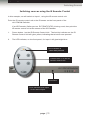
Switching sources using the IR Remote Control
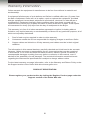
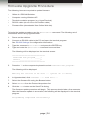
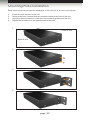
In this example, we will switch to Input 1, using the IR remote control unit.
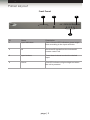
Point the IR remote control unit at the IR sensor on the front panel of the
4x1 DPKVM Switcher.
If an IR Extender (Gefen part no. EXT-RMT-EXTIR) is being used, then point the
IR remote control unit at the sensor of the IR Extender.
1.
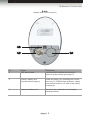
Prress button 1 on the IR Remote Control Unit. The Activity Indicator on the IR
Remote Control Unit will glow yellow, indicating that a button was pressed.
2.
The LED indicator, on the front panel, for Input 1 will glow bright blue.
LED indicates a
button was pressed
Press button 1 on the IR
remote control unit.
IR sensor
LED indicates that Input
1 is the active input.
page | 11