1
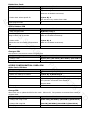
Delete Card by User ID
Deleting by ID number will clear cards and PINS
Programming Step
Keystroke Combination
1. Enter Program Mode
﹡(Master Code) #
2. Delete User Card by User ID
2 (User ID) #
3. Exit program mode
*
AC
C
Others
S
ES
Reset to Factory Default:
This will reset the K401-I to factory default but all card/PIN information will still be retained
1. Power the K401-I down
2. Press and hold the * button and power up the K401-I
reset
C
SE
3. There will be two bleeps. Then release the * button, after a second there will be one more bleep to confirm
Erase all Cards
U
This will delete ALL User data
2. Press 20000 #
All configuration data is retained
Reset Strike-Out Alarm
Y
IT
3. Exit: *
R
1. Enter Program Mode: *(Master Code) #
Sound and Light indication
C
U
D
O
PR
Enter Master Code or Valid Card/PIN to silence
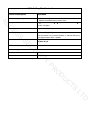
Operation Status
Red LED
Green LED
Power on
Flashing
Stand by
Flashing
Press Keypad
Flashing
Enter Master Code Entry Mode
ON
In program mode
ON
Single Flash
Short Single Bleep
Entered Program Step Successfully
ON
Single Flash
Short Single Bleep
Short Single Bleep
TS
Short Single Bleep
Short Single Bleep
LT
Entered Program Step Incorrectly
Exit from the programming mode
Sounds
3 Short Bleeps
Flashing
ON
Short Single Bleep
Open lock
Green light bright
One Bleep
Alarm Mode Engaged
Flashing
Alarm
Alarm
Red light Shines quickly
Bleeps
Pressing * Toggles Standby / Master
ON/Flashing
Short Single Bleep
Code Entry
D
Entry Granted
Short Single Bleep