1
1. Situation:
In order to use one 4 channel remote to operate with additional device besides the original gate automation
system. Install a receiver box to connect with the 2nd device (Such as swing/sliding gate opener)
or the 3rd device (Such as garage automation system)
Original gate automation: Using Button A & B (Pedestrian Mode) on the remote to control gate opener
2nd device: Install an external receiver box, connect output 1 to the 2nd device (such as another Boxer
Slider, shown as below) use button C on the same remote to control the 2nd device
3rd device: install an external receiver box, connect the output 2 to the 3rd device (such as garage door),
use the Button D now to operate.
2. Wire Connection:
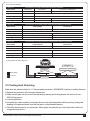
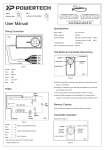
Orange
-Signal 1
Blue
-GND
Yellow
-Signal 2
Green
-GND
Red
-12V/24V
Black
-GND
9
10
11
Ph+
Pb
GND
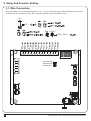
a. Orange cable (Signal 1) connect to terminal 10 (Pb) on the control board
b. Blue cable (GND) connect to terminal 11 (GND) on the control board
c. Red cable (12V/24V ac/dc) connect to terminal 9 (Ph+) on the control board
d. Black cable (GND) connect to terminal 11 (GND) on the control board
3. Device Testing & Remote Memorization
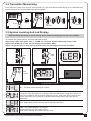
a. After connect all necessary cables properly , press
Test Button to exam if the output 1 is working, the
gate opener should operate.
b. If Output 1 is functional, press and hold Learn Button
for 1 second, the LED light should be “ON”
* If the LED does not response, please check the
cable connection again
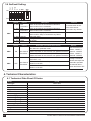
c. Press and hold Button C on the remote for 1 second
after the LED is “ON”. The remote completed the
memorizing process when LED light turns “OFF”
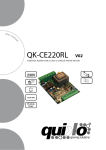
PRB-1 Receiver
1095 Budapest, Mester utca 34.
Tel.: *218-5542, 215-9771, 215-7550,
216-7017, 216-7018 Fax: 218-5542
Mobil: 30 940-1970, 20 949-2688
1141 Budapest, Fogarasi út 77.
Tel.: *220-7940, 220-7814, 220-7959,
220-8881, 364-3428 Fax: 220-7940
Mobil: 30 531-5454, 30 939-9989
E-mail: [email protected] Web: www.delton.hu
www.kaputnyitunk.hu
INSTRUCTIONS PL500 SLIDING GATE OPENER USER MANUAL
13