1
5. About Software
Uninstalling the driver software
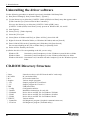
Use the following procedure to uninstall a previously installed COM Setup Disk.
(1) Run [Device Manager] from [Control Panel] - [System].
(2) Use the Delete key to delete the [CONTEC COM-4(USB) Serial Ports] entry that appears under
[USB Controller] (or [Universal Serial Bus Controller]).
Next, use the Delete key to delete the [CONTEC COM-4(USB)] entry.
[CONTEC COM-4(USB) Serial Ports] is only present on Windows Me, 98, and 95.
(3) Start Explorer.
(4) Select [Tools] - [Folder Options].
(5) Select the [View] tab.
(6) Select [Show all folders and files] (or [Show all files]), then click OK.
(7) Right click on the \Winnt\Inf folder (or \Windows\Inf folder) and run [Search].
(8) Enter COM-4(USB) in the [Containing text] field then click [Start Search].
Do not enter anything in the [File or folder name] (or [Named]) field.
(9) Delete all files found by the search.
(10)Delete the driver file corresponding to the OS you are using.
Windows XP:
Com4usb.sys and Com4port.sys in the \Windows\system32\drivers folder
Windows 2000:
Com4usb.sys and Com4port.sys in the \Winnt\system32\drivers folder
Windows Me/98/95: Com4enum.vxd, Com4usb.vxd and Com4port.sys in the \Windows\system
folder
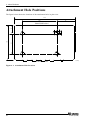
CD-ROM Directory Structure
\
|–
|–
|–
|–
|
|
|–
|
|
|
|
|
|–
Linux
PCCARD
PCI
Samples
|– VB
|– VC
USB
|– Config
|– InstDoc
|– Win2000
|– Win95
|– Win98
UTILITY
|– CommChk
|– CTstCom
28
Linux device driver (for PCI boards and PC cards only)
PC card related files
PCI board related files
Various sample programs
Sample program for Visual Basic
Sample program for Visual C++
USB related files
Configuration utilities
Installation instructions for each OS.
Device driver and INF file for Windows XP/2000.
Device driver and INF file for Windows 95OSR2.
Device driver and INF file for Windows Me/98.
Various utilities
Self diagnostic program (Loopback communication test)
Self diagnostic program (Terminal utility)
COM-4(USB)