1
SEVENTH FRAMEWORK PROGRAMME
THEME 3
Information and Communication Technologies
Grant agreement for:
Collaborative project, Small and medium-scale focused research project (STREP)
Technical Report TR-TARWIS-USER-MANUAL:
TARWIS 2.X User Manual v0.9
Project acronym: WISEBED
Project full title: Wireless Sensor Network Testbeds
Grant agreement no.: 224460
Responsible Partner: UBERN (Philipp Hurni, Gerald Wagenknecht, Markus
Anwander, Torsten Braun)
Report Preparation Date: March 14, 2011
Call identifier FP7-ICT-2007-2 / ICT-2007.1.6
Contract No. 224460
Small/medium-scale focused research project (STREP)
WISEBED
Contents
1
What Is TARWIS?
3
2
Before You Start
3
2.1
User Login . . . . . . . . . . . . . . . . . . . . . . . . . . . . . . . . . . . . . . . . . . . . .
3
2.2
User Roles . . . . . . . . . . . . . . . . . . . . . . . . . . . . . . . . . . . . . . . . . . . . . .
4
2.3
Binary Code Image for Experiments . . . . . . . . . . . . . . . . . . . . . . . . . . . . . . . .
6
3
How to Perform an Experiment on TARWIS?
6
3.1
Node Reservation . . . . . . . . . . . . . . . . . . . . . . . . . . . . . . . . . . . . . . . . . .
7
3.2
Experiment Configuration . . . . . . . . . . . . . . . . . . . . . . . . . . . . . . . . . . . . .
9
3.3
Experiment Monitoring . . . . . . . . . . . . . . . . . . . . . . . . . . . . . . . . . . . . . . . 11
3.4
Finishing Experiments . . . . . . . . . . . . . . . . . . . . . . . . . . . . . . . . . . . . . . . 12
4
Data Acquisition and Representation
13
5
Administration of TARWIS
14
5.1
Testbed Management . . . . . . . . . . . . . . . . . . . . . . . . . . . . . . . . . . . . . . . . 14
5.2
User Administration . . . . . . . . . . . . . . . . . . . . . . . . . . . . . . . . . . . . . . . . . 16
5.3
Administration of User Roles and Actions . . . . . . . . . . . . . . . . . . . . . . . . . . . . . 20
References
224460 (WISEBED) – Deliverable TR-TARWIS-USER-MANUAL
27
Page 2 of 27
Call identifier FP7-ICT-2007-2 / ICT-2007.1.6
Contract No. 224460
1
Small/medium-scale focused research project (STREP)
WISEBED
What Is TARWIS?
All over the world, researchers have set up small wireless sensor network testbeds for research purposes, in order to test and evaluate the real-world behavior of developed protocol mechanisms. A large number of testbeds
have been put into operation, each with different equipment and testbed architecture design (e.g. MoteLab [6],
Kansei [3], PowerBench [2], JAWS-DSN, DES-Testbed [1]). The popularity of wireless sensor networks is
increasing, and many researchers are setting up and deploying their own new testbeds. Although each testbed
may differ with respect to hardware and software, all wireless sensor network testbeds require common functionalities. As every shared resource, a testbed needs a notion of users, it requires support for reprogramming
and reconfiguration of the nodes, provisions to debug and remotely reset sensor nodes in case of node failures
as well as a solution for collecting and storing experimental data.
TARWIS targets at providing these functionalities independent from the node type and node operating system.
The system has been designed to access and manipulate a testbed from within a website, in order to also let
researchers access testbed resources remotely over the Internet, in order to share testbed resources with European
research partners in a federation of testbeds. TARWIS hence relieves researchers setting up a sensor network
testbed from the burden to implement their own scheduling and testbed management solutions. TARWIS has
been incrementally developed during the first two years of the WISEBED [4] project by University of Bern, and
has recently been demonstrated to the European sensor network research community [5].
2
Before You Start
First, the user has to be member of the WISEBED federation. To get a WISEBED login, the user has to ask
the administrator of its home organization (which is a partner in the WISEBED federation). Every partner is
responsible for its own users!
2.1
User Login
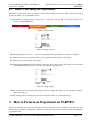
To access the TARWIS GUI the user needs to be authenticated using its WISEBED login. By accessing the
TARWIS GUI with a web browser the user is directed to the two-step login process (cf. Fig. 1 and 2).
Figure 1: Login: select home organization.
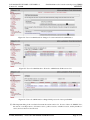
Step 1:
(A) First, the user is redirected to the WAYF (Where Are You From) server.
(B) There, the user has to select its home organization (e.g. University of Bern).
(C) If the user has no own home organization, it can select a so called virtual home organization (in this
example it is WISEBED VHO).
224460 (WISEBED) – Deliverable TR-TARWIS-USER-MANUAL
Page 3 of 27
Call identifier FP7-ICT-2007-2 / ICT-2007.1.6
Contract No. 224460
Small/medium-scale focused research project (STREP)
WISEBED
Step 2:
(D) Now, the user is directed to the login dialog (cf. Fig. 2) of its own home organization and has to enter its
credentials (from its WISEBED login).
Figure 2: Login: enter the credentials.
2.2
User Roles
After login the user is redirected to the TARWIS GUI. To perform experiments on the testbed the user requires
access rights, a so called User Role. It is not enough to be part of the WISEBED federation! On the Welcome
site, the user can see its own roles (cf. Fig. 3).
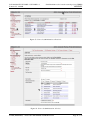
Figure 3: User roles: current roles.
Possible roles are TARWIS Viewer, TARIWS User, and TARWIS Admin. A TARWIS Viewer is allowed to monitor
public experiments and download theirs results. It is not allowed to reserve sensor nodes and perform own
experiments. A TARWIS User can reserve sensor nodes nodes from the testbed and perform experiments. A
TARWIS Admin can perform all administrative tasks.
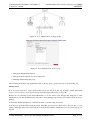
Figure 4: User roles: register for roles.
User roles can be obtained by the following steps:
(A) By clicking on register for roles on the right top of the site (cf. Fig. 4), the user can register itself for
roles.
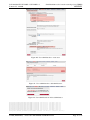
(B) The user is directed to the SNA (Sensor Network Authorization) portal, shown in Fig. 5, where the user
has to login again (using its wisebed login).
(C) The user can now subscribe for a role (cf. Fig. 6).
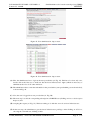
(D) By clicking on the Subscribe button (cf. Fig. 7), the role administrator will get a notification about the
request. The user gets informed by email, when it is accepted or not accepted for the requested role.
(E) By clicking on List My Roles in the left menu, the user can see its roles, including the status (cf. Fig. 8).
(F) The user can also Unsubscribe for a role.
224460 (WISEBED) – Deliverable TR-TARWIS-USER-MANUAL
Page 4 of 27
Call identifier FP7-ICT-2007-2 / ICT-2007.1.6
Contract No. 224460
Small/medium-scale focused research project (STREP)
WISEBED
Figure 5: User roles: SNA portal login.
Figure 6: User roles: available roles.
Figure 7: User roles: subscribe for a selected role.
Figure 8: User roles: list of subscriptions.
224460 (WISEBED) – Deliverable TR-TARWIS-USER-MANUAL
Page 5 of 27
Call identifier FP7-ICT-2007-2 / ICT-2007.1.6
Contract No. 224460
2.3
Small/medium-scale focused research project (STREP)
WISEBED
Binary Code Image for Experiments
The behavior of the sensor nodes only depends on the software running on the nodes. This software is developed
by the user. There is no pre-installed software.
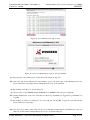
(A) By clicking on the Experiment Configuration → My Images tab (cf. Fig. 9), the user can upload its
software to the TARWIS GUI
Figure 9: Image: menu.
Figure 10: Image: upload.
(B) Selecting Upload New Image (...), the user can upload its developed binary code image (cf. Fig 10).
(C) Afterwards, the user can enter the name, version, platform, and description of the image.
(D) Then, the user selects the file of the image.
(E) Finally, the user finish the form by clicking on the Upload New Image button. The image is now uploaded
to the TARWIS GUI and can be used for the experiments (see Section 3.2).
Figure 11: Image: update.
(F) By selecting a previously uploaded image, the user can update the name, version, description, and the
platform (cf. Fig. 11).
(G) By clicking on the according button, the user can update, delete or download the image.
3
How to Perform an Experiment on TARWIS?
This Section describes the steps how a user can perform its experiment. It starts with the nodes reservation, and
afterwards the experiment configuration. Finally it describes the experiment monitoring and downloading the
experiment results.
224460 (WISEBED) – Deliverable TR-TARWIS-USER-MANUAL
Page 6 of 27
Call identifier FP7-ICT-2007-2 / ICT-2007.1.6
Contract No. 224460
3.1
Small/medium-scale focused research project (STREP)
WISEBED
Node Reservation
Figure 12: Reservation: menu.
(A) By clicking on the Reservation → Reservation Overview tab (cf. Fig. 12) the user can reserve nodes of
the underlying testbed using the schedule sheet
Figure 13: Reservation: calendar sheet.
(B) First, the user can select the day, when its experiment should performed (cf. Fig. 13). The current day is
preselected.
Figure 14: Reservation: overview.
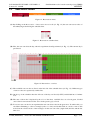
(C) The available sensor nodes are listed on the left side of the schedule sheet (cf. Fig. 14). Different types
of sensor nodes are separated by a white line.
(D) On the top of the schedule sheet the 24 hours of the day are listed (in UTC) and divided into 15 minute
slots.
(E) The state of the nodes is depicted by the color of the sheet. Available slots are colored green, blocked
ones red and own reservations blue. Slots in the past are gray colored.
(F) To reserve sensor nodes for an experiment the user can select nodes in the green area. To achieve this you
can either click&drag to select a rectangle (nodes vs. time) and double-click on a node to remove this
node from the selected nodes of the rectangle. Or the user can select (single-click) the first and the last
time slots.
224460 (WISEBED) – Deliverable TR-TARWIS-USER-MANUAL
Page 7 of 27
Call identifier FP7-ICT-2007-2 / ICT-2007.1.6
Contract No. 224460
Small/medium-scale focused research project (STREP)
WISEBED
Figure 15: Reservation: undo reservation or configure experiment.
(G) By click on the reserve button on the bottom of the page the reservation is finished.
(H) Afterwards it is depicted, if the reservations was successful or not. Now, the user can either undo the
reservation (button Undo Reservation) or
(I) go directly to the experiment configuration tab, clicking the button Configure Experiment for Reservation
(cf. Fig. 15).
Figure 16: Reservation: menu.
(J) By clicking on the Reservation → My Reservations tab, the user can find its own reservations (cf. Fig.
16).
Figure 17: Reservation: my reservations.
(K) The unique ID of the experiment owner, the ID of the experiment, the name and description (if available),
and the start- and end-time of the experiment are displayed.
(L) The user can modify the reservation (button Modify Reservation) or
(M) can configure the experiment (button Configure Experiment) or
(N) delete the reservation (button Delete Experiment), see Section 3.2.
Figure 18: Reservation: menu.
(O) By clicking on the Reservation → Testbed Map tab (cf. 18),
(P) the user can find the map of the positions of all nodes of the testbed (cf. Fig. 19).
(Q) On the right side, there are additional information about the nodes (ID, type, description, capabilities).
224460 (WISEBED) – Deliverable TR-TARWIS-USER-MANUAL
Page 8 of 27
Call identifier FP7-ICT-2007-2 / ICT-2007.1.6
Contract No. 224460
Small/medium-scale focused research project (STREP)
WISEBED
Figure 19: Reservation: testbed map.
3.2
Experiment Configuration
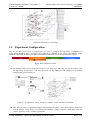
After the user has reserved nodes for certain time slots it has to configure the experiment. Configuration of
an experiment includes binary code images and configuration commands for the sensor nodes, number of runs
which the experiment should be performed, and additional information such as experiment description.
Figure 20: Configuration: menu.
(A) By clicking on the Configure Experiment for Reservation button (cf. (H) in Fig. 15) after reservation or via
the Experiment Configuration → My Experiments tab (cf. Fig. 20 the user can configure its experiments
using the dialog shown in Fig. 21.
Figure 21: Configuration: image, description, number of runs, automated commands.
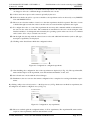
(B) First, the user can use a experiment template. This includes the images of the selected nodes, the description, the number of runs and the set of automated commands. Using a template could be utile, if the user
wants to perform a series of similar experiments.
224460 (WISEBED) – Deliverable TR-TARWIS-USER-MANUAL
Page 9 of 27
Call identifier FP7-ICT-2007-2 / ICT-2007.1.6
Contract No. 224460
Small/medium-scale focused research project (STREP)
WISEBED
(C) The user can choose its binary code which will be uploaded to the selected sensor nodes. It can choose
one image for all nodes or different images for different sensor nodes.
(D) A Name and a Description can be entered optionally by the user.
(E) If the user checks the public experiment checkbox, the experiment can be monitored by every TARWIS
User and TARWIS Viewer.
(F) The user can select the number of runs, how often the experiment should be repeated. The time of a run
is divided through reserved time. After a run the nodes are reseted and the experiment starts again.
(G) To configure the nodes or control the experiment the user may add commands which are transmitted to
the sensor nodes at the chosen time. The commands are transmitted to the sensor nodes using the serial
interface and have to be interpreted and executed by the operating system on the sensor node. A command
can be send to all or only to selected sensor nodes.
(H) On the right side, the map with the selected sensor nodes and additional information (such as (ID, type,
description, capabilities) are displayed.
(I) Clicking on the Finish button finish the configuration sheet.
Figure 22: Configuration: configured experiment.
(J) After finishing, the configuration data of the experiment are depicted (cf. Fig. 22), like experiment ID,
name and description of the experiment, start and end time and number of runs, and
(K) the selected sensor nodes with the selected images.
(L) Furthermore, the user can save the current configuration into a template for re-using with further experiments.
By clicking on Experiment Configuration → My Experiments (cf. Fig. 20 the user can finds its experiments, the
unconfigured ones and the configured ones (cf. Fig. 23).
Figure 23: Configuration: my experiments.
(M) The user can find again the configuration data of all its experiments, like experiment ID, name and description of the experiments, and start and end time as well.
224460 (WISEBED) – Deliverable TR-TARWIS-USER-MANUAL
Page 10 of 27
Call identifier FP7-ICT-2007-2 / ICT-2007.1.6
Contract No. 224460
Small/medium-scale focused research project (STREP)
WISEBED
(N) To modify the experiment configuration, the user can press the Modify Experiment button.
(O) To delete the experiment configuration, the user can press the Delete Experiment button.
3.3
Experiment Monitoring
A configured experiment is performed during the reserved time slots. The user can monitor its own experiments
(or public experiments). It can follow the output of the sensor nodes. If necessary, the user can send commands
to the sensor nodes or reset the sensor nodes (if it is owner of the experiment). It is possible that two or more
experiments running in parallel on the testbed and the user can switch between them.
Figure 24: Monitoring: menu.
(A) By clicking on the Experiment Monitoring tab the user can monitor the experiments (cf. Fig. 24).
Figure 25: Monitoring: switching between parallel experiments.
(B) On top of the site (cf. Fig. 25), all running experiments are listed including the Experiment ID, the owning
User, and the Name of the experiment.
(C) By clicking on the experiment ID, the user choose the experiment it wants to monitor.
(D) This experiment is listed with additional information such as experiment description, start and end time,
and number of runs.
(E) Also displayed is the control output, which includes, e.g., status of flashing the images on the sensor
nodes.
(F) By clicking on the End Experiment, Save Result button, the user cancel the experiment before the regular
end. The user will get an email with the zipped experiment results.
On the bottom of the site the output of the sensor nodes of the chosen experiment is displayed as shown in Fig.
26.
224460 (WISEBED) – Deliverable TR-TARWIS-USER-MANUAL
Page 11 of 27
Call identifier FP7-ICT-2007-2 / ICT-2007.1.6
Contract No. 224460
Small/medium-scale focused research project (STREP)
WISEBED
Figure 26: Monitoring: experiment output and map.
(G) On the left side the nodes’ connectivity on the node map is displayed, as soon as nodes transmits packets
and discover each other.
(H) On the right side an output window including a Reset button and a command line is displayed for each
sensor node used in the experiment.
(I) The output window can be switched off for performance and clearness reasons by clicking in the output
checkbox.
(J) If the user notices that a node misbehaves (e.g., is stuck in an endless loop or similar), it can reset the
node using the Reset button.
(K) Furthermore the user can send commands to the sensor nodes using the command line. The set of commands which can be used is the same as for the control of a local physical testbed and depends on the
operating system on the sensor nodes.
(L) It is also possible to reset all nodes with one click and send a command parallel to all sensor nodes.
3.4
Finishing Experiments
After finishing (or canceling) an experiment, all results are stored in the designated TARWIS database. The
experiments’ results and further information about the experiment are stored using WiseML (Wireless Sensor
Network Markup Language) as described in the next Section.
Figure 27: Configuration: menu.
(A) The finished experiments can be found in the Experiment Configuration → Finished Experiments tab (cf.
Fig. 27).
(B) On this site (cf. Fig. 28) all users’ experiments are listed as well as all public experiments. The user can
download the experiment results of its own experiments and of the public experiments
(C) For its own experiment, the user can delete the definitions and the results.
224460 (WISEBED) – Deliverable TR-TARWIS-USER-MANUAL
Page 12 of 27
Call identifier FP7-ICT-2007-2 / ICT-2007.1.6
Contract No. 224460
Small/medium-scale focused research project (STREP)
WISEBED
Figure 28: Configuration: finished experiments.
4
Data Acquisition and Representation
TARWIS integrates the WiseML (Wireless Sensor Network Markup Language) for several purposes. On one
side, it uses WiseML for reading and parsing the necessary information about it’s underlying Network definition.
Furthermore, it uses WiseML for storing and generating the output of the Experiment log and debug traces in a
common defined format.
Network definition: in order to read the network resources (node type, sensors, positions, etc), TARWIS calls
the getNetwork() function of the SessionManagementService API, and retrieves a WiseML document listing the
entire network endowment. It uses the retrieved positions to display the nodes of the network in the network
graph. Listing 1 lists one instantiation of a node entry. The node type and endowment are described in the
defaults section.
Listing 1: Node entry in SessionManagementService of Univ. of Bern testbed
1
2
3
4
5
6
7
8
9
<node i d =” u r n : w i s e b e d : node : u b e r n :1” >
<p o s i t i o n >
<x>69</x>
<y>20</y>
<z >52</z>
</ p o s i t i o n >
<gateway >t r u e </ gateway >
< d e s c r i p t i o n >Node 1 − O f f i c e 205 ( 2 nd F l o o r ) </ d e s c r i p t i o n >
</ node>
Experiment log and debug traces: As soon as an experiment is scheduled and configured, the TARWIS ControllerService retrieves experiment output (e.g. debug information, sensor values) over the receive function and
stores it to the TARWIS internal database.
As soon as the experiment time has expired, the nodes are reflashed with a default image, and the network is
prepared for the subsequent experiment. Every output of the finishing experiment is exported by TARWIS to
a WiseML-file, zipped and saved to the TARWIS database. This WiseML-file hence comprises all important
information about an experiment run, e.g., where the experiment took place geographically, what kind of nodes
were used, what their sensor endowment was, and much more. Storing all this experiment-related information
in one WiseML file offers many advantages, besides the possibility to easily use it for post-experiment analysis.
As it defines essentially all crucial information of an experiment, it further allows to make the experiment data
public to other research partners in a common well-defined language, giving them the opportunity to repeat
the same or similar experiment, e.g. trying to improve the results. Hence, having integrated WiseML into the
Testbed Management System inherently pushes research on wireless sensor networks one crucial step towards
transparency and repeatability of sensor network experimentation.
Listing 2: Excerpt from a TARWIS-generated Experiment Trace
1
<wiseml> [ . . . ]
224460 (WISEBED) – Deliverable TR-TARWIS-USER-MANUAL
Page 13 of 27
Call identifier FP7-ICT-2007-2 / ICT-2007.1.6
Contract No. 224460
2
3
4
5
6
7
8
9
10
11
12
13
14
15
16
17
18
19
20
21
22
23
24
25
Small/medium-scale focused research project (STREP)
WISEBED
< t r a c e i d =” e x p e r i m e n t U B E R N u n i q u e I D 2 3 4 5 3 3 2 3”>
[...]
<t i m e s t a m p >3605.164612 </ t i m e s t a m p >
<node i d =” u r n : w i s e b e d : node : u b e r n :9” >
<p o s i t i o n >
<x>85</x>
<y>80</y>
<z >52</z>
</ p o s i t i o n >
<d a t a key =” t e x t O u t p u t ”> l a t e n c y 15 ms</ d a t a >
</ node>
<t i m e s t a m p >3605.164612 </ t i m e s t a m p >
<node i d =” u r n : w i s e b e d : node : u b e r n :9” >
<p o s i t i o n >
<x>85</x>
<y>80</y>
<z >52</z>
</ p o s i t i o n >
<d a t a key =” t e x t O u t p u t ”> L i g h t 1 202 </ d a t a >
</ node>
[...]
</ t r a c e >
[...]
</ wiseml>
The WiseML code sample in Listing 2 lists two trace events retrieved in a small experiment at the University
of Bern testbed. For each output line, one can determine the exact time (within the precision of some few milliseconds) relative to the experiment start time (c.f. the timestamp tag), the position of the node (hence, with
mobile nodes, the node movement can also be captured) and the output itself. The WiseML-file generated by
TARWIS can therefore describe to a very high degree what has happened at a certain time during the experiment.
5
Administration of TARWIS
In this Section the administration of the testbed, the users and their roles are described.
5.1
Testbed Management
To perform testbed administration tasks the user has to be a TARWIS Admin. How to become a TARWIS Admin
is described in Section 5.3.
Figure 29: Testbed management: menu.
(A) By clicking on the Testbed Management → Reservations and Experiments tab, the administrator can
modify the reservations and experiments (cf. Fig. 30).
(B) The TARWIS Admin has the same reservation schedule sheet as the TARWIS user, but the administrator
can block some nodes (or the whole testbed) for a certain time period due to maintenance reasons.
224460 (WISEBED) – Deliverable TR-TARWIS-USER-MANUAL
Page 14 of 27
Call identifier FP7-ICT-2007-2 / ICT-2007.1.6
Contract No. 224460
Small/medium-scale focused research project (STREP)
WISEBED
Figure 30: Testbed management: block for maintenance.
Figure 31: Testbed management: undo blocking.
(C) After blocking the administrator can also undo it.
Figure 32: Testbed management: list of maintenance blocks and users’ reservations.
(D) The administrator has a list of all maintenance blocks and can delete them.
(E) And, it has a list of all users’ reservations and experiment configurations and can delete them as well.
Figure 33: Testbed management: menu.
(A) By clicking on the Testbed Management → Reservations and Experiments tab, the user can add new
sensor nodes to the testbed (cf. Fig. 34), or update existing ones (cf. Fig. 35).
(B) By selecting Add New Sensor Node(...) from the drop-down menu, the user can enter the properties of the
new sensor node into the form.
(C) This includes the ID (urn), position, gateway, type, description, and capabilities.
224460 (WISEBED) – Deliverable TR-TARWIS-USER-MANUAL
Page 15 of 27
Call identifier FP7-ICT-2007-2 / ICT-2007.1.6
Contract No. 224460
Small/medium-scale focused research project (STREP)
WISEBED
Figure 34: Testbed management: add new sensor node.
(D) The x-, y-, and z-value of the sensor nodes’ position are between 0 and 100 according to the coordinates
in the map.
(E) By clicking the Create New Sensor Node button, the node is added to the TARWIS database and depicted
in the map.
(F) By selecting an existing sensor node from the drop-down menu, the user can update the properties of the
new sensor node.
(G) The user can either update the properties for the selected sensor node or delete the sensor node from the
database.
Figure 35: Testbed management: update sensor node.
5.2
User Administration
Manage Groups
The following example (cf. Fig 36) illustrates a possible scenario for an university with different faculties
and departments.
To create a group, first, login to the IDPtools web-interface (as main admin). Choose menu Group: Create, as
shown in Fig. 37. To create Department C as a child of the Faculty A, choose Faculty A in the list. Fill in Name,
a Short Description and an Entitlement Prefix. Now press the Create button.
Now fill in the Helpdesk information and press the Save button, as shown in Fig 38. In this menu it is possible
to:
• Invite an user as administrator for this group and all its sub groups (later in this tutorial)
224460 (WISEBED) – Deliverable TR-TARWIS-USER-MANUAL
Page 16 of 27
Call identifier FP7-ICT-2007-2 / ICT-2007.1.6
Contract No. 224460
Small/medium-scale focused research project (STREP)
WISEBED
Figure 36: User administration: manage groups.
Figure 37: User administration: create group.
• Change the helpdesk information
• Change the mail templates for user notifications
• Enabling and disabling this group
After creating all faculties and departments click on Group: List to get an overview, as shown in Fig. 39.
Manage Users
Now we create some users. Select in the menu Group: List the group the user should be added. Then click
on User: Create. Now you see the selected group in the upper right corner (cf. Fig. 40).
Because it is not feasible for the main administrator to do the whole work, delegate the subgroups to other
administrators. To add an administrator select the corresponding group in Group: List and the click on Group:
Manage.
To invite the further administrator, send him an email, as shown in Fig. 42 and 43.
Now the user opens the URL inside the email. The URL is protected by shibboleth, so the user has to log in
with its AAI login. After successful login he is automatically added as administrator for the selected group (cf.
Fig.44).
224460 (WISEBED) – Deliverable TR-TARWIS-USER-MANUAL
Page 17 of 27
Call identifier FP7-ICT-2007-2 / ICT-2007.1.6
Contract No. 224460
Small/medium-scale focused research project (STREP)
WISEBED
Figure 38: User administration: manage group.
Figure 39: User administration: list groups.
To list and manage current user, click on User: List. There you get an overview about the users in the currently
selected group. Groups can be selected in the Group: List Menu. In this menu you can manage the users:
• Edit attributes (name, email, expiration date, ... )
• Reset password.
• Expire a user immediately
• Delete a user
IMPORTANT: IT IS NOT POSSIBLE TO REMOVE AN USER FROM THE DATABASE. For security and
auditing reasons (legal issues), every deleted unique ID remains in the database to ensure that no other new user
can get the same unique ID.
It is also possible to import users with a file formated with the CSV format (ISO-8859-1). Goto to the menu
User: Import to get further information. The fields marked with an asterisk (*) have to be in your CSV header.
Here an example. We try to import 14 users:
username,password,surname,givenname,mail,postalAddress,telephoneNumber,preferredLanguage,description,dateExpire
user1,pass1,surname1,givenname1,[email protected],street 1,+41 44 268 01 05,en,user 1,31.12.2009
224460 (WISEBED) – Deliverable TR-TARWIS-USER-MANUAL
Page 18 of 27
Call identifier FP7-ICT-2007-2 / ICT-2007.1.6
Contract No. 224460
Small/medium-scale focused research project (STREP)
WISEBED
Figure 40: User administration: create user.
Figure 41: User administration: add administrator.
Figure 42: User administration: invite administrator.
user2,pass2,surname2,givenname2,[email protected],street 2,+41 44 268 01 05,en,user 2,31.12.2009
user3,pass3,surname3,givenname3,[email protected],street 1,+41 44 268 02 05,en,user 3,31.12.2009
user4,pass4,surname4,givenname4,[email protected],street 1,+41 44 268 04 05,en,user 4,31.12.2009
user5,pass5,surname5,givenname5,[email protected],street 1,+41 44 268 05 05,en,user 5,31.12.2009
user6,pass6,surname6,givenname6,[email protected],street 1,+41 44 268 06 05,en,user 6,31.12.2009
user7,pass7,surname7,givenname7,[email protected],street 1,+41 44 268 07 05,en,user 7,31.12.2009
user8,pass8,surname8,givenname8,[email protected],street 1,+41 44 268 08 05,en,user 8,31.12.2009
user9,pass9,surname9,givenname9,[email protected],street 1,+41 44 268 09 05,en,user 9,31.12.2009
user10,pass10,surname10,givenname10,[email protected],street 1,+41 44 268 10 05,en,user 10,31.12.2009
224460 (WISEBED) – Deliverable TR-TARWIS-USER-MANUAL
Page 19 of 27
Call identifier FP7-ICT-2007-2 / ICT-2007.1.6
Contract No. 224460
Small/medium-scale focused research project (STREP)
WISEBED
Figure 43: User administration: invitation email.
Figure 44: User administration: admin is defined for this group.
user11,pass11,surname11,givenname11,[email protected],street
user12,pass12,surname12,givenname12,[email protected],street
user13,pass13,surname13,givenname13,[email protected],street
user14,pass14,surname14,givenname14,[email protected],street
1,+41
1,+41
1,+41
1,+41
44
44
44
44
268
268
268
268
11
12
13
14
05,en,user
05,en,user
05,en,user
05,en,user
11,31.12.2009
12,31.12.2009
13,31.12.2009
14,31.12.2009
As you can see, the password is clear text. If you enter no password, a password will be generated for every
user. Select the csv-file and upload it (cf. Fig. 45).
Now we get an overview with the message that all 14 users are feasibly to be imported (cf. Fig. 46).
Press button Import correct users now. Now you can see an overview about the 8 imported users. If you press
the Download password list button, as shown in Fig. 47 you will get a list about all given respectively automatic
created passwords.
In the menu Preferences you can modify several preferences, such expiration date, attributes, email settings, and
more. In the menu Statistics you get an overview about the statistics and the possibility to maintain the database.
5.3
Administration of User Roles and Actions
In this Section the administration of user roles according to the local testbed is described. First, the administrator
has to login with its AAI login and register for a role (e.g. TARWIS User), as shown in Section 2.2. In the next
step, the AAI login of the user has to get the Portal Administrator role in the SNA, thus it can administrate the
roles of all other AAI users.
224460 (WISEBED) – Deliverable TR-TARWIS-USER-MANUAL
Page 20 of 27
Call identifier FP7-ICT-2007-2 / ICT-2007.1.6
Contract No. 224460
Small/medium-scale focused research project (STREP)
WISEBED
Figure 45: User administration: import users.
Figure 46: User administration: import users.
(A) First, the administrator has to login as the user portaladmin (cf. Fig. 48). This has to be done only once,
because before the first use, no AAI user has the Portal Administrator rights (which are necessary to
administrate the roles of all other AAI users.
(B) The administrator has to enter the credentials for the portaladmin (user=portaladmin, password=wisebed),
as shown in Fig. 49.
(C) Now, the user is logged in as user portaladmin (cf. Fig. 50).
(D) The next step it to edit the own pending subscription as TARWIS user (clicking on Process Subscription
Requests) and
(E) accepting the request (cf. Fig. 51). This has nothing to do with the own role as Portal Administrator.
(F) In the next step, the administrator gets the Portal Administrator privilege. After clicking on All Users,
choosing the own AAI user, clicking on Edit
224460 (WISEBED) – Deliverable TR-TARWIS-USER-MANUAL
Page 21 of 27
Call identifier FP7-ICT-2007-2 / ICT-2007.1.6
Contract No. 224460
Small/medium-scale focused research project (STREP)
WISEBED
Figure 47: User administration: import users.
Figure 48: User role administration: login as user portaladmin.
(G) the properties of the AAI user are shown and can be edited (cf. Fig. 52).
(H) After choosing Portal Administrator and clicking on Save, the AAI login of the administrator has the
Portal Administrator privilege and can administrate the roles of all AAI users.
(I) By clicking on All Roles, as shown in Fig. 53,
(J) all roles can be seen (TARWIS Admin, TARWIS User, TARWIS Visitor are pre-configured),
(K) and the administrator of the roles. Currently it is the user portaladmin (we logged in as portaladmin, see
step (B)).
(L) By clicking on Admins, we change it to the own AAI user (in step (H), we gave the own AAI user the
Portal Administrator privilege.
(M) Now, the role provider (owner of the role) has to be changed from the initial portaladmin user to the own
AAI user (in the current example Markus Anwander), as shown in Fig. 54.
224460 (WISEBED) – Deliverable TR-TARWIS-USER-MANUAL
Page 22 of 27
Call identifier FP7-ICT-2007-2 / ICT-2007.1.6
Contract No. 224460
Small/medium-scale focused research project (STREP)
WISEBED
Figure 49: User role administration: portaladmin credentials.
Figure 50: User role administration: administrator menu.
(N) The own AAI user should also be added as a role administrator.
(O) We do this for all three roles (TARWIS Admin, TARWIS User, and TARWIS Visitor). Now, the administrator has the Portal Administrator privilege and can administrate all three roles (cf. Fig 55).
(P) As last step, the default password of the user portaladmin has to be changed (cf. Fig. 56), by clicking on
Edit. The default password can be changed using Change Local Password.
(Q) Now, the administrator (currently as user portaladmin) has to be logged out and again logged in as administrator with its own AAI login (cf. Fig 57).
224460 (WISEBED) – Deliverable TR-TARWIS-USER-MANUAL
Page 23 of 27
Call identifier FP7-ICT-2007-2 / ICT-2007.1.6
Contract No. 224460
Small/medium-scale focused research project (STREP)
WISEBED
Figure 51: User role administration: accept own role as TARWIS user.
Figure 52: User role administration: change role to portaladmin.
Figure 53: User role administration: all roles.
(R) By clicking on All Actions, the administrator can see all possible actions.
(S) Every action corresponds to a webservice supported by TARWIS and the Reservation System.
(T) Actions can be edited and deleted.
(U) By clicking on All Roles and afterwards on Edit, a role can be edited (cf. Fig 58).
224460 (WISEBED) – Deliverable TR-TARWIS-USER-MANUAL
Page 24 of 27
Call identifier FP7-ICT-2007-2 / ICT-2007.1.6
Contract No. 224460
Small/medium-scale focused research project (STREP)
WISEBED
Figure 54: User role administration: change role owner and add role administrator.
Figure 55: User role administration: allowed to administrate all three user roles.
Figure 56: User role administration: change initial password of user portaladmin.
(V) The important thing is the correlation between the actions and a role. In case of the role TARWIS User,
the actions createExperiment, deleteReservation, getReservations, makeReservation, makingOwnReservation, and viewNetwork are allowed.
224460 (WISEBED) – Deliverable TR-TARWIS-USER-MANUAL
Page 25 of 27
Call identifier FP7-ICT-2007-2 / ICT-2007.1.6
Contract No. 224460
Small/medium-scale focused research project (STREP)
WISEBED
Figure 57: User role administration: all actions.
Figure 58: User role administration: all roles.
224460 (WISEBED) – Deliverable TR-TARWIS-USER-MANUAL
Page 26 of 27
Call identifier FP7-ICT-2007-2 / ICT-2007.1.6
Contract No. 224460
Small/medium-scale focused research project (STREP)
WISEBED
References
[1] B. Blywis, F. Juraschek, M. Günes, and J. Schiller. Design concepts of a persistent wireless sensor testbed.
In 7. GI/ITG KuVS Fachgespräch Sensornetze, 2008.
[2] I. Haratcherev, G. Halkes, T. Parker, O. Visser, and K. Langendoen. PowerBench: A scalable testbed
infrastructure for benchmarking power consumption. In Int. Workshop on Sensor Network Engineering
(IWSNE), pages 37–44, Santorini Island, Greece, June 2008.
[3] Ertin, E. et. al. Kansei: a testbed for sensing at scale. In Intl. Conference On Information Processing In
Sensor Networks (IPSN), 2006.
[4] Seventh Framework Programme FP7 - Information and Communication Technologies. Wireless sensor networks testbed project (wisebed), ongoing project since june 2008. http://www.wisebed.eu.
[5] P. Hurni and G.Wagenknecht and M. Anwander and T. Braun. A Testbed Management System for Wireless Sensor Network Testbeds (TARWIS). European Conference on Wireless Sensor Networks (EWSN),
February 17-19, Coimbra, Portugal, 2010.
[6] G. Werner-Allen, P. Swieskowski, and M. Welsh. Motelab: A wireless sensor network testbed. In IPSNSPOTS ’05, pages 483–488, California, USA, April 2005.
224460 (WISEBED) – Deliverable TR-TARWIS-USER-MANUAL
Page 27 of 27