1
Call identifier FP7-ICT-2007-2 / ICT-2007.1.6
Contract No. 224460
1
Small/medium-scale focused research project (STREP)
WISEBED
What Is TARWIS?
All over the world, researchers have set up small wireless sensor network testbeds for research purposes, in order to test and evaluate the real-world behavior of developed protocol mechanisms. A large number of testbeds
have been put into operation, each with different equipment and testbed architecture design (e.g. MoteLab [6],
Kansei [3], PowerBench [2], JAWS-DSN, DES-Testbed [1]). The popularity of wireless sensor networks is
increasing, and many researchers are setting up and deploying their own new testbeds. Although each testbed
may differ with respect to hardware and software, all wireless sensor network testbeds require common functionalities. As every shared resource, a testbed needs a notion of users, it requires support for reprogramming
and reconfiguration of the nodes, provisions to debug and remotely reset sensor nodes in case of node failures
as well as a solution for collecting and storing experimental data.
TARWIS targets at providing these functionalities independent from the node type and node operating system.
The system has been designed to access and manipulate a testbed from within a website, in order to also let
researchers access testbed resources remotely over the Internet, in order to share testbed resources with European
research partners in a federation of testbeds. TARWIS hence relieves researchers setting up a sensor network
testbed from the burden to implement their own scheduling and testbed management solutions. TARWIS has
been incrementally developed during the first two years of the WISEBED [4] project by University of Bern, and
has recently been demonstrated to the European sensor network research community [5].
2
Before You Start
First, the user has to be member of the WISEBED federation. To get a WISEBED login, the user has to ask
the administrator of its home organization (which is a partner in the WISEBED federation). Every partner is
responsible for its own users!
2.1
User Login
To access the TARWIS GUI the user needs to be authenticated using its WISEBED login. By accessing the
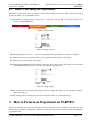
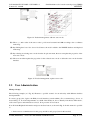
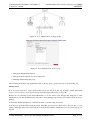
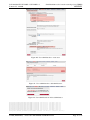
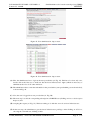
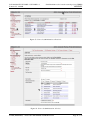
TARWIS GUI with a web browser the user is directed to the two-step login process (cf. Fig. 1 and 2).
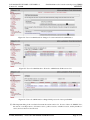
Figure 1: Login: select home organization.
Step 1:
(A) First, the user is redirected to the WAYF (Where Are You From) server.
(B) There, the user has to select its home organization (e.g. University of Bern).
(C) If the user has no own home organization, it can select a so called virtual home organization (in this
example it is WISEBED VHO).
224460 (WISEBED) – Deliverable TR-TARWIS-USER-MANUAL
Page 3 of 27