1
User Guide
www.myffrs.com
User Guide – Using FFRS
Table of contents
Programing Your Speed Dial
3
Caller ID blocking - removal
3
Utilizing Reports
16
4
Creating a Report
16
Away from the station
4
Report Printing
17
At the Station
4
Report Exporting
17
5
Report Groups
18
Using response data to make informed decisions
5
Database Export
19
Supported Internet Browsers
5
Creating a FFRS desktop shortcut
5
Department Reports
20
Checking out after a call
6
Station Reports
20
On-Duty Status
7
Group Reports
20
20
Registering Your Response
Using Response Data
Adding and Removing members on the On-Duty Grid 7
Available/Unavailable Status
8
Adding members to Available or Unavailable Grids
8
Change members Status from a Computer
8
Registering your availability via the phone
8
Scheduling your availability via the Scheduler
8
Types of Reports
Mutual Aid
9
10
Using On-Duty and Available/Unavailable Data
11
eNotify Module
Reports
12
Sending a Message
12
Scheduling Messages
13
eNotify Groups
14
eNotify Reports
15
Syncing
15
Support Resources: (resources located in
the FFRS application; “Support” link)
•• User Guides
•• Training Tutorials
•• Frequently Asked Questions
•• FFRS Standard Operating Guidelines (SOGs)
U.S. Patent No. 7,898,410
Last updated: 07/2015
16
20
21
User Guide – Using FFRS
Programing Your Speed Dial
Each of your FFRS tabs (stations, etc) has been provisioned with a unique virtual toll free phone number. These unique toll free numbers
need to be programmed in your mobile phone. This will enable you to push just one button on your cell phone to call the FFRS application. Your station numbers should coincide with your mobile phone buttons if possible (i.e. Station 1 = Button 1, Station 2 = Button 2,
etc). If your department allows you to respond directly to the incident, a virtual toll free number will be provisioned for this as well. This
number should also be added to your speed dial.
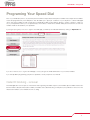
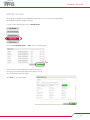
If your agency has given you access to sign into the FFRS app, you will find your FFRS tab numbers by clicking on “My Profile” link
If you do not have access to log into the FFRS app, contact your agencies FFRS administrator for your toll free numbers.
If you have problems programming your phone’s speed dial, consult your phone’s user manual.
Caller ID blocking - removal
The FFRS application uses two pieces of information when registering a member’s response; the members phone number and the number the member called (the virtual station number). If members have caller ID blocking on their phones, they will have to remove it for the
virtual station numbers so the FFRS knows who is calling.
3
User Guide – Using FFRS
Registering Your Response
When dispatch taps out a call and you are able to respond, you should register your response by pressing one button, either from
the smartphone app or the button that you’ve programmed in your speed dial for FFRS station number on your cell phone as you
walk to your vehicle. The phone call takes about 5 seconds and will automatically disconnect. For members who are at the
station when they are alerted of a dispatch, you can easily change your status from the User Interface. Here are the directions for
you to change your status:
Away from the station
To register your response when you are not at the station:
1. Dispatch taps out the call
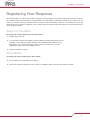
2. If you are able to respond, immediately respond to FFRS by pressing "Responding" from the
FFRS app or call in using your speed dial button that co-ordinates with the station you are
responding to. (i.e. if you are responding to station 1 then you would press 1, if you are
responding to station 2 then you would press 2, etc.)
3. Travel to the station or location
At the Station
To register your response when you are at the station:
4. You are alerted of an incident while at the station
5. Click on the member's name that is in the "On-Duty" or "Available" section and set the new status as "Arrived"
4
User Guide – Using FFRS
Using Response Data
Using response data to make informed decisions
FFRS helps you and your agency make informed decisions by providing response data in real-time. This information can be used both
at the station and/or in the field. For use at the station, personnel who are already at the station and first arriving members should
review their FFRS display screen so they know who is still responding. You should base your decisions on responding member
resources and the equipment requested by dispatch. For example, if an engine and a tender are requested, two members are at the
station, and the FFRS shows a third member on the way. In this scenario, the two volunteers who are at the station would respond with
the engine and leave the tender for the third member. In another example, if only an engine is requested, two members are at the
station, and the FFRS shows a third member on the way, the two members could wait for the third so they can respond with a three
man engine crew.
Commanders who are either en route to or on scene can make operational strategies well in advanced of volunteers arriving at the
station. Your commanders can view available resources from a MDT (mobile data terminal) placed in emergency apparatus (command
vehicles, engines, etc) or from a smartphone using the mobile app.
Supported Internet Browsers
•
•
•
•
Firefox
Google Chrome
Safari
Internet Explorer
Creating a FFRS desktop shortcut
Creating a FFRS shortcut on your desktop enables your users to easily launch the FFRS. To create a FFRS desktop shortcut, follow
these steps:
1. Log into your FFRS application
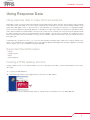
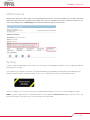
2. Click and hold the small icon in the upper left hand corner next to the URL address.
3. Drag this icon out to the desktop and then release it. This will create your desktop shortcut to the FFRS application.
5
User Guide – Using FFRS
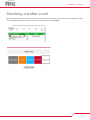
Checking out after a call
After returning to the station from a call and when you are ready to leave the station, remove yourself from the FFRS by checking
out of the FFRS response grid. To log off, click on your name, and then select “Checkout”.
6
User Guide – Using FFRS
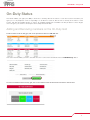
On-Duty Status
This feature enables your agency the ability to know who is On-Duty, either at the station or some other location. This allows your
agency to not only keep track of who is responding to a call when it's toned out, but also who is On-Duty at the station or other
location, and what the members position or event is. An example would be that a member is On-Duty at Station 1 and on Engine
335. Your agency can create it’s own unique locations and position/event fields.
Adding and Removing members on the On-Duty Grid
To add a member to the On-Duty grid, click on the sprocket and click the “add new” link
Then select which members you want to add, and select the Location and Position/Event and click “Add Member(s)” button
To remove a member from the On-Duty grid, click on the members name and select their new status to remove them.
7
User Guide – Using FFRS
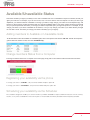
Available/Unavailable Status
This feature enables your agency the ability to know who is available and who is unavailable to respond to incidents, should your
agency be toned out. For example, if you are out of town, sick, or for some reason could not respond to a call if you were to get
dispatched, you would be listed as unavailable. To change your status, simply change your status via the smartphone app, web
browser or call the toll free number associated with your agencies Availability Status This phone number should be programmed
into your phone’s speed dial. How often you change your status is dependent upon your agencies protocol. For example, do you
change your status if you will be unavailable for 30 minutes, or do you only change your status if your status will stay changed
for more than 2 hours. How often you change your status is ultimately up to your agency.
Adding members to Available or Unavailable Grids
To add members to either the Available or Unavailable grids, click on the sprocket and click the “add new” link with the respective
grid and select the member to add, then click “Add Member(s)”.
Change members Status from a Computer
To change a member’s status from a computer on the home page, simply click on the members name and select the new status.
Registering your availability via the phone
To change your status to “available”, call your toll free number and press option “4”.
To change your status to “unavailable”, call your toll free number and press option “5”.
Scheduling your availability via the Scheduler
The scheduler is designed to enable you to enter in the times you will be unavailable to respond, whether it’s because of work, sickness,
vacation, or any other scheduled time. There are two parts to the Scheduler, the Primary Schedule and the Temporary Schedule.
8
User Guide – Using FFRS
Scheduler Module
The Scheduler Module has both primary and temporary schedules. The primary schedule is used to keep track of your week-toweek schedule. Data that you put in this schedule can automatically be used for each consecutive week. This schedule can be
edited at any time. The temporary schedule is used to keep track of your vacations, illness, and other times that are unexpected
and outside of your regular routine.
If at any time during the week your schedule changes, and you are not able to change your status on the scheduler, you can
simply change your status on the mobile app, from a computer or call into your toll free number and enter your status.
Changing your status will override whatever your schedule says until the next scheduled event. For example, if your
schedule shows you as “Unavailable” today from 8am to 5pm, and then “Unavailable” tomorrow from 8am to 5pm, but you
become “Available” today at 2pm, you can change your status and you will be moved to “Available”. And tomorrow morning
at 8am, your schedule will pick back up, and move you over to “Unavailable”.
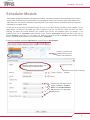
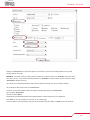
To create your schedule, click on the “My Profile” link, and then click on “New Schedule”.
OR click on the date in the
calendar view you want to
create a new schedule for.
Enter the subject for the schedule. This
will show up in the calendar views.
Click this box to create a temporary
schedule.
Click the drop down button next to
"Type", "Location", "Position/
Event" and "Scheduled Station/
Tab" and click on the appropriate
fields for each.
9
User Guide – Using FFRS
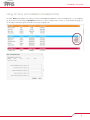
Clicking the "Recurrence" box opens the options for recurrences. Recurrences are designated for Hourly, Daily,
Weekly, Monthly and Yearly.
EXAMPLE: John Smith needs to create a primary schedule as a volunteer and is only "Available" during non-office
hours due to his job. John would set his default position as "Available" but would create a primary schedule of being
"Unavailable" during those hours.
John would go to the Scheduler Module, click on the first date this would be true, in this example, 07/06/15.
He would set the date and time then click "Recurrence".
From this menu he would indicate that it will happen every Monday-Friday with "No end date."
Type would be "Unavailable"
Location would be "Work"
Position/Event and Schedules Station/Tab would be based on what his duties are for the department.
Click “Save” to save the schedule and go back to your profile page.
To edit or delete an existing schedule, right-click on the schedule and click “edit” or “delete” next to the schedule
10
User Guide – Using FFRS
Using On-Duty and Available/Unavailable Data
The FFRS “Home” page displays your agencies On-Duty and Available/Unavailable data. There are multiple ways you can manipulate
this data to fit your needs. Using the “Filter Data” link allows you to filter out data by stations, ranks, etc. On the FFRS home page, you
are also able to minimize the grids, which will show you just the grand totals.
11
User Guide – Using FFRS
eNotify Module
The eNotify module is a mass notification system that allows messages to be sent to members by simply typing a message and
clicking send. The eNotify module will send out push notification, SMS text, email, pager, web browser, voice messages, or any
combination the department wants. The benefit to sending out a voice message via a phone call is being able to poll your
personnel. For example, if a message was sent out reminding members of a training coming up, you could ask the members to
press 1 if they will be able to attend the training, press 2 if they are unsure, and press 3 if they will not be able to make it. You will
then be able to view a report on that message and know who is attending the training, who is unsure, and those who can’t make it.
Sending a Message
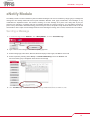
1. To send a message, click on “Modules”, then “eNotify Module”, and then “Create Message”
2. Type a name for the message; this is used for reporting purposes
3. Select message type; either Push, SMS Text, Browser Display, Email, Pager, Paid SMS or Phone Call
4. Select recipients by selecting either “Group” or “Individual Memeber(s)” next to the “Sent To” and
then select which group or firefighters should receive the message
5. Click “Send Message” to send the message. The message will be initiated and sent within seconds.
12
User Guide – Using FFRS
Scheduling Messages
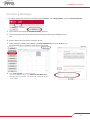
1. To create a message that will be sent in the future, click on “Modules”, then “eNotify Module”, and then “Schedule Message”
2. Type a name for the message; this is used for reporting purposes.
3. Select message type; either Push, SMS Text, Browser Display, Email, Pager, Paid SMS or Phone
Call
4. Select a date and time you want the message to be sent
5. Select recipients by selecting either “Group” or “Individual Members(s)” next to the “Sent To” and
then select which group or firefighters should receive the message
6. Click “Save Schedule” to save the message
To view scheduled messages, click “View Scheduled Messages”.
Messages that have not been sent and are still scheduled to be sent
can be edited.
13
User Guide – Using FFRS
eNotify Groups
eNotify groups are designed to group department personnel so you can send a message quickly by
selecting that group when creating a message.
To create or edit a eNotify group, click on “eNotify Groups”
Click either “Create New Group” or “edit” next to an existing groups.
Check the box for each member that you want to receive the
message for the selected group and uncheck the box for those
who should not be a part of the group.
Click “Save” to save your changes.
14
User Guide – Using FFRS
eNotify Reports
eNotify reports allow you to view a report on each message that was sent out. For phone messages, you are able to view what
button each person that was call pushed. This enables you to poll your members to see who is coming to functions, etc. To
view a report, simply click on “eNotify Reports” and select view next to the report you wish to view.
Syncing
In order to keep your FFRS response data current, our servers push your FFRS application updates to your computer automatically
whenever there is a change.
In the event that your computer loses Internet connectivity, FFRS will alert you by displaying a warning image on the FFRS page. This
alert will insure that you don’t use FFRS to make decisions, as your computer does not have your current response data.
Once your computer is re-connected to the Internet, your FFRS will automatically reconnect to our servers and update your data.
NOTE: If you have confirmed that your computer has Internet connectivity but the “Disconnected” image is still shown, click on the
browser refresh button. If that doesn’t work, close the browser and re-open FFRS.
15
User Guide – Using the Firefighter Response System
Reports
Utilizing Reports
FFRS reports can be used to track your members’ responses and man-hours. This can be useful for OSHA 300 reporting, as well as
point systems used for paying members’ for the incidents they respond on.
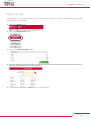
Creating a Report
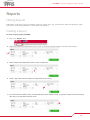
To create a report, log into your FFRS:
1. Click on the “Reports” button
2. Select a date range from the drop-down menu or create a custom time frame by entering a start date and an end date
3. Select a Report; either Department, Station, Group, or Responder
4. Select a Type; either Overview, Station List, Responder List, or Call Log
5. If you have selected a Station, Group, or Responder report, select a station number, or a group or member name from the dropdown menu or by manually entering the name.
16
User Guide – Using FFRS
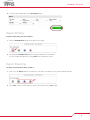
6. To run the report, simply click on the “Run Report” button
Report Printing
To print a report after you have created it:
1. Click the “Printable View” image on the bottom of the report
2. By clicking the “Printable View” button, your report will open in a new window.
You can now print the report by choosing “Print” from your browser controls.
Report Exporting
To export a report after you have created it:
1. Click one of the “Export” buttons on the bottom of the report. Your export choices are: Excel, Word, and PDF
2. Click “Save”, enter a location where you want it to be saved, and click “Save” again.
17
User Guide – Using FFRS
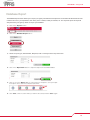
Report Groups
To create reports for a select number of personnel, you can add them to a group. You can add or remove personnel to the group as
needed anytime. To create a group:
1. Click on the “Reports” button
2. Click on the “Report Groups” button
3. Click on the “Create New Group” button
4. Add a Group Name and Group Description, check the box to activate the group, and then select the members who belong to
the group. Click the “Save” button to create the group.
5. To edit a group, simply click the “edit” button next to the group name.
18
User Guide – Using FFRS
Database Export
The Database Export feature allows you to export your agency’s member list and responses. The members list will include all of the
members who are in your department, their ranks, phone numbers, FFRS pin numbers, etc. The response export will export all
calls placed into your agency’s FFRS. To export your Database:
1. Click on the “Reports” button
2. Click on the “Database Export” button
3. Select an export type, either Member, Response, PAS or On Duty from the drop-down menu
4. Click on the “Export Now” button to export the report from the FFRS Database
5. Click on one of the “Export” buttons on the bottom of the report to save your report.
Your export choices are: Excel, CSV, Word, and PDF
6. Click “Save”, enter a location where you want it to be saved, and click “Save” again.
19
User Guide – Using FFRS
Types of Reports
Department Reports
•
•
•
•
Overview Report
Station List Report
Responder List Report
Call Log Report
Station Reports
• Overview Report
• Responder List Report
• Call Log Report
Group Reports
• Overview Report
• Responder List Report
• Call Log Report
Responder Reports
• Overview Report
• Call Log Report
Dispatch Reports
• Details of every dispatch sent and received
20
User Guide – Using FFRS
Mutual Aid
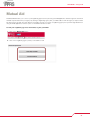
The Mutual Aid link takes you to a list of your neighboring agencies if they are using the FFRS application and have agreed to share their
member response data with your agency. By clicking a neighboring agency link, you will be able to view that agency’s response data.
This data is view-only and cannot be edited or changed in any way. If you have a neighboring agency that you think might benefit from
using the FFRS application, feel free to pass on the FFRS information to them.
To view your neighboring agencies information, log into your FFRS:
1. Click on the “Mutual Aid” button
2. Click on the neighboring agency name you would like to view
21