1
FINNDENT 8000+ QUICK REFERENCE
DENTAL UNIT FUNCTIONS
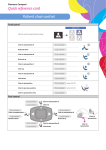
Main Control Panel
Door Open
Short press
Call Assistant
Short press
Clock
Press and hold to adjust time
Timer
Short press repeatedly until the
timer you want appears
Either door open or call assistant
may be installed
Either door open or call assistant
may be installed
Short press to start rinse
Press and hold to adjust rinse
duration
Glass Fill
Short press to start glass fill
Press and hold to adjust fill duration
Air Spray
Short press to turn ON / OFF
Water Spray
Short press to turn ON / OFF
Bowl Rinse
Chip Blow
Increase / Decrease
Select instrument and shortly press
For turbine and micromotor only
to turn chip blow ON / OFF
Short press to increase or decrease
function settings
3+ Control Panel
Suction Tube Rinse
Instrument must be active to use air
spray
Instrument must be active to use
water spray
Short press to activate rinse cycle
Unit Foot Control
A Spray ON / OFF
B Power range selection for the instrument
C Micromotor reverse / forward
C Additional functions in connection with ENDO use:
Auto reverse
Auto reverse forward
Press C to switch between functions.
D Press the pedal to start the selected instrument.
To decrease the power level, slide the pedal to the left.
To increase the power level, slide the pedal to the right.
For detailed instructions, please see the User’s Manual | www.finndent.com
Finndent Oy | Niittylänpolku 16 | Helsinki | 00620 | Finland