1
Installation, cont’d
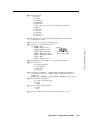
N After a mode 1 reset is performed, update the Annotators’s firmware to the latest
version. Do not operate the firmware version that results from the mode 1 reset.
If you want to use the factory default firmware, you must upload that version
again.
If you do not want to update firmware, or you performed a mode 1 reset by mistake,
cycle power to the device to return to the firmware version that was running before the
mode 1 reset. Use the 0Q SIS command to confirm that the factory default firmware is
no longer running (look for the asterisk [*] following the version number).
PRELIMINARY
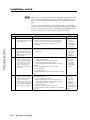
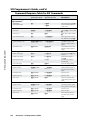
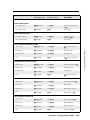
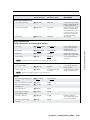
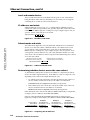
Reset Mode Comparison Summary
Mode
Activation
Result
Notes
1
Hold down the recessed
Reset button while applying
power to the unit.
Mode 1 causes the unit to revert to the factory default
firmware. Event scripting does not start if the unit is
powered on in this mode. All user files and settings
(drivers, audio adjustments, IP settings, etc.) are
maintained.
Use mode 1
to remove
a version of
firmware if
incompatibility
issues arise.
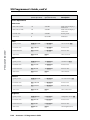
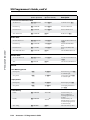
3
Hold down the Reset button
for about 3 seconds, until
the Reset LED blinks once.
Then, within 1 second, press
Reset again briefly (for less
than 1 second).
Mode 3 turns events on or off. During resetting, the Reset
LED flashes 2 times if events are starting; 3 times if events
are stopping.
Events must
be turned on
if you want
to change IP
settings or
scheduling.
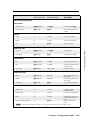
4
Hold down the Reset button
for about 6 seconds, until
the Reset LED has blinked
twice (once at 3 seconds,
once at 6 seconds). Then,
within 1 second, press
Reset briefly (for less than 1
second).
Mode 4 does the following:
• Enables ARP capability.
• Sets the IP address back to factory default.
• Sets the subnet back to factory default.
• Sets the default gateway address back to the factory
default.
• Sets port mapping back to factory default.
• Turns DHCP off.
• Turns all events off.
The Reset LED flashes 4 times in quick succession during
reset.
Mode 4 enables
you to set
IP address
information
using ARP
and the MAC
address.
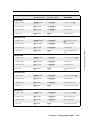
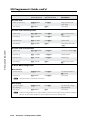
5
Hold down the Reset button
for about 9 seconds, until
the Reset LED has blinked
three times (once at 3
seconds, once at 6 sec., once
at 9 seconds). Then, within
1 second, press Reset briefly
(for less than 1 second).
Mode 5 performs a complete reset to factory defaults
(except the firmware).
• Does everything mode 4 does.
• Resets everything that was set via the Real Time
Adjustments part of the control program: all video
settings and miscellaneous options.
• Resets all IP options.
• Removes/clears all files from the processor.
The Reset LED flashes 4 times in quick succession during
the reset.
Mode 5 is
useful if
you want to
start over
with control
software
configuration
and uploading,
and to replace
events.
2-8
Annotator • Installation