1
2.4.4
Master Volume Control
Master manual volume control of all output channels can be done with an external 10k linear
potentiometer instead of through the software. One or multiple miniDSP boards can be connected
to a single potentiometer for master volume control of multiple channels.
Warning: All connection between the board and the potentiometer shall be done with the board
turned OFF to prevent any damage to the electronic.
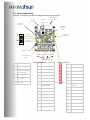
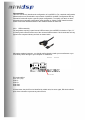
See below diagram on how to connect the potentiometer directly to the connector. If your volume
control behavior is reversed (clockwise decreasing volume), simply swap Ground and 3.3V
connection on the potentiometer.
Potentiometer Diagram
Ground
Center tap
3.3V
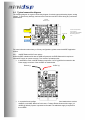
As mentioned earlier on, a single potentiometer can control the master volume of multiple miniDSP
kits (2 and up). Making it work simply requires connecting together the potentiometer to all boards
as shown below:
miniDSP kit# 1
miniDSP kit #2
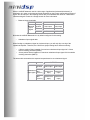
The last step to enable the external volume control is to toggle the Potentiometer button in the
system settings from its original default position (Volume control disabled).
(Default position – External Pot not in place)
(External Potentiometer in place)
Note: If the potentiometer is not in use, make sure to disable this feature otherwise causing a very
low volume.