1
IP Camera User Manual
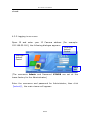
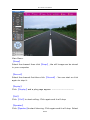
Main Menu:
【Snap】
Select the channel then click【Snap】, the still image can be stored
in your computer.
【Record】
Select the channel first then click 【Record】. You can start or click
again to stop it.
【Replay】
Click 【Replay】and a play page appear. ------------------------【Call】
Click 【Call】to start calling. Click again and it will stop.
【Speaker】
Click【Speaker】to start listening. Click again and it will stop. Select
26/ 50