1
8. Troubleshooting
7. DMX512 Connection
• If the unit is not functioning well – check main power supply is ‘on’ and check
fuses.
• If the unit is functioning but lamp does not light - may require replacing lamp.
• If the unit is not moving to the music, check the sound-activation adjustment
(when applicable)
• After trying these solutions, you still have a problem, contact your dealer for
technical assistance.
• The unit has built-in thermal switch. The lamp will not work when the internal
temperature is above 80℃, and the lamp will work again when the internal
temperature is cool down.
※ Caution
The DMX512 is widely used in intelligent lighting control, with a maximum of 512
channels.
• Do not obstruct the air vents.
• Do not touch the unit while it’s hot.
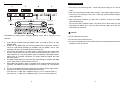
1. If you using a controller with 5 pins DMX output, you need to use a 5 to 3 pin
adapter-cable.
2. At last unit, the DMX cable has to be terminated with a terminator. Solder a
120 ohm 1/4W resistor between pin 2(DMX-) and pin 3(DMX+) into a 3-pin
XLR-plug and plug it in the DMX-output of the last unit.
3. Connect the unit together in a ‘daisy chain’ by XLR plug from the output of the
unit to the input of the next unit. The cable can not be branched or split to a ‘Y’
cable. DMX512 is a very high-speed signal. Inadequate or damaged cables,
solder joints or corroded connectors can easily distort the signal and shut
down the system.
4. The DMX output and input connectors are pass-through to maintain the DMX
circuit, when power is disconnected to the unit.
5. Each lighting unit needs to have an address set to receive the data sent by the
controller. The address number is between 0-511 (usually 0 & 1 are equal to
1).
6. The end of the DMX512 system should be terminated to reduce signal errors.
7. 3 pin XLR connectors are more popular than 5 pin XLR.
3 pin XLR: Pin 1: GND, Pin 2: Negative signal (-), Pin 3: Positive signal (+)
5 pin XLR: Pin 1: GND, Pin 2: Negative signal (-), Pin 3: Positive signal (+)
8-
• No user serviceable parts inside, please refer to the nearest authorized technical
assistance office for service.
9-