1
1 = fix (intern)
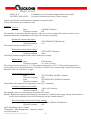
OUTPUT
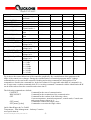
Output voltage
percental
SENSOR_TEMP
Sensor temperature
TEMP_OFFSET
Temperature offset
SETPOINT
Nominal value
SETPOINT_FIXED
Nominal value at
Control mode = 1
SETPOINT_MIN
Min.-temperaturlimit
SETPOINT_MAX
Max.-temperaturelimit
HYSTERESIS
Hysteresis
BANDWIDTH_COOL Bandwith cooling
MIN_COOL_OUTP
Minimal cooling
voltage in %
MAX_COOL_OUTP
Maximal cooling
voltage in %
BANDWIDTH_HEAT Bandwidth heating
MIN_HEAT_OUTP
Minimal heating
voltage in %
MAX_HEAT_OUTP
Maximal heating
voltage in %
PWM_FREQ
PWM-frequency
0 = 1 kHz
1 = 5 kHz
2 = 10 kHz
3 = 15 kHz
4 = 20 kHz
5 = 25 kHz
0.0
100.0
read only
R
-40.0
-10.0
-40.0
-40.0
+100.0
+10.0
+100.0
+100.0
read only
+20.0
R
R/W
R
R/W
-40.0
+100.0
-40.0
R/W
-40.0
+100.0
+100.0
R/W
0.0
0.1
0.0
1.0
10.0
100.0
1.0
1.0
0.0
R/W
R/W
R/W
0.0
100.0
100.0
R/W
0.1
0.0
10.0
100.0
1.0
0.0
R/W
R/W
0.0
100.0
100.0
R/W
2
R/W
0.0
read only
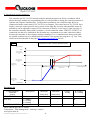
Fig. 4 shows the control behaviour of the controller graphically. By a modification of the parameters the
shape of the control curve changes. During the communication via terminal programs and PC-linkage
commands have to be send to the controller. Reading and writing commands are distinguished. The
commands are listed in the command list. In the last column it is recognizable what kind of command is in
use. R represents a readout command while W is a writing command. Commands with the identification R/W
can be both read out from the controller and written into it.
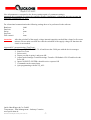
The following commands are defined:
CONNECT
Command for the start of communication
DISCONNECT
Command for the termination of the communication
GET
Command for the readout of the following values:
Current temperature; nominal temperature; control mode; Control state
and current output voltage in %
GET [name]
Command to readout the single values
SET [name] [value]
Command to overwrite the single values
Quick-Ohm Küpper & Co. GmbH
Components – Heat Management – Industry Ceramics
www.quick-ohm.de
20140505User Manual English Controller QC-PC-CO-CH1.doc
-5-