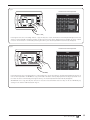
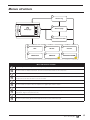
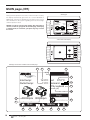
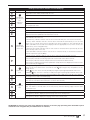
1
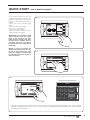
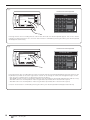
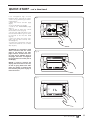
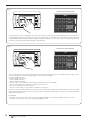
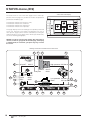
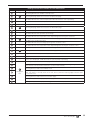
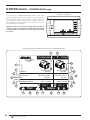
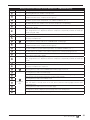
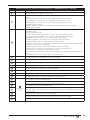
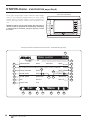
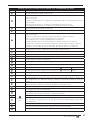
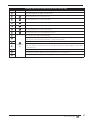
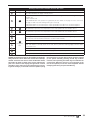
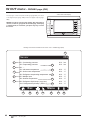
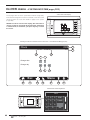
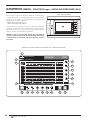
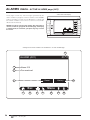
Readings and functions available from the STATUS menu - EVAPORATION page (Evp6)
Index
Display area
Description
1
---
This index identifies the page currently active
2
---
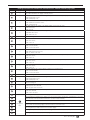
This data indicates the status of the unit; this status can be:
• Off: the unit is off;
• On: the unit is on;
• High pressure prevention: the compressor is partialised to reduce the speed; the fan revs are
also increased;
• Low pressure prevention: the compressor is partialised to reduce the speed;
• Low temperature prevention: the compressor is partialised to reduce the speed;
3
---
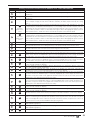
This value indicates the total request of unit power
4
---
This value indicates the maximum limit of the power that can be supplied, calculated by the unit
5
---
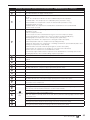
This data indicates the current phase in which the unit is found; this phase can be:
• Off: the unit is off;
• Compressors switch-off: the unit is performing the procedure for compressor switch-off;
• Just one compr. active: the unit is operating with just one compressor;
• Two compressors active: the unit is operating with two compressors;
• Start up individual compr.: the unit is performing the procedure for switch-on of a compressor;
• Start up of two compressors: the unit is performing the procedure for switch-on of both compressors;
• Start up of second compr.A: the unit is performing the procedure for switch-on of compressor 1;
• Start up of second compr.B: the unit is performing the procedure for switch-on of compressor 2
6
---
This data indicates the time (countdown) for which the phase in progress will last
7
---
This data indicates the power request to compressor 1
8
---
This data indicates the power request to compressor 2
9
---
This data indicates compressor 1 input power
10
This data indicates compressor 2 input power
11
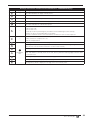
This data indicates the status of compressor 1 (ON or OFF)
12
This data indicates the status of compressor 2 (ON or OFF)
13
This data indicates whether compressor 1 is in the switch-on (
) or switch-off (
) phase
14
This data indicates whether compressor 2 is in the switch-on (
) or switch-off (
) phase
15
This data indicates the number of revs at which compressor 1 is currently operating
16
This data indicates the number of revs at which compressor 2 is currently operating, if present
This data indicates the opening percentage of the valve positioned inside compressor 1 (intake); this
value, along with the revs. adjustment, allows the compressor to dynamically modulate the intake gas
flow rate
This data indicates the opening percentage of the valve positioned on intake of eventual compressor 2.
This valve allows the compressor to dynamically modulate the intake gas flow rate
17
18
19
This data identifies the current compression ratio calculated by the control board
20
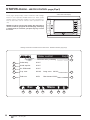
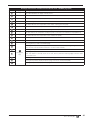
Pressing this key leads to the MAIN page
21
Pressing this key leads to the upper level menu (for further information regarding the structure
of the menus, refer to the Menu structure“ section in this manual)
22
A
23
Navigation
bar
Pressing this key leads to the STATUS menu
Pressing this key leads to the ALARMS menu;
Note: if an alarm is currently active in the unit, this key will have flashing edges until the alarm
is solved or reset
24
Pressing this key leads to the menu selection page
25
Pressing this key allows to display the previous page of the menu currently active (Evp3)
26
Pressing this key allows to display the next page of the menu currently active (Evp3)
0312 - 4471910_00
IT
35