1
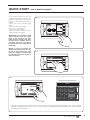
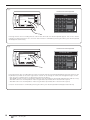
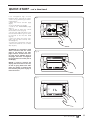
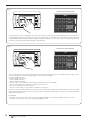
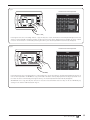
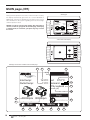
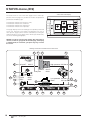
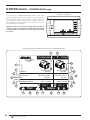
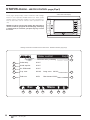
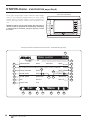
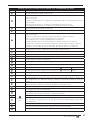
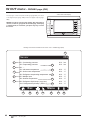
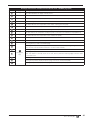
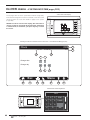
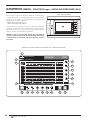
Readings and functions available from the STATUS menu - COMPRESSORS page
Index
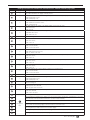
Display area
Description
1
---
2
---
3
---
4
---
5
---
6
---
7
---
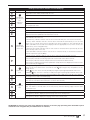
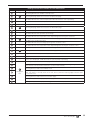
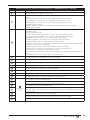
This data identifies the compression ratio at which compressor 1 is operating
8
---
These data represent the pressure values read on intake (Low pressure) and on flow (High
pressure) of compressor 1
9
A
Pressing this key always leads to the COMPRESSOR 1 INFO pages
10
---
11
---
12
---
13
---
14
---
15
---
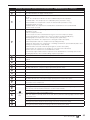
This data identifies the compression ratio at which any compressor 2 is operating
16
---
These data represent the pressure values read on intake (Low pressure) and on flow (High
pressure) of compressor 2, if present
17
B
Pressing this key leads to the COMPRESSOR 2 INFO pages, if present
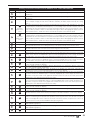
This string identifies the window currently active
The colour of this LED represents the status of compressor 1;
(compressor OFF = blue, compressor ON = green)
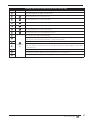
This data indicates the percentage power requested at compressor 1, calculated on the work
conditions (system return temperature, set, outdoor conditions, etc....)
This data indicates the number of revs at which compressor 1 is operating
These data indicate compressor 1 input, both input power (expressed in kW) and input current
(expressed in Amps)
This data indicates the opening percentage of the valve positioned inside compressor 1 (intake); this
value, along with the revs. adjustment, allows the compressor to dynamically modulate the intake gas
flow rate (range 0~110%)
The colour of this LED represents the status of compressor 2, if present;
(compressor OFF = blue, compressor ON = green)
This data indicates the percentage power requested at compressor 2, if present, calculated on
the work conditions (system return temperature, set, outdoor conditions, etc....)
This data indicates the number of revs at which compressor 2 is currently operating, if present
These data indicate eventual compressor 2 input, both input power (expressed in kW) and
input current (expressed in Amps)
This data indicates the opening percentage of the valve positioned inside compressor 2 (intake); this
value, along with the revs. adjustment, allows the compressor to dynamically modulate the intake gas
flow rate
18
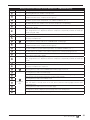
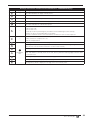
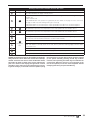
Pressing this key leads to the MAIN page
19
Pressing this key leads to the upper level menu (for further information regarding the structure
of the menus, refer to the Menu structure“ section in this manual)
20
C
21
Navigation
bar
Pressing this key leads to the STATUS menu
Pressing this key leads to the ALARMS menu;
Note: if an alarm is currently active in the unit, this key will have flashing edges until the alarm
is solved or reset
22
Pressing this key leads to the menu selection page
23
Pressing this key allows to display the previous page of the menu currently active
24
Pressing this key allows to display the next page of the menu currently active
0312 - 4471910_00
IT
21