1
Download a FREE
electronic copy of
the Owner’s Manual
or Warranty Booklet
by visiting the Owner's tab at:
www.driveSRT.com (U.S.)
2013 VI P E R U SER G U I D E
13ZD-926-AA
viper
First Edition
User Guide
1135185_13_SRT_Viper_ UG_Cover_072712.indd 1
7/27/12 2:35 PM
If you are the first registered retail owner of your vehicle, you
may obtain a complimentary printed copy of the Owner’s
Manual, Navigation/Uconnect ™ Manuals or Warranty Booklet by
calling 1-855-778-8326. (U.S.) or 1-800-387-1143 (Canada)
or by contacting your dealer.
I M PO R TANT
This User Guide is intended to familiarize you with the important features of your vehicle.
The DVD enclosed contains your Owner’s Manual, Navigation/Uconnect ™ Manuals, Warranty
d r i v e s r t.com
This guide has been prepared to help you get quickly acquainted with your new SRT and to
provide a convenient reference source for common questions. However, it is not a substitute for
your Owner’s Manual.
For complete operational instructions, maintenance procedures and important safety messages,
please consult your Owner’s Manual, Navigation/Uconnect™ Manuals, Multimedia User Manual
and other Warning Labels in your vehicle.
Not all features shown in this guide may apply to your vehicle. For additional information on
accessories to help personalize your vehicle, visit www.mopar.com or your local SRT high
performance dealer.
Booklets, Tire Warranty and Roadside Assistance (new vehicles purchased in the U.S.) or
Roadside Assistance (new vehicles purchased in Canada) in electronic format. We hope you
find it useful. Replacement DVD kits may be purchased by visiting www.techauthority.com.
Copyright 2012 Chrysler Group LLC.
The driver’s primary responsibility is the safe operation of the vehicle. Driving while
distracted can result in loss of vehicle control, resulting in a collision and personal injury.
Chrysler Group LLC strongly recommends that the driver use extreme caution when using
any device or feature that may take their attention off the road. Use of any electrical
devices such as cell phones, computers, portable radios, vehicle navigation or other
devices by the driver while the vehicle is moving is dangerous and could lead to a serious
collision. Texting while driving is also dangerous and should never be done while the
vehicle is moving. If you find yourself unable to devote your full attention to vehicle
operation, pull off the road to a safe location and stop your vehicle. Some States or
Provinces prohibit the use of cellular telephones or texting while driving. It is always the
driver’s responsibility to comply with all local laws.
1135185_13_SRT_Viper_ UG_Cover_072712.indd 2
dr iv in g a n d alcohol
Drunken driving is one of the most frequent causes of accidents. Your driving ability
can be seriously impaired with blood alcohol levels far below the legal minimum. If you
are drinking, don’t drive. Ride with a designated non-drinking driver, call a cab, a
friend, or use public transportation.
WA R NIN G!
Driving after drinking can lead to an accident. Your perceptions are less sharp, your
reflexes are slower, and your judgment is impaired when you have been drinking. Never
drink and then drive.
7/27/12 2:36 PM
TABLE OF CONTENTS
INTRODUCTION/WELCOME
UTILITY
WELCOME FROM CHRYSLER
GROUP LLC . . . . . . . . . . . . . . . . . . 2
TRAILER TOWING WEIGHTS (MAXIMUM
TRAILER WEIGHT RATINGS) . . . . . . . . 64
RECREATIONAL TOWING (BEHIND
MOTORHOME, ETC.) . . . . . . . . . . . . 64
CONTROLS AT A GLANCE
DRIVER COCKPIT . . . . . . . . . . . . . . . 4
INSTRUMENT CLUSTER . . . . . . . . . . . 6
GETTING STARTED
KEY FOB . . . . . . . . . . . . . . . . . . . . 8
ENGINE STARTING/STOPPING . . . . . . . 9
THEFT ALARM . . . . . . . . . . . . . . . . . 9
SEAT BELT . . . . . . . . . . . . . . . . . . . 10
SUPPLEMENTAL RESTRAINT SYSTEM
(SRS) — AIR BAGS . . . . . . . . . . . . . 10
CHILD RESTRAINTS . . . . . . . . . . . . . 11
FRONT SEATS . . . . . . . . . . . . . . . . 14
ADJUSTABLE PEDALS . . . . . . . . . . . 16
ADJUSTABLE FOOT REST . . . . . . . . . . 16
TILT / TELESCOPING STEERING
COLUMN . . . . . . . . . . . . . . . . . . . 17
OPERATING YOUR VEHICLE
ENGINE BREAK-IN RECOMMENDATIONS —
SRT8 VERSIONS . . . . . . . . . . . . . . . 18
TURN SIGNALS/WIPER/WASHER/HIGH
BEAMS LEVER . . . . . . . . . . . . . . . . 18
Automatic Headlights/Parking Lights/
Headlights . . . . . . . . . . . . . . . . . . . 19
Instrument Panel Dimmer . . . . . . . . . . 19
SPEED CONTROL . . . . . . . . . . . . . . . 20
MANUAL TRANSMISSION 1 TO 4 SKIP
SHIFT . . . . . . . . . . . . . . . . . . . . . 21
AUTOMATIC TEMPERATURE CONTROL
(ATC) . . . . . . . . . . . . . . . . . . . . . . 21
PARKVIEW® REAR BACK-UP CAMERA . . 23
ELECTRONICS
YOUR VEHICLE'S SOUND SYSTEM . .
IDENTIFYING YOUR RADIO . . . . . . .
Uconnect™ ACCESS (Available on
Uconnect™ 8.4A and Uconnect™
8.4AN) . . . . . . . . . . . . . . . . . . .
Uconnect™ 8.4A . . . . . . . . . . . . .
Uconnect™ 8.4AN . . . . . . . . . . . .
STEERING WHEEL AUDIO CONTROLS
ELECTRONIC VEHICLE INFORMATION
CENTER (EVIC) . . . . . . . . . . . . . .
PROGRAMMABLE FEATURES . . . . .
UNIVERSAL GARAGE DOOR OPENER
(HomeLink®) . . . . . . . . . . . . . . .
POWER OUTLETS . . . . . . . . . . . .
. . 24
. . 26
.
.
.
.
.
.
.
.
27
30
44
58
. . 58
. . 59
. . 60
. . 63
SRT
LAUNCH MODE . . . . . . . . . . .
ELECTRONIC CONTROL DAMPING
SYSTEM . . . . . . . . . . . . . . .
PERFORMANCE FEATURES . . .
SUMMER/THREE-SEASON TIRES
. . . . . 65
. . . . . 65
. . . . . 67
. . . . . 67
WHAT TO DO IN EMERGENCIES
INSTRUMENT CLUSTER WARNING
LIGHTS . . . . . . . . . . . . . . . .
IF YOUR ENGINE OVERHEATS . . .
TIREFIT KIT . . . . . . . . . . . . .
JUMP-STARTING . . . . . . . . . . .
TOWING A DISABLED VEHICLE . .
FREEING A STUCK VEHICLE . . . .
.
.
.
.
.
.
.
.
.
.
.
.
.
.
.
.
.
.
.
.
.
.
.
.
68
71
72
77
80
80
.
.
.
.
.
.
.
.
81
82
83
84
85
88
88
89
MAINTAINING YOUR VEHICLE
ENGINE COMPARTMENT . . . . . . .
FLUIDS AND CAPACITIES - Non SRT8
MAINTENANCE CHART . . . . . . . .
SRT – MAINTENANCE RECORD . . .
FUSES . . . . . . . . . . . . . . . . . .
TIRE PRESSURES . . . . . . . . . . .
WHEEL AND WHEEL TRIM CARE . .
EXTERIOR BULBS . . . . . . . . . . .
.
.
.
.
.
.
.
.
.
.
.
.
.
.
.
.
CONSUMER ASSISTANCE
CHRYSLER GROUP LLC CUSTOMER
CENTER . . . . . . . . . . . . . . . . . .
CHRYSLER CANADA INC. CUSTOMER
CENTER . . . . . . . . . . . . . . . . . .
ASSISTANCE FOR THE HEARING
IMPAIRED . . . . . . . . . . . . . . . . .
PUBLICATIONS ORDERING . . . . . .
REPORTING SAFETY DEFECTS IN THE
50 UNITED STATES AND
WASHINGTON, D.C. . . . . . . . . . . .
. . 90
. . 90
. . 90
. . 90
. . 91
AUTHENTIC ACCESSORIES BY
MOPAR® . . . . . . . . . . . . . . . . . 92
INDEX . . . . . . . . . . . . . . . . . . . . 93
FAQ (How To?) . . . . . . . . . . . . . . 95
FREQUENTLY ASKED QUESTIONS . . . . 95
I NT R OD U C TION/WELCOME
WELCOME FROM CHRYSLER GROUP LLC
Congratulations on selecting your new Chrysler Group LLC vehicle. Be assured that it
represents precision workmanship, distinctive styling, and high quality - all essentials that
are traditional to our vehicles.
Your new Chrysler Group LLC vehicle has characteristics to enhance the driver's control
under some driving conditions. These are to assist the driver and are never a substitute for
attentive driving. They can never take the driver's place. Always drive carefully.
Your new vehicle has many features for the comfort and convenience of you and your
passengers. Some of these should not be used when driving because they take your eyes
from the road or your attention from driving. Never text while driving or take your eyes more
than momentarily off the road.
This guide illustrates and describes the operation of features and equipment that are
either standard or optional on this vehicle. This guide may also include a description of
features and equipment that are no longer available or were not ordered on this vehicle.
Please disregard any features and equipment described in this guide that are not available
on this vehicle. Chrysler Group LLC reserves the right to make changes in design and
specifications and/or make additions to or improvements to its products without imposing
any obligation upon itself to install them on products previously manufactured.
This User Guide has been prepared to help you quickly become acquainted with the
important features of your vehicle. It contains most things you will need to operate and
maintain the vehicle, including emergency information.
The DVD includes a computer application containing detailed owner's information which
can be viewed on a personal computer or MAC computer. The multimedia DVD also
includes videos which can be played on any standard DVD player (including the Media
Center Touch-Screen Radios). Additional DVD operational information is located on the
back of the DVD sleeve.
For complete owner information, refer to your Owner's Manual on the DVD in the owner’s
kit provided at the time of new vehicle purchase. For your convenience, the information
contained on the DVD may also be printed and saved for future reference.
Chrysler Group LLC is committed to protecting our environment and natural resources. By
converting from paper to electronic delivery for the majority of the user information for
your vehicle, together we greatly reduce the demand for tree-based products and lessen
the stress on our environment.
2
I NT RODUCTION/WELCOME
VEHICLES SOLD IN CANADA
With respect to any vehicles sold in Canada, the name Chrysler Group LLC shall be
deemed to be deleted and the name Chrysler Canada Inc. used in substitution therefore.
WARNING!
• Pedals that cannot move freely can cause loss of vehicle control and increase the
risk of serious personal injury.
• Always make sure that objects cannot fall into the driver foot well while the vehicle
is moving. Objects can become trapped under the brake pedal and accelerator
pedal causing a loss of vehicle control.
• Failure to properly follow floor mat installation or mounting can cause interference
with the brake pedal and accelerator pedal operation causing loss of control of the
vehicle.
• Never use the ‘PARK’ position as a substitute for the parking brake. Always apply
the parking brake fully when parked to guard against vehicle movement and
possible injury or damage.
• Refer to your Owner's Manual on the DVD for further details.
USE OF AFTERMARKET PRODUCTS (ELECTRONICS)
The use of aftermarket devices including cell phones, MP3 players, GPS systems, or
chargers may affect the performance of on-board wireless features including Keyless
Enter-N-Go™ and Remote Start range. If you are experiencing difficulties with any of your
wireless features, try disconnecting your aftermarket devices to see if the situation
improves. If your symptoms persist, please see an authorized dealer.
CHRYSLER, DODGE, JEEP, RAM TRUCK, SRT, ATF+4, MOPAR and Uconnect are
registered trademarks of Chrysler Group LLC.
COPYRIGHT ©2012 CHRYSLER GROUP LLC
3
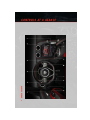
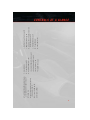
DRIVER COCKPIT
CO N T R OLS AT A GLANCE
4
E. Emergency Brake
D. Uconnect 8.4AN pg. 44
C. Ignition Start/Stop Button (behind
steering wheel) pg. 9
B. Tachometer
A. Turn Signal/Wiper/Washer/High Beams
Lever (behind steering wheel) pg. 18
• Heated Mirrors pg. 22
• Recirculation pg. 22
• Air Conditioning (A/C) pg. 22
• Automatic Climate Controls pg. 21
N. Power Door Locks
M. Power Mirrors
L. Headlight Switch pg. 19
K. Electronic Vehicle Information Center
(EVIC) Messages pg. 58
J. Adjustable Pedals pg. 16
G. Power Outlets pg. 63
H. Automatic Climate Control
I. Electronic Speed Control pg. 20
F. Hazard Button
C ONTROLS AT A GLANCE
5
CO N T R OLS AT A GLANCE
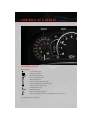
INSTRUMENT CLUSTER
Warning Lights
- Low Fuel Warning Light
- Charging System Light**
- Oil Pressure Warning Light
- Anti-Lock Brake (ABS) Light**
- Air Bag Warning Light**
- Electronic Throttle Control (ETC) Light
- Tire Pressure Monitoring System (TPMS) Light
- Engine Temperature Warning Light
- Seat Belt Reminder Light
BRAKE
- Brake Warning Light**
- Malfunction Indicator Light (MIL)**
- Electronic Stability Control (ESC) Activation/Malfunction Indicator Light*
(See page 68 for more information.)
6
C ONTROLS AT A GLANCE
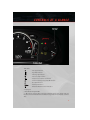
Indicators
- Turn Signal Indicators
- High Beam Indicator
- Front Fog Light Indicator
- Vehicle Security Indicator*
- Electronic Speed Control Set Indicator
- Electronic Stability Control (ESC) Off Indicator*
- Door Ajar Indicator***
- Trunk Ajar Indicator***
- Windshield Washer Fluid Low Indicator***
* If equipped
** Bulb Check with Ignition On
*** On vehicles equipped with a Premium Instrument Cluster, this display shows the
Electronic Vehicle Information Center (EVIC) messages when the appropriate conditions
exist.
7
G ET T I NG S TARTED
KEY FOB
Locking And Unlocking The Doors
• Press the LOCK button once to lock all
the doors. Press the UNLOCK button
once to unlock the driver’s door only and
twice within five seconds to unlock all
the doors.
• All doors can be programmed to unlock
on the first press of the UNLOCK button.
Refer to Programmable Features in this
guide.
Opening The Trunk
• Press the TRUNK button two times
within five seconds to open the trunk.
Panic Alarm
• Press the PANIC button once to turn the panic alarm on.
• Wait approximately three seconds and press the button a second time to turn the panic
alarm off.
Emergency Key
• Should the battery in the vehicle or the Key Fob transmitter go dead, there is an
emergency key located in the Key Fob. To remove the emergency key, slide the button
at the back of the Key Fob sideways with your thumb and then pull the key out with your
other hand.
• The emergency key is also for locking the glove compartment.
WARNING!
• Never use the PARK position as a substitute for the parking brake. Always apply the
parking brake fully when parked to guard against vehicle movement and possible
injury or damage.
• When leaving the vehicle, always remove the key fob from the ignition and lock your
vehicle.
• Never leave children alone in a vehicle, or with access to an unlocked vehicle.
Allowing children to be in a vehicle unattended is dangerous for a number of
reasons. A child or others could be seriously or fatally injured. Children should be
warned not to touch the parking brake, brake pedal or the shift lever.
• Do not leave the key fob in or near the vehicle, or in a location accessible to children,
and do not leave a vehicle equipped with Keyless Enter-N-Go™ in the ACC or
ON/RUN mode. A child could operate power windows, other controls, or move the
vehicle.
8
GETTING STARTED
ENGINE STARTING/STOPPING
Starting
1. Fully apply the parking brake.
2. Press the clutch pedal to the floor.
3. Place the shift lever in NEUTRAL.
4. Press the red ENGINE START/STOP
button located on the instrument panel.
Release the button when the engine
starts.
NOTE:
The engine will not start unless the clutch pedal is pressed to the floor.
Stopping
1. Bring the vehicle to a complete stop.
2. Fully apply the parking brake.
3. Press the clutch pedal to the floor.
4. Place the shift lever in NEUTRAL/1st Gear.
5. Press the ENGINE START/STOP button once. The ignition switch will return to the OFF
position.
THEFT ALARM
To Arm:
Follow these steps to arm the Vehicle Security Alarm:
• Press LOCK on the interior power door lock switch with the driver and/or passenger door
open.
• Press the LOCK button on the Remote Keyless Entry (RKE) transmitter.
NOTE:
Using the key to open the liftgate while the
Vehicle Security Alarm is armed will not trigger the theft alarm.
To Disarm:
The Vehicle Security Alarm can be disarmed using any of the following methods:
• Press the UNLOCK button on the Remote Keyless Entry (RKE) transmitter.
• Cycle the vehicle ignition system out of the OFF position.
9
G ET T I NG S TARTED
SEAT BELT
• Be sure everyone in your vehicle is in a seat and using a seat belt properly.
• Position the lap belt across your thighs, below your abdomen. To remove slack in the lap
portion, pull up a bit on the shoulder belt. To loosen the lap belt if it is too tight, tilt the
latch plate and pull on the lap belt. A snug belt reduces the risk of sliding under the belt
in a collision.
• Position the shoulder belt on your chest so that it is comfortable and not resting on your
neck. The retractor will withdraw any slack in the belt.
• A shoulder belt placed behind you will not protect you from injury during a collision. You
are more likely to hit your head in a collision if you do not wear your shoulder belt. The
lap and shoulder belt are meant to be used together.
• A belt that is too loose will not protect you properly. In a sudden stop you could move too
far forward, increasing the possibility of injury. Wear your seat belt snugly.
• A frayed or torn belt could rip apart in a collision and leave you with no protection.
Inspect the belt system periodically, checking for cuts, frays, or loose parts. Damaged
parts must be replaced immediately. Do not disassemble or modify the system. Seat
belt assemblies must be replaced after a collision if they have been damaged (bent
retractor, torn webbing, etc.).
• The seat belts for both front seating positions are equipped with pretensioning devices
that are designed to remove slack from the seat belt in the event of a collision.
• A deployed pretensioner or a deployed air bag must be replaced immediately.
WARNING!
In a collision, you and your passengers can suffer much greater injuries if you are not
buckled up properly. You can strike the interior of your vehicle or other passengers, or
you can be thrown out of the vehicle. Always be sure you and others in your vehicle are
buckled up properly.
SUPPLEMENTAL RESTRAINT SYSTEM (SRS) — AIR BAGS
• This vehicle has Advanced Front Air Bags for both the driver and right front passenger
as a supplement to the seat belt restraint system. The Advanced Front Air Bags will not
deploy in every type of collision.
• Advanced Front Air Bags are designed to provide additional protection by supplementing the seat belts in certain frontal collisions depending on several factors, including
the severity and type of collision. Advanced Front Air Bags are not expected to reduce
the risk of injury in rear, side, or rollover collisions.
is not on during starting, stays on, or turns on while
• If the Air Bag Warning Light
driving, have the vehicle serviced by an authorized service center immediately.
• Refer to the Owner's Manual on the DVD for further details regarding the Supplemental
Restraint System (SRS).
10
GETTING STARTED
WARNING!
• Relying on the air bags alone could lead to more severe injuries in a collision. The
air bags work with your seat belt to restrain you properly. In some collisions, the air
bags won't deploy at all. Always wear your seat belts even though you have air bags.
• Being too close to the steering wheel or instrument panel during Advanced Front Air
Bag deployment could cause serious injury, including death. Air bags need room to
inflate. Sit back, comfortably extending your arms to reach the steering wheel or
instrument panel.
• Do not drive your vehicle after the air bags have deployed. If you are involved in
another collision, the air bags will not be in place to protect you.
• After any collision, the vehicle should be taken to an authorized dealer immediately.
CHILD RESTRAINTS
Everyone in your vehicle needs to be buckled up all the time, including babies and
children. Every state in the United States and all Canadian provinces require small
children ride in proper restraint systems. This is the law, and you can be prosecuted for
ignoring it.
There are different sizes and types of restraints for children from newborn size to the child
almost large enough for an adult safety belt. Always check the child seat Owner’s Manual
to ensure you have the correct seat for your child. Use the restraint that is correct for your
child.
Infant and Child Restraints
• Safety experts recommend that children ride rearward-facing in the vehicle until they
are two years old or until they reach either the height or weight limit of their rear facing
child safety seat. Two types of child restraints can be used rearward-facing: infant
carriers and convertible child seats.
• The infant carrier is only used rearward-facing in the vehicle. It is recommended for
children from birth until they reach the weight or height limit of the infant carrier.
Convertible child seats can be used either rearward-facing or forward-facing in the
vehicle. Convertible child seats often have a higher weight limit in the rearward-facing
direction than infant carriers do, so they can be used rearward-facing by children who
have outgrown their infant carrier but are still less than at least two years old. Children
should remain rearward-facing until they reach the highest weight or height allowed by
their convertible child seat.
11
G ET T I NG S TARTED
Older Children and Child Restraints
• Children who are two years old or who have outgrown their rear-facing convertible child
seat can ride forward-facing in the vehicle. Forward-facing child seats and convertible
child seats used in the forward-facing direction are for children who are over two years
old or who have outgrown the rear-facing weight or height limit of their rear-facing
convertible child seat. Children should remain in a forward-facing child seat with a
harness for as long as possible, up to the highest weight or height allowed by the child
seat.
• All children whose weight or height is above the forward-facing limit for the child seat
should use a belt-positioning booster seat until the vehicle’s seat belts fit properly. If the
child cannot sit with knees bent over the vehicle’s seat cushion while the child’s back
is against the seatback, they should use a belt-positioning booster seat. The child and
belt-positioning booster seat are held in the vehicle by the seat belt.
Children Too Large for Booster Seats
Children who are large enough to wear the shoulder belt comfortably, and whose legs are
long enough to bend over the front of the seat when their back is against the seatback,
should use the seat belt in the seat. Use this simple 5-step test to decide whether the
child can use the vehicle’s seat belt alone:
• Can the child sit all the way back against the back of the vehicle seat?
• Do the child’s knees bend comfortably over the front of the vehicle seat – while they are
still sitting all the way back?
• Does the shoulder belt cross the child’s shoulder between their neck and arm?
• Is the lap part of the belt as low as possible, touching the child’s thighs and not their
stomach?
• Can the child stay seated like this for the whole trip?
If the answer to any of these questions was “no,” then the child still needs to use a booster
seat in this vehicle. If the child is using the lap/shoulder belt, check belt fit periodically.
A child’s squirming or slouching can move the belt out of position. If the shoulder belt
contacts the face or neck, move the child closer to the center of the vehicle. Never allow
a child to put the shoulder belt under an arm or behind their back.
NOTE:
For additional information, refer to www.seatcheck.org or call 1–866–SEATCHECK.
Canadian residents, should refer to Transport Canada’s website for additional information.
http://www.tc.gc.ca/eng/roadsafety/safedrivers-childsafety-index-53.htm
12
GETTING STARTED
WARNING!
• In a collision, an unrestrained child, even a tiny baby, can become a projectile
inside the vehicle. The force required to hold even an infant on your lap could
become so great that you could not hold the child, no matter how strong you are.
The child and others could be severely injured or killed. Any child riding in your
vehicle should be in a proper restraint for the child's size.
• Improper installation of a child restraint to the LATCH anchorages can lead to
failure of an infant or child restraint. The child could be severely injured or killed.
Follow the manufacturer’s directions exactly when installing an infant or child
restraint.
• An incorrectly anchored tether strap could lead to increased head motion and
possible injury to the child. Use only the anchor positions directly behind the child
seat to secure a child restraint top tether strap.
• Rearward-facing child seats must never be used in the front seat of a vehicle with
a front passenger air bag. An air bag deployment could cause severe injury or death
to infants in this position.
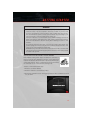
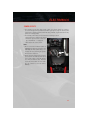
INSTALLING CHILD RESTRAINT TETHER ANCHOR
Child restraints having tether straps and hooks for connection to
tether anchors have been available for some time. In fact, many child
restraint manufacturers will provide add-on tether-strap kits for some
of their older products. There is a tether strap anchor located behind
the child tether access cover behind the passenger seat.
To attach a child restraint tether strap:
1. Move the seat-bottom forward.
2. Move the seatback to its full forward position.
3. Remove the child tether access cover by prying either side with a screwdriver or similar
tool, as shown.
13
G ET T I NG S TARTED
NOTE:
While the child tether is in use, keep the
access cover in a safe place so that it can be
replaced after use of the child tether.
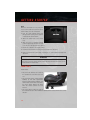
4. Pass the child restraint tether hook
through either opening in the seatback
underneath the head restraint.
5. Attach the tether hook to the anchor
loop.
6. Move the seat to its farthest rearward
position. Apply body pressure to the seat
to be sure the seat adjusters have latched.
7. Return the seatback to an upright position.
8. Install the child restraint according to the manufacturer's directions.
9. Remove slack from the tether strap according to the child restraint manufacturer's
directions.
WARNING!
An incorrectly anchored tether strap could lead to increased head motion and possible
injury to the child. Use only the anchor position directly behind the child seat to secure
a child restraint top tether strap.
FRONT SEATS
Power Seats
• The power seat switches are located on
the outboard side of the front seat cushions.
• The power seat switch controls forward,
rearward, up and down adjustments.
Push the switch forward, rearward, up or
down and the seat will move in the direction of the switch. Release the switch
when the desired position has been
reached.
• The recline switch controls the angle of
the seatback. Press the switch forward or rearward and the seatback will move in either
direction.
14
GETTING STARTED
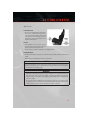
Manual Seats
Forward/Rearward
• Lift up on the adjusting bar located at the
front of the seat near the floor and release at the desired position. Then, using
body pressure, move forward and backward on the seat to be sure that the seat
adjusters have latched.
Recliner
• Lean forward in the seat and lift the
recliner lever, then lean back to the desired position and release the lever.
• Lift the lever to return the seatback to an upright position.
Height Adjustment
• Ratchet the front lever, located on the outboard side of the seat, upward to raise the seat
height.
• Ratchet the lever downward to lower the seat height.
CAUTION!
Do not place any article under a power seat or impede its ability to move as it may cause
damage to the seat controls. Seat travel may become limited if movement is stopped
by an obstruction in the seat's path.
WARNING!
• Adjusting a seat while the vehicle is moving is dangerous. The sudden movement of
the seat could cause you to lose control. The seat belt might not be properly
adjusted, and you could be severely injured or killed. Only adjust a seat while the
vehicle is parked.
• Do not ride with the seatback reclined so that the seat belt is no longer resting
against your chest. In a collision, you could slide under the seat belt and be severely
injured or killed. Use the recliner only when the vehicle is parked.
15
G ET T I NG S TARTED
ADJUSTABLE PEDALS
• The adjustable pedal switch is located to
the left side of the steering column.
• Press the switch forward to move the
pedals forward (toward the front of the
vehicle).
• Press the switch rearward to move the
pedals rearward (toward the driver).
CAUTION!
Do not place any article under the adjustable pedals or impede its ability to move, as
it may cause damage to the pedal controls. Pedal travel may become limited if
movement is stopped by an obstruction in the adjustable pedal's path.
WARNING!
Do not adjust the pedals while the vehicle is moving. You could lose control and have
a collision. Always adjust the pedals while the vehicle is parked.
ADJUSTABLE FOOT REST
• The adjustable foot rest can be adjusted
forward or rearward and rotated upward
or downward to allow for greater driving
comfort.
• To adjust the pedal:
1. Adjust the seat and steering column to a
comfortable position.
2. Using a 13 mm socket wrench, loosen
the nut on the pedal.
3. Slide the pedal either forward or rearward and rotate it upward or downward as desired.
4. Tighten the nut, being careful not to over tighten it.
16
GETTING STARTED
TILT / TELESCOPING STEERING COLUMN
• The tilt release lever is located below the
multifunction lever on the left side of the
steering column.
• To tilt the column, simply pull the release
lever rearward toward you and then move
the steering wheel upward or downward
as desired.
• Push the release lever forward to lock the
column firmly in place.
WARNING!
Do not adjust the steering wheel while driving. The tilt adjustment must be locked
while driving. Adjusting the steering wheel while driving or driving without the tilt
adjustment locked could cause the driver to lose control of the vehicle. Failure to follow
this warning may result in you and others being severely injured or killed.
17
O PE R AT I NG YOUR VEHICLE
ENGINE BREAK-IN RECOMMENDATIONS — SRT8 VERSIONS
• A long break-in period is not required for the drivetrain (engine, transmission, and rear
axle) in your new vehicle.
• Drive moderately during the first 500 miles (800 km). After the initial 60 miles (100
km), speeds up to 50 or 55 mph (80 or 90 km/h) are desirable.
• While cruising, brief full-throttle acceleration within the limits of local traffic laws
contributes to a good break-in. However, wide-open throttle acceleration in low gear can
be detrimental and should be avoided.
• The engine oil is a high performance synthetic lubricant, the transmission fluid, and
axle lubricant installed at the factory is high-quality and energy-conserving. Oil, fluid,
and lubricant changes should be consistent with anticipated climate and conditions
under which vehicle operations will occur. For the recommended viscosity and quality
grades, refer to “Maintaining Your Vehicle”.
NOTE:
A new engine may consume some oil during its first few thousand miles (kilometers) of
operation. This should be considered a normal part of the break-in and not interpreted as
an indication of difficulty.
CAUTION!
Never use Non-Detergent Oil or Straight Mineral Oil in the engine or damage may
result.
TURN SIGNALS/WIPER/WASHER/HIGH BEAMS LEVER
18
O PE RATING YOUR VEHICLE
Wipers
Intermittent, Low And High Operation
• Rotate the end of the lever to the first detent position for one of five intermittent
settings, the second detent for low wiper operation and the third detent for high wiper
operation.
Washer Operation
• Push the end of the lever inward to the second detent and hold for as long as spray is
desired.
Mist Feature
• When a single wipe to clear off road mist or spray from a passing vehicle is needed, push
the washer knob, located on the end of the multifunction lever, inward to the first detent
and release. The wipers will cycle one time and automatically shut off.
High Beams
• Push the lever away from you to activate the high beams.
• A high beam symbol will illuminate in the cluster to indicate the high beams are on.
NOTE:
For safe driving, turn off the high beams when oncoming traffic is present to prevent
headlight glare and as a courtesy to other motorists.
Automatic Headlights/Parking Lights/Headlights
• Rotate the headlight switch, located on
the instrument panel to the left of the
steering wheel, to the first detent from
the off position for parking light
and to the second detent for headlight
.
• Rotate the headlight switch to “AUTO”
for AUTO headlights.
• When set to AUTO, the system automatically turns the headlights on or off based
on ambient light levels.
Instrument Panel Dimmer
• Rotate the dimmer control to the extreme bottom position to fully dim the instrument
panel lights and prevent the interior lights from illuminating when a door is opened.
• Rotate the dimmer control up to increase the brightness of the instrument panel when
the parking lights or headlights are on.
19
O PE R AT I NG YOUR VEHICLE
• Rotate the dimmer control up to the next detent position to fully brighten the odometer
and radio when the parking lights or headlights are on. Refer to your Media Center/
Radio User Manual on the DVD for display dimming.
• Rotate the dimmer control up to the last detent position to turn on the interior lighting.
SPEED CONTROL
• The electronic speed control switches are
located on the steering wheel.
Cruise ON/OFF
• Push the ON/OFF button to activate the
Electronic Speed Control.
will appear on the instru• CRUISE
ment cluster to indicate the Electronic
Speed Control is on.
• Push the ON/OFF button a second time
to turn the system off.
Set
• With the Speed Control on, push and
release the SET – button to set a desired
speed.
Accel/Decel
• Once a speed is set, pushing the RES + button once or the SET – button once will
increase or decrease the set speed approximately 1 mph (2 km/h).
• Push and hold the RES + button to accelerate in 5 mph (8 km/h) increments or push
and hold the SET – button to decelerate in 5 mph (8 km/h) increments; release the
button to save the new set speed.
Resume
• To resume a previously selected set speed in memory, push the RES + button and
release.
Cancel
• Push the CANCEL button, or apply the brakes to cancel the set speed and maintain the
set speed memory.
• Push the ON/OFF button to turn the system off and erase the set speed memory.
20
O PE RATING YOUR VEHICLE
WARNING!
• Leaving the Electronic Speed Control system on when not in use is dangerous. You
could accidentally set the system or cause it to go faster than you want. You could
lose control and have a collision. Always leave the Electronic Speed Control system
off when you are not using it.
• Electronic Speed Control can be dangerous where the system cannot maintain a
constant speed. Your vehicle could go too fast for the conditions, and you could lose
control. A collision could be the result. Do not use Electronic Speed Control in
heavy traffic or on roads that are winding, icy, snow-covered or slippery.
MANUAL TRANSMISSION 1 TO 4 SKIP SHIFT
• Skip Shift is enabled when vehicle speed is greater than 16 MPH
(26 km/h) but less than 18 MPH (29 km/h) and the accelerator is
at 20% or less.
• For optimal fuel economy, under low acceleration conditions, your
vehicle will only allow you to shift from first gear to fourth gear.
Additionally, the skip shift message will appear in the tachometer.
• Refer to your Owner's Manual on the DVD for further information.
AUTOMATIC TEMPERATURE CONTROL (ATC)
• Press the AUTO button or AUTO soft-key.
• Select the desired temperature by pushing the up or down temperature buttons for the
driver or passenger.
• The system will maintain the set temperature automatically.
21
O PE R AT I NG YOUR VEHICLE
Air Conditioning (A/C)
• If the air conditioning button is pressed while in AUTO mode, the system will exit AUTO
mode and stay in A/C. The mode and blower will go to the previous user setting.
Air Recirculation
• Use recirculation for maximum A/C operation.
• For window defogging turn the recirculation button off.
• If the recirculation button is pushed while in the AUTO mode, the indicator light may
flash three times to indicate the cabin air is being controlled automatically.
Heated Mirrors
• The mirrors are heated to melt frost or ice. This feature is activated whenever you turn
on the rear window defroster.
22
O PE RATING YOUR VEHICLE
PARKVIEW® REAR BACK-UP CAMERA
• You can see an on-screen image of the rear surroundings of your vehicle whenever the
shift lever is put into REVERSE. The ParkView® Rear Back-Up Camera image will be
displayed in the rearview mirror or touchscreen display along with a caution note to
“check entire surroundings” across the top of the screen. After five seconds this note
will disappear.
• If the rearview mirror or touchscreen display appears foggy, clean the ParkView® camera
located to the left of the tailgate handle.
WARNING!
Drivers must be careful when backing up; even when using the ParkView® Rear
Back-Up Camera. Always check carefully behind your vehicle, and be sure to check for
pedestrians, animals, other vehicles, obstructions, or blind spots before backing up.
You must continue to pay attention while backing up. Failure to do so can result in
serious injury or death.
23
ELE C TR ONI CS
YOUR VEHICLE'S SOUND SYSTEM
24
ELECTRONICS
25
E LE C TR ONI CS
IDENTIFYING YOUR RADIO
Uconnect™ 8.4A
NOTE:
The 8.4A and 8.4AN appearance is the
same, but the listed features provide the
differences.
• 8.4” Touch-Screen
• Navigation-ready, see dealer for details
• Hands-free/Bluetooth®
• USB port, AUX port and SD Card slot
standard
• Touchscreen Climate Controls
• SiriusXM™ Standard
• Embedded Connectivity (US Market Only)
• Uconnect Access via Mobile Phone
Uconnect™ 8.4AN
NOTE:
The 8.4A and 8.4AN appearance is the
same, but the listed features provide the
differences.
• 8.4” Touch-Screen
• Navigation Standard
• Hands-free/Bluetooth®
• USB port, AUX port and SD Card slot
standard
• Touchscreen Climate Controls
• HD Radio
• SiriusXM™ Standard
• SiriusXM™ Traffic
• SiriusXM™ Travel Link
• Embedded Connectivity (US Market Only)
• Uconnect Access via Mobile Phone
26
ELECTRONICS
Uconnect™ ACCESS (Available on Uconnect™ 8.4A and
Uconnect™ 8.4AN)
• With Uconnect™ Access, owners now have emergency and remote vehicle features and
apps available. In-vehicle features include 9-1-1 Call, and Roadside Assistance Call.
Your vehicle is also capable of remote vehicle features such as Remote Start, Remote
Door Lock/Unlock, and Remote Horn and Lights , by being registered and using a
compatible smartphone.
• Your vehicle may come with a complimentary trial period for use of the Uconnect™
Access features. To activate the trial, you must first register with Uconnect™. See the
simple registration steps below. Once registered, Uconnect™ Access customers can
purchase additional features and Apps as they become available. After the trial period,
you can subscribe for continued service . For additional information, contact
Uconnect™ Customer Care at 855-792-4241, or visit Owner Connect at
www.Dodge.com/MoparOwnerConnect.com.
Uconnect™ Access In-Vehicle Features
Uconnect™ Access in-vehicle features do not require that you have a compatible
smartphone. Instead, they work by using the onboard connectivity service.
Assist Call
• The rear view mirror contains an ASSIST
push button which automatically connects the vehicle occupants to one of
several predefined destinations for immediate support:
1. Roadside Assistance Call – If you get a
flat tire, or need a tow, you’ll be connected to someone who can help anytime. Additional fees may apply.
2. Uconnect™ Access Customer Care –
In-vehicle support for Uconnect™ Access System, Apps and Features.
3. Vehicle Customer Care – Total support for your Chrysler Group vehicle.
Emergency 9-1-1 Call (If Equipped):
• Places a direct call to a local emergency authority.
• If a connection between the vehicle and a 9-1-1 operator is made, the 9-1-1 Call
system may transmit certain vehicle information to a 9-1-1 operator, including the last
known GPS coordinates of your vehicle. If a connection is made between a 9-1-1
operator and your vehicle, you understand and agree that 9-1-1 operators may record
conversations and sounds in your car upon connection and consent to such recordings.
Your vehicle MUST have a working electrical system for the 9-1-1 Call system, among
others, to operate. IF YOUR VEHICLE LOSES BATTERY POWER FOR ANY REASON
(INCLUDING DURING OR AFTER AN ACCIDENT) THE 9-1-1 CALL SYSTEM, AMONG
OTHER VEHICLES SYSTEMS, WILL NOT OPERATE.
27
E LE C TR ONI CS
Roadside Assistance (if equipped):
• If your vehicle is equipped with this feature and within cellular range, you may be able
to connect to Roadside Assistance, Uconnect™ Care and Vehicle Care by pressing the
“Assist” button on the Rearview Mirror of your vehicle. To the extent any such calls
incur additional costs you are responsible for them. If Roadside Assistance is provided
to your vehicle, you agree to be responsible for any additional roadside assistance
service costs that you may incur. In order to provide Uconnect™ Services to you, we
may record and monitor your conversations with Roadside Assistance, Uconnect™
Care or Vehicle Care, whether such conversations are initiated through the Uconnect™
Services in your vehicle, or via a landline or mobile telephone, and may share
information obtained through such recording and monitoring in accordance with
regulatory requirements. You acknowledge, agree and consent to any recording,
monitoring or sharing of information obtained through any such call recordings.
How to Register with Uconnect™ Access
1. With the vehicle parked and the radio powered on, select the “Apps” soft-key located
near the bottom of the radio touch screen.
2. Select the “Uconnect Registration” App soft-key from the Apps list.
3. The Uconnect™ Registration App opens, providing simple step-by-step instructions
on entering your email address to begin the registration process.
4. You will receive a secured registration email from Uconnect™ Access containing a link
for completing your Uconnect™ Access Registration on-line. For security reasons, this
email link will be valid for 24 hours.
5. Follow the link to complete the final step of registration and to begin using Uconnect™
Access
For additional registration assistance while in the vehicle, push the ASSIST button to
contact Uconnect™ Customer Care.
NOTE:
If 24 hours has passed and the email link is no longer valid, customers can follow the
process as previously described beginning at Step 1.
Uconnect™ Access In-Vehicle Connectivity Services
• Uconnect™ Access brings the power of the internet into your vehicle with exciting
features, remote capabilities, theft alarm notification, and stolen vehicle assistance
applications through on-board connectivity service. Once registered with Uconnect™
Access, you can customize the capabilities of your vehicle system using your
Uconnect™ Access account from the vehicle, the web, or your Smartphone.
• Please refer to your Uconnect™ Access account for information on available subscriptions, applications and packages for your vehicle. For additional information, contact
Uconnect™ Customer Care at 855-792-4241, or visit Owner Connect
(www.Dodge.com/MoparOwnerConnect.com).
28
ELECTRONICS
Uconnect™ Access via Mobile (If Equipped, Available on Uconnect™ 8.4A
and 8.4AN)
• Uconnect™ Access via Mobile offers additional apps such as Weather, Sports, Aha, and
Slacker, with more apps available in the future. It uses the data connection in your
compatible smartphone, not the onboard connectivity service.
• To get started using Uconnect™ Access Via Mobile, first register for Uconnect™
Access. Then, go to www.Dodge.com/MoparOwnerConnect to download the Uconnect
Mobile App. Pair your phone to the vehicle (see Phone Pairing section), then start the
Uconnect™ Mobile App on your smartphone. Your Access Via Mobile apps will appear
in the appropriate tab within the Apps section of the radio. They are identified by the
words “Via Mobile” after the App name.
• Note that you must have a compatible smartphone to use this feature. Go to
www.UconnectPhone.com for the latest phone compatibility information and pairing
assistance.
• For additional information on Uconnect™ Access Via Mobile, push the ASSIST button
to contact Uconnect™ Customer Care, phone them directly at 855-792-4241, or go to
Owner Connect www.Dodge.com/MoparOwnerConnect.
Uconnect™ Access Additional Information
My Uconnect Account
• To use the Uconnect™ Features and Services, you must first register your vehicle with
Uconnect™ Access. Please refer to the “Register with Uconnect Access” section of
this User's Manual to start registration. Once registered, you can personalize your
vehicle Uconnect™ System as desired.
How to Purchase or Cancel an App
• From your Uconnect™ Access Account, you can easily purchase or cancel Applications
or subscriptions. Simply log-in to your Uconnect™ Access Account and visit your
Uconnect™ Store.
Correcting a Download Error - How to Reset the Uconnect™ Access System
• You can easily correct any Application related issues by Resetting the Application.
Simply log-in to your Uconnect™ Access Account and visit the Uconnect™ Store, click
on My Apps, click on Settings, and then choose Reset/Reinstall. In minutes your App
will be reinstalled and ready to go.
Selling my Vehicle - How to Completely Remove My Uconnect™ Access Account
• To completely remove your Uconnect™ Account, simply log-in to your Uconnect™
Account and visit the Uconnect™ Store, click on My Apps, click on Settings, and then
choose Remove Uconnect™ Account. In minutes your entire Uconnect™ Account and
information will be removed from your vehicle.
NOTE:
For further assistance call 1-855-792-4241, or go to the Mopar Owner Connect site at
(www.Dodge.com/MoparOwnerConnect.com).
29
E LE C TR ONI CS
Always Drive Safely
• ALWAYS drive safely with your hands on the wheel. You have full responsibility and
assume all risks related to the use of the Uconnect™ features and applications in this
vehicle.
• For additional information, contact Uconnect™ Customer Care at 855-792-4241, or
visit Owner Connect www.Dodge.com/MoparOwnerConnect.
Uconnect™ 8.4A
Uconnect™ 8.4A AT A GLANCE
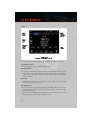
Displaying the Time
• If the time is not currently displayed on the radio or player main page, touch the
Settings soft-key or the Apps soft-key and then the Settings soft-key. In the Settings list,
touch the Clock soft-key then touch the check box next to Show Time in Status Bar.
Setting the Time
• Model 8.4AN synchronizes time automatically via GPS, so should not require any time
adjustment. If you do need to set the time manually, follow the instructions below for
Model 8.4A.
• For Model 8.4A, turn the unit on, then touch the time display at the top of the screen.
Touch Yes.
• If the time is not displayed at the top of the screen, touch the Settings soft-key or the
Apps soft-key and then the Settings soft-key. In the Settings screen, touch the Clock
soft-key, then check or uncheck this option.
30
ELECTRONICS
• Touch + or – next to Set Time Hours and Set Time Minutes to adjust the time.
• If these features are not available, uncheck the Sync with GPS box.
• Touch X to save your settings and exit out of the Clock Setting screen.
Audio Settings
• Touch of the Audio soft-key to activate the Audio settings screen to adjust
Balance\Fade, Equalizer, and Speed Adjusted Volume.
• You can return to the Radio screen by touching the X located at the top right.
Balance/Fade
• Touch the Balance/Fade soft-key to Balance audio between the front speakers or fade
the audio between the rear and front speakers.
• Touching the Front, Rear, Left, or Right soft-keys or touch and drag the blue Speaker
Icon to adjust the Balance/Fade.
Equalizer
• Touch the Equalizer soft-key to activate the Equalizer screen.
• Touch the + or - soft-keys, or by touching and dragging over the level bar for each of the
equalizer bands. The level value, which spans between plus or minus 9, is displayed at
the bottom of each of the Bands.
Speed Adjusted Volume
• Touch the Speed Adjusted Volume soft-key to activate the Speed Adjusted Volume
screen. The Speed Adjusted Volume is adjusted by touching the + and - buttons or by
touching and dragging over the level bar. This alters the automatic adjustment of the
audio volume with variation to vehicle speed.
31
E LE C TR ONI CS
RADIO
• To access the Radio mode, touch the Radio soft-key at the lower left of the screen.
Selecting Radio Stations
• Touch the desired radio band (AM, FM or SAT) soft-key.
Seek Up/Seek Down
• Touch the Seek arrow soft-keys for less than two seconds to seek through radio stations.
• Touch and hold either arrow soft-key for more than two seconds to bypass stations
without stopping. The radio will stop at the next listenable station once the arrow
soft-key is released.
Direct Tune
• Tune directly to a radio station by pressing the “Tune” button on the screen, and
entering the desired station number.
Store Radio Presets
• Your radio can store 12 total preset stations. They are shown at the top of your screen.
To see all 12 stations, press the arrow soft-key at the top right of the screen to toggle
between the six presets.
• To set a station into memory press and hold the desired numbered soft-key for more
than two seconds or until you hear a confirmation beep.
32
ELECTRONICS
SiriusXM™ SATELLITE RADIO
• SiriusXM™ Satellite Radio gives you over 130 channels, including 100% commercialfree music from nearly every genre, plus all your favorite sports, news, talk and
entertainment channels – all with crystal clear, coast-to-coast coverage, all in one place
and all at your fingertips.
• To access SiriusXM™ Satellite Radio, touch the SXM soft-key on the main Radio
screen.
• The following describes features that are available when in SiriusXM™ Satellite Radio
mode.
Seek Up/Seek Down
• Touch the Seek arrow soft-keys for less than two seconds to seek through channels in
SXM mode.
• Touch and hold either arrow soft-key for more than two seconds to bypass channels
without stopping. The radio will stop at the next listenable channel once the arrow
soft-key is released.
Direct Tune
• Tune directly to a SXM channel by pressing the “Tune” button on the screen, and
entering the desired station number.
Jump
• Automatically tells you when Traffic & Weather for a favorite city is available, and gives
you the option to switch to that channel. Touch Jump to activate the feature. After
listening to Traffic and Weather, touch Jump again to return to the previous channel.
Fav
• Activates the favorites menu. You can add up to 50 favorite artists or songs. Just touch
Add Fav Artist or Add Fav Song while the song is playing. You will then be alerted any
time one of these songs, or works by these artists, is playing on other SiriusXM™
channels.
SiriusXM™ Parental Controls
• You can skip or hide certain channels from view if you do not want access to them.
Touch the More soft-key, then the Settings soft-key, next touch the Sirius Setup
soft-key, then select Channel Skip. Touch the box, check-mark, next to the channel you
want skipped. They will not show up in normal usage.
• SiriusXM™ also offers the option to permanently block selected channels. Call
(1-888-601-6297 for U.S. customers, 1-888-539-7474 for Canadian customers) and
request the Family Package.
33
E LE C TR ONI CS
Browse
• Lets you browse the SiriusXM™ channel listing or Genre listing. Favorites, Game Zone,
Weather and Jump settings also provide a way to browse the SiriusXM™ channel list.
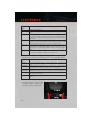
Browse Sub- Sub-Menu Description
Menu
All
Shows the channel listing.
Genre
Provides a list of all genres, and lets you jump to a channel within the selected
genre.
Presets
Lets you scroll the list of Preset satellite channels. Touch the channel, or press
Enter on the Tune knob, to go to that channel. Touch the trash can icon to
delete a preset. Your presets are also shown at the top of the main Satellite
Radio screen.
Favorites
Lets you manage artists and songs in the Favorites list and configure Alert
Settings to let you know when favorite songs or artists are playing on other
channels. Also, view a list of channels airing any of your Favorites.
Game Zone
Provides alerts when your favorite sports teams are starting a game which is
being aired on other SiriusXM™ channels, or when their game score is
announced. You can select and manage your Teams list here, and configure
alerts.
Jump
Lets you select your favorite cities for Traffic & Weather information, which is
used by the Jump feature on the main satellite radio screen.
Replay
• Lets you replay up to 44 minutes of the content of the current SiriusXM™ channel.
Replay Op- Option Description
tion
Play/Pause
Touch to Pause content playback. Touch Pause/Play again to resume playback.
Rewind/RW Rewinds the channel content in steps of 5 seconds. Touch and hold to rewind
continuously, then release to begin playing content at that point.
Fast
Forwards the content, and works similarly to Rewind/RW. However, Fast
Forward/FW Forward/FW can only be used when content has been previously rewound.
Replay Time Displays the amount of time in the upper center of the screen by which your
content lags the Live channel.
Live
Resumes playback of Live content at any time while replaying rewound
content.
34
ELECTRONICS
PLAYING iPod/USB/MP3 DEVICES
• There are many ways to play music from
iPod®/MP3 players or USB devices
through your vehicle's sound system.
Audio Jack
• The Audio Jack allows a portable device,
such as an MP3 player or a cassette
player, to be plugged into the radio and
utilize the vehicle’s sound system, using
a 3.5 mm audio cable, to amplify the
source and play through the vehicle
speakers.
• Touching the Media soft-key then choose AUX source will change the mode to auxiliary
device if the Audio Jack is connected, allowing the music from your portable device to
be heard through the vehicle's speakers. In order activate the AUS, plug in the audio
jack.
• The functions of the portable device are controlled using the device buttons. The
volume may be controlled using the radio or portable device.
• To route the audio cable out of the center console, use the access cut out in the front of
the console.
USB Port
• Connect your iPod® or compatible device using a USB cable into the USB Port. USB
Memory sticks with audio files can also be used. Then, audio from the device can be
played on the vehicles sound system while providing metadata (artist, track title,
album, etc.) information on the radio display.
• When connected, the iPod®/compatible USB device can be controlled using the radio
or Steering Wheel Audio Controls to play, skip to the next or previous track, browse, and
list the contents.
• The iPod® battery charges when plugged into the USB port (if supported by the specific
device).
• To route the USB/iPod® cable out of the center console, use the access cut out in the
front of the console.
NOTE:
• When connecting your iPod® device for the first time, the system may take several
minutes to read your music, depending on the number of files. For example, the system
will take approximately 5 minutes for every 1000 songs loaded on the device. Also
during the reading process, the Shuffle and Browse functions will be disabled. This
process is needed to ensure the full use of your iPod® features and only happens the
first time it is connected. After the first time, the reading process of your iPod® will take
considerably less time unless changes are made or new songs are added to the playlist.
35
E LE C TR ONI CS
• The USB port supports certain Mini, Classic, Nano, Touch, and iPhone® devices. The
USB port also supports playing music from compatible external USB Mass Storage
Class memory devices. Some iPod® software versions may not fully support the USB
port features. Please visit Apple’s website for iPod® software updates.
SD Card
• Play songs stored on an SD card inserted into the SD card slot.
• Song playback can be controlled using the radio or Steering Wheel Audio Controls to
play, skip to the next or previous track, browse, and list the contents.
Bluetooth® Streaming Audio
• If equipped with Uconnect™ Voice Command, your Bluetooth-equipped iPod® devices, cell phones or other media players, may also be able to stream music to your
vehicle's sound system. Your connected device must be Bluetooth-compatible, and
paired with your Uconnect™ Touch system (see Uconnect™ Phone for pairing
instructions). You can access the music from your connected Bluetooth® device by
touching the Source soft-key while in Player mode.
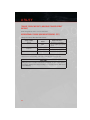
Uconnect™ 8.4A & 8.4AN Available Media Hubs
Uconnect™
8.4A &
8.4AN
Media Hub
(USB, AUX
Ports)
-
S = Standard Equipment
O = Optional Equipment
36
Media Hub
(SD, USB,
AUX Ports)
S
Remote USB
Port (Fully
Functional)
S
Remote USB Dual ChargPort (Charg- ing Ports
ing Only)
O
O
ELECTRONICS
iPod®/CD/AUX CONTROLS
• The iPod®/CD/AUX controls are accessed by touching the source soft-key and choose
between Disc, AUX, iPod®, Bluetooth or SD Card.
NOTE:
Uconnect™ Access will usually automatically switch to the appropriate mode when
something is first connected or inserted into the system.
NAVIGATION (DEALER-INSTALLED OPTION)
• Your Uconnect™ 8.4A is “Navigation-Ready”, and can be equipped with Navigation at
an extra cost. See your dealer for details.
• The information in this section is only applicable if the feature has been equipped. If so
equipped, you will see a Nav soft-key at the bottom of the touch-screen.
Changing the Navigation Voice Prompt Volume
1. Touch the View Map soft-key from the Nav Main Menu.
2. With the map displayed, touch the Settings soft-key in the lower right area of the
screen.
3. In the Settings menu, touch the Guidance soft-key.
4. In the Guidance menu, adjust the Nav Volume by touching the + or – soft-keys.
37
E LE C TR ONI CS
Finding Points of Interest
• From the main Navigation menu, touch Where To?, then touch Points of Interest.
• Select a Category and then a subcategory, if necessary.
• Select your destination and touch Yes.
Finding a Place by Spelling the Name
• From the Main Navigation Menu, touch Where to?, then touch Points of Interest and
then touch Spell Name.
• Enter the name of your destination.
• Touch Done.
• Select your destination and touch Yes.
Entering a Destination Address
• From the main Navigation menu, touch Where To?, then touch Address.
• Follow the on-screen prompts to enter the address and touch Yes.
Setting Your Home Location
• Touch the NAV soft-key in the menu bar to access the Navigation system and the Main
Navigation menu.
• Touch Where To?, then touch Go Home.
• You may enter your address directly, use your current location as your home address, or
choose from recently found locations.
38
ELECTRONICS
• To delete your Home location (or other saved locations) so you can save a new Home
location, touch Where To? from the Main Navigation menu, then touch Go Home, and
in the Yes screen touch the Options soft-key. In the Options menu touch Clear Home.
Set a new Home location be following the previous instructions.
Go Home
• A Home location must be saved in the system. From the Main Navigation menu, touch
Where To?, then touch Go Home.
• Your route is marked with a blue line on the map. If you depart from the original route,
your route is recalculated. A speed limit icon could appear as you travel on major
roadways.
Adding a Stop
• To add a stop you must be navigating a route.
• Touch the Menu soft-key to return to the Main Navigation menu.
• Touch Where To?, then search for the extra stop. When another location has been
selected, you can choose to cancel your previous route, add as the first destination or
add as the last destination.
• Touch the desired selection and touch Yes.
Taking a Detour
• To take a detour you must be navigating a route.
• Touch Detour.
39
E LE C TR ONI CS
NOTE:
• If the route you are currently taking is the only reasonable option, the device might not
calculate a detour.
• For more information, see your Uconnect™ Access User's Manual.
Uconnect™ PHONE (Bluetooth® HANDS FREE CALLING)
• If the Uconnect™ Phone Button
Uconnect™ Phone features.
exists on your steering wheel, then you have the
• The Uconnect™ Phone is a voice-activated, hands-free, in-vehicle communications
system with Voice Command Capability (see Voice Command section).
• The Uconnect™ Phone allows you to dial a phone number with your mobile phone
using simple voice commands or using screen soft-keys.
• Refer to the Understand The Features Of Your Vehicle section of your vehicle's Owner's
Manual on the DVD for further details.
The Uconnect™ Phone requires a mobile phone equipped with the Bluetooth® Hands-Free
Profile, Version 1.0 or higher. For Uconnect™ customer support, call 1–877–855–8400 or
visit www.UconnectPhone.com.
Pairing a Phone
• To use the Uconnect™ Phone feature, you must first pair your Bluetooth® phone with
the Uconnect™ system.
Start pairing procedure on the radio
• Touch the Phone soft-key and then the Settings soft-key. Next, touch Add Device.
• Uconnect™ Phone will display an “In progress” screen while the system is connecting.
Start pairing procedure on mobile phone
• Search for available devices on your Bluetooth® enabled mobile phone. This is usually
within Settings or Options under “Bluetooth”. See your mobile phone’s manual for
details.
• When your phone finds the system, select “Uconnect” as the paired device.
Complete the pairing procedure
• When prompted on the phone, enter the 4-digit PIN number shown on the Uconnect™
Screen.
• If your phone asks you to accept a connection request from Uconnect, select “Yes”. If
available, check the box telling it not to ask again – that way your phone will
automatically connect each time you start the vehicle.
Select the mobile phone's priority level
• When the pairing process has successfully completed, the system will prompt you to
choose whether or not this is your favorite phone. Selecting Yes will make this phone the
highest priority. This phone will take precedence over other paired phones within range.
Only one phone can be paired at a time.
40
ELECTRONICS
• You are now ready to make hands-free calls. Press the Uconnect™ Phone button on
your steering wheel to begin.
Making A Phone Call
• Press the Uconnect™ Phone button
.
• (After the BEEP), say “dial” then the number (or “call” then the name as listed in your
phone; see Phonebook).
NOTE:
You can also initiate a call by using the touch-screen on the Phone main screen.
Receiving A Call – Accept (And End)
• When an incoming call rings/is announced on Uconnect™, press the Phone button
.
• To end a call, press the Phone button
.
Mute (Or Unmute) Microphone During Call
• During a call, touch the mute soft-key on the Phone main screen to mute and unmute
the call.
Transfer Ongoing Call Between Handset And Vehicle
• During a call, touch the Transfer soft-key on the Phone main screen to transfer an on
going call between handset and vehicle.
Common Phone Commands (Examples)
• “Call John Smith”
• “Call John Smith mobile”
• “Dial 1 248 555 1212
• “Call Emergency”
• “Call Towing Assistance”
• “Redial”
Phonebook
• Uconnect™ radios will automatically download your phonebook from your paired
phone, if this feature is supported by your phone. Entries are updated each time that
the phone is connected. If your phone book entries do not appear, check the settings on
your phone. Some phones require you to enable this feature manually.
• Your phonebook can be browsed on your radio screen, but editing can only be done on
your phone. To browse, touch the Phone soft-key, then the Phonebook soft-key.
• Favorite phonebook entries can be saved as Favorites for quicker access. Favorites are
shown at the top of your main phone screen.
41
E LE C TR ONI CS
Voice Command Tips
• Use longer names that are less easily mistaken for others. For example, say “Call John
Doe” instead of “Call John”.
• You can “chain” commands together for faster results. Say “Call John Doe, mobile”, for
example.
• You can interrupt while the system is talking to you, enabling you to enter your response
button on the steering wheel
without waiting. Just press the Voice Command
to say your command.
Changing The Volume
• Start a dialogue by pressing the Phone button
- "Help".
, then say a command for example
• Use the radio ON/OFF VOLUME rotary knob to adjust the volume to a comfortable level
while the Uconnect™ system is speaking. Please note the volume setting for
Uconnect™ is different than the audio system.
NOTE:
To access help, press the Uconnect™ Phone
"help." Touch the display or push either
or
the help session.
button on the steering wheel and say
button and say "cancel" to cancel
SMS (Text Messaging)
• Uconnect™ Phone can read or send new text messages on your mobile phone.
• Your mobile phone must support SMS over Bluetooth® in order to use this feature. If the
Uconnect™ Phone determines your phone is not compatible with SMS messaging over
Bluetooth® the “Messaging” button will be greyed out and the feature will not be
available for use.
NOTE:
• For mobile phone compatibility
www.UconnectPhone.com
and
pairing
instructions,
please
visit
• Uconnect™ Phone SMS is only available when the vehicle is not moving.
• Any voice commanded system should be used only in safe driving conditions following
applicable laws regarding phone use. All attention should be kept on the roadway
ahead. Failure to do so may result in a collision causing you and others to be severely
injured or killed.
• In an emergency, to use Uconnect™ Phone, your mobile phone must be:
• turned on,
• paired to Uconnect™ Phone,
• and have network coverage.
Uconnect™ VOICE COMMAND
• If the Uconnect™ Voice Command
you have the Voice Command feature.
42
button exists on your steering wheel, then
ELECTRONICS
• The Voice Command feature lets you keep your hands on the steering wheel, and your
eyes on the road.
located on the radio faceplate or
• When you press the Voice Command button
steering wheel, you will hear a beep. The beep is your signal to give a command. If you
do not know what commands to say, you can say "help" and the system will provide
options to you. If you ever wish to interrupt the system while it lists options, press the
, listen for the BEEP, and say your command.
Voice Command button
• You can “chain” commands together for faster results. Say “Call John Doe, mobile”, for
example.
Changing The Volume
• Start a dialogue by pressing the Voice Command button
(for example, “help”).
, then say a command
• Use the radio ON/OFF VOLUME rotary knob to adjust the volume to a comfortable level
while the Voice Command system is speaking. The volume setting for Voice Command
is different than the audio system.
• Refer to the Understand The Features Of Your Vehicle section of your vehicle's Owner's
Manual on the DVD for further details.
Common Voice Commands (Examples)
Switch Modes
Radio (FM, AM)
Player
SiriusXM™ Satellite Radio
SiriusXM™ Travel Link
“FM”
“Satellite” “AM”
“Change Source to my iPod”
“Change Source to SD Card”
“95.5”
“95.5 FM”
“Go to preset 5”
“Play Album 'Greatest Hits”
“Play Artist 'Scott Joplin” “Play Genre 'Rock”
“Play Song 'Maple Leaf Rag”
“39”
“Foxxhole”
“Show fuel prices”
“Show movie listings”
“Show current weather”
“Show extended weather”
“Show Travel Link favorites”
“Show NFL headlines”
“Show NBA rankings”
“Show NFL schedules”
“Show NBA scores”
43
E LE C TR ONI CS
NOTE:
• For the shortened SiriusXM™ Satellite Radio mode commands to be recognized you
must be in that mode. For example, if you are in SiriusXM™ Satellite Radio mode you
can say “39”, but if you are not in SiriusXM™ mode, you would need to say “Tune to
Satellite Channel 39.”
• For
additional
information
on
available
Voice
Commands,
www.driveuconnect.com/features/entertainment/ and select Voice Commands.
visit
Uconnect™ 8.4AN
Uconnect™ 8.4AN AT A GLANCE
Displaying the Time
• If the time is not currently displayed on the radio or player main page, touch the
Settings soft-key or the Apps soft-key and then the Settings soft-key. In the Settings list,
touch the Clock soft-key then touch the check box next to Show Time in Status Bar.
Setting the Time
• Model 8.4AN synchronizes time automatically via GPS, so should not require any time
adjustment. If you do need to set the time manually, follow the instructions below for
Model 8.4A.
• For Model 8.4A, turn the unit on, then touch the time display at the top of the screen.
Touch Yes.
44
ELECTRONICS
• If the time is not displayed at the top of the screen, touch Settings soft-key or the Apps
soft-key and then the Settings soft-key. In the Settings screen, touch the Clock soft-key,
then check or uncheck this option.
• Touch + or – next to Set Time Hours and Set Time Minutes to adjust the time.
• If these features are not available, uncheck the Sync with GPS box.
• Touch X to save your settings and exit out of the Clock Setting screen.
Audio Settings
• Touch of the Audio soft-key to activate the Audio settings screen to adjust
Balance\Fade, Equalizer, and Speed Adjusted Volume.
• You can return to the Radio screen by touching the X located at the top right.
Balance/Fade
• Touch the Balance/Fade soft-key to Balance audio between the front speakers or fade
the audio between the rear and front speakers.
• Touching the Front, Rear, Left, or Right soft-keys or touch and drag the blue Speaker
Icon to adjust the Balance/Fade.
Equalizer
• Touch the Equalizer soft-key to activate the Equalizer screen.
• Touch the + or - soft-keys, or by touching and dragging over the level bar for each of the
equalizer bands. The level value, which spans between plus or minus 9, is displayed at
the bottom of each of the Bands.
Speed Adjusted Volume
• Touch the Speed Adjusted Volume soft-key to activate the Speed Adjusted Volume
screen. The Speed Adjusted Volume is adjusted by touching the + and - buttons or by
touching and dragging over the level bar. This alters the automatic adjustment of the
audio volume with variation to vehicle speed.
45
E LE C TR ONI CS
RADIO
• To access the Radio mode, touch the Radio soft-key at the lower left of the screen.
Selecting Radio Stations
• Touch the desired radio band (AM, FM or SAT) soft-key.
Seek Up/Seek Down
• Touch the Seek arrow soft-keys for less than two seconds to seek through radio stations.
• Touch and hold either arrow soft-key for more than two seconds to bypass stations
without stopping. The radio will stop at the next listenable station once the arrow
soft-key is released.
Direct Tune
• Tune directly to a radio station by pressing the “Tune” button on the screen, and
entering the desired station number.
Store Radio Presets
• Your radio can store 12 total preset stations. They are shown at the top of your screen.
To see all 12 stations, press the arrow soft-key at the top right of the screen to toggle
between the six presets.
• To set a station into memory press and hold the desired numbered soft-key for more
than two seconds or until you hear a confirmation beep.
46
ELECTRONICS
SiriusXM™ SATELLITE RADIO
• SiriusXM™ Satellite Radio gives you over 130 channels, including 100% commercialfree music from nearly every genre, plus all your favorite sports, news, talk and
entertainment channels – all with crystal clear, coast-to-coast coverage, all in one place
and all at your fingertips.
• To access SiriusXM™ Satellite Radio, touch the SXM soft-key on the main Radio
screen.
• The following describes features that are available when in SiriusXM™ Satellite Radio
mode.
Seek Up/Seek Down
• Touch the Seek arrow soft-keys for less than two seconds to seek through channels in
SXM mode.
• Touch and hold either arrow soft-key for more than two seconds to bypass channels
without stopping. The radio will stop at the next listenable channel once the arrow
soft-key is released.
Direct Tune
• Tune directly to a SXM channel by pressing the “Tune” button on the screen, and
entering the desired station number.
Jump
• Automatically tells you when Traffic & Weather for a favorite city is available, and gives
you the option to switch to that channel. Touch Jump to activate the feature. After
listening to Traffic and Weather, touch Jump again to return to the previous channel.
Fav
• Activates the favorites menu. You can add up to 50 favorite artists or songs. Just touch
Add Fav Artist or Add Fav Song while the song is playing. You will then be alerted any
time one of these songs, or works by these artists, is playing on other SiriusXM™
channels.
SiriusXM™ Parental Controls
• You can skip or hide certain channels from view if you do not want access to them.
Touch the More soft-key, then the Settings soft-key, next touch the Sirius Setup
soft-key, then select Channel Skip. Touch the box, check-mark, next to the channel you
want skipped. They will not show up in normal usage.
• SiriusXM™ also offers the option to permanently block selected channels. Call
(1-888-601-6297 for U.S. customers, 1-888-539-7474 for Canadian customers) and
request the Family Package.
Browse
• Lets you browse the SiriusXM™ channel listing or Genre listing. Favorites, Game Zone,
Weather and Jump settings also provide a way to browse the SiriusXM™ channel list.
47
E LE C TR ONI CS
Browse Sub- Sub-Menu Description
Menu
All
Shows the channel listing.
Genre
Provides a list of all genres, and lets you jump to a channel within the selected
genre.
Presets
Lets you scroll the list of Preset satellite channels. Touch the channel, or press
Enter on the Tune knob, to go to that channel. Touch the trash can icon to
delete a preset. Your presets are also shown at the top of the main Satellite
Radio screen.
Favorites
Lets you manage artists and songs in the Favorites list and configure Alert
Settings to let you know when favorite songs or artists are playing on other
channels. Also, view a list of channels airing any of your Favorites.
Game Zone
Provides alerts when your favorite sports teams are starting a game which is
being aired on other SiriusXM™ channels, or when their game score is
announced. You can select and manage your Teams list here, and configure
alerts.
Jump
Lets you select your favorite cities for Traffic & Weather information, which is
used by the Jump feature on the main satellite radio screen.
Replay
• Lets you replay up to 44 minutes of the content of the current SiriusXM™ channel.
Replay Op- Option Description
tion
Play/Pause
Touch to Pause content playback. Touch Pause/Play again to resume playback.
Rewind/RW Rewinds the channel content in steps of 5 seconds. Touch and hold to rewind
continuously, then release to begin playing content at that point.
Fast
Forwards the content, and works similarly to Rewind/RW. However, Fast
Forward/FW Forward/FW can only be used when content has been previously rewound.
Replay Time Displays the amount of time in the upper center of the screen by which your
content lags the Live channel.
Live
Resumes playback of Live content at any time while replaying rewound
content.
PLAYING iPod/USB/MP3 DEVICES
• There are many ways to play music from
iPod®/MP3 players or USB devices
through your vehicle's sound system.
48
ELECTRONICS
Audio Jack
• The Audio Jack allows a portable device, such as an MP3 player or a cassette player, to
be plugged into the radio and utilize the vehicle’s sound system, using a 3.5 mm audio
cable, to amplify the source and play through the vehicle speakers.
• Touching the Media soft-key then choose AUX source will change the mode to auxiliary
device if the Audio Jack is connected, allowing the music from your portable device to
be heard through the vehicle's speakers. In order activate the AUS, plug in the audio
jack.
• The functions of the portable device are controlled using the device buttons. The
volume may be controlled using the radio or portable device.
• To route the audio cable out of the center console, use the access cut out in the front of
the console.
USB Port
• Connect your iPod® or compatible device using a USB cable into the USB Port. USB
Memory sticks with audio files can also be used. Then, audio from the device can be
played on the vehicles sound system while providing metadata (artist, track title,
album, etc.) information on the radio display.
• When connected, the iPod®/compatible USB device can be controlled using the radio
or Steering Wheel Audio Controls to play, skip to the next or previous track, browse, and
list the contents.
• The iPod® battery charges when plugged into the USB port (if supported by the specific
device).
• To route the USB/iPod® cable out of the center console, use the access cut out in the
front of the console.
NOTE:
• When connecting your iPod® device for the first time, the system may take several
minutes to read your music, depending on the number of files. For example, the system
will take approximately 5 minutes for every 1000 songs loaded on the device. Also
during the reading process, the Shuffle and Browse functions will be disabled. This
process is needed to ensure the full use of your iPod® features and only happens the
first time it is connected. After the first time, the reading process of your iPod® will take
considerably less time unless changes are made or new songs are added to the playlist.
• The USB port supports certain Mini, Classic, Nano, Touch, and iPhone® devices. The
USB port also supports playing music from compatible external USB Mass Storage
Class memory devices. Some iPod® software versions may not fully support the USB
port features. Please visit Apple’s website for iPod® software updates.
SD Card
• Play songs stored on an SD card inserted into the SD card slot.
• Song playback can be controlled using the radio or Steering Wheel Audio Controls to
play, skip to the next or previous track, browse, and list the contents.
49
E LE C TR ONI CS
Bluetooth® Streaming Audio
• If equipped with Uconnect™ Voice Command, your Bluetooth-equipped iPod® devices, cell phones or other media players, may also be able to stream music to your
vehicle's sound system. Your connected device must be Bluetooth-compatible, and
paired with your Uconnect™ Touch system (see Uconnect™ Phone for pairing
instructions). You can access the music from your connected Bluetooth® device by
touching the Source soft-key while in Player mode.
Uconnect™ 8.4A & 8.4AN Available Media Hubs
Uconnect™
8.4A &
8.4AN
Media Hub
(USB, AUX
Ports)
-
Media Hub
(SD, USB,
AUX Ports)
S
Remote USB
Port (Fully
Functional)
S
Remote USB Dual ChargPort (Charg- ing Ports
ing Only)
O
O
S = Standard Equipment
O = Optional Equipment
iPod®/CD/AUX CONTROLS
• The iPod®/CD/AUX controls are accessed by touching the source soft-key and choose
between Disc, AUX, iPod®, Bluetooth or SD Card.
NOTE:
Uconnect™ Access will usually automatically switch to the appropriate mode when
something is first connected or inserted into the system.
50
ELECTRONICS
NAVIGATION
• Touch the Nav soft-key in the menu bar to access the Navigation system.
Changing the Navigation Voice Prompt Volume
1. Touch the View Map soft-key from the Nav Main Menu.
2. With the map displayed, touch the Settings soft-key in the lower right area of the
screen.
3. In the Settings menu, touch the Guidance soft-key.
4. In the Guidance menu, adjust the Nav Volume by touching the + or – soft-keys.
Finding Points of Interest
• From the main Navigation menu, touch Where To?, then touch Points of Interest.
• Select a Category and then a subcategory, if necessary.
• Select your destination and touch Yes.
Finding a Place by Spelling the Name
• From the Main Navigation Menu, touch Where to?, then touch Points of Interest and
then touch Spell Name.
• Enter the name of your destination.
• Touch Done.
• Select your destination and touch Yes.
51
E LE C TR ONI CS
Entering a Destination Address
• From the main Navigation menu, touch Where To?, then touch Address.
• Follow the on-screen prompts to enter the address and touch Yes.
NOTE:
Destination entry is not available while your vehicle is in motion. However, you can also
use Voice Commands to enter an address while moving. Refer to Common Navigation
Voice Commands in the Uconnect™ Voice Command section.
Setting Your Home Location
• Touch the NAV soft-key in the menu bar to access the Navigation system and the Main
Navigation menu.
• Touch Where To?, then touch Go Home.
• You may enter your address directly, use your current location as your home address, or
choose from recently found locations.
• To delete your Home location (or other saved locations) so you can save a new Home
location, touch Where To? from the Main Navigation menu, then touch Go Home, and
in the Yes screen touch the Options soft-key. In the Options menu touch Clear Home.
Set a new Home location be following the previous instructions.
Go Home
• A Home location must be saved in the system. From the Main Navigation menu, touch
Where To?, then touch Go Home.
52
ELECTRONICS
• Your route is marked with a blue line on the map. If you depart from the original route,
your route is recalculated. A speed limit icon could appear as you travel on major
roadways.
Adding a Stop
• To add a stop you must be navigating a route.
• Touch the Menu soft-key to return to the Main Navigation menu.
• Touch Where To?, then search for the extra stop. When another location has been
selected, you can choose to cancel your previous route, add as the first destination or
add as the last destination.
• Touch the desired selection and touch Yes.
Taking a Detour
• To take a detour you must be navigating a route.
• Touch Detour.
NOTE:
• If the route you are currently taking is the only reasonable option, the device might not
calculate a detour.
• For more information, see your Uconnect™ Access User's Manual.
SiriusXM™ TRAVEL LINK
• SiriusXM™ Travel Link brings a wealth of useful information into your vehicle and right
to your fingertips.
• To access SiriusXM™ Travel Link, touch Apps soft-key, then the SiriusXM™ Travel Link
soft-key.
NOTE:
• SiriusXM™ Travel Link requires a subscription, sold separately after the 1 year trial
subscription included with your vehicle purchase.
• SiriusXM™ Travel Link is only available in the United States.
Fuel Prices
Movie
Listings
Sports
Scores
SiriusXM™
My Favorites
Weather
View detailed price information for fuel stations near your current location.
View information on movies that are playing at theaters near your current
location.
View scores and upcoming events for all major sports.
View subscription information.
View and store your favorite location, theater and sport teams for quick
access.
View detailed weather conditions, forecasts and ski/snowboarding conditions
at local resorts.
53
E LE C TR ONI CS
Uconnect™ PHONE (Bluetooth® HANDS FREE CALLING)
• If the Uconnect™ Phone Button
Uconnect™ Phone features.
exists on your steering wheel, then you have the
• The Uconnect™ Phone is a voice-activated, hands-free, in-vehicle communications
system with Voice Command Capability (see Voice Command section).
• The Uconnect™ Phone allows you to dial a phone number with your mobile phone
using simple voice commands or using screen soft-keys.
• Refer to the Understand The Features Of Your Vehicle section of your vehicle's Owner's
Manual on the DVD for further details.
The Uconnect™ Phone requires a mobile phone equipped with the Bluetooth® Hands-Free
Profile, Version 1.0 or higher. For Uconnect™ customer support, call 1–877–855–8400 or
visit www.UconnectPhone.com.
Pairing a Phone
• To use the Uconnect™ Phone feature, you must first pair your Bluetooth® phone with
the Uconnect™ system.
Start pairing procedure on the radio
• Touch the Phone soft-key and then the Settings soft-key. Next, touch Add Device.
• Uconnect™ Phone will display an “In progress” screen while the system is connecting.
Start pairing procedure on mobile phone
• Search for available devices on your Bluetooth® enabled mobile phone. This is usually
within Settings or Options under “Bluetooth”. See your mobile phone’s manual for
details.
• When your phone finds the system, select “Uconnect” as the paired device.
Complete the pairing procedure
• When prompted on the phone, enter the 4-digit PIN number shown on the Uconnect™
Screen.
• If your phone asks you to accept a connection request from Uconnect, select “Yes”. If
available, check the box telling it not to ask again – that way your phone will
automatically connect each time you start the vehicle.
Select the mobile phone's priority level
• When the pairing process has successfully completed, the system will prompt you to
choose whether or not this is your favorite phone. Selecting Yes will make this phone the
highest priority. This phone will take precedence over other paired phones within range.
Only one phone can be paired at a time.
• You are now ready to make hands-free calls. Press the Uconnect™ Phone button on
your steering wheel to begin.
54
ELECTRONICS
Making A Phone Call
• Press the Uconnect™ Phone button
.
• (After the BEEP), say “dial” then the number (or “call” then the name as listed in your
phone; see Phonebook).
NOTE:
You can also initiate a call by using the touch-screen on the Phone main screen.
Receiving A Call – Accept (And End)
• When an incoming call rings/is announced on Uconnect™, press the Phone button
.
• To end a call, press the Phone button
.
Mute (Or Unmute) Microphone During Call
• During a call, touch the mute soft-key on the Phone main screen to mute and unmute
the call.
Transfer Ongoing Call Between Handset And Vehicle
• During a call, touch the Transfer soft-key on the Phone main screen to transfer an on
going call between handset and vehicle.
Common Phone Commands (Examples)
• “Call John Smith”
• “Call John Smith mobile”
• “Dial 1 248 555 1212
• “Call Emergency”
• “Call Towing Assistance”
• “Redial”
Phonebook
• Uconnect™ radios will automatically download your phonebook from your paired
phone, if this feature is supported by your phone. Entries are updated each time that
the phone is connected. If your phone book entries do not appear, check the settings on
your phone. Some phones require you to enable this feature manually.
• Your phonebook can be browsed on your radio screen, but editing can only be done on
your phone. To browse, touch the Phone soft-key, then the Phonebook soft-key.
• Favorite phonebook entries can be saved as Favorites for quicker access. Favorites are
shown at the top of your main phone screen.
Voice Command Tips
• Use longer names that are less easily mistaken for others. For example, say “Call John
Doe” instead of “Call John”.
• You can “chain” commands together for faster results. Say “Call John Doe, mobile”, for
example.
55
E LE C TR ONI CS
• You can interrupt while the system is talking to you, enabling you to enter your response
button on the steering wheel
without waiting. Just press the Voice Command
to say your command.
Changing The Volume
• Start a dialogue by pressing the Phone button
- "Help".
, then say a command for example
• Use the radio ON/OFF VOLUME rotary knob to adjust the volume to a comfortable level
while the Uconnect™ system is speaking. Please note the volume setting for
Uconnect™ is different than the audio system.
NOTE:
To access help, press the Uconnect™ Phone
"help." Touch the display or push either
or
the help session.
button on the steering wheel and say
button and say "cancel" to cancel
SMS (Text Messaging)
• Uconnect™ Phone can read or send new text messages on your mobile phone.
• Your mobile phone must support SMS over Bluetooth® in order to use this feature. If the
Uconnect™ Phone determines your phone is not compatible with SMS messaging over
Bluetooth® the “Messaging” button will be greyed out and the feature will not be
available for use.
NOTE:
• For mobile phone compatibility
www.UconnectPhone.com
and
pairing
instructions,
please
visit
• Uconnect™ Phone SMS is only available when the vehicle is not moving.
• Any voice commanded system should be used only in safe driving conditions following
applicable laws regarding phone use. All attention should be kept on the roadway
ahead. Failure to do so may result in a collision causing you and others to be severely
injured or killed.
• In an emergency, to use Uconnect™ Phone, your mobile phone must be:
• turned on,
• paired to Uconnect™ Phone,
• and have network coverage.
Uconnect™ VOICE COMMAND
• If the Uconnect™ Voice Command
you have the Voice Command feature.
button exists on your steering wheel, then
• The Voice Command feature lets you keep your hands on the steering wheel, and your
eyes on the road.
56
ELECTRONICS
• When you press the Voice Command button
located on the radio faceplate or
steering wheel, you will hear a beep. The beep is your signal to give a command. If you
do not know what commands to say, you can say "help" and the system will provide
options to you. If you ever wish to interrupt the system while it lists options, press the
, listen for the BEEP, and say your command.
Voice Command button
• You can “chain” commands together for faster results. Say “Call John Doe, mobile”, for
example.
Changing The Volume
• Start a dialogue by pressing the Voice Command button
(for example, “help”).
, then say a command
• Use the radio ON/OFF VOLUME rotary knob to adjust the volume to a comfortable level
while the Voice Command system is speaking. The volume setting for Voice Command
is different than the audio system.
• Refer to the Understand The Features Of Your Vehicle section of your vehicle's Owner's
Manual on the DVD for further details.
Common Voice Commands (Examples)
Switch Modes
Radio (FM, AM)
Player
SiriusXM™ Satellite Radio
SiriusXM™ Travel Link
“FM”
“Satellite” “AM”
“Change Source to my iPod”
“Change Source to SD Card”
“95.5”
“95.5 FM”
“Go to preset 5”
“Play Album 'Greatest Hits”
“Play Artist 'Scott Joplin” “Play Genre 'Rock”
“Play Song 'Maple Leaf Rag”
“39”
“Foxxhole”
“Show fuel prices”
“Show movie listings”
“Show current weather”
“Show extended weather”
“Show Travel Link favorites”
“Show NFL headlines”
“Show NBA rankings”
“Show NFL schedules”
“Show NBA scores”
NOTE:
• For the shortened SiriusXM™ Satellite Radio mode commands to be recognized you
must be in that mode. For example, if you are in SiriusXM™ Satellite Radio mode you
can say “39”, but if you are not in SiriusXM™ mode, you would need to say “Tune to
Satellite Channel 39.”
57
E LE C TR ONI CS
• For
additional
information
on
available
Voice
Commands,
www.driveuconnect.com/features/entertainment/ and select Voice Commands.
visit
STEERING WHEEL AUDIO CONTROLS
• The steering wheel audio controls are
located on the rear surface of the steering
wheel.
Right Switch
• Press the switch up or down to increase or
decrease the volume.
• Press the button in the center to change
modes AM/FM/CD/SAT.
Left Switch
• Press the switch up or down to search for
the next listenable station or select the next or previous CD track.
• Press the button in the center to select the next preset station (radio) or to change CDs
if equipped with a CD Changer.
ELECTRONIC VEHICLE INFORMATION CENTER (EVIC)
• The EVIC features a driver interactive
display that is located in the instrument
cluster. Pressing the controls on the left
side of the steering wheel allows the
driver to select vehicle information and
Personal Settings. For additional information, refer to Programmable Features
in this guide.
• Press and release the UP arrow
button to scroll upward through the main
menus (Fuel Economy, Trip A, Trip B,
Audio, Stored Messages, Screen Set Up)
and sub menus.
• Press and release the DOWN arrow
menus and sub menus.
button to scroll downward through the main
button for access to main menus, sub menus
• Press and release the RIGHT arrow
or to select a personal setting in the setup menu.
• Press the BACK/LEFT arrow
58
button to scroll back to a previous menu or sub menu.
ELECTRONICS
Compass Calibration
• This compass is self-calibrating, which eliminates the need to set the compass
manually. When the vehicle is new, the compass may appear erratic and the EVIC will
display “CAL” until the compass is calibrated.
• You may also calibrate the compass by completing one or more 360 degree turns (in an
area free from large metal or metallic objects) until the “CAL” message displayed in the
EVIC turns off. The compass will now function normally.
PROGRAMMABLE FEATURES
Electronic Vehicle Information Center (EVIC)
• The EVIC can be used to view or change the following settings. Press the UP or DOWN
button until System Setup displays, then press the RIGHT arrow button. Scroll through
the settings using the UP or DOWN buttons. Press the RIGHT arrow button to change
the setting. Press the BACK/LEFT arrow button to scroll back to a previous menu or sub
menu.
•
•
•
•
•
•
•
•
•
•
•
Select Language
Nav-Turn By Turn
Park Assist System
Auto Unlock Doors
Remote Unlock Sequence
RKE Linked To Memory
Remote Start Comfort Sys.
Horn With Remote Start
Sound Horn With Lock
Flash Lamps With Lock
Headlamp Off Delay
•
•
•
•
•
•
•
•
•
•
Headlamps With Wipers
Automatic High Beams
Intermittent Wiper Options
Easy Entry/Exit Seat
Key-Off Power Delay
Illuminated Approach
Hill Start Assist (HSA)
Display Fuel Saver
Compass Variance
Calibrate Compass
Key Fob Programmable Features
• The following features may also be programmed by using the Key Fob transmitter or the
ignition switch and driver's door lock switch.
NOTE:
Pressing the LOCK button while you are inside the vehicle will activate the Vehicle
Security Alarm. Opening a door with the Vehicle Security Alarm activated will cause the
alarm to sound. Press the UNLOCK button to deactivate the Vehicle Security Alarm.
Unlock On First Press
• To unlock either the driver's side, or all doors, on the first press of the UNLOCK button:
• Press and hold the LOCK button for at least 4 seconds, but no longer than 10
seconds. Then, press and hold the UNLOCK button while still holding the LOCK
button.
• Release both buttons at the same time.
59
E LE C TR ONI CS
Auto Unlock Doors On Exit
• To have all of the vehicle doors unlock when any door is opened:
• Enter your vehicle and close all the doors, and fasten your seat belt.
• Cycle the ignition switch between the LOCK and ON position four times, ending in the
LOCK position (do not start the engine).
• Press the power door UNLOCK switch to unlock the doors. A single chime will
indicate that programming is complete.
Sound Horn With Lock
• To turn the horn chirp on or off when the doors are locked:
• Press the LOCK button for at least 4 seconds, but no longer than 10 seconds. Then,
press the PANIC button while still holding the LOCK button.
• Release both buttons at the same time.
Flashing Lights With Lock
• The turn signal lights flashing, when the doors are locked or unlocked, feature can be
turned on or off. To turn this feature on or off:
• Press and hold the UNLOCK button for at least 4 seconds, but no longer than 10
seconds. Then, press and hold the LOCK button while still holding the UNLOCK
button.
• Release both buttons at the same time.
UNIVERSAL GARAGE DOOR OPENER (HomeLink®)
• HomeLink® replaces up to three hand-held transmitters that operate devices such as
garage door openers, motorized gates, lighting or home security systems. The
HomeLink® unit is powered by your vehicles 12 Volt battery.
• The HomeLink® buttons that are located in the overhead console or sunvisor designate
the three different HomeLink® channels.
• The HomeLink® indicator is located above the center button.
Before You Begin Programming
HomeLink®
• Be sure that your vehicle is parked outside of the garage before you begin programming.
• For more efficient programming and accurate transmission of the radiofrequency signal it is recommended that
a new battery be placed in the hand-held
transmitter of the device that is being
programmed to the HomeLink® system.
• Erase all channels before you begin programming. To erase the channels, place the
ignition switch into the ON/RUN position, then press and hold the two outside
HomeLink® buttons (I and III) for up 20 seconds or until the red indicator flashes.
60
ELECTRONICS
NOTE:
• Erasing all channels should only be performed when programming HomeLink® for the
first time. Do not erase channels when programming additional buttons.
• If you have any problems, or require assistance, please call toll-free 1–800–355–3515
or, on the Internet at www.HomeLink.com for information or assistance.
Programming A Rolling Code
• For programming Garage Door Openers that were manufactured after 1995. These
Garage Door Openers can be identified by the “LEARN” or “TRAIN” button located
where the hanging antenna is attached to the Garage Door Opener. It is NOT the button
that is normally used to open and close the door. The name and color of the button may
vary by manufacturer.
• Place the ignition switch into the ON/RUN position.
• Place the hand-held transmitter 1 to 3 in (3 to 8 cm) away from the HomeLink® button
you wish to program while keeping the HomeLink® indicator light in view.
• Simultaneously press and hold both the HomeLink® button you want to program and
the hand-held transmitter button.
• Continue to hold both buttons and observe the indicator light. The HomeLink® indicator
will flash slowly and then rapidly after HomeLink® has received the frequency signal
from the hand-held transmitter. Release both buttons after the indicator light changes
from slow to rapid.
• At the garage door opener motor (in the garage), locate the “LEARN” or “TRAINING”
button. This can usually be found where the hanging antenna wire is attached to the
garage door opener motor. Firmly press and release the “LEARN” or “TRAINING”
button.
NOTE:
You have 30 seconds in which to initiate the next step after the LEARN button has been
pressed.
• Return to the vehicle and press the programmed HomeLink® button twice (holding the
button for two seconds each time). If the device is plugged in and activates, programming is complete.
NOTE:
If the device does not activate, press the button a third time (for two seconds) to complete
the training.
• To program the remaining two HomeLink® buttons, repeat each step for each remaining
button. DO NOT erase the channels.
Programming A Non-Rolling Code
• For programming Garage Door Openers manufactured before 1995.
• Turn the ignition switch to the ON/RUN position.
• Place the hand-held transmitter 1 to 3 in (3 to 8 cm) away from the HomeLink® button
you wish to program while keeping the HomeLink® indicator light in view.
61
E LE C TR ONI CS
• Simultaneously press and hold both the HomeLink® button you want to program and
the hand-held transmitter button.
• Continue to hold both buttons and observe the indicator light. The HomeLink® indicator
will flash slowly and then rapidly after HomeLink® has received the frequency signal
from the hand-held transmitter. Release both buttons after the indicator light changes
from slow to rapid.
• Press and hold the programmed HomeLink® button and observe the indicator light.
NOTE:
• If the indicator light stays on constantly, programming is complete and the garage
door (or device) should activate when the HomeLink® button is pressed.
• To program the two remaining HomeLink® buttons, repeat each step for each
remaining button. DO NOT erase the channels.
Using HomeLink®
• To operate, press and release the programmed HomeLink® button. Activation will now
occur for the programmed device (i.e., garage door opener, gate operator, security
system, entry door lock, home/office lighting, etc.,). The hand-held transmitter of the
device may also be used at any time.
WARNING!
• Your motorized door or gate will open and close while you are programming the
universal transceiver. Do not program the transceiver if people or pets are in the
path of the door or gate.
• Do not run your vehicle in a closed garage or confined area while programming the
transceiver. Exhaust gas from your vehicle contains Carbon Monoxide (CO) which is
odorless and colorless. Carbon Monoxide is poisonous when inhaled and can cause
you and others to be severely injured or killed.
62
ELECTRONICS
POWER OUTLETS
• The auxiliary 12 Volt (13 Amp) power outlets can provide power for in-vehicle
accessories designed for use with the standard “cigar lighter” plug. The 12 Volt power
outlets have a cap attached to the outlet indicating “12V DC”, together with either a key
symbol or a battery symbol.
• The auxiliary power outlets can be found in the following locations:
• To the right of the shifter on the console
• Inside the upper lid of the center storage compartment — if equipped.
• Rear area of the center console.
NOTE:
• Do not exceed the maximum power of
160 Watts (13 Amps) at 12 Volts. If the
160 Watt (13 Amp) power rating is exceeded, the fuse protecting the system
will need to be replaced.
• Power outlets are designed for accessory
plugs only. Do not insert any other object
in the power outlet as this will damage
the outlet and blow the fuse. Improper
use of the power outlet can cause damage not covered by your new vehicle
warranty.
63
UT I LI T Y
TRAILER TOWING WEIGHTS (MAXIMUM TRAILER WEIGHT
RATINGS)
Trailer towing with this vehicle is not recommended.
RECREATIONAL TOWING (BEHIND MOTORHOME, ETC.)
Towing This Vehicle Behind Another Vehicle
Towing Condition
Wheels OFF the
Ground
Flat Tow
NONE
Dolly Tow
On Trailer
Front
Rear
ALL
Manual Transmission
•
•
Transmission in NEUTRAL
65 mph (105 km/h) maximum
speed
Not Recommended
Not Recommended
OK
NOTE:
• If the vehicle requires towing, make sure all four wheels are off the ground.
CAUTION!
Towing this vehicle in violation of the above requirements can cause severe transmission damage. Damage from improper towing is not covered under the New Vehicle
Limited Warranty.
64
SRT
LAUNCH MODE
• This system maximizes acceleration traction for straight line racing.
1. Bring vehicle to a complete stop.
2. Set the steering wheel for straight ahead
driving.
3. Fully depress the clutch and select the
first gear position.
4. Press and release the “LAUNCH” Button (Located on the steering wheel controls).
5. Press the accelerator pedal to the floor.
6. Release the clutch.
• Pressing the launch control button when
launch control is active will deactivate launch control also shifting the vehicle into
second gear will disable the system.
NOTE:
• Launch Mode brings the engine to optimum launch RPM and waits for the driver to
release the clutch. Launch Mode then uses engine throttle only to achieve controlled
wheelslip for maximum acceleration through first gear.
• If the cluster launch EVIC message indicates all conditions are correct for launch and
the throttle is pressed to the floor quickly (within approximately 1/2 second) the system
will hold the engine speed to a preset speed (below the engine rev limiter speed).
• Launch Mode can be used in any of the Electronic Stability Control (ESC) Modes.
ELECTRONIC CONTROL DAMPING SYSTEM
• This vehicle may be equipped with an electronic controlled dampening system. This
system reduces body roll and pitch in many driving situations including cornering,
acceleration and braking.
• This system allows for a street suspension damping setting or a firmer race suspension
damping setting. There are two modes of operation:
65
S RT
STREET MODE
• This mode will give a sporty, but comfortable ride. Within this mode, the suspension will adapt to the vehicle inputs,
including vehicle speed, braking and acceleration.
• This mode is driver selectable when the
vehicle is placed in STREET mode (press
the “STREET” button on the Instrument
Panel).
• This mode will set suspension for maximum performance handling and is intended for a smoother ride on the various
types of pavement and road conditions
while still providing damping levels appropriate extreme capabilities.
RACE MODE
• Race mode is driver selectable when the vehicle is placed in RACE mode (press the
“RACE” button on the Instrument Panel).
• This mode is for track use only and will supply maximum grip to the tires.
• When RACE mode is enabled, a Shock symbol with “RACE” next to it will light up in the
instrument cluster.
NOTE:
The RACE setting will provide a firmer ride.
66
SRT
PERFORMANCE FEATURES
Electronic Vehicle Information Center (EVIC)
• The EVIC can be used to program the
following Performance Features. Press
the UP or DOWN button until Performance Features displays, then press the
RIGHT arrow button. Scroll through the
settings using the UP or DOWN buttons.
Press the RIGHT arrow button to change
the setting. Press the Left arrow button to
scroll back to a previous menu or sub
menu.
•
•
•
•
•
•
•
0-60 mph (0-100 km/h)
Braking Distance
1/8 Mile
1/4 Mile
Current G-Force
Peak G-Force
Digital Speedometer
SUMMER/THREE-SEASON TIRES
• This vehicle may be equipped with wheels and tires to enhance traction in both wet and
dry conditions.
• Summer tires are not intended to be driven in snow or on ice.
• Use summer tires only in sets of four.
NOTE:
Summer tires will not contain the all season designation or mountain/snowflake symbol on
the sidewall of the tire.
WARNING!
Do not use summer tires in snow/ice conditions. You could lose control, resulting in
severe injury or death.
67
WHAT T O D O IN EMERGENCIES
INSTRUMENT CLUSTER WARNING LIGHTS
- Electronic Stability Control (ESC) Activation/Malfunction Indicator Light
• The “ESC Activation/Malfunction Indicator Light” in the instrument cluster will come
on when the ignition switch is turned to the ON/RUN position. It should go out with the
engine running. If the “ESC Activation/Malfunction Indicator Light” comes on continuously with the engine running, a malfunction has been detected in the ESC system.
• If this light remains on after several ignition cycles, and the vehicle has been driven
several miles (kilometers) at speeds greater than 30 mph (48 km/h), we recommend
you drive to the nearest service center and have the vehicle serviced immediately.
- Tire Pressure Monitoring System (TPMS) Light
• Each tire, including the spare (if provided), should be checked monthly, when cold and
inflated to the inflation pressure recommended by the vehicle manufacturer on the
vehicle placard or tire inflation pressure label. (If your vehicle has tires of a different
size than the size indicated on the vehicle placard or tire inflation pressure label, you
should determine the proper tire inflation pressure for those tires.)
• As an added safety feature, your vehicle has been equipped with a Tire Pressure
Monitoring System (TPMS) that illuminates a low tire pressure telltale when one or
more of your tires is significantly under-inflated. Accordingly, when the low tire pressure
telltale illuminates, you should stop and check your tires as soon as possible, and
inflate them to the proper pressure. Driving on a significantly under-inflated tire causes
the tire to overheat and can lead to tire failure. Under-inflation also reduces fuel
efficiency and tire tread life, and may affect the vehicle’s handling and stopping ability.
• IF THE LIGHT STARTS FLASHING INDICATING A LOW TIRE PRESSURE, ADJUST THE AIR
PRESSURE IN THE LOW TIRE TO THE AIR PRESSURE SHOWN ON THE VEHICLE PLACARD
OR TIRE INFLATION PRESSURE LABEL LOCATED ON THE DRIVER'S DOOR.
NOTE:
AFTER INFLATION, THE VEHICLE MAY NEED TO BE DRIVEN FOR 20 MINUTES
BEFORE THE FLASHING LIGHT WILL TURN OFF.
• Please note that the TPMS is not a substitute for proper tire maintenance, and it is the
driver’s responsibility to maintain correct tire pressure, even if under-inflation has not
reached the level to trigger illumination of the TPMS low tire pressure telltale.
• Your vehicle has also been equipped with a TPMS malfunction indicator to indicate
when the system is not operating properly. The TPMS malfunction indicator is
combined with the low tire pressure telltale. When the system detects a malfunction,
the telltale will flash for approximately one minute and then remain continuously
illuminated. This sequence will continue each time the vehicle is restarted as long as
the malfunction exists.
• When the malfunction indicator is illuminated, the system may not be able to detect or
signal low tire pressure as intended. TPMS malfunctions may occur for a variety of
reasons, including the installation of replacement or alternate tires or wheels on the
vehicle that prevent the TPMS from functioning properly. Always check the TPMS
68
W HAT T O DO IN EMERGENCIES
malfunction telltale after replacing one or more tires or wheels on your vehicle, to
ensure that the replacement or alternate tires and wheels allow the TPMS to continue
to function properly.
NOTE:
Tire pressures change by approximately 1 psi (7 kPa) per 12° F (7° C) of air temperature
change. Keep this in mind when checking tire pressure inside a garage, especially in the
Winter. Example: If garage temperature is 68°F (20°C) and the outside temperature is
32°F (0°C), then the cold tire inflation pressure should be increased by 3 psi (21 kPa),
which equals 1 psi (7 kPa) for every 12°F (7°C) for this outside temperature condition.
CAUTION!
The TPMS has been optimized for the original equipment tires and wheels. TPMS
pressures and warning have been established for the tire size equipped on your vehicle.
Undesirable system operation or sensor damage may result when using replacement
equipment that is not of the same size, type, and/or style. Aftermarket wheels can
cause sensor damage. Do not use tire sealant from a can, or balance beads if your
vehicle is equipped with a TPMS, as damage to the sensors may result.
- Engine Temperature Warning Light
• This light warns of an overheated engine condition.
• If the light turns on or flashes continuously while driving, safely pull over and stop the
vehicle. If the A/C system is on, turn it off. Also, shift the transmission into NEUTRAL
and idle the vehicle. If the temperature reading does not return to normal, turn the
engine off immediately.
• We recommend that you do not operate the vehicle or engine damage will occur. Have
the vehicle serviced immediately.
WARNING!
A hot engine cooling system is dangerous. You or others could be badly burned by
steam or boiling coolant. You may want to call an authorized dealer for service if your
vehicle overheats.
BRAKE - Brake Warning Light
• The Brake Warning light illuminates when there is either a system malfunction or the
parking brake is applied. If the light is on and the parking brake is not applied, it
indicates a possible brake hydraulic malfunction, brake booster problem or an AntiLock Brake System problem.
• Please have your vehicle serviced immediately.
69
WHAT T O D O IN EMERGENCIES
WARNING!
Driving a vehicle with the red brake light on is dangerous. Part of the brake system may
have failed. It will take longer to stop the vehicle. You could have a collision. Have the
vehicle checked immediately.
- Malfunction Indicator Light (MIL)
• Certain conditions, such as a poor fuel quality, etc., may illuminate the MIL after engine
start. The vehicle should be serviced if the light stays on through several typical driving
cycles. In most situations, the vehicle will drive normally and not require towing.
• If the MIL flashes when the engine is running, serious conditions may exist that could
lead to immediate loss of power or severe catalytic converter damage. We recommend
you do not operate the vehicle. Have the vehicle serviced immediately.
- Electronic Stability Control (ESC) OFF Indicator Light
• This light indicates the Electronic Stability Control (ESC) is off.
- Charging System Light
• This light shows the status of the electrical charging system. If the charging system light
remains on, it means that the vehicle is experiencing a problem with the charging
system.
• We recommend you do not continue driving if the charging system light is on. Have the
vehicle serviced immediately.
- Oil Pressure Warning Light
• This light indicates low engine oil pressure. If the light turns on while driving, stop the
vehicle and shut off the engine as soon as possible. A chime will sound when this light
turns on.
• We recommend you do not operate the vehicle or engine damage will occur. Have the
vehicle serviced immediately.
- Anti-Lock Brake (ABS) Light
• This light monitors the Anti-Lock Brake System (ABS).
• If the light is not on during starting, stays on, or turns on while driving, we recommend
you drive to the nearest service center and have the vehicle serviced immediately.
- Electronic Throttle Control (ETC) Indicator Light
• This light informs you of a problem with the Electronic Throttle Control (ETC) system.
• If a problem is detected, the light will come on while the engine is running. Cycle the
ignition when the vehicle has completely stopped and the shift lever is placed in the
PARK position; the light should turn off.
70
W HAT T O DO IN EMERGENCIES
• If the light remains lit with the engine running, your vehicle will usually be drivable;
however, see an authorized service center immediately. If the light is flashing when the
engine is running, immediate service is required and you may experience reduced
performance, an elevated/rough idle or engine stall and your vehicle may require
towing.
- Air Bag Warning Light
• If the light is not on during starting, stays on, or turns on while driving, have the vehicle
serviced by an authorized service center immediately.
IF YOUR ENGINE OVERHEATS
• In any of the following situations, you can reduce the potential for overheating by taking
the appropriate action.
• On the highways — slow down.
• In city traffic — while stopped, place the transmission in NEUTRAL, but do not
increase engine idle speed.
NOTE:
There are steps that you can take to slow down an impending overheat condition:
• If your air conditioner (A/C) is on, turn it off. The A/C system adds heat to the engine
cooling system and turning the A/C off can help remove this heat.
• You can also turn the temperature control to maximum heat, the mode control to floor
and the blower control to high. This allows the heater core to act as a supplement to the
radiator and aids in removing heat from the engine cooling system.
CAUTION!
Driving with a hot cooling system could damage your vehicle. If the temperature gauge
reads HOT (H), pull over and stop the vehicle. Idle the vehicle with the air conditioner
turned off until the pointer drops back into the normal range. If the pointer remains on
HOT (H), and you hear continuous chimes, turn the engine off immediately, and call for
service.
WARNING!
You or others can be badly burned by hot engine coolant (antifreeze) or steam from your
radiator. If you see or hear steam coming from under the hood, do not open the hood
until the radiator has had time to cool. Never try to open a cooling system pressure cap
when the radiator or coolant bottle is hot.
71
WHAT T O D O IN EMERGENCIES
TIREFIT KIT
• Small punctures up to 1/4 in (6 mm) in the tire tread can be sealed with TIREFIT.
Foreign objects (e.g., screws or nails) should not be removed from the tire. TIREFIT can
be used in outside temperatures down to approximately -4°F (-20°C).
• This kit will provide a temporary tire seal, allowing you to drive your vehicle up to 100
miles (160 km) with a maximum speed of 55 mph (88 km/h).
TIREFIT Storage
• The TIREFIT kit is located in the trunk.
TIREFIT Kit Components And Operation
1. Sealant Bottle
2. Deflation Button
3. Pressure Gauge
4. Power Button
5. Mode Select Knob
6. Sealant Hose (Clear)
7. Air Pump Hose (Black)
8. Power Plug
Using The Mode Select Knob And Hoses
• Your TIREFIT kit is equipped with the following symbols to indicate the air or sealant
mode.
Selecting Air Mode
• Turn the Mode Select Knob (5) to this position for air pump operation only. Use the
Black Air Pump Hose (7) when selecting this mode.
Selecting Sealant Mode
• Turn the Mode Select Knob (5) to this position to inject the TIREFIT Sealant and to
inflate the tire. Use the Sealant Hose (clear hose) (6) when selecting this mode.
Using The Power Button
• Push and release the Power Button (4) once to turn On the TIREFIT kit. Push and
release the Power Button (4) again to turn Off the TIREFIT kit.
72
W HAT T O DO IN EMERGENCIES
Using The Deflation Button
• Press the Deflation Button (2) to reduce the air pressure in the tire if it becomes
over-inflated.
TIREFIT Usage Precautions
• Replace the TIREFIT Sealant Bottle (1) and Sealant Hose (6) prior to the expiration
date (printed on the bottle label) to assure optimum operation of the system. Refer to
“Sealing a Tire with TIREFIT” section (F) “Sealant Bottle and Hose Replacement”.
• The Sealant Bottle (1) and Sealant Hose (6) are a one tire application use. After each
use, always replace these components immediately at an authorized dealer.
• When the TIREFIT sealant is in a liquid form, clean water, and a damp cloth will remove
the material from the vehicle or tire and wheel components. Once the sealant dries, it
can easily be peeled off and properly discarded.
• For optimum performance, make sure the valve stem on the wheel is free of debris
before connecting the TIREFIT kit.
• You can use the TIREFIT air pump to inflate bicycle tires. The kit also comes with two
needles, located in the Accessory Storage Compartment (on the bottom of the air
pump) for inflating sport balls, rafts, or similar inflatable items. However, use only the
Air Pump Hose (7) and make sure the Mode Select Knob (5) is in the Air Mode when
inflating such items to avoid injecting sealant into them. The TIREFIT Sealant is only
intended to seal punctures less than 1/4 in (6 mm) diameter in the tread of your
vehicle.
• Do not lift or carry the TIREFIT kit by the hoses.
Sealing A Tire With TIREFIT
(A) Whenever You Stop To Use TIREFIT:
1. Pull over to a safe location and turn on the vehicle’s Hazard Warning flashers.
2. Verify that the valve stem (on the wheel with the deflated tire) is in a position that is
near to the ground. This will allow the TIREFIT Hoses (6) and (7) to reach the valve
stem and keep the TIREFIT kit flat on the ground. This will provide the best positioning
of the kit when injecting the sealant into the deflated tire and running the air pump.
Move the vehicle as necessary to place the valve stem in this position before
proceeding.
3. Place the transmission in PARK (auto transmission) or in Gear (manual transmission)
and turn Off the ignition.
4. Set the parking brake.
(B) Setting Up To Use TIREFIT:
1. Turn the Mode Select Knob (5) to the Sealant Mode position.
2. Uncoil the Sealant Hose (6) and then remove the cap from the fitting at the end of the
hose.
3. Place the TIREFIT kit flat on the ground next to the deflated tire.
73
WHAT T O D O IN EMERGENCIES
4. Remove the cap from the valve stem and then screw the fitting at the end of the
Sealant Hose (6) onto the valve stem.
5. Uncoil the Power Plug (8) and insert the plug into the vehicle’s 12 Volt power outlet.
6. Do not remove foreign objects (e.g., screws or nails) from the tire.
(C) Injecting TIREFIT Sealant Into The Deflated Tire:
• Always start the engine before turning ON the TIREFIT kit.
NOTE:
Manual transmission vehicles must have the parking brake engaged and the shift lever in
NEUTRAL.
• After pressing the Power Button (4), the sealant (white fluid) will flow from the Sealant
Bottle (1) through the Sealant Hose (6) and into the tire.
NOTE:
Sealant may leak out through the puncture in the tire.
• If the sealant (white fluid) does not flow within 0 – 10 seconds through the Sealant
Hose (6):
1. Press the Power Button (4) to turn Off the TIREFIT kit. Disconnect the Sealant Hose
(6) from the valve stem. Make sure the valve stem is free of debris. Reconnect the
Sealant Hose (6) to the valve stem. Check that the Mode Select Knob (5) is in the
Sealant Mode position and not Air Mode. Press the Power Button (4) to turn On the
TIREFIT kit.
2. Connect the Power Plug (8) to a different 12 Volt power outlet in your vehicle or
another vehicle, if available. Make sure the engine is running before turning ON the
TIREFIT kit.
3. The Sealant Bottle (1) may be empty due to previous use. Call for assistance.
NOTE:
If the Mode Select Knob (5) is on Air Mode and the pump is operating, air will dispense
from the Air Pump Hose (7) only, not the Sealant Hose (6).
• If the sealant (white fluid) does flow through the Sealant Hose (6):
1. Continue to operate the pump until sealant is no longer flowing through hose (typically
takes 30 - 70 seconds). As the sealant flows through the Sealant Hose (6), the
Pressure Gauge (3) can read as high as 70 psi (5 kPa). The Pressure Gauge (3) will
decrease quickly from approximately 70 psi (5 kPa) to the actual tire pressure when
the Sealant Bottle (1) is empty.
2. The pump will start to inject air into the tire immediately after the Sealant Bottle (1)
is empty. Continue to operate the pump and inflate the tire to the pressure indicated
on the tire pressure label on the driver-side latch pillar (recommended pressure).
Check the tire pressure by looking at the Pressure Gauge (3).
74
W HAT T O DO IN EMERGENCIES
• If the tire does not inflate to at least 26 psi (1.8 kPa) pressure within 15 minutes:
• The tire is too badly damaged. Do not attempt to drive the vehicle further. Call for
assistance.
NOTE:
If the tire becomes over-inflated, press the Deflation Button to reduce the tire pressure to
the recommended inflation pressure before continuing.
• If the tire does not inflate to at least 26 psi (1.8 kPa) pressure within 15 minutes:
1. Press the Power Button (4) to turn off the TIREFIT kit.
2. Remove the Speed Limit sticker from the top of the Sealant Bottle (1) and place the
sticker on the instrument panel.
3. Immediately disconnect the Sealant Hose (6) from the valve stem, reinstall the cap on
the fitting at the end of the hose, and place the TIREFIT kit in the vehicle storage
location. Quickly proceed to (D) “Drive Vehicle”.
(D) Drive Vehicle:
• Immediately after injecting sealant and inflating the tire, drive the vehicle 5 miles
(8 km) or 10 minutes to ensure distribution of the TIREFIT Sealant within the tire. Do
not exceed 55 mph (88 km/h).
(E) After Driving:
Pull over to a safe location. Refer to “Whenever You Stop to Use TIREFIT” before
continuing.
1. Turn the Mode Select Knob (5) to the Air Mode position.
2. Uncoil the Air Pump Hose (7) (black in color) and screw the fitting at the end of hose
(7) onto the valve stem.
3. Uncoil the power plug and insert the plug into the vehicles 12 Volt power outlet.
4. Check the pressure in the tire by reading the Pressure Gauge (3).
• If tire pressure is less than 19 psi (1.3 kPa), the tire is too badly damaged. Do not
attempt to drive the vehicle further. Call for assistance.
If the tire pressure is 19 psi (1.3 kPa) or higher:
1. Press the Power Button (4) to turn on TIREFIT and inflate the tire to the pressure
indicated on the tire and loading information label on the driver-side door opening.
2. Disconnect the TIREFIT kit from the valve stem, reinstall the cap on the valve stem and
unplug from 12 Volt outlet.
3. Place the TIREFIT kit in its proper storage area in the vehicle.
4. Have the tire inspected and repaired or replaced at the earliest opportunity at an
authorized dealer or tire service center.
5. Replace the Sealant Bottle (1) and Sealant Hose (6) assembly at your authorized
dealer as soon as possible. Refer to “(F) Sealant Bottle and Hose Replacement.”
75
WHAT T O D O IN EMERGENCIES
NOTE:
If the tire becomes over-inflated, press the Deflation Button to reduce the tire pressure to
the recommended inflation pressure before continuing.
NOTE:
When having the tire serviced, advise the authorized dealer or service center that the tire
has been sealed using the TIREFIT service kit.
(F) Sealant Bottle And Hose Replacement:
1. Uncoil the Sealant Hose (6) (clear in color).
2. Locate the round Sealant Bottle release button in the recessed area under the sealant
bottle.
3. Press the Sealant Bottle release button. The Sealant Bottle (1) will pop up. Remove
the bottle and dispose of it accordingly.
4. Clean any remaining sealant from the TIREFIT housing.
5. Position the new Sealant Bottle (1) in the housing so that the Sealant Hose (6) aligns
with the hose slot in the front of the housing. Press the bottle into the housing. An
audible click will be heard indicating the bottle is locked into place.
6. Verify that the cap is installed on the fitting at the end of the Sealant Hose (6) and
return the hose to its storage area (located on the bottom of the air pump).
7. Return the TIREFIT kit to its storage location in the vehicle.
CAUTION!
• The metal end fitting from Power Plug (8) may get hot after use, so it should be
handled carefully.
• Failure to reinstall the cap on the fitting at the end of the Sealant Hose (6) can result
in sealant contacting your skin, clothing, and the vehicle’s interior. It can also result
in sealant contacting internal TIREFIT kit components which may cause permanent damage to the kit.
76
W HAT T O DO IN EMERGENCIES
WARNING!
• Do not attempt to seal a tire on the side of the vehicle closest to traffic. Pull far
enough off the road to avoid the danger of being hit when using the TIREFIT kit.
• Do not use TIREFIT or drive the vehicle under the following circumstances:
• If the puncture in the tire tread is approximately 1/4 in. (6 mm) or larger.
• If the tire has any sidewall damage.
• If the tire has any damage from driving with extremely low tire pressure.
• If the tire has any damage from driving on a flat tire.
• If the wheel has any damage.
• If you are unsure of the condition of the tire or the wheel.
• Keep TIREFIT away from open flames or heat source.
• A loose TIREFIT kit thrown forward in a collision or hard stop could endanger the
occupants of the vehicle. Always stow the TIREFIT kit in the place provided. Failure
to follow these warnings can result in injuries that are serious or fatal to you, your
passengers, and others around you.
• Take care not to allow the contents of TIREFIT to come in contact with hair, eyes,
or clothing. TIREFIT is harmful if inhaled, swallowed, or absorbed through the skin.
It causes skin, eye, and respiratory irritation. Flush immediately with plenty of water
if there is any contact with eyes or skin. Change clothing as soon as possible, if there
is any contact with clothing.
• TIREFIT Sealant solution contains latex. In case of an allergic reaction or rash,
consult a physician immediately. Keep TIREFIT out of reach of children. If
swallowed, rinse mouth immediately with plenty of water and drink plenty of water.
Do not induce vomiting! Consult a physician immediately.
• TIREFIT is not a permanent flat tire repair. Have the tire inspected and repaired or
replaced after using TIREFIT. Do not exceed 55 mph (88 km/h) until the tire is
repaired or replaced. Failure to follow this warning can result in injuries that are
serious or fatal to you, your passengers, and others around you.
JUMP-STARTING
• If your vehicle has a discharged battery it
can be jump-started using a set of
jumper cables and a battery in another
vehicle or by using a portable battery
booster pack.
• Jump-starting can be dangerous if done
improperly so please follow the procedures in this section carefully.
77
WHAT T O D O IN EMERGENCIES
NOTE:
When using a portable battery booster pack follow the manufacturer’s operating instructions and precautions.
Preparations for Jump-Start
• The battery is stored under an access cover in the trunk. Remote battery posts are
located on the left side of the engine compartment for jump-starting.
NOTE:
The remote battery posts are viewed by standing on the left side of the vehicle looking over
the fender.
• Set the parking brake, shift the transmission into gear and turn the ignition to OFF.
• Turn off the heater, radio, and all unnecessary electrical accessories.
• If using another vehicle to jump-start the battery, park the vehicle within the jumper
cables reach, set the parking brake and make sure the ignition is OFF.
Jump-Starting Procedure
• Connect the positive (+) end of the jumper cable to the remote positive (+) post of the
discharged vehicle.
• Connect the opposite end of the positive (+) jumper cable to the positive (+) post of the
booster battery.
• Connect the negative end (-) of the jumper cable to the negative (-) post of the booster
battery.
• Connect the opposite end of the negative (-) jumper cable to the remote negative (-) post
of the vehicle with the discharged battery.
• Start the engine in the vehicle that has the booster battery, let the engine idle a few
minutes, and then start the engine in the vehicle with the discharged battery.
Once the engine is started, remove the jumper cables in the reverse sequence:
• Disconnect the negative (-) jumper cable from the remote negative (-) post of the vehicle
with the discharged battery.
• Disconnect the negative end (-) of the jumper cable from the negative (-) post of the
booster battery.
• Disconnect the opposite end of the positive (+) jumper cable from the positive (+) post
of the booster battery.
• Disconnect the positive (+) end of the jumper cable from the remote positive (+) post of
the discharged vehicle.
• If frequent jump-starting is required to start your vehicle you should have the battery
and charging system inspected at your authorized dealer.
78
W HAT T O DO IN EMERGENCIES
CAUTION!
• Do not use a portable battery booster pack or any other booster source with a system
voltage greater than 12 Volts or damage to the battery, starter motor, alternator or
electrical system may occur.
• Failure to follow these procedures could result in damage to the charging system of
the booster vehicle or the discharged vehicle.
• Accessories that can be plugged into the vehicle power outlets draw power from the
vehicle’s battery, even when not in use (i.e., cellular phones, etc.). Eventually, if
plugged in long enough, the vehicle’s battery will discharge sufficiently to degrade
battery life and/or prevent the engine from starting.
WARNING!
• When temperatures are below the freezing point, electrolyte in a discharged battery
may freeze. Do not attempt jump-starting because the battery could rupture or
explode and cause personal injury. Battery temperature must be brought above
freezing point before attempting a jump-start.
• Take care to avoid the radiator cooling fan whenever the hood is raised. It can start
anytime the ignition switch is on. You can be injured by moving fan blades.
• Remove any metal jewelry, such as watch bands or bracelets, that might make an
inadvertent electrical contact. You could be severely injured.
• Batteries contain sulfuric acid that can burn your skin or eyes and generate
hydrogen gas which is flammable and explosive. Keep open flames or sparks away
from the battery.
• Do not allow vehicles to touch each other as this could establish a ground
connection and personal injury could result.
• Failure to follow this procedure could result in personal injury or property damage
due to battery explosion.
• Do not connect the cable to the negative post (-) of the discharged battery. The
resulting electrical spark could cause the battery to explode and could result in
personal injury.
79
WHAT T O D O IN EMERGENCIES
TOWING A DISABLED VEHICLE
Do not tow with sling-type equipment. Only use flatbed equipment. Always comply with
applicable state or local towing ordinances.
CAUTION!
• Failure to follow these towing methods can cause severe transmission damage.
Such damage is not covered by the New Vehicle Limited Warranty.
• If the vehicle being towed requires steering, the ignition switch must be in the
ON/RUN position.
• Do not attempt to use sling-type equipment when towing. When securing the
vehicle to a flatbed truck, do not attach to front or rear suspension components.
Damage to your vehicle may result from improper towing.
FREEING A STUCK VEHICLE
• If your vehicle becomes stuck in mud, sand or snow, it can often be moved by a rocking
motion. Turn your steering wheel right and left to clear the area around the front wheels.
Then shift back and forth between 2nd gear and REVERSE. Using minimal accelerator
pedal pressure to maintain the rocking motion, without spinning the wheels, is most
effective.
WARNING!
Fast spinning tires can be dangerous. Forces generated by excessive wheel speeds may
cause tire damage or failure. A tire could explode and injure someone. Do not spin your
vehicle's wheels faster than 30 mph (48 km/h) when you are stuck. Do not let anyone
near a spinning wheel, no matter what the speed.
80
MA INTAINING YOUR VEHICLE
ENGINE COMPARTMENT
8.4L Engine
81
M AI NTA INI NG YOUR VEHICLE
FLUIDS AND CAPACITIES - Non SRT8
Component
Fluid, Lubricant, or Genuine
Part
Engine Coolant– 8.4L Engine MOPAR® Antifreeze/ Coolant
Five Year/150,000 Mile Formula OAT (Organic Additive
Technology) or equivalent.
Engine Oil with Filter– 8.4L We recommend you use SAE
Engine
0W-40 engine oil, API Certified.
Engine Oil Filter
We recommend you use
MOPAR® Engine Oil Filters.
Spark Plug– 8.4L Engine
We recommend you use
MOPAR® Spark Plugs, see
your authorized dealer.
Manual Transmission
MOPAR® ATF+4® Automatic
Transmission Fluid or
equivalent licensed ATF+4®
product.
Axle Rear– 8.4L Engine
We recommend you use Castrol SAF-XJ/SAE 75W-140
Synthetic Gear and Axle Lubricant.
We recommend you use
Brake Master Cylinder
MOPAR® Brake and Clutch
Fluid DOT 4 Motor Vehicle.
We recommend you use
MOPAR® Power Steering
Power Steering Reservoir
Fluid + 4, MOPAR® or
ATF+4® Automatic Transmission Fluid.
We recommend you use PreFuel Selection– 8.4L Engine mium Unleaded 91 Octane
Only or Higher
82
Capacities
16 Quarts (15 Liters) Includes heater and coolant
recovery bottle filled to MAX
level.
11 Quarts (10.4 Liters)
—
—
3.4 Quarts (3.2 Liters)
1.5 Quarts (1.4 Liters)
—
—
16 Gallons (61 Liters) (Approximate)
X
X
X
X
X
X
X
X
X
X
X
X
X
X
X
X
X
X
X
X
• Refer to the Owner's Manual on the DVD for complete maintenance schedule.
NOTE:
Flush and replace the engine coolant at 120 months if not done at 150,000 miles (240,000 km).
Replace the air conditioning filter.
Replace the engine air cleaner.
Inspect front suspension, tie rod ends, and boot seals,
for cracks or leaks and all parts for damage, wear, improper looseness or end play; replace if necessary.
Inspect the rear axle fluid.
Change the rear axle fluid.
Inspect the manual transmission fluid (if equipped), add
as necessary.
Change the manual transmission fluid.
X
X
Adjust the parking brake on vehicles equipped with four
wheel disc brakes.
Inspect the exhaust system.
X
X
X
Inspect the brake linings; replace if necessary.
X
X
X
X
X
X
X
X
X
X
X
X
X
X
X
X
X
X
X
X
X
X
X
X
X
X
X
X
12
6
10,000
X
18
12,000
20,000
X
24
18,000
30,000
X
30
24,000
40,000
X
36
30,000
50,000
X
42
36,000
60,000
X
48
42,000
70,000
X
54
48,000
80,000
X
60
54,000
90,000
X
66
60,000
100,000
X
72
66,000
110,000
Rotate the tires, rotate at the first sign of irregular wear,
even if it occurs before scheduled maintenance.
78
72,000
120,000
Change the engine oil and engine oil filter.
Or Kilometers:
Or Months:
Miles:
6,000
78,000
130,000
MAINTENANCE CHART
MA INTAINING YOUR VEHICLE
83
M AI NTA INI NG YOUR VEHICLE
SRT – MAINTENANCE RECORD
Odometer
6,000 Miles
(10,000 km) or
6 Months
12,000 Miles
(20,000 km) or
12 Months
18,000 Miles
(30,000 km) or
18 Months
24,000 Miles
(40,000 km) or
24 Months
30,000 Miles
(50,000 km) or
30 Months
36,000 Miles
(60,000 km) or
36 Months
42,000 Miles
(70,000 km) or
42 Months
48,000 Miles
(80,000 km) or
48 Months
54,000 Miles
(90,000 km) or
54 Months
60,000 Miles
(100,000 km) or
60 Months
66,000 Miles
(110,000 km) or
66 Months
72,000 Miles
(120,000 km) or
72 Months
78,000 Miles
(130,000 km) or
78 Months
84
Date
Signature, Authorized Service Center
Cavity
3
4
5
6
7
8
9
10
11
12
13
14
15
16
17
18
19
20
21
22
Relay
—
—
—
—
—
—
—
—
—
—
—
—
—
—
—
—
—
—
—
—
Cartridge Fuse
40 Amp Green
40 Amp Green
40 Amp Green
40 Amp Green
40 Amp Green
40 Amp Green
30 Amp Pink
—
—
25 Amp Natural
—
—
—
—
—
30 Amp Pink
30 Amp Pink
30 Amp Pink
20 Amp Blue
—
Mini-Fuse
—
—
—
—
—
—
—
—
20 Amp Yellow
—
20 Amp Yellow
10 Amp Red
10 Amp Red
15 Amp Blue
15 Amp Blue
—
—
—
—
—
Micro-Fuse
—
—
—
—
—
—
—
—
—
—
—
—
—
—
—
—
—
—
—
—
Description
Rad Fan
Rad Fan Rly High
ABS/ESP Pump Feed
Starter
CBC (Ext. Lighting #1)
CBC (Ext. Lighting #2)
CBC (Int. Liggting, washer)
b+ Jumper
Auto Shutdown Relay (ASD)
ABS/ESP Valve Feed
Horn
A/C Clutch
Diagnostic, Mirror, Fuel Door, Stop Switch
KIN, RF Hub
Power Seats
Driver Door Mod
Passenger Door Mod
EBL
Wiper
B+ Jumper
• The Integrated Power Module (fuses) is located in the engine compartment on the right hand side near the Brake/Clutch Fluid Reservoir.
This module contains fuses and relays.
Integrated Power Module
FUSES
MA INTAINING YOUR VEHICLE
85
Relay
—
—
—
—
—
—
—
—
—
—
—
—
—
—
—
—
—
—
G8VA
G8VA
—
—
—
Cavity
23
24
25
86
26
27
28
29
30
31
32
33
34
35
36
37
38
39
40
41
42
43AC
43BE
44BE
—
—
—
40 Amp Green
20 Amp Yellow
—
—
20 Amp Yellow
—
—
—
—
—
—
—
—
—
—
—
—
—
Cartridge Fuse
—
—
Mini-Fuse
15 Amp Blue
25 Amp Natural
25 Amp Natural
20 Amp Yellow
20 Amp Yellow
—
—
—
—
—
—
—
—
10 Amp Red
15 Amp Blue
20 Amp Yellow
10 Amp Red
15 Amp Blue
—
—
10 Amp Red
10 Amp Red
10 Amp Red
—
—
—
—
—
—
—
—
—
—
—
—
—
—
—
—
—
—
—
—
—
Micro-Fuse
—
—
ASD #1
ASD #2
Spare
HVAC Blower
RR Power Outlet, Adj. Pedals, UCI
B+ Jumper
B+ Jumper
Run ACCY #1
B+ Jumper
Spare
ORC Mod Run
Cluster, Mirror, Camera
Active Damping Suspension
HVAC Module, In Car Temp
Radio
Run/Start
Fuel Door
SCCM
Corax
IBS
Fuel Pump
Description
HVAC Module, Cluster, ICS Switch Bank
PCM- Power Control Module
MA INTA INI NG YOUR VEHICLE
Relay
—
—
—
—
—
—
—
—
—
HC Relay
—
—
G8VA
G8VA
—
—
G8VA
G8VA
—
—
G8VA
Cavity
45
46
47
48
49
50
51
52
53
54
55
56
57
58
59
60
61
62
63
64
65
—
—
—
—
—
—
—
—
—
—
—
—
—
—
—
—
Cartridge Fuse
—
—
—
—
—
Mini-Fuse
10 Amp Red
10 Amp Red
10 Amp Red
10 Amp Red
25 Amp Natural
—
—
—
—
—
—
—
—
—
—
—
—
—
—
—
—
HC Micro
HC Micro
HC Micro
HC Micro
—
HC Micro
HC Micro
—
—
HC Micro
HC Micro
—
—
HC Micro
HC Micro
—
Micro-Fuse
—
—
—
—
—
Rad Fan
Rad Fan Relay SER/PAR
Starter Relay
EBL Relay
Rad Fan Relay High
Wiper ON/OFF
Wiper LO/HI
Horn Relay
A/C Clutch Relay
HVAC Blower
Fuel Pump
Run Relay #1
Run Relay #2
ASD #1
ASD #2
Run Accy #1, Pop Up
Description
PCM- Powertrain Control Module
ESP Module
ORC Module
SCCM
Amplifier
MA INTAINING YOUR VEHICLE
87
M AI NTA INI NG YOUR VEHICLE
TIRE PRESSURES
• Check the inflation pressure of each tire, including the spare tire, at least monthly and
inflate to the recommended pressure for your vehicle.
• The tire pressures recommended for your vehicle are found on the “Tire and Loading
Information” label located on the driver’s side door opening.
NOTE:
Refer to the Owner's Manual on the DVD for
more information regarding tire warnings
and instructions.
WARNING!
• Overloading of your tires is dangerous. Overloading can cause tire failure, affect
vehicle handling, and increase your stopping distance. Use tires of the recommended load capacity for your vehicle. Never overload them.
• Improperly inflated tires are dangerous and can cause collisions. Under-inflation is
the leading cause of tire failure and may result in severe cracking, component
separation, or “blow out”. Over-inflation reduces a tire’s ability to cushion shock.
Objects on the road and chuck holes can cause damage that results in tire failure.
Unequal tire pressures can cause steering problems. You could lose control of your
vehicle. Over-inflated or under-inflated tires can affect vehicle handling and can fail
suddenly, resulting in loss of vehicle control.
WHEEL AND WHEEL TRIM CARE
• All wheels and wheel trim, especially aluminum and chrome plated wheels, should be
cleaned regularly with a mild soap and water to prevent corrosion.
• To remove heavy soil and/or excessive brake dust, use MOPAR® Wheel Cleaner or
equivalent or select a non-abrasive, non-acidic cleaner.
CAUTION!
Do not use scouring pads, steel wool, a bristle brush, or metal polishes. Do not use oven
cleaner. These products may damage the wheel's protective finish. Avoid automatic car
washes that use acidic solutions or harsh brushes that may damage the wheel's
protective finish. Only MOPAR® Wheel Cleaner or equivalent is recommended.
88
MA INTAINING YOUR VEHICLE
EXTERIOR BULBS
LIGHT BULBS – Exterior
Low/High Beam Headlamp
Front Park/Turn Signal Lamp
Front Side Marker Lamp
Center High-Mounted Stop Lamp (CHMSL)
Tail/Stop/Turn Signal Lamp
Rear Marker Lamp
Backup Lamp
License Lamp
Bulb Number
LED (Serviced at Authorized Dealer)
LED (Serviced at Authorized Dealer)
2886X
LED (Serviced at Authorized Dealer)
LED (Serviced at Authorized Dealer)
194
3157
LED (Serviced at Authorized Dealer)
89
C ONS U M ER ASSISTANCE
CHRYSLER GROUP LLC CUSTOMER CENTER
P.O. Box 21–8004 Auburn Hills, MI 48321–8004 Phone: 1–855–SRT–TEAM
CHRYSLER CANADA INC. CUSTOMER CENTER
P.O. Box 1621 Windsor, Ontario N9A 4H6 Phone: 1–800–465–2001 (English) Phone:
1–800–387–9983 (French)
ASSISTANCE FOR THE HEARING IMPAIRED
• To assist customers who have hearing difficulties, the manufacturer has installed
special TDD (Telecommunication Devices for the Deaf) equipment at its customer
center. Any hearing or speech impaired customer, who has access to a TDD or a
conventional teletypewriter (TTY) in the United States, can communicate with the
manufacturer by dialing 1–800–380–CHRY. Canadian residents with hearing difficulties that require assistance can use the special needs relay service offered by Bell
Canada. For TTY teletypewriter users, dial 711 and for Voice callers, dial 1–800–855–
0511 to connect with a Bell Relay Service operator.
WARNING!
Engine exhaust, some of its constituents, and certain vehicle components contain, or
emit, chemicals known to the State of California to cause cancer and birth defects, or
other reproductive harm. In addition, certain fluids contained in vehicles and certain
products of component wear contain, or emit, chemicals known to the State of
California to cause cancer and birth defects, or other reproductive harm.
PUBLICATIONS ORDERING
• If you are the first registered retail owner of your vehicle, you may obtain one free
printed copy of the Owner's Manual, Warranty Booklet or Radio Manuals on your DVD
by calling 1–800–423–6343 (U.S.) or 1–800–387–1143 (Canada) or by contacting
your dealer.
• Replacement User Guide kits or DVDs or, if you prefer, additional printed copies of the
Owner's Manual, Warranty Booklet or Radio Manuals may be purchased by visiting
www.techauthority.com or by calling 1–800–890–4038 (U.S.) or 1–800–387–1143
(Canada). Visa, Master Card, American Express and Discover orders are accepted. If
you prefer mailing your order, please call the above numbers for an order form.
NOTE:
• A street address is required when ordering manuals (no P.O. Boxes).
• The Owner's Manual and User Guide electronic files are also available on the Chrysler,
Jeep, Ram Truck and Dodge websites.
• Click on the "For Owners" tab, select "Owner/Service Manuals", then select your desired
model year and vehicle from the drop down lists.
90
C ONSUMER ASSISTANCE
REPORTING SAFETY DEFECTS IN THE 50 UNITED STATES AND
WASHINGTON, D.C.
• If you believe that your vehicle has a defect that could cause a collision or cause injury
or death, you should immediately inform the National Highway Traffic Safety Administration (NHTSA) in addition to notifying the manufacturer.
• If NHTSA receives similar complaints, it may open an investigation, and if it finds that
a safety defect exists in a group of vehicles, it may order a recall and remedy campaign.
However, NHTSA cannot become involved in individual problems between you, your
authorized dealer and the manufacturer.
• To contact NHTSA, you may either call the Auto Safety Hotline toll free at 1–888–327–
4236 (TTY: 1–800–424–9153), or go to http://www.safercar.gov; or write to: Administrator, NHTSA, 1200 New Jersey Avenue, SE., West Building, Washington, D.C.
20590. You can also obtain other information about motor vehicle safety from
http://www.safercar.gov.
In Canada
• If you believe that your vehicle has a safety defect, you should contact the Customer
Service Department immediately. Canadian customers who wish to report a safety
defect to the Canadian government should contact Transport Canada, Motor Vehicle
Defect Investigations and Recalls at 1-800-333-0510 or go to http://www.tc.gc.ca/
roadsafety/
• French Canadian customers who wish to report a safety defect to the Canadian
government should contact Transport Canada, Motor Vehicle Defect Investigations and
Recalls at 1-800-333-0510 or go to http://www.tc.gc.ca/securiteroutiere/
91
AUTHENTIC ACCESSORIES BY MOPAR®
• The following highlights just some of the many Authentic Viper Accessories by Mopar
featuring a fit, finish, and functionality specifically for your Viper.
• In choosing Authentic Accessories you gain far more than expressive style, premium
protection, or extreme entertainment, you also benefit from enhancing your vehicle
with accessories that have been thoroughly tested and factory-approved.
• For the full line of Authentic Viper Accessories by Mopar, visit your local dealership or
online at mopar.com.
EXTERIOR:
• Rear Go-Wing Spoiler
• Molded Splash Guards
• Custom Wheels
• Hood Venting System
• Body Decal Kit
• Full Vehicle Cover
• Graphics Packages
• Hood
• Fuel Filler Doors
• Quad Exhaust Tips
INTERIOR:
• Premium Carpet Floor Mats • Katzkin Leather Seats
• Bright Pedal Kit
• Door Sill Guards
• Slush Mats
• Shifters
• Pedal Kit
ELECTRONICS:
• Portable Navigation
• Uconnect™ Web (WiFi)
• Uconnect™ Phone
Systems
• Media Center Upgrades
• Remote Start
• iPod® Adapter
• Kicker® Double SubWoofer • Electronic Vehicle Tracking • Ecometer
System
• Rear Park Assist
• iPod® is a registered trademark of Apple, Inc.
• Kicker® is a registered trademark of Stillwater Designs and Audio, Inc.
92
INDEX
Adjustable Pedals . . . . . . . . . . . .16
Airbag . . . . . . . . . . . . . . . . . .10
Air Conditioning . . . . . . . . . . .21, 22
Arming Theft System (Security Alarm) . .9
Automatic Headlights . . . . . . . . . .19
Automatic Temperature Control (ATC) .21
Automatic Transmission
Fluid Type . . . . . . . . . . . . . .82
Axle Fluid . . . . . . . . . . . . . . . .82
Back-Up Camera . . . . . . . . .
Belts, Seat . . . . . . . . . . . . .
Brake Fluid . . . . . . . . . . . .
Break-In Recommendations, New
Vehicle . . . . . . . . . . . . .
Bulb Replacement. . . . . . . . .
. . .23
. . .10
. . .82
Calibration, Compass . . . . .
Child Restraint Tether Anchors
Climate Control . . . . . . . .
Compass Calibration. . . . . .
Cooling System
Coolant Capacity . . . . .
Cruise Control (Speed Control)
Cruise Light . . . . . . . . . .
Customer Assistance . . . . .
. . .18
. . .89
Stopping . . . . . . . . . . . . . . .9
Exterior Lights . . . . . . . . . . . . . .89
Fluid Capacities . . . . .
Fluids . . . . . . . . . .
Fog Lights . . . . . . . .
Freeing A Stuck Vehicle .
Fuel
Specifications . . . .
Fuse . . . . . . . . . . .
Fuses. . . . . . . . . . .
.
.
.
.
.
.
.
.
.
.
.
.
.
.
.
.
.
.
.
.
.
.
.
.
.
.
.
.
.82
.82
.19
.80
. . . . . . . .82
. . . . . . . .85
. . . . . . . .85
Garage Door Opener (HomeLink®) . . .60
.
.
.
.
.
.
.
.
.
.
.
.
.
.
.
.
.59
.13
.21
.59
Headlights
Automatic . . . . . . . . . . . . . .19
Dimmer Switch . . . . . . . . . . .19
High Beam . . . . . . . . . . . . .19
High Beam/Low Beam Select (Dimmer)
Switch . . . . . . . . . . . . . . . .19
HomeLink® (Garage Door Opener) . . .60
.
.
.
.
.
.
.
.
.
.
.
.
.
.
.
.
.82
.20
.20
.90
Instrument Cluster
Indicators . . . . . . . . . . . . . . .7
Intermittent Wipers (Delay Wipers) . . .19
Introduction . . . . . . . . . . . . . . . .2
Defects, Reporting. . . . . . . . . . . .91
Dimmer Control . . . . . . . . . . . . .19
Dimmer Switch, Headlight . . . . . . .19
Jump Starting . . . . . . . . . . . . . .77
Electronics
Your Vehicle's Sound System . . .24
Electronic Speed Control (Cruise
Control) . . . . . . . . . . . . . . . .20
Electronic Vehicle Information Center
(EVIC). . . . . . . . . . . . . . . . .59
Emergency, In Case of
Brake Warning Light . . . . . . . .69
Freeing Vehicle When Stuck . . . .80
Overheating . . . . . . . . . . . . .71
Emergency Key . . . . . . . . . . . . . .8
Engine
Break-In Recommendations . . . .18
Compartment . . . . . . . . . . . .81
Oil Selection . . . . . . . . . . . .82
Overheating . . . . . . . . . . . . .71
Starting . . . . . . . . . . . . . . . .9
Key Fob . . . . . . . . . . . . . . . . . .8
Key Fob Programmable Features . . . .59
Keyless Enter-N-Go
Starting/Stopping . . . . . . . . . .9
LATCH (Lower Anchors and Tether for
CHildren) . . . . . . . . . . . . . . .13
Lights
Tire Pressure Monitoring (TPMS) .68
Maintenance Record . . . . . . . . . .84
Maintenance Schedule . . . . . . . . .83
MOPAR® Accessories . . . . . . . . . .92
Navigation . . . . . . . . . . . . . .37, 51
New Vehicle Break-In Period . . . . . .18
Oil, Engine
Capacity . . . . . . . . . . . . . . .82
93
I ND EX
Outlet
Power . . . . . . . . . . . . . . . .63
Overheating, Engine . . . . . . . . . . .71
Pedals, Adjustable. . . . . . . . . . . .16
Placard, Tire and Loading Information .88
Power
Outlet (Auxiliary Electrical Outlet) .63
Seats . . . . . . . . . . . . . . . .14
Steering . . . . . . . . . . . . . . .82
Programmable Electronic
Features . . . . . . . . . . . . .59, 67
Rain Sensitive Wiper System
Rear Camera . . . . . . . . .
Rear Park Sense System . .
Recreational Towing . . . . .
Replacement Bulbs . . . . .
Reporting Safety Defects . .
Rocking Vehicle When Stuck
.
.
.
.
.
.
.
.
.
.
.
.
.
.
.
.
.
.
.
.
.
.
.
.
.
.
.
.
.19
.23
.23
.64
.89
.91
.80
Seat Belts . . . . . . . . . . . .
Seats . . . . . . . . . . . . . . .
Adjustment . . . . . . . . .
Power . . . . . . . . . . . .
SIRIUS Travel Link . . . . . . .
Spark Plugs . . . . . . . . . . .
Speed Control
Accel/Decel . . . . . . . . .
Distance Setting (ACC Only)
.
.
.
.
.
.
.
.
.
.
.
.
.
.
.
.
.
.
.10
.14
.15
.14
.53
.82
94
.
.
.
.
.
.
.
. . . .20
. . . .20
Steering
Tilt Column . . . . . . . . . . . . .17
Stuck, Freeing . . . . . . . . . . . . . .80
Supplemental Restraint System Airbag. . . . . . . . . . . . . . . . .10
Temperature Control, Automatic (ATC) .21
Theft System Arming . . . . . . . . . . .9
Tilt Steering Column. . . . . . . . . . .17
TIREFIT . . . . . . . . . . . . . . . . .72
Tires
Air Pressure . . . . . . . . . . . . .88
Towing . . . . . . . . . . . . . . . . . .64
Disabled Vehicle . . . . . . . . . .80
Recreational . . . . . . . . . . . .64
Towing Vehicle Behind a Motorhome . .64
Trailer Towing
Trailer and Tongue Weight . . . . .64
Trailer Weight . . . . . . . . . . . . . .64
Transmission
Fluid . . . . . . . . . . . . . . . .82
Uconnect™ 8.4A . . . . . . . . . . . .30
Uconnect™ 8.4AN . . . . . . . . . . .44
Uconnect™ Access . . . . . . . . . . .27
Washers, Windshield . . . .
Wheel and Wheel Trim Care.
Windshield Washers . . . . .
Windshield Wipers. . . . . .
.
.
.
.
.
.
.
.
.
.
.
.
.
.
.
.
.
.
.
.
.19
.88
.19
.19
FAQ ( How To?)
FREQUENTLY ASKED QUESTIONS
GETTING STARTED
• How do I adjust my foot rest? pg. 16
• How do I adjust my pedals? pg. 16
OPERATING YOUR VEHICLE
• How does my speed control work? pg. 20
ELECTRONICS
• Which radio is in my vehicle?
• Uconnect™ 8.4A pg. 30
• Uconnect™ 8.4AN pg. 44
• How do I activate the Audio Jack?
• Uconnect™ 8.4A pg. 48
• Uconnect™ 8.4AN pg. 48
• How do I set the clock on my radio?
• Uconnect™ 8.4A pg. 30
• Uconnect™ 8.4AN pg. 44
• How do I pair my cell phone via Bluetooth® with the UConnect™ Hands-Free Voice
Activation System? pg. 54
• How do I use my USB port to listen to audio through my touch-screen radio? pg. 48
• How do I configure my Universal Garage Door Opener (HomeLink)? pg. 60
UTILITY
• How do I know how much I can tow with my Viper? pg. 64
WHAT TO DO IN EMERGENCIES
• What do I do if my TPMS warning light is blinking? pg. 68
• How do I Jump-Start my vehicle? pg. 77
MAINTAINING YOUR VEHICLE
• Where is my Fuse Block located? pg. 85
• What type of oil do I use? pg. 82
• How often should I change my engine’s oil? pg. 83
• What should my tire pressure be set at? pg. 88
95
NO TE S
96
If you are the first registered retail owner of your vehicle, you
may obtain a complimentary printed copy of the Owner’s
Manual, Navigation/Uconnect ™ Manuals or Warranty Booklet by
calling 1-855-778-8326. (U.S.) or 1-800-387-1143 (Canada)
or by contacting your dealer.
I M PO R TANT
This User Guide is intended to familiarize you with the important features of your vehicle.
The DVD enclosed contains your Owner’s Manual, Navigation/Uconnect ™ Manuals, Warranty
d r i v e s r t.com
This guide has been prepared to help you get quickly acquainted with your new SRT and to
provide a convenient reference source for common questions. However, it is not a substitute for
your Owner’s Manual.
For complete operational instructions, maintenance procedures and important safety messages,
please consult your Owner’s Manual, Navigation/Uconnect™ Manuals, Multimedia User Manual
and other Warning Labels in your vehicle.
Not all features shown in this guide may apply to your vehicle. For additional information on
accessories to help personalize your vehicle, visit www.mopar.com or your local SRT high
performance dealer.
Booklets, Tire Warranty and Roadside Assistance (new vehicles purchased in the U.S.) or
Roadside Assistance (new vehicles purchased in Canada) in electronic format. We hope you
find it useful. Replacement DVD kits may be purchased by visiting www.techauthority.com.
Copyright 2012 Chrysler Group LLC.
The driver’s primary responsibility is the safe operation of the vehicle. Driving while
distracted can result in loss of vehicle control, resulting in a collision and personal injury.
Chrysler Group LLC strongly recommends that the driver use extreme caution when using
any device or feature that may take their attention off the road. Use of any electrical
devices such as cell phones, computers, portable radios, vehicle navigation or other
devices by the driver while the vehicle is moving is dangerous and could lead to a serious
collision. Texting while driving is also dangerous and should never be done while the
vehicle is moving. If you find yourself unable to devote your full attention to vehicle
operation, pull off the road to a safe location and stop your vehicle. Some States or
Provinces prohibit the use of cellular telephones or texting while driving. It is always the
driver’s responsibility to comply with all local laws.
1135185_13_SRT_Viper_ UG_Cover_072712.indd 2
dr iv in g a n d alcohol
Drunken driving is one of the most frequent causes of accidents. Your driving ability
can be seriously impaired with blood alcohol levels far below the legal minimum. If you
are drinking, don’t drive. Ride with a designated non-drinking driver, call a cab, a
friend, or use public transportation.
WA R NIN G!
Driving after drinking can lead to an accident. Your perceptions are less sharp, your
reflexes are slower, and your judgment is impaired when you have been drinking. Never
drink and then drive.
7/27/12 2:36 PM
Download a FREE
electronic copy of
the Owner’s Manual
or Warranty Booklet
by visiting the Owner's tab at:
www.driveSRT.com (U.S.)
2013 VI P E R U SER G U I D E
13ZD-926-AA
viper
First Edition
User Guide
1135185_13_SRT_Viper_ UG_Cover_072712.indd 1
7/27/12 2:35 PM