1
Activity Generator Version 4 for Microsoft Train Simulator
Page 33
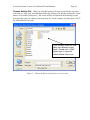
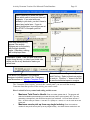
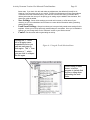
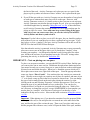
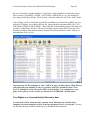
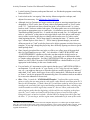
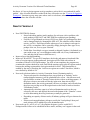
Figure 11: Poor placement: some of the spur is “wasted”, reducing capacity for
pickups.
Not the best placement: one car
can fit behind this coupler, but if
two cars are added, one will start
off the track (derailed).
In Figure 11, the car is placed in the middle of the spur. So if you set the capacity of
this spur to three cars, and the program fills the spur with three cars, then the last car
will run off the track, causing the error “Objects in the World Begin in Collision”
when the activity is loaded in MSTS.
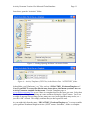
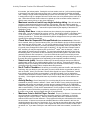
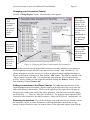
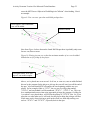
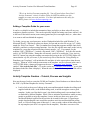
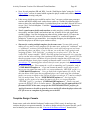
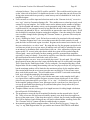
Figure 12: Worst case placement of a car on a spur.
Even a single car placed behind
this coupler will start off the
track, resulting in an error.
Figure 12 above is an example of the worst placement choice. Even though this spur
could hold at least 2 cars, probably 3, only one car can ever be placed here. You
would need to set the capacity to 1. That’s because ANY car added behind this car,
will be hanging off the track, starting the activity “derailed”. Note that it’s ok to
place a car on EITHER end – what we’re concerned with here is the DIRECTION
THE COUPLER FACES. Since cars will be added behind the coupler.
If cars are placed on a spur such that some run off the track, THIS WILL CAUSE
MSTS TO FAIL WHEN THE ACTIVITY IS STARTED, WITH THE MESSAGE
“OBJECTS BEGIN IN COLLISION, WHICH IS PROHIBITED”.
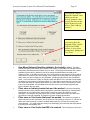
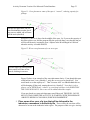
2. Place some other cars, of a type that will be delivered to the
industries, somewhere in the activity file. These will be the cars that will be
chosen to be set out at the industries in the region. The purpose of this is to give Activity