1
SELENA Multifunctional LED Clock
USER MANUAL V.27
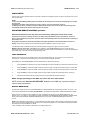
The Programmable Thermostat mode allows for programming of the time instances (hours and minutes of the day and
weekday) and the Target Temperature for each event.
All programmed data is stored in the internal, permanent memory which is retained even without the supply power.
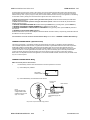
VISUAL INDICATIONS
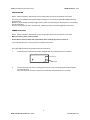
To change the display unit between Celsius and Fahrenheit enable ( Celsius ) or disable ( Fahrenheit ) the function Fn 15.
A)
B)
The Display will show the INTERNAL probe temperature if the function Fn 0 is enabled.
The Display will show the EXTERNAL probe temperature if the function Fn 1 is enabled.
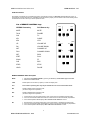
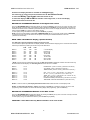
When both Fn 0 and Fn 1 are enabled, the digital display section will also show a short text designating which temperature
probe test is about to be displayed. This text contents may be selected using the functions Fn 94 and 95 as follows.
Fn 94
Fn 95
Displayed text
0FF
OFF
“In” and “Out”
0N
OFF
“Air” and “h2o”
0FF
ON
“Air” and “Pool”
0N
ON
“Pool” and “Out”
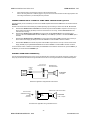
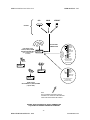
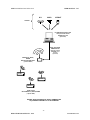
Note, that both probes may be connected to the external terminal block and may be wired up to 500 feet ( 150 m ) away from
the display, using any kind of a 2-conductor cable. Optionally, a model may be ordered with one probe installed in the wall of
the display enclosure.
Note, that either one or both temperatures may be enabled to be displayed in sequence alone or also with other display
modes enabled by any of the functions Fn 2 to Fn 7.
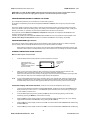
In clocks with the Electronic TEXT display, the temperature may be also displayed in that section and it may be made to
alternate between several different screens as well ( see Fn 75, 76, 77, 85).
Fn 75
Fn 76
Fn 77
OUT 25 C ( or 77 F ) ( also see Fn 0 , Fn 1 and Fn 15 )
IN 25 C ( or 77 F ) ( also see Fn 0, Fn 1 and Fn 15 )
TEMP 25 C ( or 77 F ) ( also see Fn 0, Fn 1 and Fn 15, 27 )
Selecting INTERNAL or EXTERNAL probe
Either the INTERNAL or EXTERNAL temperature PROBE may be selected for control by enabling (INTERNAL selected) or
disabling (EXTERNAL selected) the function Fn 27.
If one or both probes are not used, the probes must still be connected to the back panel screw terminals.
Alternately, a 50 kohm to 100 kohm resistor may be connected instead.
THERMOSTAT EVENTS PROGRAMMING
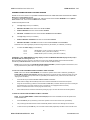
When the function Fn 48 is enabled, the thermostat may be programmed at any time during the regular clock operation and
DOES NOT require invoking of the programming mode.
1.
Press the SET key at any time during the normal clock operation.
The display will show “MANU” or “AUTO” text momentarily.
A) If in the “AUTO” mode, this will be followed by the Weekday and the Event number for that day.
NOTE: Pressing the “STOP” key at this time will invoke the MANUAL mode of operation.
B) If in the “MANU”al mode, the current preset temperature will follow.
NOTE: Pressing the “STRT” key at this time will invoke the AUTO mode of operation.
2.
A) If in the “AUTO” mode, the event number will flash to indicate that it is active for selection. Use UP and DN keys
to select the event number for that day.
B) If in the “MANU” mode, the preset temperature will flash to indicate that it is active for selection. Use UP and DN
keys to change the setting.
3.
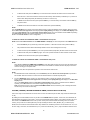
A) If in the “AUTO” mode, to move the cursor to Weekdays press the NXT key. Use UP and DN keys to select the
day and then press the NXT key. The display will show the current Target Temperature for this event. Note: If this
value was never stored before, it may be either very low or very high. Pressing the UP or DN key in the next step
will put the value within the correct range.
43
KERA TECHNOLOGIES INC. 2010
www.ledclocks.com