1
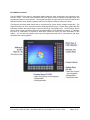
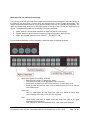
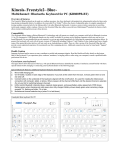
Mode Keys and Led Indicator Functionality The four keys at the top right hand of the keypad front panel are custom designed to allow the 26 keys at the bottom of the front panel (“Function Keys and System Keys”) to have multiple functionality. This multiple functionality allows these 81 keys to provide virtually every key on a standard PC keyboard. The Alpha and Symbol keys allow the left and right legends at the top of the Function and Symbol keys to utilized. The Alpha and Symbol Key functionality is described as follows: “Alpha” mode on, returns Alpha characters on upper Left side of lower 26 keys “Symbol” mode on, returns Symbol characters on upper Right side of lower 26 keys “Alpha” and “Symbol” modes both off, returns F1 – F20 and S1 – S6 A more detailed explanation of the functionality of these four keys is explained as follows: • “Alpha” and “Symbol” are mutually exclusive – Both LEDs off; unit is in “Function Key” mode – First press turns LED on and appropriate mode is selected – Press same key again turns LED off and returns to “Function Key” mode – Press the other Key and the other mode is selected (that LED turns on and the other LED turns off • “Caps Lock” – When in “Alpha Mode” and the “Caps Lock” LED is on, letters will return upper case, otherwise return lower case (like std. keyboard) • “Shift” – While holding “Shift Key” in “Alpha” mode and “Caps Lock” LED is off, upper case letters will be returned – With “Caps Lock” LED on and holding “Shift”, lower case will be returned Document No. DOC-IPC-005, User Manual iPC-Plus & nPC400, Rev A Rel. 1-2015 Page 7 of 28