1
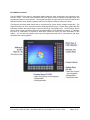
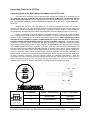
Each of these sections has specific functions explained below:
Keypad Section
ATM-style Screen
Keys
Description
These keys are on each side of the screen and can be directly tied to a specific
screen application much like an ATM. These keys are reprogrammable but are not
able to be re-legended.
Left Keys are defined as SC1 through SC8 (top to bottom)
- the default key returns for SC1 – SC8 are [CTRL+(F1 – F8 respectively)]
Right Keys are defined as SC9 through SC16 (top to bottom)
- the default key returns for SC9 – SC16 are [ALT+(F1 – F8 respectively)]
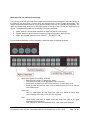
Function Keys
The 20 keys directly below the screen are normally Function keys. The Function keys
are reprogrammable and can be re-legended. They also have Alpha characters in
the top left and right corner of each key. These Alpha characters and symbols are
not reprogrammable and cannot be removed by changing the legend strips.
The default key returns for F1 – F10 are F1 – F10 respectively
The default key returns for F11 – F20 are [SHIFT+(F1 – F10 respectively)]
These keys are multi-functional and can return Alpha, Symbols and or “Function”
keys. See the explanation of “Mode and Led Keys” below.
System Keys
The 6 keys in the lower right corner of the front panel are reprogrammable keys than
can be used for specific application key returns. The System keys are can also be relegended. They also have Alpha characters in the top left and right corner of each
key. These Alpha characters and symbols are not reprogrammable and cannot be
removed by changing the legend strips.
The default key returns for S1 – S6 are [ALT+SHIFT+(F1 – F6 respectively)]
These keys are multi-functional and can return Alpha, Symbols and or “Function”
keys. See the explanation of “Mode and Led Keys” below.
Cursor Control
Keys
The 9 keys just above the “System Keys” return standard PC keyboard functionality
as marked on each key. These keys are not able to be reprogrammed or their
legend changed. This keypad section is dedicated to cursor movement on the
screen and/or in an application.
Numeric and
Control Keys
The 26 keys just above the “Cursor Control Keys” return standard PC keyboard
functionality as marked on each key. These keys are not able to be reprogrammed
or their legend changed. This keypad section is dedicated to numeric and standard
keyboard control keys I.e. DEL, CTRL, ESC, ENTER, etc.
At the top right hand of the front panel are four keys with special functionality. These
keys allow the Alpha, Symbols, and Capital Letters to be utilized. These keys are
not reprogrammable and cannot be relegended. See the section below for more
detail on how these Mode keys function.
Mode Keys and
LED Indicators
Document No. DOC-IPC-005, User Manual iPC-Plus & nPC400, Rev A Rel. 1-2015
Page 6 of 28