1
2.1 Understanding the User Interface
2.1 Understanding the User Interface
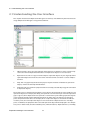
This chapter introduces the Replication Manager user interface, and additionally describes the basic
usage of Replication Manager. It is organized as follows:
1.
DB Connections: This is the entry point for the program and a database-centric view that represents the relationship between databases and replication objects in a tree structure.
2.
Replication Pairs: This is a logical view that depicts replication objects in pairs. A group of two
replication objects that have the same name and interact with each other is called a "Replication Pair".
3.
Map: This area graphically illustrates the physical layout and status of databases, replication
objects, and the relationships therebetween.
4.
Properties: This area shows the properties for the currently selected object (e.g. DB connection
or replication object).
These four panes are intended to give DBAs a variety of ways of visualizing the same databases and
replication objects. For example, the "Map" pane provides a convenient way to check the replication
gap at a glance, while "Replication Pairs" provides a convenient way of handling replication objects
as pairs without having to think about the databases on which they are working. So, these four
panes complement each other. For example, when a replication object is selected in the "DB Connections" pane, the same replication object is also selected in the "Replication Pairs" and "Map"
panes. In addition, the properties of the selected replication object will be displayed in the "Properties" pane. In other words, the three editable panes, "DB Connections", "Replication Pairs", and "Map",
Replication Manager User’s Manual
14