1
D. Video/Frame Manager
FastViewer provides Video/Frame controls to enable the user to view the images that were
stored in the system memory and to save them as a collection of TIFF files or as an AVI
movie file. The user can also determines the frame rate and “zoom in” and “zoom out” scale.
Figure 3 and Table 2 present all the Video/Frame Manager controls
Figure 3: Video/Frame Manager controls
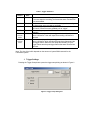
1. Play back buttons
Table 2: Play back buttons
Play the recorded images from the current frame to the end of the recorded
buffer according to the frame rate.
Play the recorded images from the current frame to the beginning of the
recorded buffer according to the frame rate.
Pauses the images play process
Moves to the beginning of the buffer and displays the first image in the
recorded buffer.
Moves to the end of the buffer and displays the last image in the recorded
buffer.
Moves forward through the recorded buffer manually frame by frame.
Moves backwards through the recorded buffer manually frame by frame.