1
XON Electronics - TSmon (EZ-Red utility) manual v 1.2
Watch-dog
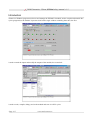
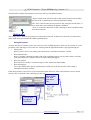
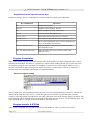
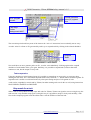
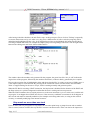
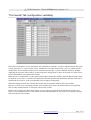
The "Wdt: OK" / "WDT fired" button shows the watch-dog status and allows to modify its settings.
When the label shows "OK", the watch-dog has not fired, as in the left image above. If the watch-dog has been
triggered, the button is labeled "fired".
It is possible to click the button in three different ways:
1. When the button is released (Wdt: OK), if left-clicked it stops the PLC cycle and sets the "alarm"
condition (watch-dog fired). Please note that TSmon performs the two operations separately in order to
do a real "emergency stop", because the watch-dog could be programmed to not stop the cycle.
2. When the button is pressed (WDT fired), if left-clicked it resets the watch-dog, bringing back the normal
status of the device. This does not mean that the cycle is restarted - simply the alarm condition is
canceled.
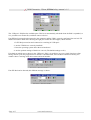
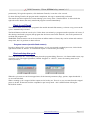
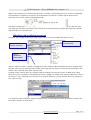
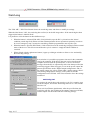
3. When clicked with the right mouse button, it pops up a dialogue window to allow to view and modify
the watch-dog settings:
In tis window it is possible to program a time-out for the commands
sent by the computer. If the device does not receive data from the
computer for more than the specified time, or if two consecutive
messages from the PC are separated by more time than specified, the
watch-dog triggers. When it triggers, it sets on the power outputs the
pattern specified here under "Digital output configuration" and, on
the analog outputs, the values written under "Analog outputs values".
After having changed these settings, click Update to send the
configuration to the EZ-Red. Click Close instead to leave the settings
untouched.
watch-dog test
To test how the watch-dog works, stop the cycle if it is running, turn
off all the outputs, and set the "Watch dog timeout" to a few seconds
like 20 or 30.
Then, exit from TSmon (Quit button). After the specified time the
watch-dog will fire: the red led near the outputs connector will flash,
and the outputs will be loaded with the watch-dog settings.
Page 16/17
www.xonelectronics.it