1
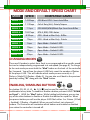
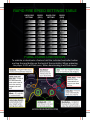
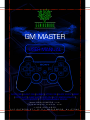
MODE AND DEFAULT SPEED CHART MODE SPEED COMPATIBLE GAMES MODE 1: 14.28sps COD Black OPS 2: Semi-‐Auto Rifles MODE 2: 11.35sps Call of Duty (ALL): Pistols/Snipers MODE 3: 7.7sps MODE 4: 16.67sps MODE 5: 8.33sps COD -‐ Word at War Only -‐ Riffles MODE 6: 10sps COD -‐ Word at War Only -‐ Pistols MODE 7: 5sps Open Mode – Default 5 SPS MODE 8: 10sps Open Mode – Default 10 SPS MODE 9: 15sps Open Mode – Default 15 SPS MODE 10: 20sps Open Mode – Default 20 SPS COD MW2/MW3/Black Ops: Semi-‐Auto Rifles GTA 4, RDR, COD: Autos CHANGING MODES There are 10 modes to select from. Each is pre-‐programed with a specific speed but can be independently programmed to a new speed (See page 6). To change to the next mode you must hold the “Mod” bu4on on the back of the controller for 3 seconds. You will see the player 4 LED flash, count the number of flashes of the player 4 LED. This will indicate which mode you are currently in. (2 flashes = Mode 2) (3 flashes = Mode 3). You can also scroll back to the previous mode by holding “R1” along with the “Mod” bu4on. ENABLING/DISABLING BUTTONS + Any bu4on (R1, R2, L1 ,L2, ▲, O, X, ■) can be used for rapid fire in any combina:on at any :me. To enable or disable a bu4on you must HOLD “DOWN on D-‐pad” + HOLD the “Mod” bu4on. While holding both bu4ons you can tap any of the other bu4ons to Enable or Disable that bu4on for rapid fire. When you press a bu4on you will see the player 4 LED flash either 1 or 2 :mes. (1 flash = Enabled) (2 flashes = Disabled). When you are finished, just release all bu4ons. The Controller will remember which bu4ons are enabled or disabled even when the controller is turned off. PAGE 2