1
processing, details of the software, including descriptions of the interfaces between expm components and those to the rest
of the Chiron system, and an estimate of the sensitivity of the system (and an appendix with miscellaneous details not yet
woven into the text).
2. Overview
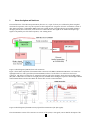
The drive signal for the Chiron shutter goes true for the duration of the exposure - the "shutter logic box" makes a positive
going pulse at both edges of the shutter signal in order to trigger the parallel port, and also passes the signal to another
input line of the parallel port so that the program can sense the polarity of the transition. The Linux system has a custom
version for the parallel port driver, which records the system clock in the interrupt routine that is triggered by the shutter
edge pulses. The software consists of the main handler ("expmsrv") which reads from the expm hardware, and a
number of client programs which connect to a socket server in expmsrv to get access to the data.
The Hamamatsu PMT digitizes the light level and outputs a stream of counts to the serial port of the Linux box, with 0.1s
cadence. The main program contains a tight loop which uses a non-blocking read to look for the current sample from the
PMT; when the read returns a sample the program assigns the current system time to that sample. Since there can be some
latency in this time assignment, the times assigned to the serial samples are likely not as accurate as those assigned to the
shutter edges.
The expmsrv program must be installed to run as root, since it must directly attach to the parallel and serial ports. When
the program is started, it initializes the PMT, including turning on the high voltage (HV), and starts looking at the
incoming samples. If a programmable number of samples consecutively exceeds a threshold, the HV will be tripped off to
protect the PMT. The expmsrv program opens three files, with timestamp names (in the form yyyymmddhhmmss). The
arriving samples are binned and are continuously written to the ".cnts" file. Information about each exposure is written to
the ".log" file. In addition, copies of the information that is sent for populating the FITS headers is written to the ".fitinf"
file. When expmsrv detects a shutter open, it records the opening time, and begins accumulating the information needed to
calculate the photon-weighted mean time. When the shutter close is detected, the calculations are performed, the
information is written to the log, and the info needed for the FITS headers are written to the appropriate output.
The expmsrv looks for client programs to connect to a particular socket. Upon connecting, each client sends an integer to
indicate which one of several types of connections it wishes to make. These mostly have the sense of being an output
stream for expmsrv data.
There are two main clients which should probably always be running, in normal production use of Chiron. The first is the
"FITS client" – it requests the stream of FITS values. As expmsrv calculates the exposure values, and writes them to the
log file and the fitinf file, it also outputs them to all clients that asked for the FITS stream. This client takes the stream, and
sends it to Chiron database system, which is interrogated during the writing of the FITS header. If the exposure meter has
populated the database, the values will appear (if the system is down, the FITS header values will be zeroes).
The second "production" client is called the "early termination client". It listens on a socket for target count values, and
receives a stream of integrated counts from the expmsrv. If it has been sent a target count, it will calculate for the current
increase in counts when the target will be reached, and send the Chiron control system a request to terminate the exposure
at the appropriate time.
3. User guide
The expmsrv computer is named "expmeter60". We are working on some cron jobs which will kill and start expmsrv, and
the FITS and early term clients at noon every day. We'll also place here the name of scripts to kill and restart the three
main programs. (If there are problems, do a "ps aux|grep exp|more" and look for the process ids for processes whose
names start "expmsrv", "expfits", and "expterm", and "kill -SIGINT" those processes (SIGINT rather than KILL because
the expmsrv can detect the interrupt and shutdown the HV cleanly.))
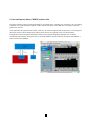
One of the other utility clients is the status GUI; the name starts with "expst". This GUI has an indicator at the top for the
HV status, three lines for status messages, and three buttons. The indicator can show as blue for "unknown" (only just
after status client has been started), red for HV off, and green for HV on. The "update" button will ping the expmsrv main
3