1
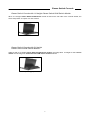
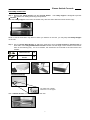
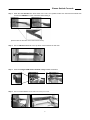
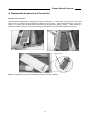
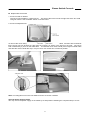
Claxan Switch Console z Replaceable Keyboard and Touch Pad Replaceable Keyboard The keyboard is replaceable for language change or maintenance. In the bottom of the tray, there is a small hole to help you pushing up the keyboard by inserting your one finger. After the keyboard rising, look at the bottom of it, locate the mini-USB cable underneath the keyboard and gently unplug it. While installing a keyboard, make sure that you extend just enough of the cable to keep the keyboard flat inside the tray. Triangular mark Note: The triangular mark on the mini-USB connector must face outwards. 12