1
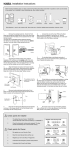
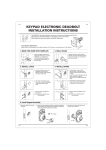
3. Install Latch
KEYPAD ELECTRONIC DEADBOLT
INSTALLATION INSTRUCTIONS
a. Insert the latch and ensure it is paralleled to
the door face.
Mark the outline of the faceplate, then take
out the latch.
The BACKSET is the distance between the center of
cross bore and edge bore of the door.
Adjustable latch fits both BACKSET of 2-3/8” (60mm)
and 2-3/4” (70mm). Please follow the steps shown
below for BACKSET adjustment.
b. Chisel 1/8” (3mm) deep along the outline to
allow the faceplate to be aligned with the door
edge.
Latch Backset Adjustment :
Rotate the latch case as diagram on the
right for backset 2-3/4" (70mm) or
reverse direction for 2-3/8" (60mm).
"
3/4
c. Insert the latch and tighten it with screws.
Note : please use tapping screws for metal
door.
)
mm
(70
2-
4. Install Strike
1. Mark The Door With Template
a. To identify the center of strike :
close the door, on the basis of the faceplate
mark horizontal center line of strike.
Ensure the center of faceplate and the center
of strike are aligned.
Use the mark as a guide outlines the strike.
Select the height and backset as desired on the
door face ; use the TEMPLATE as an indication
to mark the center of the circle on the door face
and the center of the door edge.
b. Chisel 5/64” (2mm) deep along the strike
outline to allow the strike to be aligned with
the doorframe.
2. Drill Holes
Using the marks as a guide to drill a hole Ø2-1/8”
(54mm) through the door face for the lockset, then
a hole of Ø1” (25.4mm) for latch.
c. Insert the strike and tighten it with screws.
Note : please use ”tapping screws” for metal
door.
1
2