1
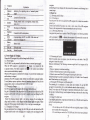
3.25 USB
rup
Hl
in tt
.
pt oto browser inrerface shown as below.
,
6.9 USB Setting
Connect the GPS navigator to PC via the MINI USB port to transmit data, or back
up data from the navigator data to PC.
you may select
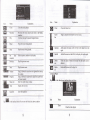
The GPS navigator provides MASS STORAGE and MS STOMGE modes. Select
one in the USB setting.
5.
I
,o
"n,"r
rrB
charging mode and the system main interface
After communication, unplug rhe MINI USB cable.
6.9.2 MS ACTIVESYNC
6.9,I MASS STORAGE
l.
Have the GPS navigator in operation status aird the SD cad plugged in the slot;
,.
,"0 fl
l. T"p
fl
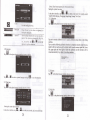
in the settmg interface to enter USB Option as shown below.
in the setting interfrce to enter USB Option as shom below.
Select MASS ACTIVESYNC and tap EI
to save the s"ttirg. .
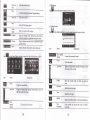
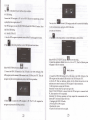
2. Instatl the application Mobile Device in a drive of PC. Then the following icon
will appear in the drive selection.
Select MASS STORAGE md tap
B
ro
,ur" it.
3. Connect the MINI USB terminal of the USB cord to the MINI USB port of the
GPS navigator and the standrd USB teminal to the USB Hosr port of pC. Then, the
navigator stop the curent progrm and switch to the following interface,
+. S"te"t
tr
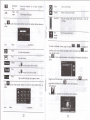
to connect the GPS navigator to PC. The PC will recognize the
navigator and prompt the following interface.
22
[f .*...,.-".
3. Connect th€ MINI USB teminal of the USB cable to the MINI USB port of the
GPS navigator and the standud USB teminal to the USB Host port of PC.
4. After the PC finds new hardware, double click the Mobile Device drive in the
selection area to enter the memory of GPS navigator for data aansmission.
5. After transnission, unplug the USB cable.
lAttention] For data safety back up the navigator data
[Note] If MASS STORAGE is selecred while the GPS navigator is connected with
PC, other operations will be suspended.
[Attention] The following operations will stop suspend the communication of the
system and PC and unsaved data will be lost.
1. Unplugging the MINI USB cablet
2. Powering offthe GPS navigaton
3. Resetting the system;
4. Tap the on close button on the top dght.
23