1
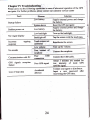
Chapter IV Troubleshooting
case of abnomal operation of the GPS
nayigatoi For further problems, pleas'@ntact ou cstomer seilice c€nter
Plemi cany out the followirig operatiotr in
Solution
,Ri:amn
Low battery
Supply extemal power and charge
the baftery.
Startup failwe
dom
Sudden power cut
Supply extemal power
Low battery
Low backlight
No/ vague display
Inconect
taPpins
response
No sounds
Backlight
off
srem with
the touch Pan.
Riialibmtethe*reen.
Lowrohme
Turn up the
Poor-tqntact of
GPS signals reception pmr
Loss ofmap data
up the backlight
Tap the
ffi*m""
CommuicationwithPC I^T-**
comefllm
failure
Tm
GpS
"u
charge
volme
Connect the earphone.
ComecttheusBcable
signal low interoity of local
..raltir. d6rl
you
GPS
agent or distributor.
after
rcovering the GPS data.
Contact
Accidental
Input a new password
deletion
I
24