1
Integrity Instruments
232M100 Series User Manual
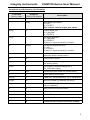
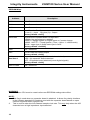
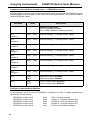
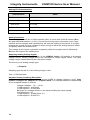
Value at EEPROM Location 0x04/0x05
Description
0x0000
Asynchronous Update Mode disabled
0x0001
State Change Update
Digital Input or Pulse Counter change
0x0002 to 0xFFFF
Decimal Range
2 to 65535)
Timed Update
Time = Value * 1 millisecond
Range = .002 second - 65.5 seconds
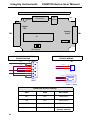
#2a) Asynchronous Update Mode — State Change Update
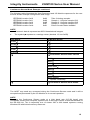
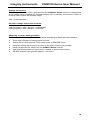
When EEPROM locations 0x04/0x05 = 0x01, the 232M100 Series I/O module enters an
asynchronous update mode whereby any detected change on the Digital Input port or the
Counter Capture port causes the I/O module to transmit data to the host.
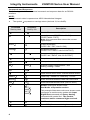
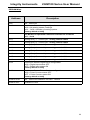
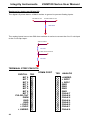
Status Change
Data Sent by I/O Module
Digital Input port change
Ixxxx
Counter Capture change
Nxxxx
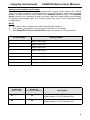
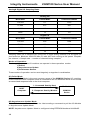
HOST
Computer
1 - Data Sent by Module
I/O Module
232M100
#2b) Asynchronous Update Mode — Timed Update
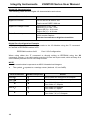
When EEPROM locations 0x04/0x05 = 0x0002...0xFFFF, the 232M100 Series I/O
module enters a timed update mode whereby the I/O module will send data to the host
after the specified time period has elapsed.
Time Period = Value (EEPROM locations 0x04/0x05) * .001 second
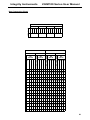
When using Asynchronous Update Mode, the I/O module uses the Continuous Stream
Mode configuration to determine the data sent to the host.
#3) Continuous Stream Mode
The final mode of operation is Continuous Stream mode. This mode constantly sends or
streams data to the host until the host halts the mode. In brief, the I/O Module can send 0
thru 8 analog samples, digital input status, and the counter capture status.
The I/O module uses parameters found in EEPROM locations 0x10 thru 0x1A to
configure the Continuous Stream mode. Therefore, the EEPROM must be configured
before engaging the Continuous Stream mode.
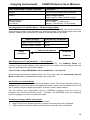
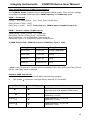
Continuous Stream Mode setup steps
1. Configure EEPROM locations 0x10 thru 0x1A
2. Begin Continuous Stream mode by sending command ‘S’ to the I/O Module
3. Halt Continuous Stream mode by sending command ‘H’ to the I/O Module
13