1
Integrity Instruments
232M100 Series User Manual
Commands and Responses
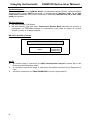
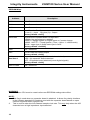
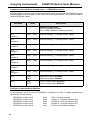
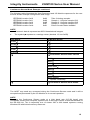
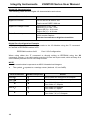
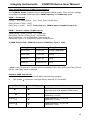
The following table illustrates actual command and response data for an RS-232
interface.
NOTE:
All numeric data is represent as ASCII Hexadecimal integers.
•
•
The symbol ↵ equates to a carriage return (decimal 13, hex 0x0D).
Command
Sent by Host
Response
Sent by I/O
Description
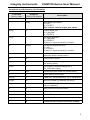
V↵
V40↵
Module Firmware version 3.0
I↵
I000F↵
Input digital port [PORT2 bits 0-3 ON]
[PORT2 bits 4-7 OFF]
Note: this command also returns the current
digital output
O007F↵
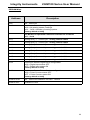
O↵
Output digital port
[PORT2 bit 7 OFF, bits 0-6 ON]
T0080↵
T↵
Set digital direction
[PORT2 bit 7 INPUT, bits 0-6 OUTPUT]
G↵
G0080↵
Get current digital direction
[PORT2 bit 7 INPUT, bits 0-6 OUTPUT]
N↵
N0000000F↵
Get pulse counter: Current count = 15
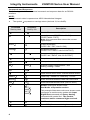
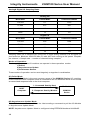
M↵
M↵
Clear pusle counter: Current count = 0
U3↵
U340F↵
Unipolar analog control nibble = 0x3
Analog reading = 0x40F
K↵
K00↵
Current receive errors = 0
J↵
J↵
Clear receive error count: Current receive errors
P4801F↵
P↵
PWM freq = 50499 Hz, PWM duty = 10.6%
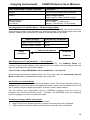
W0410↵
W↵
Write EEPROM Address 0x04 with value 0x10
R04↵
R10↵
Read EEPROM Adress 0x04 (value is 0x10)
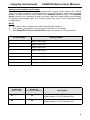
S↵
S↵
I00FF↵
U800F↵
I00FF↵
U800F↵
START continuous stream mode
See Modes of Operation section
This example illustrates continuous stream mode
configured to continuously update with Input
Digital Port command and Query Analog
command with control 0x1. The module
continues until a command H↵is received.
H↵
H↵
HALT continuous stream mode
Z↵
Z↵
Reset CPU (forces a watchdog timeout)
8