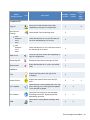
1
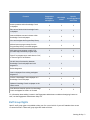
Ribbon
Group/Function
Icon
Description
Available Available
in Word
in Excel
Available
via
RightClick
Complete Cells
Sign Off
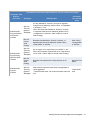
Inserts your initials and the current date
(depending on the sign-off configuration).
X
Roll Forward
Settings
Opens the Roll Forward Settings menu.
X
View
Responses
Set to
Keep
Check this selection to view all cells that are
set to be retained during roll forward.
X
View
Responses
Set to
Reset
Check this selection to view cells that are set to
be reset during roll forward.
X
Mark as N/A
Inserts N/A and the current date (depending on
sign-off configuration).
X
Delete Sign Off
Deletes the information in the sign-off field.
X
Reset Answer
Resets the selected cell or cells to the default
state
X
Tips
Displays the Tips pane to the right of the
workpaper.
X
Answer Effects
Displays the Answer Effects tab in the Tips
pane.
X
X
View Updates
Opens the View Content Updates tab in the Tips
pane, allowing you to view significant updates
to the selected workpaper.
X
X
KC Guidance
Opens the Title Help file for the associated
Knowledge Coach title, displaying the KBA
Methodology Overview.
X
X
X
X
X*
Guidance
ARM
Opens the Accounting Research Manager Web
site.
X
The Knowledge Coach Ribbon • 20