1
BACnet OPC-Server
Content
1.1
Preface....................................................................................................................... 6
1.2
Operating system versions supported ....................................................................... 6
1.3
Hardware required ..................................................................................................... 6
2
Literature information ......................................................................................................... 6
2.1
Interesting links on the subject of BACnet on the World Wide Web ........................ 6
2.2
Registered trademark ................................................................................................ 7
3
Copyright ........................................................................................................................... 7
3.1
Document revision ..................................................................................................... 8
4
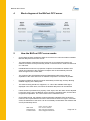
Block diagram of the BACnet OPC server......................................................................... 9
5
How the BACnet OPC server works .................................................................................. 9
6
Installation of the BACnet OPC server ............................................................................ 11
6.1
General notes on installation ................................................................................... 11
6.2
Installing the network card ....................................................................................... 11
6.3
Installing the operating system ................................................................................ 11
6.4
Installing the service pack........................................................................................ 11
6.5
Installing the driver software for network cards ....................................................... 11
6.6
Checking the network card ...................................................................................... 11
6.7
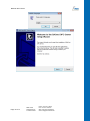
Installing the BACnet OPC server ........................................................................... 11
6.8
Updating the Windows service pack ........................................................................ 15
7
Protocol versions supported ............................................................................................ 15
8
Installing the BACnet data link layer ................................................................................ 15
8.1
9
Installing the BACnet protocol stack ........................................................................ 15
Configuration of the BACnet data link layer .................................................................... 16
9.1
Configuration of the network settings ...................................................................... 16
9.2
General .................................................................................................................... 16
9.3
Starting the configuration dialog .............................................................................. 16
10
General information on configuring the network connections .................................... 17
10.1
Symbols used to represent the connections............................................................ 17
10.2
Network Number ...................................................................................................... 17
10.3
Port ID ...................................................................................................................... 17
10.4
Routing..................................................................................................................... 17
11
Setting up the connections .......................................................................................... 18
11.1
Setting up a BACnet / Ethernet connection ............................................................. 18
11.2
Setting up a BACnet / IP connection ....................................................................... 19
MBS GmbH
Römerstraße 15
D-47809 Krefeld
Phone: +49 2151 7294-0
Fax: +49 2151 7294-50
Web: www.mbs-software.de
email: [email protected]
Page 1 of 71