1
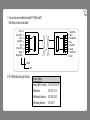
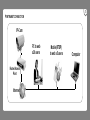
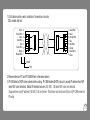
1.Cat 5 cable must be used in condition of connection via router,
DSL modem and hub.
Brown
Brown/White
Green
Blue/White
Blue
Green/White
Orange
Orange/White
8
7
6
5
4
3
2
1
1
2
3
4
5
6
7
8
Green/White
Green
Orange/White
Blue
Blue/White
Orange
Brown/White
Brown
COLOR
PIN#
2.Please make sure PC and IP CAMERA are in the same domain.
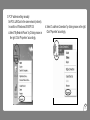
3.IP-CAM detects DHCP when system starts working. IP-CAM Enables DHCP protocol to accept IP address from NAT
when NAT router detected. Default IP address becomes 192.168.1.126 when NAT router not detected.
Suppose there is an IP address 192.168.1.126 on internet. This device must be turned off prior to IP-CAM renew the
IP setup.
.11.