1
Robotic Ball Operaf-n
Note: If thr- f rll :
.-
Robotic Ball Operating Manual
.:: -r iaien and teduce
7. Music kev olalins:
rro.
5. l r:
:--: ii :f DIICO
,r,"
cu.". ."-n, cli.k ffi
ro come ro music
kc; plal ing:
function.
::i:- ::. h!a:i :!'reen click the E!!
,o .,un thc rnusic player function.
'.on,on your Smartphone. Choose a song
The .{pp l ill auto-search the music library
to
play and you're your Ball will dance along.
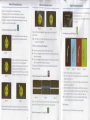
Each ofthe seven coloured buttons represents a musical note, press each key
and your smartphone wil! sound accordingly, whilst the ball will so show the
appropriate colour. Select from eithcr drum or piano sound.
trrom the cames menu click the gittiu.a butt i"o..
@
EIE
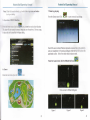
Home screen for Billiard ball
Figure I
Figue
2
gme
Figuc
3