1
Ready
Get
Before you get started, let’s ensure your Reader is ready.
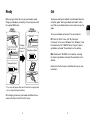
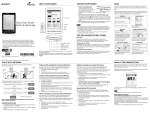
Charge your Reader by connecting it to your computer with
the supplied USB cable.
To purchase and transfer eBooks to your Reader, follow the
instruction guide “How to get eBooks on Reader”, which
you’ll find on your Reader device. Here’s how to access the
guide.
Begin
Charging
Charge
Completed!
Turns off
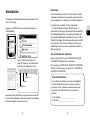
Turn on your Reader and connect it to your computer.
PC: From the “Start” menu, click “My Computer”
Lights up in red
Charging
time up to
3 hours
Charging complete
(“Computer” in the case of Windows Vista, Windows 7) and
then double-click the “READER” drive. Drag the “How to
get eBooks on Reader” file and drop it on the desktop.
Mac: Double-click “READER” on the desktop, and drag
the “How to get eBooks on Reader” file and drop it on the
desktop.
Charging battery *
Double-click the file to open it and follow the step-by-step
instructions.
* The screen will appear after about 5 minutes if charging starts
with a completely depleted battery.
After charging, disconnect your Reader and follow the onscreen instructions to finish the initial setup.
EN
FR