1
Maintenance
This section describes maintenance tasks such as cleaning the projector and replacing consumable parts.
Cleaning
You should clean the projector if it becomes dirty or if the quality of projected images starts to
deteriorate.
Do not use sprays containing a flammable gas to remove dirt or dust which is adhering
to parts such as the lens or filter of the projector. Because the lamp inside the projector
becomes very hot during use, the gases may ignite and result in a fire.
Cleaning the air filter
If the air filter becomes blocked with dust and the message "The projector is overheating. Make sure
nothing is blocking the air vent, and clean or replace the air filter" is displayed, clean the air filter.
• If the air filter becomes clogged with dust, it can result in overheating which may
cause operating problems or reduce the operating life of the optical parts. It is
recommended that you clean the air filter about once every three month. If using the
projector in a dusty location, the air filter should be cleaned more often.
• The air filter is not washable. Also do not use detergent or solvents.
• When using a brush for cleaning, use a soft brush with long bristles and brush the
filter gently. If you brush too strong, dust may be pushed inside the air filter and hardly
be removed.
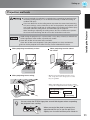
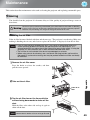
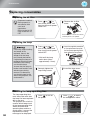
Remove the air filter cover.
Take out the air filter.
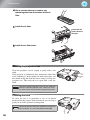
Front of air
filter
Appendix
Press the knobs to release the catches, and then
pull the cover upward.
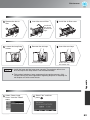
Tap the air filter four or five times with the
surface facing downwards to shake off the
dust.
Hold the filter at the other side and tap it again to
shake off the dust.
Do not hit the air filter hard, otherwise it may
become bent or broken and can no longer be used.
49