1
A1000 Cheat Sheet (Closed Loop Operation)
Step
4
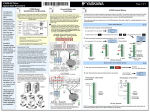
Check Motor Rotation in Open Loop
(Motor uncoupled from Load)
In this step the motor is checked for proper direction and operation.
This test is to be performed solely from the digital operator. Apply
power to the A1000 after all the electrical connections have been
made and protective covers have been re-attached. At this point,
DO NOT RUN THE MOTOR, the Digital Operator should display as
shown in Fig. 3.
Changing Parameters and
Monitoring the A1000
Step
5
6
Make sure all protective covers have been re-attached and power
is turned on. DO NOT RUN THE MOTOR.
Access Parameter Menu and Change Parameter Value
Fig. 3
Digital Operator
Press
Rotational Auto-Tuning Closed Loop
(De-couple Motor from Load)
Step
This step shows how to access and modify a A1000 parameter as
well as how to monitor A1000 signals such as output frequency
and motor current.
two times until the digital operator shows the parameter menu.
Page 2 of 3
In this step the A1000 is setup for use with the motor in closed loop operation. Make sure the following has been done:
·
·
·
·
Encoder (PG) connected correctly to the PG-X3 Card
All protective covers have been re-attached
Ensure the motor can spin freely and any connected mechanical brake is released
Connected machinery should be allowed to rotate the motor
IMPORTANT:
To achieve optimal drive performance use rotational Auto-Tuning with the load decoupled from the motor. If motor and load can not be decoupled,
reduce the motor load so that it is no greater than 30% of the rated load. Performing rotational Auto-Tuning with a higher load can result in incorrect
motor parameters and may cause irregular motor rotation.
Next apply power to the A1000. DO NOT RUN THE MOTOR.
A1-02
Select Closed Loop Control Method
V/f with PG
Select Closed Loop Control Method
Control method suitable for
applications that require accurate
motor speed regulation (0.02%) but do
not require a high speed response.
Motor Rotation Test
2X
Select V/f with PG Method
or Closed Loop Vector
Control Method
Go to parameter A1-02,
Select Digit
To adjust control method use
Press
/
and press
Closed Loop Vector (Recommended)
Control method suitable for applications
that medium to high speed control
accuracy, high torque response and full
torque at 0 speed.
.
2X
First Digit
Flashing
Green LED
turns on.
Next, press
! Encoder Direction
Inc./Dec. Selection
Go to Next Digit
Inc./Dec. Selection
Auto-tuning Procedure
Start here
to move the cursor one
position to the right and
Check the motor speed monitor U1-05 while turning the motor manually in forward direction (CW). If the sign displayed
is negative, power down the drive, wait at least five minutes until the charge indicator extinguishes completely
then swap encoder wires A+ with A- on the PG-X3 card. Next power-up the drive and repeat this test. Or reverse the
encoder direction with parameter F1-05. For encoders with only A & B outputs, exchange A & B.
From the main reference press
to increase the
once until the Digital Operator
shows the Auto-Tuning menu then press
frequency reference (d1-01) to 10.00 Hz.
For standard AC motors
use the default setting for
T1-04 Rated current (e.g. 11.0 A, 22.0 A)
motor base frequency
T1-05 Rated Frequency (e.g. 60.0 Hz)
(60Hz), motor poles (4) and
motor rated speed.
T1-06 Number of Poles (e.g. 4 Poles)
T1-03 Rated Voltage (e.g. 230 V, 460 V)
.
T1-07 Rated Speed (e.g. 1750 rpm)
Press
to save frequency reference.
T1-08 Encoder / PG Number of Pulses per Rev. (e.g. 1024)
Switch to Edit Mode
10.00 Hz
Next, press
Modify Value
Save New Value
After setting parameter T1-08 press
Monitor Motor Frequency and Motor Current
on the Digital Operator. The motor
to select the
Auto-Tuning start command.
should now be operating at low speed running in the correct
forward (clockwise) direction.
A1000 Digital Operator power-up state
Next, press
Output Frequency and Motor Current can be monitored
on the Digital Operator.
If motor rotation is not correct, then either reverse “Phase
Order” using parameter b1-14 or power down the drive, wait
five minutes and swap 2 motor leads.
!
Press
simultaneously.
once until the Digital Operator shows parameter
T1-02 Mtr Rated Power then press
To monitor output frequency and motor current or other signals
Digital Operator
turned off.
Use precaution, and
refer to Fig.1 or 2, swap
any two of the three
output leads to the motor
(U/T1, V/T2 and W/T3).
After the wiring change,
repeat Step 3 and
recheck motor direction.
individually, press
once,
. Next press
Motor HP to kW = HP x 0.746
Example: 10HP = 10 x 0.746 = 7.46 kW
the press
Digit Flashing
to select monitor
Press
Use
to select monitor signal.
Digits
Flashing
use
Press
U1-02 Output Frequency
Please refer to the A1000 User Manual, (Document No.
SIEP C710606 21A) on how to access other drive monitors.
motor may start unexpectedly during Auto-Tuning.
Warning! Electric Shock Hazard. High voltage will be
supplied to the motor when stationary Auto-Tuning is
performed. Do not touch the motor during auto-tuning.
Enter Motor Power in kW (Kilowatt)
DANGER
After the power has been turned OFF, wait at least five
minutes until the charge indicator extinguishes completely
before touching any wiring, circuit boards or components.
! Warning! Sudden movement hazard. The A1000 and
to select the digit you would like to change and
to adjust value and press
to save.
to select the next parameter and follow the same
procedure described above to adjust its value.
Notice: Auto-Tuning will not function properly when a
brake is engaged on the load. Ensure the motor shaft
can freely rotate. Never perform an Auto-Tune with
motor connected to a load.
Next, press
on the Digital Operator. The A1000
will now start the Auto-tuning procedure.
The display will show message “Tune Successful” when the
Auto-Tuning procedure has been successfully completed.
Please refer to the A1000 User Manual or repeat the
Continue
procedure again if the display shows an error message.