1
Programming Manual
1: General Information
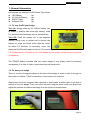
Accessories per each set of LED Name Tag include:
z
z
z
z
LED Badge:
3V Lithium Battery:
RS232 Cable:
Software Disk:
1pc
1pc
1pc
1pc
1.1: To turn On/Off your badge
Turn On: Simply slide the 3V Lithium battery into
its holder (+ positive side up as right shown), snap
it in and the stored message will run automatically.
Turn Off: Push the battery out in the opposite
manner using a key or similar tool to remove the
battery, or, press the button at the right top corner
for about 2-3 seconds. (If necessary, users can
press the On/Off switch again for about 2-3 seconds to turn on the badge)
P.S: Please remove the battery out of the badge for the energy saving during a long time
off operation.
The CR2032 battery included with your name badge is very widely used for electronic
components. It is easy to find in most stores that sell electronics.
1.2: To wear your badge
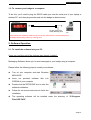
There is one set of magnetic plates at the back of the badge in order to stick it strongly on
the surface of Jacket, T-Shirt or elsewhere. No screws to be required.
Simply push the front magnetic plate upwards or downwards at either right or left side to
remove it from the badge. Then, move the removed magnetic plate under your jacket and
adjust the position accords to the badge over the jacket as shown below.
- Page 2-