1
4/8 DVR Quick Start Guide
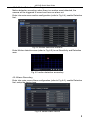
Select a date, press Search button, click the time grid to set the play start time
or input play record time manually. The selected time match the blue grid.
Click Play button. It will play from the time point where user set.
Click the relative buttons on the screen to do fast forward/rewind, pause, stop,
and change the screen mode and re-search.
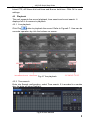
4.3.3 Event search
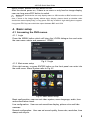
Enter into Search configuration, select Event search (refer to Fig 4-9), and
choose a certain day in the event search interface.
Fig 4-9 Event search
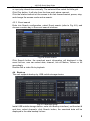
Click Search button, the searched event information will displayed in the
event list box, user can select date, channel, tick off Motion, Sensor or All
accordingly.
Double click a video file to playback.
4.4 Back up
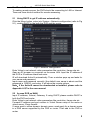
This unit supports backup by USB mobile storage device.
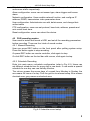
Fig 4-10 Backup setup
Install USB mobile storage device, enter into Backup interface), set the start &
end time, select channels, click Search button; the searched data will be
displayed in the data backup list box.
8