1
Safety Function: SensaGuard Non-contact Interlock Switch
25
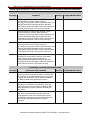
GuardLogix/SensaGuard - Safety Function Verification and Validation Checklist
General Machinery Information
Machine Name/Model Number
Machine Serial Number
Customer Name
Test Date
Tester Name(s)
Schematic Drawing Number
Controller Name
Safety Signature 10
Safety Network Number(s)
RSLogix 5000 Software Version
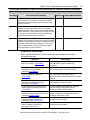
Safety Control System Modules
GuardLogix Safety Controller
CompactLogix Ethernet Bridge
POINT I/O™ Ethernet Adapter
POINT I/O Input Modules
POINT I/O Output Modules
GuardLogix Modules
Firmware Revision
1768-L43S
1768-ENBT
1734-AENT
1734-IB8S
1734-OB8S
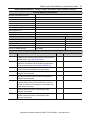
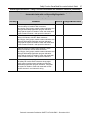
GuardLogix Safety System Configuration and Wiring Verification
Test Step
Verification
Pass/Fail Changes/Modifications
Verify that the safety system has been designed in
accordance with the GuardLogix System Safety reference
manuals listed in the Additional Resources.
Verify that the safety application program has been
designed in accordance with the GuardLogix Application
reference manuals listed in the Additional Resources.
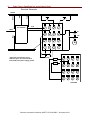
Visually inspect the safety system network and verify that
the I/O is wired as documented in the schematics.
Visually inspect the SensaGuard switch to verify that it is
configured as documented.
Visually inspect the RSLogix 5000 program to verify that
safety system network and I/O module configuration is
configured as documented.
Visually inspect the RSLogix 5000 application program to
verify that suitable safety-certified instructions are used.
The logic is readable, understandable, and testable, with
the aid of clear comments.
All input devices are qualified by cycling their respective
actuators. Monitor the status in the RSLogix 5000
Controller Tags window.
All output devices are qualified by cycling their respective
actuators. Monitor the status in the RSLogix 5000
Controller Tags window.
Rockwell Automation Publication SAFETY-AT108A-EN-P – December 2013