1
Page 2
Page 1
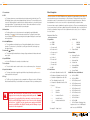
Quick Setup Guide
Table of Contents
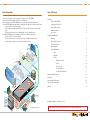
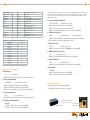
1.Begin with the KD-VP2500 and all input/output devices turned off with power cables removed
2.Connect video/audio sources to appropriate input ports on the KD-VP2500
3.Connect video/audio outputs to display or receiving devices
4.Connect power to the KD-VP2500 and all other input/output devices and turn them on
5.On the KD-VP2500, assign audio inputs to appropriate video inputs in the ‘A/V Association’ menu
»» Press the “Menu” key on the front panel
»» Press the down arrow key on the front panel to get to the ‘A/V Set’ menu for desired video
input
»» Press the right arrow key to select desired audio source for this video input
6.On the KD-VP2500, select desired output resolution in the ‘Out Resolution’ menu
»» Press the “Menu” key on the front panel
»» Press the down arrow key on the front panel to get to the ‘Out Resolution’ menu
»» Press the right arrow key to select the desired output resolution
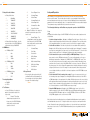
Plasma/LCD
HD
MI/
DV
I*
Surround Sound
Projector
Introduction
About the KD-VP2500 . . . . . . . . . . . . . . . . . . . . . . . . . . . . . . . . . . . . . . . . . . . . . . . . . . 2
Video/Audio Connections . . . . . . . . . . . . . . . . . . . . . . . . . . . . . . . . . . . . . . . . . . . . . . . 3
Supported Resolutions . . . . . . . . . . . . . . . . . . . . . . . . . . . . . . . . . . . . . . . . . . . . . . . . . 4
Additional Features . . . . . . . . . . . . . . . . . . . . . . . . . . . . . . . . . . . . . . . . . . . . . . . . . . . . 4
Accessories . . . . . . . . . . . . . . . . . . . . . . . . . . . . . . . . . . . . . . . . . . . . . . . . . . . . . . . . . . 4
Installation and Operation
Mounting . . . . . . . . . . . . . . . . . . . . . . . . . . . . . . . . . . . . . . . . . . . . . . . . . . . . . . . . . . . . 5
Rear Panel Connections . . . . . . . . . . . . . . . . . . . . . . . . . . . . . . . . . . . . . . . . . . . . . . . . 5
Front Panel Features . . . . . . . . . . . . . . . . . . . . . . . . . . . . . . . . . . . . . . . . . . . . . . . . . . . 7
Menu Navigation . . . . . . . . . . . . . . . . . . . . . . . . . . . . . . . . . . . . . . . . . . . . . . . . . . . . . . 9
Setup and Operation . . . . . . . . . . . . . . . . . . . . . . . . . . . . . . . . . . . . . . . . . . . . . . . . . . 11
Setup . . . . . . . . . . . . . . . . . . . . . . . . . . . . . . . . . . . . . . . . . . . . . . . . . . . . . . . . 11
Operation . . . . . . . . . . . . . . . . . . . . . . . . . . . . . . . . . . . . . . . . . . . . . . . . . . . . . 13
Control . . . . . . . . . . . . . . . . . . . . . . . . . . . . . . . . . . . . . . . . . . . . . . . . . . . . . . . 13
Sub-Woofer
Co
mp
one
nt
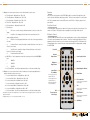
IR (Remote Control) . . . . . . . . . . . . . . . . . . . . . . . . . . . . . . . . . . . . . . . . . 13
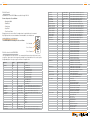
RS-232 . . . . . . . . . . . . . . . . . . . . . . . . . . . . . . . . . . . . . . . . . . . . . . . . . . 14
RS-232 Codes . . . . . . . . . . . . . . . . . . . . . . . . . . . . . . . . . . . . . . . . . . . . 14
RS-232 Examples . . . . . . . . . . . . . . . . . . . . . . . . . . . . . . . . . . . . . . . . . . 16
Serial IR with IR Extender . . . . . . . . . . . . . . . . . . . . . . . . . . . . . . . . . . . . .17
Firmware Update Procedure . . . . . . . . . . . . . . . . . . . . . . . . . . . . . . . . . . . . . . . . . . . . . . . . . . . 18
A/V Receiver
Mechanical . . . . . . . . . . . . . . . . . . . . . . . . . . . . . . . . . . . . . . . . . . . . . . . . . . . . . . . . . . . . . . . . 18
Surround Sound
Important Safety Instructions . . . . . . . . . . . . . . . . . . . . . . . . . . . . . . . . . . . . . . . . . . . . . . . . . . 19
Serial IR
Aud
io
Optical IR
How to Contact Key Digital® . . . . . . . . . . . . . . . . . . . . . . . . . . . . . . . . . . . . . . . . . . . . . . . . . . . 20
RS232 Control
Warranty . . . . . . . . . . . . . . . . . . . . . . . . . . . . . . . . . . . . . . . . . . . . . . . . . . . . . . . . . . . . . . . . . . 21
Optical IR
KD-VP2500
Computer
VG
A
Game Console
Aud
io
Blu-Ray
Cable Box
DVR Player
VCR
HD
MI/
DV
I*
HD
MI/
DV
I*
Co
mp
one
nt
S-V
ide
o
Co
S-V
ide
DV Cam
mp
o
one
© 2010 Key Digital, Inc. All rights reserved.
nt
Fig. 1: Application Example
Always follow the instructions provided in this Operating Manual.