1
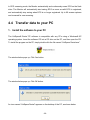
2. Create a master folder on the hard drive
It is highly recommended to create a new folder on the hard drive to be the master folder for
storing all patient data recorded by the Monitor before you transfer any data to the PC. You
can give any name to the master folder. For example, you can name it “My VetSpecs Data”.
3. Transfer data to the hard drive
Remove the flash drive from the Monitor, and insert it to a USB port on the PC. The flash
drive should be recognized by the PC automatically, and indicated as Removable Disk under
My Computer.
It is highly recommended that you copy all folders on the flash drive to the master folder or a
folder inside the master folder on the same day they were recorded, and then delete all
folders on the flash drive. Otherwise, you may get confused with the folders on the flash
drive.
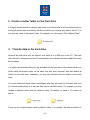
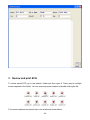
You must rename all these folders immediately after they are copied to the hard drive, and
you should rename them in a way that they can be identified easily. For example, you may
rename a patient’s folder with the patient’s name, ID number, or name + ID number as
below:
There can be multiple folders inside a patient’s folder. For example, the data recorded in a
- 21 -