1
Step 2: If your computer does not have Bluetooth networking capability, obtain a Bluetooth dongle from your local computer
store or online (such as amazon.com). I use the Inland Mini Bluetooth Dongle purchased for $9. Wiibrew.org maintains a list
of compatible Bluetooth dongles at http://wiibrew.org/wiki/List_of_Working_Bluetooth_Devices
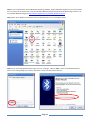
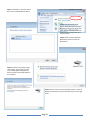
Step 3: Open up the Windows Control Panel. Click the “Bluetooth Devices” icon (see figure below).
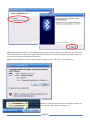
Step 4: If you have a Wii gamebox within range, turn it off. / unplug it. Click the “Add…” button in the Bluetooth Devices
panel. In the resulting dialog box, check the “My device is setup and ready to be found” box.
Page 23