1
Introduction
Autosoft NT User Manual
1. Introduction
1.1 Introduction
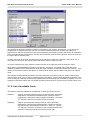
Autosoft NT is a software package designed to configure and control Autolog and Unilog data
acquisition systems produced by Peekel Instruments B.V. It can control multiple Autolog 2005, Autolog
2100 and/or Unilog 2500 devices with BASE controller connected to the same PC using serial ports or
National Instruments GPIB-cards (IEEE-488). Using the appropriate hardware it can measure up to
2000 channels per second. To run Autosoft NT, you need at least Windows 98 or Windows NT 4.0.
Make sure you install a recent Service Pack (at least Service Pack 3) on Windows NT 4.0.
To measure data using Autosoft NT, first configure one or more measurement devices. After that,
create channels to measure. Depending on the hardware, Autosoft NT can measure DC Voltage,
Thermocouples, Pt-100, Straingauges, Transducers, Counters, LVDT's, Analog Outputs and Digital
Inputs and Outputs.
In addition, you can create Rosette channels for combinations of two or three straingauges. Virtual
channels allow you to perform complex calculations on the measured data on-line.
After your devices and channels are configured, you can create measurement groups in which you can
place any collection of channels to be measured. Numerical groups allow you to show measurement
data on screen in numerical form, and also store measured data. Online graphics are supported using
graphical groups, which can show up to 16 channels in a single graphical display.
In addition to all of this, Autosoft NT also supports autobalance measurements, alarms (which can not
only be displayed, but can also trigger output relays and the start or stop of measurements) and the
manual setting of output channels.
Throughout the use of the program you can press the F1 key to obtain context sensitive online help.
1.2 Commands
File menu
Edit menu
Insert menu
View menu
Window menu
Help menu
Copyright 2001 by Peekel Instruments
Page 4 of 74