1
The Learning Key
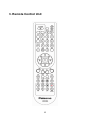
Your PVR remote has four learning keys plus a self-coding function. The keys can
be used for the STB remote to function as any of the four keys on your TV remote.
The recommended keys to use are “TV POWER”, the two grey keys below ”TV/AV”,
and “SET”. The identification of ”TV/AV” key varies with the TV type. For example,
identifying AV, INPUT 123, etc.
You do not need to use your TV remote when watching the digital TV program and
services once your PVR remote has been set up to turn on your TV and change to
the correct AV channel.
Instructions to use the STB RCU learning keys:
1. Press “SET” key to keep for more than three seconds, indicator light will keep on;
2. The TV RCU aims to “receiving window” on the STB RCU, and press the STB
RCU key to do learning. (Such as power key on the TV RCU);
3. The indicator light of the STB RCU flashes three times, and it indicates that the
STB RCU has received signal from the TV RCU;
4. And press corresponding learning keys on “TV key” window of the STB RCU
again (such as power key), the indicator light will plash three times, and then
extinguish. It indicates that the key has learned successfully and is ready to use.
5. When pressing keys on the “TV key” window of the STB RCU, the indicator light
will flash. It indicates that the STB RCU is to control the TV. It is the same as the
VOL+, VOL- and TV/AV keys.
Appendix :
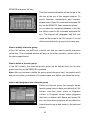
1. When watching TV pressing “INFO’ key on the RCU, the information of the
current and next channel, such as name, starting time and ending time, will be
displayed on the screen. The message will disappear automatically in several
seconds. And also press “exit” to cancel.
2. The description information of the current channel will be displayed on the screen
in several seconds with by pressing “INFO” again. And then press “exit” to enter the
full-screen mode to watch TV program.
12