1
7.4 Information
When watching a channel, press INFO key, a simple EPG banner that includes
current and next program information will appear. Duration of banner’s display can
be modified referring to Common Setup Banner Time. Further more, SD or HD mark
will display at top-right corner of this banner according to current TV Program
transmitted header.
By pressing INFO key again at this bar, system
will pop up a bigger textbox showing more
details about current program. By pressing
INFO key again on the REMOTE to continue
reading the next program information. Press
INFO key once again to return to the normal
view mode.
During the whole operation, press EXIT key to
exit from this banner at anytime.
7.5 EPG and EPG Schedule
This is the same as Program Guide.
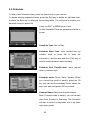
When the right list is on focus, press OK key you can enter EPG Schedule window,
then
you
can
reserve
program,
change
type
(Rec
or
Play)
and
mode(once/daily/weekly), press OK to complete it and Exit to back without saved.
When is success, you can see an icon like clock on the right of the item.
7.6 Recall the favorite channel
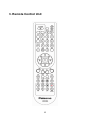
Press the FAV key to recall a stored favorite channel.
Favorite channels are programmed and stored in the Program list menu.
30