1
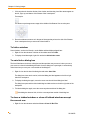
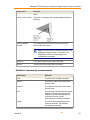
MetaMorph® NX Microscopy Automation
& Image Analysis Software
Version 1.1
User Guide
5011685.B
December 2010
This document is provided to customers who have purchased Molecular Devices, Inc.
(“Molecular Devices”) equipment, software, reagents, and consumables to use in the
operation of such Molecular Devices equipment, software, reagents, and consumables.
This document is copyright protected and any reproduction of this document, in whole or
any part, is strictly prohibited, except as Molecular Devices may authorize in writing.
Software that may be described in this document is furnished under a license agreement.
It is against the law to copy, modify, or distribute the software on any medium, except as
specifically allowed in the license agreement. Furthermore, the license agreement may
prohibit the software from being disassembled, reverse engineered, or decompiled for
any purpose.
Portions of this document may make reference to other manufacturers and/or their
products, which may contain parts whose names are registered as trademarks and/or
function as trademarks of their respective owners. Any such usage is intended only to
designate those manufacturers' products as supplied by Molecular Devices for
incorporation into its equipment and does not imply any right and/or license to use or
permit others to use such manufacturers' and/or their product names as trademarks.
Molecular Devices makes no warranties or representations as to the fitness of this
equipment for any particular purpose and assumes no responsibility or contingent liability,
including indirect or consequential damages, for any use to which the purchaser may put
the equipment described herein, or for any adverse circumstances arising therefrom.
For research use only. Not for use in diagnostic procedures.
The trademarks mentioned herein are the property of Molecular Devices, Inc., or their
respective owners. These trademarks may not be used in any type of promotion or
advertising without the prior written permission of Molecular Devices, Inc.
Product manufactured by Molecular Devices, Inc.
1311 Orleans Drive, Sunnyvale, California, United States of America 94089.
Molecular Devices, Inc. is ISO 9001 registered.
© 2010 Molecular Devices, Inc.
All rights reserved.
Printed in the USA.
Contents
Chapter 1: Navigating the Workspace
Tour of the Workspace
Creating Shortcuts to Options Using the Quick Access Toolbar
To add an item to the toolbar
To remove an item from the toolbar
To move the toolbar above or below the ribbon
Minimizing the Ribbon
To minimize the ribbon
To re-display the ribbon
9
9
15
15
15
16
16
16
16
Chapter 2: Viewing Images
Arranging and Displaying Images
To display a specific dataset
To display images acquired at a stage position, Z position, or time point
To navigate between images in the image grid
To use the view modes to display and arrange multiple images or display a single
image
To change the display color of a channel
To turn the display of a channel on or off
Rearranging Dataset Views
To move or group tabbed windows
To move windows
To hide a window
To auto hide a dialog box
To close a tabbed window or close all tabbed windows except the current one
Scaling Images
To scale channels in an image
Zooming in on Images
Displaying Series Information on Images in the Image Grid
To display series information on images in the image grid
17
17
17
18
19
Chapter 3: Exporting Images to Microsoft Office PowerPoint
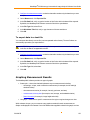
To export images to PowerPoint
33
33
Chapter 4: Configuring a Keypad, Keyboard, or Mouse
Using the Mouse Wheel to Control Device Movement
To configure the wheel control
To use the wheel control
Configuring an Input Accessory Such as a Keypad/Keyboard or Mouse
To configure an input accessory
35
35
35
36
36
37
Chapter 5: Creating and Managing Experiments
About Experiment and Dataset Folders and Files
Creating a New Experiment
To create a new experiment
39
39
42
42
20
23
24
24
25
25
26
26
26
27
28
31
32
32
3
4
To change the experiment default settings
Opening an Experiment
To open an experiment
Linking an Image to an Experiment
To link an image
42
43
43
43
44
Chapter 6: Installing and Configuring Hardware
General Workflow
Preparing to Install Hardware Device Drivers
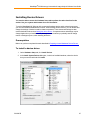
Installing Device Drivers
Prerequisites
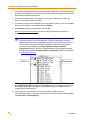
To install a device driver
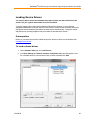
Loading Device Drivers
Prerequisites
To load a device driver
Device and Component Settings
Device Calibration Settings
Discrete Component Position Settings
Filter Wheel Settings
Objective Settings
Shutter Settings
Creating and Modifying Hardware Settings
Prerequisites
To create or modify a hardware setting
Creating and Modifying Illumination Settings
Prerequisites
To create or modify an illumination setting
Creating and Modifying Magnification Settings
Prerequisites
To create or modify a magnification setting
Configuring Camera Drivers
To install and configure a camera driver
Camera Settings
Basic Camera Settings
Defect Correction
Demonstration Camera Driver
45
45
46
47
47
47
49
49
49
50
50
51
51
52
52
53
54
54
55
55
55
57
57
57
60
60
61
61
62
63
Chapter 7: Acquiring Images
Overview
General Workflow
Selecting an Acquisition Mode
Acquiring Images in Interactive Mode
Prerequisites
To configure an interactive acquisition
To save images into a dataset
Acquiring Images in Multidimensional Mode
Setting the Camera Area for Acquisition
To set the camera area
Configuring Channels for a Multidimensional Acquisition
65
66
67
68
69
70
70
72
75
78
78
78
5011685.B
MetaMorph® NX Microscopy Automation & Image Analysis Software User Guide
Prerequisites
To configure a channel
Configuring Stage Positions for a Multidimensional Acquisition
Prerequisites
To configure a stage series
Configuring a Z Series for a Multidimensional Acquisition
Prerequisites
To configure a Z series
Configuring a Time Series for a Multidimensional Acquisition
To configure a time series
Designating Z Motors and Stages for Acquisition
Prerequisites
To designate up to two Z and stage motors
Setting a Point of Origin
Prerequisites
To set a point of origin
Displaying a Live View
To display a live view while setting up the microscope
To display a live view while configuring an image acquisition
Snapping an Image
To snap an image while configuring hardware settings
To snap an image while in Multidimensional acquisition mode
Using Auto Expose
To use auto expose before acquiring an image
Configuring Image Autofocus
Prerequisites
To configure image autofocus before acquiring an image
To use image autofocus in a multidimensional acquisition
To use image autofocus in an interactive acquisition
Using Focus Stabilization
Nikon Perfect Focus
Prerequisites
To use the Nikon PFS for an interactive acquisition
To use the Nikon PFS for a multidimensional acquisition without a stage series
To use the Nikon PFS for a multidimensional acquisition with a stage series
Olympus ZDC and ZDC2
Prerequisites
79
79
83
84
84
86
87
88
89
90
92
92
92
93
93
93
94
94
95
95
96
96
97
97
98
99
100
101
103
105
106
106
106
107
108
110
110
To use the Olympus ZDC or ZDC2 for an interactive acquisition using one shot focus
111
To use the Olympus ZDC or ZDC2 for an interactive acquisition using continuous
focus
112
To use the ZDC or ZDC2 for a simple time lapse acquisition without a Z series or stage
series (continuous focus)
113
To use the Olympus ZDC or ZDC2 for a multidimensional image acquisition without a
stage series
114
To use the Olympus ZDC or ZDC2 for a multidimensional image acquisition with a
stage series
115
Zeiss Definite Focus
117
Prerequisites
117
To use the Zeiss Definite Focus for an interactive acquisition
117
5011685.B
5
To use the Zeiss Definite Focus for a multidimensional image acquisition without a
stage series
To use the Zeiss Definite Focus for a multidimensional image acquisition with a stage
series
Pausing or Stopping an Acquisition
To pause an acquisition
To stop an acquisition
Saving and Loading Acquisition Settings (Protocols)
To save acquisition settings
To load saved acquisition settings
Chapter 8: Measuring and Analyzing Images
Overview
General Workflow
Viewing Plane Information
To view plane information for a dataset
Plane information data definitions
Measuring Morphometry of Objects (Measure Using Threshold)
To measure morphometry using thresholding
Measurement definitions
Area measurements
Dimension measurements
Shape, position, and orientation measurements
Intensity measurements
Statistical (summary) measurements
Drawing and Measuring Regions
To draw and measure regions
Region measurement definitions
Area measurements
Dimension measurements
Shape, position, and orientation measurements
Intensity measurements
Statistical (summary) measurements
Counting Nuclei
To count nuclei
Count Nuclei measurement definitions
Displaying Measurement Results in a Table
To open the data table for a measurement set
To sort data in a column by ascending or descending values
To include or exclude a column
To filter data
Exporting Measurement Data
To export data to an open Excel spreadsheet
To export data to an Excel file while Microsoft Excel is closed or not installed
To export data to a text file
Graphing Measurement Results
To create a graph of measurement results
To filter data for a graph
To configure the graph style and range of data
To change the graph type
Adaptive Background Correction™
6
118
119
121
121
121
122
122
122
125
125
127
127
128
128
130
130
132
132
134
135
136
137
138
139
141
141
142
143
146
146
147
147
149
149
150
150
151
151
152
152
152
153
153
154
155
156
157
157
5011685.B
MetaMorph® NX Microscopy Automation & Image Analysis Software User Guide
Chapter 9: Frequently Asked Questions
159
Chapter 10: Obtaining Support
163
Chapter 11: Checking for Software Updates
165
Chapter 12: Microscopy and Image Processing Resources
Web sites
Journals
Books
167
167
167
167
Index
169
5011685.B
7
Chapter 1: Navigating the Workspace
This chapter includes the following topics:
l
Tour of the Workspace
l
Creating Shortcuts for Ribbon Options on the Quick Access Toolbar
l
Minimizing the Ribbon
Tour of the Workspace
With its integrated Dataset View, the MetaMorph® NX Software makes it easy to navigate
through and compare sets of images, explore relationships between images, dimensions, and
data, and prepare images and data for presentations. The workspace is flexible and can be
arranged in a variety of layouts. You can move, group, resize, and hide windows.
Two main areas comprise the MetaMorph NX Software workspace:
l
The ribbon across the top, which contains tabs and options for performing tasks
l
The Dataset View, which contains images and optionally a filmstrip, the data table, and
one or more graphs that belong to a dataset
9
Chapter 1: Navigating the Workspace
More than one Dataset View can be open at a time, allowing you to compare the images, data table,
and graphs of multiple datasets and different stage positions, Z positions, or time points. The
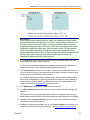
example below shows two Dataset Views, each displaying a different stage position of the same
dataset:
You can open as many Dataset Views as you need. See Rearranging Dataset Views.
As you move the mouse cursor over an image, information about the image appears below the image
grid. This information includes the intensity values of the pixels for each channel, the X, Y
coordinates, and, if applicable, the stage position number, time point number, and Z step number of
the image. For example:
If the image is a single image (it was acquired at one time point, at one stage position, at one Z
position), then "Single Image" appears below the image grid rather than stage, Z, and time point.
10
5011685.B
MetaMorph® NX Microscopy Automation & Image Analysis Software User Guide
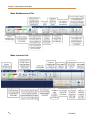
Home Tab
Acquisition Mode Tab
5011685.B
11
Chapter 1: Navigating the Workspace
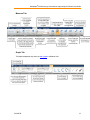
Mode: Multidimensional Tab
Mode: Interactive Tab
12
5011685.B
MetaMorph® NX Microscopy Automation & Image Analysis Software User Guide
Measure Tab
Graph Tab
The Graph tab appears only when you add a graph to a Dataset View.
5011685.B
13
Chapter 1: Navigating the Workspace
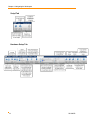
Script Tab
Hardware Setup Tab
14
5011685.B
MetaMorph® NX Microscopy Automation & Image Analysis Software User Guide
Creating Shortcuts to Options Using the Quick Access
Toolbar
With the Quick Access Toolbar, located above the Home tab, you can quickly create and access
shortcuts to the options on the ribbon that you use frequently. You can add almost any ribbon item to
the toolbar. For example, the toolbar below contains shortcuts to the Live Display, Mouse Wheel
Control, Export to PowerPoint, and View Mode options:
If an option on the ribbon provides a drop-down list of choices, the list is also available from the Quick
Access Toolbar. In the example above, the down arrows next to the Mouse Wheel Control and View
Mode options indicate that the list of choices associated with those options is available from the
Quick Access Toolbar.
When you click on the shortcut in the toolbar, the MetaMorph NX Software carries out the option as
though you had selected the option on the ribbon. For example, if you add a shortcut for the Snap
Image option to the toolbar, when you click on the shortcut, the MetaMorph NX Software snaps an
image.
Note: Ribbon items that are specific to an experiment (for example, channels) will not appear
on the toolbar when you open another experiment. You may have to re-create shortcuts each
time you open an experiment, depending on the items that are in the toolbar.
This section describes how to:
l
Add an item to the toolbar
l
Remove an item from the toolbar
l
Move the toolbar above or below the ribbon
To add an item to the toolbar
1. On the ribbon, right-click the option or item that you want to add to the toolbar.
2. Select Add to Quick Access Toolbar.
A small icon that represents the ribbon option or item appears in the toolbar.
To remove an item from the toolbar
1. On the Quick Access Toolbar, right-click the shortcut that you want to remove.
2. Select Remove from Quick Access Toolbar.
5011685.B
15
Chapter 1: Navigating the Workspace
To move the toolbar above or below the ribbon
1. Click the down arrow on the Quick Access Toolbar to display its menu options.
2. Select Show Below the Ribbon or Show Above the Ribbon.
Minimizing the Ribbon
To create more space for a Dataset View, you can minimize (hide) the ribbon so that just the tab
names appear across the top of the MetaMorph NX Software workspace. While the ribbon is
minimized, you can select a tab to display its options and you can navigate between tabs and
options. Then, when you click inside the Dataset View, the ribbon will minimize again.
This section describes how to:
l
Minimize the ribbon
l
Re-display the ribbon
To minimize the ribbon
1. On the Quick Access Toolbar (located just above the Home tab), click the down arrow to
display its menu options.
2. Select Minimize the Ribbon.
A check appears next to the menu option.
To re-display the ribbon
1. On the Quick Access Toolbar (located just above the Home tab), click the down arrow to
display its menu options.
2. Select Minimize the Ribbon.
The check is removed from the menu option and the ribbon appears again.
16
5011685.B
Chapter 2: Viewing Images
This chapter includes the following topics:
l
Displaying Images in a Dataset
l
Rearranging Dataset Views
l
Scaling Images
l
Zooming in on Images
l
Displaying Series Information on Images in the Image Grid
Arranging and Displaying Images
The Home tab provides many ways to control how images are displayed in the image grid. This
section describes how to:
l
Display a specific dataset in the open experiment
l
Display images acquired at a specific stage position, Z position, or time point
l
Navigate between images in the image grid
l
Use the view modes to display and arrange multiple images in the image grid or display
a single composite image
l
Change the display color of a channel
l
Turn the display of a channel on or off
For information about scaling channels in an image or zooming in on and out of images, see
Scaling Images or Zooming in on Images.
To display a specific dataset
If the open experiment contains more than one dataset, you can select the dataset that you
want to view in one of two ways:
l
On the Home tab, in Dataset View, select the dataset.
l
In the filmstrip, in the View Mode field, select Dataset and then double-click the
thumbnail image that represents the dataset.
17
Chapter 2: Viewing Images
To display images acquired at a stage position, Z position, or
time point
You can display the images in a dataset that were acquired at a specific stage position in one of two
ways:
l
On the Home tab, in Dataset View, select the stage position.
l
In the filmstrip, in the View Mode field, select Stage and then double-click the thumbnail
image that represents the stage position.
To compare images acquired at various stage positions, open another tabbed window (click the +
sign on the extra tab) and select another stage position. You can arrange the tabbed windows in the
workspace so that you can compare images side-by-side. See Rearranging Dataset Views for more
information.
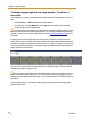
To display images that were acquired at a specific Z position or time point, use the filmstrip view
modes. When you select a filmstrip view mode, the thumbnail images update to represent images in
the dataset according to the option that you selected (time, Z, or stage). For example, if you select "Z"
in the View Mode field in the filmstrip, the thumbnail images that appear in the filmstrip represent the
images acquired at each Z position:
After you select a view mode in the filmstrip, double-click a thumbnail image to move the images in
the image grid so that the image is in view.
Place the mouse cursor anywhere in the filmstrip and use the wheel on your mouse to zoom in to
and out of thumbnail images in the filmstrip. You can also resize the filmstrip by dragging the top of
the filmstrip window. When the filmstrip is larger, you can zoom in further on the thumbnail images in
the filmstrip.
If you close the filmstrip, you can display it again by right-clicking anywhere in the image grid and
selecting Add Filmstrip.
18
5011685.B
MetaMorph® NX Microscopy Automation & Image Analysis Software User Guide
To navigate between images in the image grid
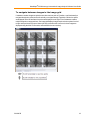
If a dataset contains images acquired at more than one time point or Z position, scroll horizontally to
navigate through time points and scroll vertically to navigate through Z positions. Earlier time points
are displayed on the left and later time points are displayed on the right. Even if a dataset contains
multiple channels or stage positions, the image grid displays images acquired at time points from left
to right and Z positions from top to bottom (the only case when this is not true is when images are
displayed using the Multi Z view mode, as described in the next section).
5011685.B
19
Chapter 2: Viewing Images
To use the view modes to display and arrange multiple images
or display a single image
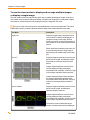
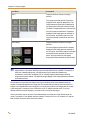
The view modes on the Home tab provide a quick way to organize the display of images. In the list of
view modes, select a mode to change the display of images in the image grid. You may want to adjust
the number of columns and rows in the image grid when you change the view mode.
You can click the icon on the top of the View Mode button to view the selected mode. This button
is particularly useful if you want to alternate between Single View mode and another view mode.
View Mode
Description
Single View
Displays a single image comprised of one or
more channels. Channels are displayed in a
composite overlay on the image. While in
Single View mode, you can turn the display of
each channel on or off as described in the next
section.
When switching from another view mode, the
Z step and time point of the single image is
determined by the middle image in the image
grid.
Time vs Z
Displays images acquired at successive time
points from left to right, and displays images
acquired at successive Z steps from top to
bottom.
Images acquired earlier are to the left of the
currently displayed image, and images
acquired later are to the right. Scroll left or right
to see images acquired at other time points.
Images acquired at higher Z steps are above
the currently displayed image and images
acquired at lower Z steps are below. Scroll up
or down to see images acquired at other Z
steps.
Time vs Channel
Displays images acquired at successive time
points from left to right, and displays a
separate channel in each row.
Images acquired earlier are to the left of the
currently displayed image, and images
acquired later are to the right. Scroll left or right
to see images acquired at other time points.
The number of rows is determined by the
number of channels selected to be displayed
20
5011685.B
MetaMorph® NX Microscopy Automation & Image Analysis Software User Guide
View Mode
Description
(those channels that are not hidden). See the
next section for information about how to turn
on or off the display of each channel.
Channel vs Z
Displays a separate channel in each column,
and displays images acquired at successive Z
steps from top to bottom.
The number of columns is determined by the
number of channels selected to be displayed
(those channels that are not hidden). See the
next section for information about how to turn
on or off the display of each channel.
Images acquired at higher Z steps are above
the currently displayed image and images
acquired at lower Z steps are below. Scroll up
or down to see images acquired at other Z
steps.
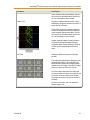
Multi Time
Displays a different time point in each grid
position.
The image acquired earliest is displayed in the
upper left grid position. The image that was
acquired next is displayed in the grid position
just below the first image. The order of images
starts over at the top of the next column.
All of the images displayed in the image grid
were acquired at successive time points at one
Z position. Scroll up or down to see images
acquired at successive time points at other Z
positions.
Of all the view modes, this view shows the
largest range of time.
5011685.B
21
Chapter 2: Viewing Images
View Mode
Description
Multi Z
Displays a different Z step in each grid
position.
The image acquired at the first Z position is
displayed in the upper left grid position. The
image that was acquired next is displayed in
the grid position to the right of the first image.
The order of images starts over in the next row.
All of the images acquired at the Z positions
displayed in the image grid were acquired at
one time point. Scroll left or right to see the
images acquired at Z positions at other time
points.
Multi Channel
Displays a different channel in each grid
position.
All of the images acquired with the channels
displayed in the image grid were acquired at
one time point. Scroll left or right to see images
acquired with these channels at other time
points. Scroll up or down to see images
acquired with these channels at other Z steps.
Note: In a sparse acquisition, images are not necessarily acquired at every possible Z step,
stage position, or time point and they may not be acquired with every channel. For example, to
save time or data storage space, your experiment may use particular channels only
occasionally. In this case, the display "fills in" missing images by duplicating an existing
image from the same channel. The duplicate images appear in the image grid and are included
in all measurements.
The number of columns and rows shown next to the View Mode on the Home tab determines the
number of images that appear in the image grid. The numbers that you specify reflect the number of
images in the viewable area of the image grid; you may need to scroll to view images that are outside
of the image grid. For example, if the columns are set to "3" and the rows are set to "3" but your
dataset contains more than 9 images, you must scroll to view all of the images.
Some view modes may not be useful if your dataset does not contain one of the dimensions in the
mode. For example, if your dataset does not contain a Z series, the Time vs Z, Channel vs Z, and the
Multi Z modes are not as useful as the other modes.
22
5011685.B
MetaMorph® NX Microscopy Automation & Image Analysis Software User Guide
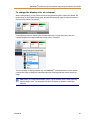
To change the display color of a channel
When viewing images, you can choose the color that represents a specific channel in a dataset. On
the Home tab, in the Channel Display group, the color that represents a specific channel is shown in
the icon for the channel. For example:
To assign a new color to a channel, click the channel and then click the arrow next to the color
currently assigned to the channel and select a new color. For example:
The color changes for display purposes only; the MetaMorph® NX Software does not save the new
color with the image or change any information about the wavelength that was used to acquire the
image.
Note: When you change channel display colors, only the channels in the current (selected)
dataset change colors. The changes do not affect the display of channels in other open
datasets.
5011685.B
23
Chapter 2: Viewing Images
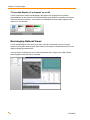
To turn the display of a channel on or off
You can control which channels are displayed in the images in the image grid of the open and
selected dataset. On the Home tab, in the Channel Display group, double-click the name of a channel
to hide the channel or to display it. If the channel is not displayed, the word "Hidden" appears in the
channel icon. For example:
Rearranging Dataset Views
You can arrange Dataset Views side by side, either vertically or horizontally, and you can group
Dataset Views together into a tab group. Each Dataset View can have one data table and one or more
graphs for displaying measurements.
You may want to put dialog boxes on one side of the Dataset View, images in the middle, and the
table and graphs on the other side. For example:
24
5011685.B
MetaMorph® NX Microscopy Automation & Image Analysis Software User Guide
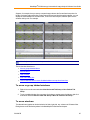
Suppose, for example, that you want to compare images taken at the first and last time points of a
lengthy time lapse image acquisition. Rather than scroll back and forth through the dataset, you can
display the same dataset in a second window, scroll to the last time point, and then place the two
windows side by side. For example:
Note: Only one experiment can be open at a time.
This section describes how to:
l
Move or group tabbed windows
l
Move windows
l
Hide a window
l
Auto Hide a dialog box
l
Close a tabbed window or close all tabbed windows except the selected one
To move or group tabbed windows
1. Right-click on a tab name and select New Horizontal Tab Group or New Vertical Tab
Group.
2. To move a tabbed window from one group of windows to another group of windows, right-click
a tab name and select Move to Next Tab Group or Move to Previous Tab Group.
To move windows
The data table and graphs can be docked at the left side, right side, top, or bottom of a Dataset View.
Dialog boxes can be docked anywhere in the MetaMorph NX Software workspace.
5011685.B
25
Chapter 2: Viewing Images
1. Click anywhere in the tab or title bar of the window, and then drag it until dim arrows appear on
the left, right, top, and bottom of the Dataset View or workspace.
For example:
The arrows may also appear as a target in the middle of the Dataset View or workspace:
2. Place the window on an arrow or in the part of the target that points to the side of the Dataset
View or workspace that you want to dock the window to.
To hide a window
Some windows, such as the filmstrip, can be hidden and then displayed again later.
1. Right-click on the tab name or title bar of the window and select Hide.
2. To display the window again, right-click and select Add window name.
To auto hide a dialog box
The Auto Hide feature minimizes a dialog box and then provides easy access to it when you move
your cursor over the minimized dialog box label. Once the dialog box is open again, it automatically
minimizes when you move your cursor outside of the dialog box.
1. Right-click on the title bar of the dialog box and select Auto Hide.
The dialog box closes and a vertical, minimized dialog box label appears on the left or right
side of the workspace.
2. To display the dialog box again, move the cursor over the minimized dialog box label.
The dialog box opens and the minimized dialog box label remains on the left or right side of the
workspace.
3. To hide the dialog box again, move the cursor anywhere outside of the dialog box.
If the dialog box does not hide, click the cursor anywhere outside of the dialog box.
To close a tabbed window or close all tabbed windows except
the current one
l
26
Right-click on the tab name and select Close or Close All But This.
5011685.B
MetaMorph® NX Microscopy Automation & Image Analysis Software User Guide
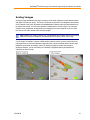
Scaling Images
Scaling an image redistributes the range of intensity values used to display channels based on lower
and upper limits that you specify. The result is an increase or decrease in the brightness and contrast
of the channels in the image. By default, the MetaMorph NX Software scales channels based on the
bit depth of the camera. You can scale channels in images that are of any bit depth. You can scale
channels in any images that are displayed in the image grid, the Latest Image tab, or the Live View
tab, and you can scale channels while acquiring images.
Note: Scaling is for display purposes only; the MetaMorph NX Software does not save scaling
data with the image or change any information about the intensity values in the image.
A 12-bit image, for example, consists of 4095 possible intensity values. However, especially in low
light experiments, much of the important image information may be contained within a narrow range
toward the lower end of the intensity values. By scaling an image to increase the contrast of
displayed channels, you can more easily see variations in brightness that might otherwise be
impossible to detect visually.
5011685.B
27
Chapter 2: Viewing Images
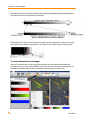
The illustration below shows that the Fixed scaling method will redistribute intensity values using only
the pixels with intensity values between 100 and 200:
The histogram below shows that the Normalize scaling method will redistribute intensity values using
only the pixels with intensity values between 7.5% and 96% of the original range of intensity values:
To scale channels in an image
This section describes how to scale images using the options in the Channel Display dialog box,
which opens when you click Channel Display on the Home tab. Most of the same scaling options are
available in the Scaling toolbar, which is located below the image grid, as shown below.
28
5011685.B
MetaMorph® NX Microscopy Automation & Image Analysis Software User Guide
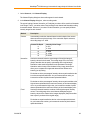
1. On the Home tab, click Channel Display.
The Channel Display dialog box shows a histogram for each channel.
2. In the Channel Display dialog box, select a scaling mode.
The type of scaling (Camera, Normalize, or Fixed) that you select will be used for all channels
in the image. That is, you cannot select Fixed scaling for one channel and Normalize scaling
for another channel. However, if you select Fixed or Normalize, you can specify different
intensity ranges for each channel.
Method
Description
Camera
Automatically scales the channels based on the bit depth of the camera
that was used to acquire the image. If the camera bit depth is unknown,
the scaling range is 0 - 4095.
Camera Bit Depth
8
10
12
14
16
Normalize
Intensity Value Range
0 - 255
0 - 1023
0 - 4095
0 - 16383
0 - 65535
Scales the channels based on a percentage of the original range of
intensity values for the channel. The scaling range is from 0 to 100%.
(Step 3 describes how to specify a percentage of the original range.)
Normalize scales each image based on the pixel data in the image.
Normalize makes it easy to see the data in every image, but does not
allow you to compare two images and determine the differences in
intensity just by looking.
Pixels that are in the percentage of intensity values equal to and below the
low value are replaced with black. As you increase the low value, you
increase the number of pixels that are replaced with black.
Pixels that are in the percentage of intensity values equal to and above the
high value are replaced with the maximum intensity of the channel display
color. As you decrease the high value, you increase the number of pixels
that are replaced with the maximum intensity of the channel display color.
Fixed
Scales the channels based on a subset of the original range of intensity
values. The scaling range is the actual lowest and highest original
intensity values of the channel in the images displayed. (Step 3 describes
how to specify a subset of the original range.)
Pixels that are equal to and below the low value are replaced with black.
As you increase this number, you increase the number of pixels that are
replaced with black.
5011685.B
29
Chapter 2: Viewing Images
Method
Description
Pixels that are equal to and above the high value are replaced with the
maximum intensity of the channel display color. As you decrease this
number, you increase the number of pixels that are replaced with the
maximum intensity of the channel display color.
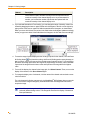
3. If you selected Normalize or Fixed scaling, you can change the range of intensity values for a
channel by dragging the lower or upper limit bar on the histogram to the left or to the right or by
typing values in the lower or upper limit fields that are below the histogram, as shown below.
When you move the limit bars, the values in the fields below the histogram update accordingly,
and as you type new values in the fields below the histogram, the limit bars move accordingly.
4. To reset the range of pixels displayed to the full range of pixels for the channel, click the Reset
All Scaling button . For Normalize scaling, the Reset All Scaling option resets the range so
that it is from 0 (zero) to 100 percent of the original range of intensity values. For Fixed scaling,
the Reset All Scaling option resets the range to the original range of intensity values and adds
5 percent of the range below the lowest value and 5 percent of the range above the highest
value.
5. To turn off the display of a channel in the image grid, click Show Channel. Then, to turn on the
display of the channel, click Show Channel again.
6. To change the display color of a channel, click the name of the channel color and select a new
color from the list.
The color changes for display purposes only; the MetaMorph® NX Software does not save the
new color with the image or change any information about the wavelength that was used to
acquire the image.
Note: When you change channel display colors, only the channels in the current
(selected) dataset change colors. The changes do not affect the display of channels in
other open datasets.
30
5011685.B
MetaMorph® NX Microscopy Automation & Image Analysis Software User Guide
Zooming in on Images
You can use the wheel on your mouse to zoom in on or out of images in the image grid, snapped
images, the live display, or the filmstrip. You can use the zoom options on the Home tab to change
the zoom level of images displayed in the selected tab (the zoom options on the Home tab do not
control the zoom level of thumbnail images in the filmstrip).
To use the wheel on your mouse, place the mouse cursor anywhere in the image grid, Latest Image
tab, Live Display tab, or filmstrip, and scroll the wheel up to zoom in on images; then scroll the wheel
down to zoom out.
To use the zoom options on the Home tab:
l
click Zoom To Fit Space to resize the display of the images so that the entire image fits into
each grid in the image grid, Latest Image tab, or Live Display tab
l
select or type a percentage of the original image display size and then press <Enter>
l
click + or – to increase or decrease the current zoom level by 20 percent
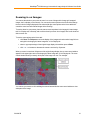
When you zoom in more than 100 percent of the original image display size, a zoom control window
appears in the upper right corner of the image grid, Latest Image tab, or Live Display tab. The zoom
control window shows you exactly which part of the image is in view. For example:
You can use your mouse to click and drag the zoomed area within the zoom control window to view
other parts of the image.
5011685.B
31
Chapter 2: Viewing Images
Displaying Series Information on Images in the Image
Grid
You can display an overlay of information on each image in the image grid and in the filmstrip. The
overlay lists the dataset to which the image belongs, the channel used to acquire the image, and the Z
step number, time point number, and stage position number at which the image was acquired. For
example:
Dataset=Dataset2
Z=4
Time=1
Stage=2
Channel=2
In this example, the overlay indicates that the image is part of Dataset2 and that it was acquired at
the fifth Z step, at the second time point, at the third stage position using the third channel defined in
the channel series. Keep in mind the MetaMorph NX Software starts counting time points, stage
positions, Z steps, and channels at zero (0).
To display series information on images in the image grid
1. On the Application menu, click MetaMorph NX Administration.
2. Click Image Grid Overlay Configuration and then select the Show Image Grid Overlay
check box.
32
5011685.B
Chapter 3: Exporting Images to
Microsoft Office PowerPoint
If Microsoft Office PowerPoint 2003 or 2007 is installed on your computer, you can export
images to a PowerPoint presentation. The MetaMorph NX Software duplicates the displayed
resolution and size of the images so that images are exported exactly as they are displayed in
the image grid. Exported images are embedded in the PowerPoint slide (they are not linked as
files in PowerPoint). Once the images are in PowerPoint, you can manipulate the images as
you would any other picture.
Note: You can also use version 7.7 of the MetaMorph Software to open images that
were acquired with the MetaMorph NX Software.
To export images to PowerPoint
If more than one Dataset View is open, make sure you select the Dataset View that contains
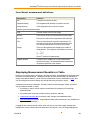
the images that you want to export. (Click once anywhere in the Dataset View to select it. An
orange border appears around the selected Dataset View.) Only the images that are displayed
in the image grid of the selected Dataset View are exported.
1. Use the display options on the Home tab to display the image or images exactly the
way you want them to appear in a PowerPoint slide. See Arranging and Displaying
Images for more information.
2. On the Home tab, in Dataset View, click Export to PowerPoint.
Microsoft PowerPoint opens and displays the images that you exported in a new slide.
The dataset name and the date it was created, as well as any dimension information
that is available (for example, stage position or time point), appears in a text box above
the image.
3. To export another image to a new slide in the same presentation, keep Microsoft
PowerPoint open and repeat Steps 1-2.
33
Chapter 4: Configuring a Keypad,
Keyboard, or Mouse
This chapter includes the following topics:
l
Using the Mouse Wheel to Control Device Movement
l
Configuring an Input Accessory Such as a Keypad or Mouse
Using the Mouse Wheel to Control Device
Movement
If your mouse has a wheel, you can use the Mouse Wheel Control option to specify that a
device should move when you scroll the mouse wheel. For example, you could configure the
wheel control so that a Z motor moves up or down when you scroll the mouse wheel up or
down. The devices that the mouse wheel can move depend on the type of hardware that is
installed.
If you have two mice, one can be used as the primary (system) mouse and the other can be
used as an input accessory. Keep in mind that when the Mouse Wheel Control option is
enabled, both the system mouse and input accessory mouse wheels will perform the command
that is assigned in the Mouse Wheel Control option. When the Mouse Wheel Control option is
disabled, the input accessory mouse will perform the input accessory commands.
The Mouse Wheel Control option is located on the Hardware Setup tab. You may need a
password to access the Hardware Setup tab or you may not be allowed to access it. If you
cannot access the Hardware Setup tab, your system administrator may have placed a shortcut
to the mouse wheel control on the Quick Access Toolbar so that you can use it. All of the
mouse wheel control settings that are available on the Hardware Setup tab are also available in
the shortcut on the Quick Access Toolbar.
This section describes how to:
l
Configure the wheel control
l
Use the wheel control
To configure the wheel control
1. If you have access to the Hardware Setup tab, in Mouse Wheel, click Wheel Control
to display the list of devices that can be moved with the mouse wheel. Or, if the Quick
35
Chapter 4: Configuring a Keypad, Keyboard, or Mouse
Access Toolbar contains a shortcut to the mouse wheel control, click the down arrow next to
the mouse icon
.
2. In the Spin Unit fields that appear, type the increments by which the devices will move when
you scroll the wheel.
The spin unit is not a specific unit of measurement but is a value that reflects the amount that
the device will move each time you scroll the mouse wheel. For example, if the spin unit for the
Z motor is 2, the Z motor position will move 2 units at a time when you scroll the mouse wheel
(for example, from 10 to 12, from 12 to 14, from 14 to 16, and so on).
To use the wheel control
1. If you have access to the Hardware Setup tab, in Mouse Wheel, click Wheel Control to
display the list of devices that can be moved with the mouse wheel. Or, if the Quick Access
Toolbar contains a shortcut to the wheel control, click the down arrow next to the mouse icon
.
2. Select the device that you want to move with the mouse wheel.
3. On the Hardware Setup tab or in the Quick Access Toolbar, click the mouse icon
on the wheel control.
to turn
The mouse icon turns yellow to indicate that the wheel control is on.
4. Scroll the mouse wheel to move the device that you selected in Step 2.
While the wheel control is on, you cannot use the mouse wheel to zoom in on or zoom out of
images in the image grid. You can, however, perform other tasks in the MetaMorph NX
Software.
5. Click the mouse icon
again to turn off the wheel control.
Configuring an Input Accessory Such as a
Keypad/Keyboard or Mouse
You can assign MetaMorph® NX Software functions (commands) to keys, wheels, or buttons on a
device that Microsoft Windows recognizes as a keyboard/keypad or a mouse. For example, you
could assign the Snap command to the "S" key on a keyboard so that every time you press the "S"
key, an image is snapped.
Note: One keypad/keyboard and one mouse can be configured as input accessories. Do not
use your primary (system) keyboard or your primary mouse as an input accessory. If you do
so, you will not be able to use the keys or buttons to perform common tasks. For example, you
may not be able to use the number keys to type a value such as a time series interval or
exposure time. If you accidentally configure a primary keyboard or mouse as an input
accessory, press the F12 key to change the status of the input accessory to Unavailable,
which will allow you to use the input accessory for commands other than the ones assigned to
it.
36
5011685.B
MetaMorph® NX Microscopy Automation & Image Analysis Software User Guide
The Input Accessory Setup option is located on the Hardware Setup tab. You may need a password
to access the Hardware Setup tab or you may not be allowed to access it. If you cannot access the
Hardware Setup tab, your system administrator may have placed a shortcut to the Input Accessory
Setup option on the Quick Access Toolbar for your use.
CAUTION! If you have assigned commands to keys or buttons that you will use in another
application, be sure to close the MetaMorph NX Software before working in the other
application. While the MetaMorph NX Software is open, commands that you have assigned to
an input accessory will function even when you are working in another application. For
example, suppose the Snap command is assigned to the "S" key. If you type in a Microsoft
Office Word document while the MetaMorph NX Software is open, every time you type the
letter "S" the MetaMorph NX Software will snap an image.
To configure an input accessory
1. Connect the input accessory to your computer.
2. If you have access to the Hardware Setup tab, click Input Accessory Setup. Or, if the
Quick Access Toolbar contains a shortcut to the Input Accessory Setup option, click the
shortcut
.
3. In the Input Accessory dialog box, click Select Input Accessories.
4. Press any key, wheel, or button on the input accessory that you want to configure.
The name of the accessory appears in the Last Device Input statement at the bottom of the
Select Input Accessories dialog box. Note the name of the accessory. For example:
5. In the Select Input Accessories dialog box, select the input accessory from the list.
The Last Device Input statement at the bottom of the dialog box updates to display the name
of the device you used to select the accessory from the list (typically a mouse); the Last
Device Input statement is for informational purposes only and does not indicate that you have
selected the device for configuration.
5011685.B
37
Chapter 4: Configuring a Keypad, Keyboard, or Mouse
If the input accessory is not included in the list, make sure that the input accessory is
connected properly to your computer and click Refresh to update the list.
6. Click OK.
In the Input Accessory Setup dialog box, the status for the accessory that you selected
changes from Unavailable to Available.
7. If you are configuring a keypad or keyboard, click Edit Mode. If you are configuring a mouse,
proceed to Step 13.
8. On the keyboard or keypad, press any key that you want to assign a command to.
A new row for the key that you pressed appears in the Keypad Button Commands section of
the dialog box.
9. In the Command column, select a command for the key.
10. If an additional parameter is needed for the command, enter the appropriate value in the field
that appears in the Parameters column. For example, if you assign the Select Channel
command to a key, the Channel # field appears in the Parameters column.
Note: While in Edit Mode, you cannot use the input accessory to carry out the assigned
commands. To use an assigned command, click the Edit Mode button to exit Edit
Mode. Then, after you have used the command, click the Edit Mode button again to
continue configuring the input accessory.
11. Repeat Steps 8-10 for all keys that you want to assign commands to for the selected input
accessory.
12. Click Edit Mode to exit Edit Mode, which enables the command assignments for the
keyboard or keypad.
13. To configure a mouse wheel, in the Keypad Mouse Commands section select the name of the
device, and then in the Spin Unit field type the increments by which the device will move when
you scroll the wheel.
The spin unit is not a specific unit of measurement but is a value that reflects the amount that
the device will move each time you scroll the mouse wheel. For example, if the spin unit for a Z
motor is 2, the Z motor position will move 2 units at a time when you scroll the mouse wheel
(for example, from 10 to 12, from 12 to 14, from 14 to 16, and so on).
14. In the Command column, select commands for the left and right mouse buttons. The mouse
button commands are enabled as soon as you assign them.
The MetaMorph NX Software remembers the command assignments when you close the software.
The next time you start the MetaMorph NX Software, you can immediately use the command
assignments that you configured.
38
5011685.B
Chapter 5: Creating and Managing
Experiments
This chapter includes the following topics:
l
About Experiment and Dataset Folders and Files
l
Creating a New Experiment
l
Opening an Experiment
l
Linking an Image to an Experiment
About Experiment and Dataset Folders and Files
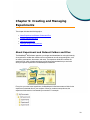
The MetaMorph® NX Software organizes your images and related data into a simple hierarchy.
An experiment is a folder that contains one or more datasets as well as supporting files, such
as emails, presentations, documents, and notes. The experiment folder also contains the
experiment file, which contains references to all of the experiment data that you work with
when you open the experiment in the MetaMorph NX Software.
Every time you create a new experiment, the MetaMorph NX Software creates a folder for the
experiment on the hard drive of your computer. When you create a new experiment, the
experiment folder name is incremented by one number. For example:
39
Chapter 5: Creating and Managing Experiments
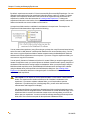
By default, experiments are saved in C:\Users\username\My Documents\My Experiments. You can
change the name and location of an experiment folder either before or after it is created. To change
the prefix of the experiment folder name or the location where experiments are saved before an
experiment is created, follow the instructions in Creating a New Experiment. To change the
experiment folder name or the location of an experiment after the experiment is created, rename the
folder on the hard drive or move the folder to a new location.
An experiment folder contains a subfolder for each dataset in the experiment. For example, the
Experiment1 folder shown above might contain the following:
You can rename the experiment (.mexp) file as long as you keep the .mexp file extension and as long
as the file name is valid (does not contain special characters such as exclamation points). You can
also move or copy the experiment folder to another computer running the MetaMorph NX Software
and then work with the experiment on that computer. If you move or copy the experiment folder, you
must move or copy all of its contents.
You can specify the name of a dataset only before it is created. When you acquire images using the
Interactive acquisition mode, you use the options on the Mode: Interactive tab to specify the prefix of
the dataset folder name before saving images into the dataset. When you acquire images using the
Multidimensional acquisition mode, the MetaMorph NX Software saves the images into a dataset
using the dataset name prefix specified in the Administration dialog box. See Creating a New
Experiment for information about how to change the prefix for the dataset folder name for
multidimensional acquisitions.
CAUTION! You can rename or move experiment folders. Do not rename or delete dataset
folders. The experiment file contains references to all of the data in all datasets in the
experiment. If you rename or delete a dataset folder, you will not be able to open the
experiment. If you delete any files, including image files, you will not be able to access
measurements and images will not display.
If an image was linked to an experiment, the experiment folder contains the path name to the
location from where the image was linked. The folder does not contain the actual image. If the
experiment folder is moved to a location that cannot access the image data, you will not be
able to open your experiment. You can move the linked image data along with the experiment
folder, but it must use the correct path for the experiment and dataset folders.
40
5011685.B
MetaMorph® NX Microscopy Automation & Image Analysis Software User Guide
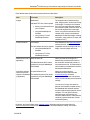
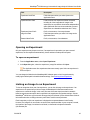
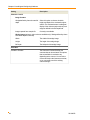
Each dataset folder contains the items described in the table below.
Item
File name
Images
t#s#z#c#.tif
Plane Information
Info.Dataset
Description
The image file name includes the time
point, stage position, channel, and Z step
Individual TIFF files can be opened: of the image. For example, the filename
l directly from the hard drive on t2s1c1.tif is an image that was acquired
at the third time point in the time series, at
your computer
the second stage position in the stage
l using the MetaMorph NX
series, using the second channel in the
Software
channel series. (Keep in mind that the
MetaMorph NX Software begins counting
l using version 7.7 of the
time points, stage positions, Z steps, and
MetaMorph Software
channels at zero.)
Each dataset has one Plane Information
measurement set, which contains basic
The Info.Dataset file can be opened: image data such as the image width and
height, camera bit depth, and so on.
l using the MetaMorph NX
Software
l
using version 7.7 of the
MetaMorph Software
Measurement sets (if Measurements.db
applicable)
The Measurements.db file can be
opened only using the MetaMorph
NX Software.
When you measure the images in a
dataset using a measurement function,
the results are automatically saved in a
new measurement set. All measurement
sets that belong to a dataset are stored in
the Measurements.db file.
Acquisition settings AcquisitionProtocol.xml
used to acquire the
images in the dataset The acquisition protocol file can be
opened only using the MetaMorph
(if applicable)
NX Software.
When you acquire images in
Multidimensional acquisition mode,
acquisition settings are saved
automatically. In Interactive acquisition
mode, you can manually save acquisition
settings.
You can move or copy an acquisition
protocol file to another computer running
the MetaMorph NX Software and then
acquire images using the protocol on that
computer. You can give this file any
name as long as you keep the .xml
extension and the name is valid (does not
contain any special characters such as
exclamation points).
By default, the Scratch folder stores snapped images and images that were acquired using the
Interactive acquisition mode but that have not yet been saved into a dataset. Initially, the Scratch
5011685.B
41
Chapter 5: Creating and Managing Experiments
folder is in C:\Users\username\AppData\Local\Temp. You can move or rename the Scratch folder by
designating a new location or name in the Administration dialog box. See the MetaMorph® NX
Microscopy Automation & Image Analysis Software System Administrator Guide for more
information.
The file name format of images in the Scratch folder is different than the file name format of images
that are saved in a dataset. In the Scratch folder, the file name includes the date on which the image
was snapped or acquired and a number that increments by one with each image that is snapped or
acquired. For example, Image_20101122_0000000015.tif is the fifteenth image in a series of images
that were snapped on November 22, 2010.
Creating a New Experiment
You can create an experiment that will contain images that you plan to acquire or to which you plan to
link images. The MetaMorph NX Software creates an experiment for you if one is not already open
when you acquire or link images.
The MetaMorph NX Software saves and names the new experiment folder as specified by the
experiment default settings.
This section describes how to:
l
Create a new experiment
l
Change the experiment default settings
Note: All images acquired using the multidimensional acquisition mode and all measurement
data in an experiment are automatically saved as you work; when you close an experiment, it
is automatically saved.
To create a new experiment
l
To create a new experiment in the default location using the default base name, from the
Application menu, select New and then select New again.
An empty Dataset View appears and a folder for the new experiment is created in the default location.
For example, if the experiment base name is "Experiment," the new experiment folder may be named
"Experiment1."
To change the experiment default settings
1. To change the location where new experiments are saved and, optionally, change the base
name for new experiment folders, from the Application menu, select New and then select Set
Experiment Defaults.
2. Change the locations and the prefixes for the experiment and dataset folders as needed:
42
5011685.B
MetaMorph® NX Microscopy Automation & Image Analysis Software User Guide
Field
Description
Experiment Load Path
Folder that opens when you select Open on the
Application menu
Experiment Save Path
Location where new experiment folders are saved,
including all of the image data for images in the
experiment; be sure that this location has adequate disk
space (Molecular Devices recommends that you save
experiments on a data drive rather than the C: drive)
Experiment Name Prefix
Prefix, or base name, of new experiments
Image Link Path
Folder that opens when you select Link Image on the
Application menu
Dataset Name Prefix
Prefix, or base name, of new datasets
Opening an Experiment
Only one experiment may be open at a time. If an experiment is open when you open a second
experiment, the first experiment automatically closes and the second experiment opens.
To open an experiment
1. From the Application menu, select Open Experiment.
2. In the Open dialog box, select the experiment (.mexp) file and then click Open.
The Application menu lists experiments that were recently open. Select an experiment in
the list to open it.
You can change the folder that the MetaMorph NX Software opens to look for experiments by
modifying the default path in the administration settings. See Creating a New Experiment.
Linking an Image to an Experiment
To view an image that is not part of an experiment, you can link the image to the experiment. If an
experiment is not open when you link an image, the MetaMorph NX Software creates a new
experiment to contain the image; in this case, the name of the new experiment that is created is
based on experiment name prefix that is specified in the experiment configuration settings. See the
MetaMorph® NX Microscopy Automation & Image Analysis Software System Administrator Guide for
information about how to change the name prefix that is used for new experiments.
Each image that you link to an experiment is displayed as a separate dataset in the filmstrip.
However, the image file is not moved to or saved in the experiment folder on your computer; instead,
the location of the image, from where it was linked, is referenced in the plane information
(Info.Dataset) file.
5011685.B
43
Chapter 5: Creating and Managing Experiments
You can link the following types of image files:
l
.tif
l
.stk
l
.nd
The calibration of an image does not change when it is linked to an experiment.
To link an image
1. To link the image to the open experiment, from the Application menu, select Link Image and
then Link Image into Current or, to link the image into a new experiment, select Link Image
and then Link Image into New.
2. In the Open dialog box, select the image and click Open.
The image appears as a new dataset in the open experiment or in the newly created
experiment.
Note: You can change the folder that opens by default when you link an image. See
Creating a New Experiment.
44
5011685.B
Chapter 6: Installing and Configuring
Hardware
This chapter includes the following topics:
l
General Workflow for Installing and Loading Hardware Device Drivers
l
Preparing to Install Hardware Device Drivers
l
Installing Device Drivers
l
Loading Device Drivers
l
Device and Component Settings
l
Creating and Modifying Hardware Settings
l
Creating and Modifying Illumination Settings
l
Creating and Modifying Magnification Settings
l
Configuring Camera Drivers
l
Camera Settings
General Workflow
You must be able to access the Hardware Setup tab to perform the tasks described in
this section. See your system administrator for more information.
The MetaMorph® NX Software provides control of automated microscopes, motorized filter
wheels, shutters, monochromators, Z motors, motorized stages, digital and serial input/output
to communicate with unique devices, and robotic devices from major manufacturers.
Setting up the MetaMorph NX Software so that it can be used with connected hardware
devices involves two required tasks and a few optional tasks. First, you must install the device
drivers to make them available for use with the MetaMorph NX Software. Then, you load the
device drivers and related components that you want to use. As you carry out these two
required tasks, you can also configure the device drivers and components. For example, you
may want to rename a device driver or modify the settings of a component.
After you have installed and loaded the hardware device drivers, you can create hardware
settings, illumination settings, and magnification settings. The settings that you create appear
on the acquisition tabs, where they can be selected for use with image acquisitions.
45
Chapter 6: Installing and Configuring Hardware
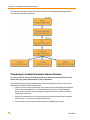
The flowchart below shows the general sequence of tasks for installing and configuring hardware
device drivers and related components.
Preparing to Install Hardware Device Drivers
You must be able to access the Hardware Setup tab to perform the tasks described in this
section. See your system administrator for more information.
Before installing and configuring a hardware device driver and related components for use with the
MetaMorph NX Software, follow the steps below.
1. Create a list of the devices connected to your computer and the corresponding serial, parallel,
USB, or 1394 port assignments, a list of the hardware for which you will install hardware
device drivers, and a list of any port assignment requirements noted in the documentation
supplied with the devices.
2. Connect the hardware device to your computer as instructed in the documentation supplied
with the device. You may need to install related Software.
3. Turn on the device as instructed in the documentation supplied with the device.
46
5011685.B
MetaMorph® NX Microscopy Automation & Image Analysis Software User Guide
Installing Device Drivers
You must be able to access the Hardware Setup tab to perform the tasks described in this
section. See your system administrator for more information.
To use the MetaMorph NX Software with a connected hardware device and its related components,
you must first install the hardware device driver. After installing the device driver, you can rename and
change the settings of the device and its related components. These names and settings are then
used as the default values when loading the device drivers. Component names and settings may be
changed again when you load the device, although in most situations you probably need to change
names or settings only once, when installing the device.
Prerequisites
Make sure you have completed the tasks described in Preparing to Install Hardware Device Drivers.
To install a device driver
1. On the Hardware Setup tab, click Install Devices.
2. In the Install System Devices dialog box, in the list of available hardware, select the device
that you want to install and click Install.
5011685.B
47
Chapter 6: Installing and Configuring Hardware
3. Verify that the port assignment shown in the Status area, if applicable, is not already assigned
to another device and that the port assignment is consistent with any requirements listed in the
documentation supplied with the device.
4. To rename the installed device or a component, in the list of installed devices, select the
device or component and type a new name.
5. To change the settings of the installed device or a component of a device, in the list of installed
devices, select the device or component and click Settings.
6. In the Settings dialog box, make changes, and click OK.
See Device and Component Settings for specific settings information for the device or
component.
Note: You can change the settings for a device and remove a component from or add a
component to a device only in this dialog box. These are settings that connect the
MetaMorph NX Software to the hardware through a serial port or manufacturer's driver.
Device settings cannot be changed and components cannot be removed or added
when the device is loaded using the User Settings for 'Default' hardware
configuration dialog box. However, component settings can be changed in both this
dialog box and in the User 'Default' hardware configuration dialog box as described
in Loading Device Drivers.
7. In the Install System Devices dialog box, click Apply to save your changes without closing
the dialog box (if you want to install and configure other devices) or click OK to save your
changes and close the dialog box.
8. If you are using a communications port other than COM1 or COM2, confirm the
communications settings for the device using the Microsoft Windows Device Manager (Start
> Control Panel > Device Manager).
48
5011685.B
MetaMorph® NX Microscopy Automation & Image Analysis Software User Guide
Loading Device Drivers
You must be able to access the Hardware Setup tab to perform the tasks described in this
section. See your system administrator for more information.
To acquire images and to create unique hardware and illumination settings, you must load the
appropriate hardware device drivers. When you load a device, the device and component names and
settings that were defined during installation are loaded as the default settings. Component names
and settings may be changed again as they are loaded, as described in this section .
Prerequisites
Before you can load a device and its related components, the device driver must be installed. See
Installing Device Drivers.
To load a device driver
1. On the Hardware Setup tab, click Load Devices.
2. In the User Settings for "Default" hardware configuration dialog box that appears, in the
list of available devices, select the device that you want to load and click Add.
5011685.B
49
Chapter 6: Installing and Configuring Hardware
3. To rename a device or component, in the list of claimed devices, select the device or
component and type a new name.
4. To change the settings of a component, in the list of claimed devices, select the component
and click Settings. In the Settings dialog box, make the changes, and click OK.
See Device and Component Settings for specific settings information for the component.
Note: Device settings can be changed and components can be removed or added only
in the Install System Devices dialog box as described in Installing Device Drivers.
Component settings can be changed in both the User Settings for 'Default'
configuration hardware dialog box and the Install System Devices dialog box.
Changes that you make to component settings in the User Settings for 'Default'
configuration hardware dialog box do not affect the settings defined in the Install
System Devices dialog box.
5. In the User Settings for 'Default' configuration hardware dialog box, click Apply to save
your changes without closing the dialog box (if you want to load and configure other devices) or
click OK to save your changes and close the dialog box.
To uninstall a device driver, you do not have to first "unload" it. You can simply click Install
Devices on the Hardware Setup tab, select the driver, and click Remove.
Device and Component Settings
This section provides information about the settings that are common to most of the devices and
components that the MetaMorph NX Software supports.
l
Device Calibration Settings
l
Discrete Component Position Settings
l
Filter Wheel Settings
l
Objective Settings
l
Shutter Settings
For information about settings that are specific to certain hardware and to view a list of currently
supported hardware, visit the MetaMorph NX Support web site at
http://support.meta.moleculardevices.com/hardware/hardware.php
Device Calibration Settings
Use the options described below to define the unit of measurement for device movements. For
example, you could define the unit of measurement for X stage movements so that 4 microns equals
1 step.
50
5011685.B
MetaMorph® NX Microscopy Automation & Image Analysis Software User Guide
The settings that are available may vary slightly depending on the type of hardware that you are
using.
Setting
Description
Unit Conversion
User Units
Number of units that comprise the unit of measurement.
User Units Label
The measurement for the user unit.
Device Units
Number of units that equal the number of user units. For example, 1 micron
equals 1 step.
Device Units Label
The unit of measurement as defined by the device. For example, "step" or "1/10
micron."
Position Settings
Position
The current position of the stage.
Move
Click the + or - buttons or type a new value to move the stage.
Go to Origin
Moves the stage to its origin position.
Discrete Component Position Settings
The settings that are available for discrete components (for example, lenses, disks, wheels, lamps,
and mirrors) may vary slightly depending on the type of hardware that you are using.
Settings
Description
Position Labels
Position #
Labels for each position on the component.
Discrete Component Parameters
Open Control
Dialog
Opens the Control Device dialog box, which provides the following options for
testing the movement of the device:
Position Controls — Moves the device to the selected position.
<< — Moves the device backward by one position.
>> — Moves the device forward by one position.
Filter Wheel Settings
The filter wheel settings that are available may vary slightly depending on the type of hardware that
you are using.
5011685.B
51
Chapter 6: Installing and Configuring Hardware
Setting
Description
Filter Labels
Filter #
Labels for each filter on the wheel.
Filter Visiting Status
Normal
The wheel will stop at this filter position as needed.
No Stop
The wheel will pass through, but not stop at, this filter position as needed.
No Visit
The wheel will not be allowed to pass through this filter position.
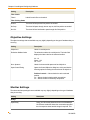
Objective Settings
The objective settings that are available may vary slightly depending on the type of hardware that you
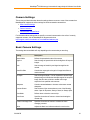
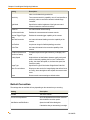
are using.
Setting
Description
Objective #
Labels for each objective.
Refraction Medium/Index
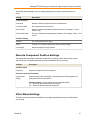
The refraction medium for each objective. The Index field
displays the index value for the selected medium:
Air - 1.0
Water - 1.33
Oil - 1.515
Num. Aperture
Labels for the numerical aperture of each objective.
Open Control Dialog
Opens the Control Objective dialog box, which provides the
following options for testing the movement of the objective:
Position Controls — Moves the device to the selected
position.
<< — Moves the device backward by one position.
>> — Moves the device forward by one position.
Shutter Settings
The shutter and lamp settings that are available may vary slightly depending on the type of hardware
that you are using.
Setting
Descripton
Delays
Open Delay
52
Delay (in milliseconds) between the time the MetaMorph
NX Software sends the shutter the command to open and
the time exposure starts and the image is acquired. This
5011685.B
MetaMorph® NX Microscopy Automation & Image Analysis Software User Guide
Setting
Descripton
delay is needed to ensure that the shutter has time to open
before acquisition. (See illustration below.)
Note: When using an automated microscope, the
transmitted light may not be shuttered, but may be
turned on or off to simulate a shutter. In this case,
the Open Delay setting must be long, such as 500
ms, to account for the time it takes for the bulb to
achieve a stable brightness.
Close Delay
Delay (in milliseconds) between the time the MetaMorph
NX Software sends the shutter the command to close and
the time that the MetaMorph NX Software will start another
command. This delay is needed to ensure that the shutter
has closed completely. (See illustration below.)
Shutter Parameters
Open Shutter Control Dialog
Opens the Control Shutter dialog box, which provides the
following options for testing the shutter:
Open — Opens the shutter.
Close — Closes the shutter.
Toggle — Opens and then closes the shutter or closes and
then opens the shutter.
Creating and Modifying Hardware Settings
You must be able to access the Hardware Setup tab to perform the tasks described in this
section. See your system administrator for more information.
Rather than define settings for hardware devices and components each time you set up your
microscope for a particular type of experiment, you can define and save specific collections of
settings as hardware settings and re-use them as needed. You may also want to use a saved
hardware setting to quickly test and compare the effects of adjusting certain components.
Unlike illumination settings and magnification settings, hardware settings are not part of the image
acquisition process. Hardware settings are mostly useful for initializing the position of a microscope
for a pre-set condition. For example, you may want to set all the device positions so they are the
same at the start of every session, or you may want to set up the illumination path for an experiment
5011685.B
53
Chapter 6: Installing and Configuring Hardware
that uses DIC (differential interference contrast). Because these settings, including the objective
position, are not used as part of an acquisition configuration, it is important to make sure that
magnification and illumination settings are correct after you use a hardware setting and before
acquiring images.
You can define and save the settings of any available hardware component, and you can create as
many hardware settings as you need. The components that are available depend on what hardware
devices are connected and configured for use with the MetaMorph NX Software.
Prerequisites
Before you can create hardware settings, the appropriate hardware devices and components must be
installed and loaded. See Installing and Loading Hardware Device Drivers.
To create or modify a hardware setting
1. On the Hardware Setup tab, in Manage Settings, click Hardware Settings.
2. In the Hardware Settings dialog box, do one of the following:
l
To create a new setting, click Add New Setting and type a name for the setting in the
blank field that appears in the list of settings.
l
To modify a setting, click the name of the setting.
l
To rename a setting, double-click the name of the setting and type a new name.
3. The position of a component appears next to the component's name. To set the position of the
component whenever the hardware setting is used, select the check box to the left of the
component. Then, optionally, select or type the position that you want to be applied when the
setting becomes active (for example, when it is selected to test a microscope setup).
4. Optionally, select the Serialize Moves check box to indicate that no other devices should
move when the selected device moves.
5. If additional properties for a component are available, you can click Other Peripherals to
expand the list of properties. See Device and Component Settings topics for specific settings
information.
6. Click Save Current Setting to save your changes.
The new hardware setting is saved in the list of settings on the Hardware Setup tab and the
Acquisition Mode tab.
7. To move the devices to the positions defined in the hardware setting, on the Hardware Setup
tab, in Select Setting, select the hardware setting and click Apply. Or, on the Acquisition
Mode tab, in Hardware Settings, select the setting and click Apply.
54
5011685.B
MetaMorph® NX Microscopy Automation & Image Analysis Software User Guide
Creating and Modifying Illumination Settings
You must be able to access the Hardware Setup tab to perform the tasks described in this
section. See your system administrator for more information.
Rather than define settings for the multiple hardware devices that affect illumination each time you
carry out an experiment, you can define specific collections of device and component settings and
save them as illumination settings. Illumination settings allow the specification of multiple device
positions so that each channel is illuminated appropriately.Then, when you are configuring channels
for an image acquisition, you can simply select a saved illumination setting.
You can create as many illumination settings as you need. The components that are available depend
on what hardware devices are connected and configured for use with the MetaMorph NX Software. In
the Illumination Settings dialog box, the components and settings listed first are those that the
MetaMorph NX Software considers most relevant to illumination. At the bottom of the list are other
components, the settings for which can also be defined and saved as part of the illumination setting.
Components commonly used to control illumination include:
l
shutters
l
wheels and filters
l
lamps
Prerequisites
Before you can create an illumination setting, the appropriate hardware devices and components
must be installed and loaded. See Installing and Loading Hardware Device Drivers.
To create or modify an illumination setting
1. On the Hardware Setup tab, in Manage Settings, click Illumination Settings.
2. In the Illumination Settings dialog box, do one of the following:
l
To create a new setting, click Add New Setting and type a name for the setting in the
blank field that appears in the list of settings.
l
To modify a setting, click the name of the setting.
l
To rename a setting, double-click the name of the setting and type a new name.
3. In the Wavelength field, type the collection (emission) wavelength for the setting. If the image
is full spectrum or if wavelength does not apply for other reasons, set the value to 0 (zero).
The wavelength will be recorded in images collected with this illumination setting. The
wavelength can be important for some image processing techniques.
The color box shows the color that corresponds to the wavelength. This color will be used in
the brightest pixels when the image display color is specified as "Set by Wavelength" in the
5011685.B
55
Chapter 6: Installing and Configuring Hardware
Channel Display group on the Home tab. If you set the wavelength outside the visible range
(380-780), the color box turns white.
4. The position of a component appears next to the component's name. To set the position of the
component whenever the illumination setting is used, select the check box to the left of the
component. Then, optionally, select or type the position to be applied when the setting
becomes active (when it is used as part of an acquisition or when testing a microscope setup).
Note: The shutter setting determines the state of the shutter when images are
acquired. The shutter setting also determines whether you can use the Shutter button
on the ribbon to toggle the shutter open and closed. To open or close a shutter using the
Shutter button on the ribbon, the shutter state in the selected illumination setting must
be set to active.
Active — The shutter will open only during acquisition or when the Shutter button on the
ribbon is used to open and close all active shutters in the illumination setting.
Open — The shutter will open when the illumination setting is selected and will stay
open until the illumination setting is changed. Use this setting if you are using the eye
pieces.
Closed — The shutter will remain closed during acquisition and while the illumination
setting is selected; use this setting if you are using transmitted light and do not want
any fluorescent excitation or fluorescent light and do not want any transmitted light.
Best Practice
Change a setting for a component only if needed. Often, an illumination setting does not need
to control the position of certain components. For example, a fluorescent setting does not
require that the lamp voltage be adjusted for transmitted light illumination. Setting the lamp
voltage value in this case would serve no purpose and would waste acquisition time as the
lamp adjusted. To avoid this situation, you would leave the lamp voltage component
unchecked. The lamp voltage will be adjusted only if the check box for the component is
selected.
5. Optionally, select the Serialize Moves check box to indicate that no other devices should
move when the selected device moves.
6. If additional properties for a component are available, you can click Other Peripherals to
expand the list of properties. See Device and Component Settings topics for specific settings
information.
7. Click Save Current Setting to save your changes.
The new illumination setting is added to the list of illumination settings on the Hardware Setup
tab in the Select Setting group. The setting is also included in the list of illumination settings
that are available to use with channels for image acquisition in the Channel Settings group on
the Mode: Multidimensional tab and Mode: Interactive tab.
8. To move the devices to the positions defined in the illumination setting, on the Hardware
Setup tab, in Select Setting, select the illumination setting.
56
5011685.B
MetaMorph® NX Microscopy Automation & Image Analysis Software User Guide
Creating and Modifying Magnification Settings
You must be able to access the Hardware Setup tab to perform the tasks described in this
section. See your system administrator for more information.
A magnification setting is a group of device settings that will affect the area covered by each pixel in
an image. Rather than define individual settings for the hardware devices and components that
control magnification each time you acquire images, you can define specific collections of settings
and save them as magnification settings. Then, when you configure an image acquisition, you can
select the appropriate magnification setting.
The MetaMorph NX Software uses magnification settings to apply the correct spatial calibration to
images as they are acquired. Even if the objectives are changed manually, you should define
magnification settings to ensure correct spatial calibration of images. Specific data included in a
magnification setting, such as refractive index and numerical aperture, are recorded in the Plane
Information measurement set; these values are often important in deconvolution operations and other
calculations.
The calibration should be defined for a non-binned image. When acquiring images that have been
binned, the MetaMorph NX Software will automatically adjust the spatial calibration to reflect this
binning.
Best Practice
Magnification settings are not camera-specific. If you use multiple cameras, include the name of the
camera in the name of the magnification setting so that it is clear that a particular magnification
setting should be used with a particular camera. Different cameras may require different calibrations
so if you create the magnification setting based on just the magnification, then the calibration could be
incorrect when you switch cameras.
You can create as many magnification settings as you need. The components that are available
depend on what hardware devices are connected and configured for use with the MetaMorph NX
Software. In the Magnification Settings dialog box, the components and settings listed first are those
that the MetaMorph NX Software considers most relevant to magnification. At the bottom of the list
are other components, the settings for which can also be defined and saved as part of the
magnification setting.
Prerequisites
Before you can create a magnification setting, the appropriate hardware devices and components
must be installed and loaded. See Installing and Loading Hardware Device Drivers.
To create or modify a magnification setting
1. On the Hardware Setup tab, in Manage Settings, click Magnification Settings.
2. In the Magnification Settings dialog box, do one of the following:
5011685.B
57
Chapter 6: Installing and Configuring Hardware
l
To create a new setting, click Add New Setting and type a name for the setting in the
blank field that appears in the list of settings.
l
To modify a setting, click the name of the setting.
l
To rename a setting, double-click the name of the setting and type a new name.
3. If the objectives are controlled manually, select the Manual Objective check box.
If the objectives are controlled manually, you must supply the numerical aperture and
refractive index values as described in Steps 4 and 5. If the Software controls the objectives,
then the MetaMorph NX Software will automatically use the numerical aperture and refractive
index values based on the objective values defined in the hardware configuration. See Device
and Component Settings for more information.
4. In the Numerical Aperture field, type the numerical aperture of the objective.
5. In the Refractive Index field, type the refractive index of the objective.
6. Select Display Message When Setting Is Selected to have the MetaMorph NX Software
display a message when you select this magnification setting.
When you select this magnification setting, the Z motor moves to its escape position (defined
in Step 11) and a message appears that asks you to confirm that the Z motor should move
back to its original position. For example:
The message gives you time, for example, to apply oil to the lens of an oil immersion objective
before the objective is moved back to its original position.
7. In the X Offset and Y Offset fields, type the distance to move the X and Y positions of the
stage to keep the point of origin in its original position when using this magnification setting.
When the objective changes, the point of origin may shift slightly in the field of view. The X and
Y offset distances specify how far the stage should move along the X and Y axes to maintain
the point of origin. The example below illustrates the process for calculating the offset
distances.
58
5011685.B
MetaMorph® NX Microscopy Automation & Image Analysis Software User Guide
Best Practice
Select one objective as a reference objective; ideally, this is the objective with the highest
magnification because its focal position is very specific. Using the reference objective, note
the X and Y positions of the point of origin in your sample, and set the offset values in the
magnification setting for this objective to 0 (zero). Then, switch to the objective with a lower
magnification, and note the stage X and Y values of the point of origin. The offset distance
values for the magnification setting of the objective with the lower magnification are the
difference between the X and Y values of the point of origin when using the reference objective
and the X and Y values of the point of origin when using the objective with a lower
magnification. Repeat this process for each objective.
8. In the Z Offset field, type the distance to move the Z motor to keep the point of origin in its
original focal position when using this objective.
The Z offset distance helps compensate for non-parfocal systems. When a magnification
setting is selected, the Z motor position is adjusted by the offset distance.
9. In the Calibration field, type the size of one pixel. Typically, a pixel is measured in microns. If
you do not know how many microns equal a pixel, use a stage micrometer to measure a pixel
or ask your lens or camera dealer for this information.
The calibration should be defined for a non-binned image. When acquiring images that have
been binned, the MetaMorph NX Software will automatically adjust the spatial calibration to
reflect the binning (Spatial Calibration = Calibration x Binning). The spatial calibration of an
image is recorded in the Plane Information measurement set.
10. In the Magnification field, type the magnification of the objective.
11. In the Z Escape Distance field, type the distance to move the Z motor before changing the
objective.
The Z motor returns to its original position after the objective is changed. Using an escape
distance helps prevent the objective from contacting the slide while the objective is changing.
12. Optionally, select the Serialize Moves check box to indicate that no other devices should
move when the selected device moves.
13. If additional components are available, you can click Other Peripherals to expand the list of
components and review or change their properties. See Device and Component Settings
5011685.B
59
Chapter 6: Installing and Configuring Hardware
topics for specific settings information.
14. Click Save Current Setting to save your changes.
The new magnification setting is added to the list of magnification settings on the Hardware
Setup tab in the Select Setting group. The magnification setting is also included in the list of
magnification settings available to use for image acquisition in the Magnification group on the
Mode: Multidimensional tab and Mode: Interactive tab.
15. To move the devices to the positions defined in the magnification setting, on the Hardware
Setup tab, in Select Setting, select the magnification setting.
Configuring Camera Drivers
You must be able to access the Hardware Setup tab to perform the tasks described in this
section. See your system administrator for more information.
To use the MetaMorph NX Software with a connected digital camera or video camera, you must first
install the camera driver Software. Then, activate the camera driver as described in this section and,
optionally, verify or change the camera settings.
Once a camera is activated, the settings that the MetaMorph NX Software can control for that camera
are available when you configure image acquisitions. Camera settings can be set the same for all
channels in an acquisition or set individually for each channel. See Configuring Channels for a
Multidimensional Acquisition or Acquiring Images in Interactive Mode.
Note: Select the camera channel that you want to use for acquisition on the Acquisition Mode
tab.
To install and configure a camera driver
1. On the Hardware Setup tab, in Install and Configure Hardware, click Camera Setup.
2. In the Camera Configuration dialog box, select the camera driver and click Activate
Camera.
A Configure Camera button appears next to the camera name.
3. Click Configure Camera to verify and, optionally, change settings for the camera.
See Camera Settings for information about the settings that are available for most of the
cameras that the MetaMorph NX Software supports.
60
5011685.B
MetaMorph® NX Microscopy Automation & Image Analysis Software User Guide
Camera Settings
This section provides information about the settings that are common to most of the cameras that
MetaMorph NX supports as well as settings for the demonstration camera driver.
l
Basic Camera Settings
l
Defect Correction
l
Demonstration Camera Driver
For information about settings that are specific to a certain camera and to view a list of currently
supported cameras, visit the MetaMorph NX Support web site at
http://support.meta.moleculardevices.com/hardware/hardware.php.
Basic Camera Settings
The settings that are available will vary depending on the camera that you are using.
Setting
Description
Sensor Mode
Defines the operational mode of the camera.
Digitizer
Sets the range of speed within which the digitizer will acquire
images.
Gain
Sets the range of sensitivity and signal strength for the
camera.
Intensifier Gain
Controls the output gain or the gain of image intensifiers on
certain cameras.
Bit Depth
Sets the image bit depth. You can expand the camera image
bit depth range to fit within the bit depth range of the acquired
image. Set this value to 24-bit to enable color image
acquisition from qualified color cameras.
Sharpness
Controls camera hardware to increase or decrease camera
sharpness.
Camera Shutter
Sets the state of the camera shutter to one of the following
states: Open for Exposure, Always Closed, or Always Open.
Clear Mode
Defines when to clear the camera chip.
Clear Count
Specifies the number of frames to clear when clearing the
camera chip.
Frames to Average Field
Specifies the number of frames to combine for frame
averaging cameras.
Offset
Adjusts the black level reference above the zero level to
5011685.B
61
Chapter 6: Installing and Configuring Hardware
Setting
Description
reduce or eliminate background noise.
Sensitivity
Turns camera sensitivity capability on or off, and specifies a
sensitivity value to control the camera’s internal image
intensifier.
Light Mode
Specifies the relative brightness of the light source and
raises or lowers the camera’s sensitivity.
Cooler On
Activates internal camera cooling.
Use Contrast Knobs
Enables the camera-mounted contrast controls.
External Trigger/Trigger
Mode
Enables the external trigger capability of the camera.
Flat Field Correction
Activates the internal shading correction capability of the
camera.
Get Flatfield
Acquires an image for flatfield (shading) correction.
Noise Filter
Activates the internal noise correction capability of the
camera.
Compute exposure and
gain on live startup
Computes exposure and gain whenever you display a live
view.
Quality/Speed
Helps achieve an ideal balance between quality and speed
when continuously updating the live view. The better the
quality, the slower the speed; or, the faster the speed, the
lesser the quality.
Image Type
Specifies the type of illumination: Brightfield or Darkfield.
Show Focus Indicator
Displays a value on the live image display that reflects focus
accuracy, where the highest value equals the most accurate
focus.
Reset
Resets certain camera settings to default values.
Defect Correction
The settings that are available will vary depending on the camera that you are using.
Setting
Description
Camera
The active camera.
List of CCD chip defects
All CCD chip defects that will be corrected
with the defect correction option.
Add Defect and Edit Defect
Opens the Add Defect dialog box.
If the defect that you are entering is a single
62
5011685.B
MetaMorph® NX Microscopy Automation & Image Analysis Software User Guide
Setting
Description
pixel defect, type the location (X, Y
coordinates) of the defective pixel in the X
(Column) and Y (Row) fields, and select
Pixel Defect as the defect type. If the defect
you are entering includes part or all of one or
more adjacent columns, select Column
Defect and type the X, Y coordinates of the
starting location in the defective column.
When specifying a defective column, the X,
Y coordinates indicate the starting point for
the column. All pixels in the column from the
X, Y coordinate to the bottom of the chip are
included.
Chip Location — Indicates the X, Y
coordinates of the defective pixel or
column(s) of pixels.
Defect Type — Indicates the type of defect
associated with the camera. The defect
type can be either for a single pixel or an
entire column. Column locations run from
the specified pixel location to the bottom of
the chip.
Width — Indicates the number of columns
affected by the column defect.
Remove Defect
Deletes the selected defect from the list.
Remove All
Deletes all defect information from the list.
Enable defect correction
When selected, pixel information for
identified defective pixels is derived from
adjacent good pixel information.
Demonstration Camera Driver
The Demonstration camera driver emulates image acquisition using digital and video cameras. This
driver is useful for testing or teaching users how to acquire images when no camera is attached to the
system. For example, you may want to test the functionality of a script before carrying out an
experiment. You can emulate two separate channels using the Channel 1 and Channel 2 tabs on the
dialog box.
5011685.B
63
Chapter 6: Installing and Configuring Hardware
Setting
Description
Channels 1 and 2
Image Content
Wedge defined by frame size and bit Select this option to choose the width,
depth
height, and depth of the emulated image or
stream. The emulated stream is a diagonal
display of the minimum and maximum pixel
range as defined in the Bit Depth field.
Images opened from sample file
Currently not available.
Wedge Image (options in this section are available only if Wedge defined by frame
size and bit depth is selected)
Width
The width of the wedge image.
Height
The height of the wedge image.
Bit Depth
The bit depth of the wedge image.
Emulation
Camera to Emulate
64
The Camera to Emulate field lists the
cameras that can be emulated. The options
that are available for emulation vary
depending on the camera. You can select
Custom and select the features to emulate,
or you can modify one of the existing
camera settings.
5011685.B
Chapter 7: Acquiring Images
This chapter includes the following topics:
l
Overview of Acquiring Images
l
General Workflow for Acquiring Images
l
Selecting an Acquisition Mode
l
Setting the Camera Area for Acquisition
l
Acquiring Images in Interactive Mode
l
Acquiring Images in Multidimensional Mode
l
Designating Z Motors and Stages for Acquisition
l
Setting a Point of Origin
l
Displaying a Live View
l
Snapping an Image
l
Using Auto Expose
l
Configuring Image Autofocus
l
Using Focus Stabilization
l
Pausing or Stopping an Acquisition
l
Saving and Loading Acquisition Settings (Protocols)
65
Chapter 7: Acquiring Images
Overview
The MetaMorph® NX Software provides many options for acquiring images of the samples and
processes that occur in your experiment. Image acquisition can be as simple as a single image or as
complex as multiple sets of images acquired at various sites at certain times with a variety of
illumination conditions. You control when, where, and how images are acquired. The goals of your
experiment determine the complexity of the image acquisition.
The following types of acquisitions are available:
66
l
Interactive image acquisition — acquire an image with one or more channels at one stage
position, one Z position, and one time point; select individual images and save them into a
dataset
l
Multidimensional image acquisition — combine some or all of the series acquisitions
described below to create a multifaceted acquisition that can include almost any combination
of channels, stage positions, Z positions, and time points; automatically save all acquired
images into a dataset
l
Time series acquisition — acquire images at specific time intervals for a certain amount
of time
l
Stage series acquisition — acquire images at multiple sites in your sample
l
Z series acquisition — acquire multiple images along the Z axis
l
Channel series acquisition — acquire images using one or more illumination conditions,
which may include brightfield, fluorescence, and other microscopy techniques; set
exposure and camera settings for each channel or use the same camera settings for all
channels
5011685.B
MetaMorph® NX Microscopy Automation & Image Analysis Software User Guide
General Workflow
Accurate image acquisition depends on a proper microscope setup, which your MetaMorph NX
representative may have already done for you and which most likely needs to be updated only
occasionally. After the hardware is configured, in most cases you should be able to configure
acquisitions using just the options on the tab for the selected acquisition mode. The flowchart below
shows the general sequence of tasks for acquiring images.
* Requires specific hardware
5011685.B
67
Chapter 7: Acquiring Images
Selecting an Acquisition Mode
The first step in configuring an image acquisition is to select an acquisition mode. The mode that you
select determines the options and settings that appear on the ribbon; only the options that are needed
for the selected mode are displayed. Two acquisition modes are available: Interactive and
Multidimensional.
Use the following table to determine which acquisition mode will best meet your needs.
Use this mode...
If you...
Interactive
have a microscope with little to no automation and you plan to
manually move the stage to various sites
want to acquire a single image for publication purposes
want to acquire single images of a site for a simple
measurement; for example, if you plan to manually count objects
or manually calculate simple statistics for all collected data
do not want to acquire a Z series, stage series, or a time lapse of
images
want to choose which individually acquired images should be
saved into a dataset
Multidimensional
want to use an automated stage or Z motor
want to acquire a Z series, stage series, or a time lapse of
images using one or more channels
want to automatically save all acquired images into a dataset
want to automatically measure multiple images in a dataset; for
example, region intensity over time
The following table lists the major differences between the acquisition modes.
Feature
Interactive Mode
Multidimensional Mode
Live Display
Snap Images
Auto Expose
Image Autofocus
Focus Stabilization*
Channel Series
Stage Series
68
X
5011685.B
MetaMorph® NX Microscopy Automation & Image Analysis Software User Guide
Feature
Interactive Mode
Z Series
X
Time Series
X
Automatically saves all
images acquired
X
Automatically saves
acquisition settings for future
use
X
Multidimensional Mode
Allows manual save of
individual images into a
dataset
X
Available
X Not available
*Requires specific hardware
Acquiring Images in Interactive Mode
Using the Interactive acquisition mode, you can acquire individual images with one or more optical or
illumination conditions (channels). Channels can accommodate brightfield, fluorescence, and other
microscopy techniques such as differential interference contrast (DIC) and phase contrast. For each
channel you can set a variety of specific camera settings. Images are acquired with each channel
using auto expose or the exposure time that you specify. You can configure as many channels as you
need.
Note: Interactive acquisition mode supports acquisition of images using multiple channels, but
it does not support automatic acquisition at multiple stage positions, time points, or Z steps.
To acquire images using one or more channels at multiple stage positions, time points, or Z
steps, use the Multidimensional acquisition mode.
Images acquired using the Interactive acquisition mode are not automatically saved. You choose
which images should be saved either individually or together in a dataset. Datasets are saved in the
open experiment. Images that are snapped or acquired in Multidimensional acquisition mode cannot
be saved in the same dataset as images that are acquired in Interactive acquisition mode. The
filmstrip displays a vertical green line between images that cannot be saved to the same dataset.
Plane information is available for an image that was acquired using the Interactive acquisition mode
only after you have saved the image into a dataset.
After images are acquired, you can view them as separate images using the individual channels or as
composite images using some or all of the channels. See Viewing Images in a Dataset.
This section describes how to:
l
Configure an interactive acquisition
l
Save images into a dataset
5011685.B
69
Chapter 7: Acquiring Images
Prerequisites
Before you configure a channel for an acquisition, determine if you plan to use an illumination setting.
See Creating Illumination Settings.
To configure an interactive acquisition
1. On the Acquisition Mode tab, select Interactive Acquisition, select the camera channel
and, optionally, select a hardware setting if one is needed to set the microscope devices to
pre-defined positions.
2. On the Mode: Interactive tab, in Magnification, select the magnification that you want to use
for the image acquisition.
3. On the Mode: Interactive tab, click Configure to open the Acquisition dialog box.
You can also add, remove, and configure channels using the options that appear when
you select a channel in the Channel Series group on the Mode: Interactive tab. All settings that
you select to define per channel in Step 14 also appear in the options in the Channel Series
group. Changes that you make to channel settings on the Mode: Interactive tab are reflected in
the Acquisition dialog box and changes that you make in the dialog box are reflected on the
tab.
4. In the Acquisition dialog box, click Channels to expand the list of configured channels.
5. Click <None> to configure the first channel or click Add Channel to configure additional
channels.
An icon for the channel appears in the Channel Series group on the Mode: Interactive tab. The
illumination setting that you select in Step 7 will be used as the channel name.
6. In the Exposure field:
If you...
Then...
do not plan to use auto expose for
this channel
type the exposure time to be used for the channel
plan to use auto expose for this
channel
type an exposure time that will be used if auto expose
fails to achieve the target intensity
Note: The Shutter button
on the ribbon opens and closes all shutters that are set to
Active in the illumination setting that is used with the selected channel. See Creating
Illumination Settings for more information.
7. In the Illumination Setting field, select a setting from the list.
Illumination settings contain pre-defined information such as the wavelength and positions of
various components. For information about illumination settings, see Creating Illumination
Settings.
70
5011685.B
MetaMorph® NX Microscopy Automation & Image Analysis Software User Guide
8. To use auto expose for the channel, select the Auto Expose check box and follow Steps 911. If you are not using auto expose, clear the check box and proceed to Step 12.
Note: If your sample is light sensitive, you may want to minimize the number of auto
exposures.
9. In the Target Intensity field, type the maximum intensity value that auto exposure should
attempt to attain for the brightest pixel in the image. The default target intensity value is 75% of
the maximum intensity value that the camera driver is able to obtain. The target intensity will
determine the exposure time during auto expose.
10. In the Initial Exposure field, type the length of the first exposure attempt. Type an exposure
time that is well below the typical exposure time required for this type of experiment; generally,
the initial exposure time should be approximately one-tenth of the typical exposure time. If you
do not know the required exposure time, type 1 or 5 (or use the default value).
11. In the Maximum Exposure field, type the longest exposure time that you want to allow. Be
careful not to over expose your sample, which may result in bleaching, photo damage, or photo
toxicity.
12. In the Z Offset field, specify the difference between the focus position of the Z motor in this
channel and the focus position of the Z motor in the first channel. If the acquisition includes a Z
series, the entire Z series will be shifted by the Z offset distance.
Note: The Z Offset field is not available for the first channel that you define in the
Channels section.
In the example below, the position of the Z motor when the sample is in focus using Channel 1
is 500. The position of the Z motor when the sample is in focus using Channel 2 is 700. The
difference between the two positions is 200, so the Z offset distance is 200.
The next steps that you take depend on whether you want to use the displayed value of a camera
setting for all channels or if you want to set a specific camera setting for each channel. For example,
you may want to use the same shutter state for all channels but use a different gain for each channel.
If you are using just one channel for your acquisition, you can leave all of the check boxes cleared and
type or select the values in this list (in this case there is no need to set the values for each channel).
13. Click Camera Settings to expand the list of camera settings. The units of measurement that
are shown for each camera setting reflect the range that the camera supports.
5011685.B
71
Chapter 7: Acquiring Images
Note: This list of camera settings shows only the settings that can be changed and
they are specific to the camera that is active and the acquisition that you are
configuring. See Camera Settings.
14. For each camera setting, decide if you want to set a value for all channels or set a specific
value for each channel:
To use...
Then...
one value for all channels
leave the check box next to the camera setting
cleared and type or select a value in the field next to
the camera setting
a specific value in each channel
select the check box next to the camera setting; a
field for the camera setting that you selected is added
to each channel in the list of channel settings
Note: The binning value applies to all channels and cannot be set per channel.
15. If you are using different camera setting values for the channel, in the list of settings for that
channel, type or select the new value for the camera setting.
16. Optionally, configure focus stabilization.
17. Optionally, configure image autofocus.
18. After you have configured the acquisition, do one of the following:
To acquire an image...
On the Mode: Interactive tab...
using one channel
double-click the channel or select the channel
and click Snap
using all channels
click Acquire All Channels
If you configured more than one channel, the Latest Image tab displays "slots" for each channel in the
image grid. If you acquired all channels, an image acquired with each channel appears in each slot
and a composite image appears in the filmstrip; if you acquired one channel, its slot updates to
display the image that was acquired using that channel. As you acquire subsequent images using
various channels, each image updates in the corresponding slot in the image grid.
If you acquire additional images with different attributes (for example, fewer channels or a larger
binning value), the filmstrip displays a green vertical line to separate images that have different
attributes. As explained in the next section, only images acquired with the same attributes can be
saved into the same dataset.
To save images into a dataset
In Interactive acquisition mode, you can save acquired images into an existing dataset or into a new
dataset. Each time you save an image into a dataset, the image is saved as a separate stage
position. Images, whether multi-channel or single channel, can be saved together as a separate stage
72
5011685.B
MetaMorph® NX Microscopy Automation & Image Analysis Software User Guide
position in one dataset or in separate datasets. Saving as stage positions in a single dataset may
allow for easier comparisons of measurements made after acquisition. Saving as individual datasets
may make organization and reviewing simpler if you have acquired only a few images.
Only images that are consistent, such as having the same number of channels and same number of
pixels, can be saved together. The filmstrip provides guidance on which images can be saved
together. When you select (double-click) an image in the filmstrip, an orange border appears around
the image. If you select other images acquired with different channels, the orange border remains
around the images that can be saved together.
To save more than one image into a dataset, the images must have the same:
l
number of channels
l
binning value
l
camera area
l
width and height
If you attempt to save an image into an existing dataset that contains images with a different number
of channels, binning, camera area, or size, the MetaMorph NX Software automatically creates a new
dataset and saves the image into it.
Initially, saving images is a two-step process: you set up the saving options and then you save the
images. However, you do not need to configure the saving options each time you save an image; you
can change the options only when you want to save an image in a different manner.
1. Set up the saving options:
If you want to...
Then...
automatically
click Save as Individuals and in the Name Prefix field, type the prefix to use
create a new
for the name of the dataset that will be created for the image.
dataset each time
you save an image The MetaMorph NX Software appends a number to the prefix and increments
the number by one each time you save an image using this option. For
example, if the name prefix is DatasetFLUOR, the dataset that is created
when you first save an image will be named DatasetFLUOR1, and then when
you save a second image, the dataset that is created will be named
DatasetFLUOR2, and so on.
5011685.B
73
Chapter 7: Acquiring Images
If you want to...
Then...
Once you create a dataset, you can add images to it using the Save into
Groups option described below.
save an image into click Save into Groups and do one of the following:
a dataset
If the dataset...
Then...
exists
in the Saving to field, select the dataset that you want to
save the image to.
If the number of channels, binning, camera area, or size
of the image is different than the images already in the
selected dataset, a new dataset will be automatically
created for the image that you saved. The MetaMorph NX
Software names the new dataset by appending a number
to the prefix displayed in the Name Prefix field.
does not yet exist click New Dataset and in the Name Prefix field, type the
prefix to use for the dataset that will be created for the
image.
The MetaMorph NX Software appends a number to the
prefix and increments the number by one each time you
save an image. For example, if the name prefix is
DatasetFLUOR, the dataset that is created when you
first save an image will be DatasetFLUOR1, and then
when you save another image, if you do not change the
prefix, the dataset that is created will be
DatasetFLUOR2, and so on.
Once you create a dataset, you can add images to it by
selecting the dataset in the Saving to field as described
above.
2. In the filmstrip, double-click the image or images that you want to save and then click Save.
Click Clear Display on the Mode: Interactive tab to clear the images in the Latest
Image tab and remove the orange border around selected images. This option is especially
useful if you have already selected multiple images in the filmstrip but want to save, for
example, just one image acquired with one channel.
When you select more than one image to save, the images are displayed as a composite
image in the Latest Image tab. For example, if you select three images that were each
acquired with a different channel, the Latest Image tab overlays the three channels on one
image.
74
5011685.B
MetaMorph® NX Microscopy Automation & Image Analysis Software User Guide
If a dataset was created when you saved the image, a tab for the new dataset opens and
displays the saved image. If you saved an image into an existing dataset, you may want to
open the dataset and verify that it contains the image that you saved.
The next time you acquire all channels or snap an image, the image grid clears the images that were
just saved and displays the new image.
Acquiring Images in Multidimensional Mode
By acquiring images of a fixed or living sample from various perspectives, a multidimensional
acquisition can provide a comprehensive view of overall cell morphology. The collected data can be
used to analyze both significant and subtle trends over time, fluctuations in intensity, changes in
shape and position, and so on.
Example
You could configure an acquisition to acquire images at 5 stage positions using DAPI and FITC
channels with a Z series that obtains images at 10 Z positions as well a single image at the center Z
position that will be acquired with transmitted light. Or, you can acquire an image every 5 seconds at
a particular site using an exposure of 80 milliseconds and then every 2 seconds at another site using
an exposure of 100 milliseconds. You can acquire some channels more frequently than others.
Although the MetaMorph NX Software provides advanced settings for configuring a multidimensional
image, in many cases you can configure an acquisition using just the options on the ribbon. The Time
Series group, Z Series group, and Stage Series group on the Mode: Multidimensional tab each contain
a check box that you can use to include or exclude the series from the acquisition. For example:
You do not need to configure the acquisition series that comprise a multidimensional acquisition in
any particular order. However, during a multidimensional acquisition that contains a time series,
stage series, Z series, and channel series, the MetaMorph NX Software acquires images in the
following order:
1. Time point
2. Stage position
3. Center Z position or Z series
4. Channel
or
1. Time point
2. Stage position
5011685.B
75
Chapter 7: Acquiring Images
3. Channel
4. Center Z position or Z series
In the following illustration, images are acquired every 10 milliseconds at 3 stage positions. At all time
points, a Z series of images is acquired using 2 channels. At the first and last time points, an image at
the center Z position is acquired using one channel.
Keep in mind that in a time lapse experiment, if you configure the acquisition to acquire additional
images, it will take longer to acquire a single time point. As a result, images may not be acquired at
the specified interval.
While configuring the acquisition, you can test your current settings by "snapping" a single image or
by displaying a live view. Snapped images are saved in the Scratch folder on the hard drive of your
computer. See Snapping an Image and Displaying a Live View.
When you start the multidimensional acquisition, the MetaMorph NX Software saves the acquired
images into a new dataset. Unless you specify that images should not be displayed as they are
acquired, the Latest Image tab continuously updates the display of the most recently acquired image.
This display helps you gauge the quality of the images as they are acquired, which can be especially
76
5011685.B
MetaMorph® NX Microscopy Automation & Image Analysis Software User Guide
useful for lengthy time series acquisitions. The Dataset tab updates the image display after images
are acquired at each time point. As images are being acquired, you can scale the images to adjust the
contrast of a channel or channels. See Scaling Images. Also, at any time, you can rearrange the
display of the images in the Dataset tab. See Viewing Images in a Dataset.
Note: If an experiment is not open when you start an acquisition, the MetaMorph NX Software
will create one to contain the new dataset.
A separate window within the Latest Image tab displays the status of the acquisition as well as a
histogram for each channel. The MetaMorph NX Software reports the number of images acquired, as
well as the current time point in a time series if applicable, stage position if applicable, channel, and Z
position if applicable. Other statistics may also be reported to help you monitor progress.
At any time, you can pause the acquisition, adjust certain settings, and then continue the acquisition.
If you stop the acquisition, all of the images that were acquired through the last full time point are
automatically saved. See Pausing or Stopping an Acquisition.
Once the multidimensional image acquisition is complete, the MetaMorph NX Software automatically
saves the acquisition settings, or protocol, as a separate file in the dataset folder. Later, when you
want to configure the same or a similar experiment, you can save time by loading the saved
acquisition protocol. By using a saved acquisition protocol, you can ensure that an experiment is
repeated with the same acquisition settings. See Saving and Loading Acquisition Settings.
The MetaMorph NX Software saves acquired images from a multidimensional acquisition in a new
dataset in a dataset folder. To specify the prefix for new dataset names, use the options in the
Administration dialog box. See the MetaMorph® NX Microscopy Automation & Image Analysis
Software System Administrator Guide for more information.
Note: If you specify a dataset name prefix for a multidimensional image acquisition and then
you specify a new dataset name prefix for an interactive image acquisition, the new prefix
overwrites the existing prefix. Before you acquire a multidimensional image, make sure the
dataset name prefix is correct. You cannot rename or delete datasets once they are created.
In the dataset folder, the image file name reflects the time point, stage position, channel, and Z step
of the image.
Example
The filename t2s1c1.tif is an image that was acquired at the third time point in the time series, at the
second stage position in the stage series, using the second channel in the channel series. (Keep in
mind that the MetaMorph NX Software begins counting time points, stage positions, Z steps, and
channels at zero.)
Plane information for the new dataset is listed on the Measure tab. See Viewing Plane Information.
5011685.B
77
Chapter 7: Acquiring Images
You can combine up to four types of acquisition series to create a multidimensional image:
l
Channel series (a multidimensional acquisition must include at least one channel)
l
Stage series
l
Z series
l
Time series
Setting the Camera Area for Acquisition
The MetaMorph NX Software acquires images using either the full chip area of the camera or the area
that is displayed in the image grid. When you set the camera area, a snapped image of the area
appears in the Latest Image tab and a thumbnail of the image appears in the filmstrip.
Typically, you begin by selecting the full chip area of the camera.Then, if you want to acquire a
smaller area, you can zoom in until just the area that you want to acquire is displayed, and set it as
the camera area.
After you have defined the camera area to use for acquisition, you can configure other parts of the
acquisition such as stage positions, a Z series, channels, or a time series.
To set the camera area
1. On the Mode: Interactive tab or Mode: Multidimensional tab, in Camera, click the Full
Chip button
. If you want to acquire the full chip area, you do not need to follow the
remaining steps in this procedure.
The MetaMorph NX Software snaps an image of the full chip area of the camera using the
selected channel.
2. Use the wheel on your mouse to zoom in on the snapped image until just the area that you
want to acquire is displayed in the image grid.
3. On the Mode: Interactive tab or Mode: Multidimensional tab, in Camera, click the Current
View button
.
The MetaMorph NX Software snaps an image of the area displayed in the Latest Image tab
using the selected channel, resizing the image to the area that will be used for acquisition.
Configuring Channels for a Multidimensional
Acquisition
You can acquire images using one or more optical or illumination conditions (channels). Channels can
accommodate brightfield, fluorescence, and other microscopy techniques such as differential
interference contrast (DIC) and phase contrast. For each channel you can set a variety of specific
camera settings. You can also indicate whether a Z series of images should be acquired using the
channel, and you can specify a Z motor adjustment for the channel. Images are acquired with each
channel using auto expose or the exposure time that you specify.
78
5011685.B
MetaMorph® NX Microscopy Automation & Image Analysis Software User Guide
Example
You can use multiple channels to acquire a transmitted light image and two fluorescent images. You
can set different exposure times for each channel. You can specify that auto expose be used for
some or all channels.
A channel series can be used alone to acquire multiple channels at one location at one time point. Or
a channel series may be part of an acquisition that acquires images with multiple channels at multiple
locations over time. You can configure as many channels as you need.
After images are acquired, you can view them as separate images using the individual channels or as
composite images using some or all of the channels. See Viewing Images in a Dataset.
Use the options in the Channel Series group on the Mode: Multidimensional tab to define basic
settings for one or more channels. Use the Acquisition dialog box to define basic and advanced
settings for one or more channels.
Mode: Multidimensional Tab
Channel Settings
Acquisition Dialog Box Channel Settings
Illumination setting
Illumination setting
Exposure time
Exposure time
All settings that you selected to
define per channel in the Acquisition
dialog box
Auto expose settings, if applicable
Camera specific settings, such as gain
Center Z image acquisition, if applicable
Z offset distance between channels
Frequency and rate of channel acquisition
Prerequisites
Before you configure a channel for an acquisition, determine if you plan to use an illumination setting.
See Creating Illumination Settings.
To configure a channel
1. On the Acquisition Mode tab, select Multidimensional, select the camera channel and,
optionally, select a hardware setting if one is needed to set the microscope devices to predefined positions. (You will select magnification and illumination settings as described below.)
2. On the Mode: Multidimensional tab, in Magnification, select the magnification you want to
use for the acquisition.
3. On the Mode: Multidimensional tab, click Configure to open the dialog box.
You can also add, remove, and configure channels using the options that appear when
you select a channel in the Channel Series group on the Mode: Multidimensional tab. All
settings that you select to define per channel in Step 19 also appear in the options in the
Channel Series group. Changes that you make to channel settings on the Mode:
5011685.B
79
Chapter 7: Acquiring Images
Multidimensional tab are reflected in the Acquisition dialog box and changes that you make in
the dialog box are reflected on the tab.
4. In the Acquisition dialog box, select the Channels check box to indicate that the acquisition
will include a channel series, and then click Channels to expand the list of settings.
5. Click <None> to configure the first channel or click Add Channel to configure additional
channels.
An icon for the channel appears in the Channel Series group on the Mode: Multidimensional
tab. The illumination setting that you select in Step 7 will be used as the channel name.
6. In the Exposure field:
If you...
Then...
do not plan to use auto expose for
this channel
type the exposure time to be used for the channel
plan to use auto expose for this
channel
type an exposure time that will be used if auto expose
fails to achieve the target intensity
Note: The Shutter button
on the ribbon, which opens and closes the shutter, is
available only if the shutter is set to Active in the illumination setting used with the
selected channel. The Shutter button will open and close all shutters that are set to
Active in the illumination setting. See Creating Illumination Settings for more
information.
7. In the Illumination Setting field, select a setting from the list.
Illumination settings contain pre-defined information such as the wavelength and positions of
various components. For information about illumination settings, see Creating Illumination
Settings.
8. To use auto expose for the channel, select the Auto Expose check box and follow Steps 913. If you are not using auto expose, clear the check box and proceed to Step 14.
Note: If your sample is light sensitive, you may want to minimize the number of auto
exposures.
9. In the Auto Expose Frequency field:
80
Select...
To auto expose...
Every Point
at every time point (auto exposing at every time point will
slow down acquisition and will increase the sample's
exposure to light)
First
at only the first time point (auto exposing at the first time
point will ensure consistent exposure times for the channel
throughout the time lapse)
Every Nth Point
at specific time intervals (specified in the next step); for
5011685.B
MetaMorph® NX Microscopy Automation & Image Analysis Software User Guide
Select...
To auto expose...
example, you could auto expose at every tenth time point to
accommodate photo bleaching
If the acquisition does not include a time series, auto expose will occur at the first time point.
10. If you selected EveryNthPoint in the previous step, in the Auto Expose Rate field type the
time point interval at which auto exposing should occur; for example, type 3 to auto expose at
every third time point. Keep in mind that the first time point in a time series is always 0 (zero).
11. In the Target Intensity field, type the maximum intensity value that auto exposure should
attempt to attain for the brightest pixel in the image. The default target intensity value is 75% of
the maximum intensity value that the camera driver is able to obtain. The target intensity will
determine the exposure time during auto expose.
12. In the Initial Exposure field, type the length of the first exposure attempt. Type an exposure
time that is well below the typical exposure time required for this type of experiment; generally,
the initial exposure time should be approximately one-tenth of the typical exposure time. If you
do not know the required exposure time, type 1 or 5 (or use the default value).
13. In the Maximum Exposure field, type the longest exposure time that you want to allow. Be
careful not to over expose your sample, which may result in bleaching, photo damage, or photo
toxicity.
14. Select Center Z Only if you have configured a Z series but you want to acquire only one
image at the center Z position using this channel. If you have configured a Z series and you
want to acquire the entire Z series using the channel, leave the Center Z Only check box
unselected.
15. In the Z Offset field, specify the difference between the focus position of the Z motor in this
channel and the focus position of the Z motor in the first channel. If the acquisition includes a Z
series, the entire Z series will be shifted by the Z offset distance.
Note: The Z Offset field is not available for the first channel that you define in the
Channels section.
In the example below, the position of the Z motor when the sample is in focus using Channel 1
is 500. The position of the Z motor when the sample is in focus using Channel 2 is 700. The
difference between the two positions is 200, so the Z offset distance is 200.
5011685.B
81
Chapter 7: Acquiring Images
16. In the Acquisition Frequency field, select the time points at which images should be
acquired using the channel:
Select...
To acquire images using the channel...
Every Point
at every time point
First
at only the first time point
Every Nth Point
at specific time intervals (specified in the next step)
starting at the first time point; for example, you could
acquire images using the channel at every third time point
First and Last
at the first time point and the last time point
If the acquisition does not include a time series, images are acquired at the first time point.
17. If you selected Every Nth Point in the previous step, then in the Acquisition Rate field, type
the time point interval at which you want to acquire images with the channel. For example, if
you want to use the channel only every third time point, type 3 in this field. Keep in mind that
the first time point in a time series is always zero (0).
The next steps that you take depend on whether you want to use the displayed value of a camera
setting for all channels or if you want to set a specific camera setting for each channel. For example,
you may want to use the same shutter state for all channels but use a different gain for each channel.
If you are using just one channel for your acquisition, you can leave all of the check boxes cleared and
type or select the values in this list (in this case there is no need to set the values for each channel).
18. Click Camera Settings to expand the list of camera settings. The units of measurement (for
example, ms or sec) that are shown for each camera setting reflect the range that the camera
supports.
Note: This list of camera settings shows only the settings that can be changed and
they are specific to the camera that is active and the acquisition that you are
configuring. See Camera Settings.
19. For each camera setting, decide if you want to set a value for all channels or set a specific
value for each channel:
To use...
Then...
one value for all channels
leave the check box next to the camera setting
cleared and type or select a value in the field
next to the camera setting
a specific value in each channel
select the check box next to the camera
setting; a field for the camera setting that you
selected is added to each channel in the list of
channel settings
Note: The binning value applies to all channels and cannot be set per channel.
82
5011685.B
MetaMorph® NX Microscopy Automation & Image Analysis Software User Guide
20. If you are using different values for the channel, in the list of settings for the channel, type or
select the new value for the camera setting.
21. If the acquisition includes a Z series, select the Center Z Only check box to acquire an image
at just the center Z position using the channel, or clear the check box to acquire the entire Z
series using the channel. See Configuring a Z Series Acquisition.
22. To test the current device positions and settings, at the top of the Acquisition dialog box,
click the Snap button that corresponds to the channel that you want to use for testing or
double-click the icon of the channel on the Mode: Multidimensional tab. The MetaMorph NX
Software opens the Latest Image tab and displays a single new image using the selected
channel. You can use the snapped image as a guide for adjusting your settings. See Snapping
an Image.
23. Optionally, configure other parts of the acquisition before acquiring images. See Configuring a
Time Series Acquisition, Configuring a Stage Series Acquisition, Configuring Image
Autofocus, Using Focus Stabilization, or Configuring a Z Series for Acquisition.
24. Select the Do Not Update Display check box to indicate that images should not be displayed
as they are acquired (in this case, the new dataset is not added to the experiment until the
acquisition is complete), or clear the check box to indicate that the Latest Image tab should
display the most recently acquired image and that the images should appear in a new Dataset
tab as they are acquired.
25. Click Acquire.
If the Do Not Update Display check box is cleared, the MetaMorph NX Software opens the
Latest Image tab which displays the most recently acquired image. This image helps you
gauge the quality of the images as they are acquired, which can be especially useful for
lengthy time series acquisitions. During acquisition, the MetaMorph NX Software saves the
acquired images into a new dataset. You can review images as they are acquired by
displaying the Dataset tab. See Viewing Images in a Dataset for more information.
Note: If an experiment is not open when you start an acquisition, MetaMorph NX will
create one to contain the new dataset.
A separate window within the Latest Image tab displays the status of the acquisition as well as a
histogram for each channel. The MetaMorph NX Software reports the number of images acquired, as
well as the current time point in a time series if applicable, stage position if applicable, channel, and Z
position if applicable. Other statistics may also be reported to help you monitor progress.
Configuring Stage Positions for a Multidimensional
Acquisition
If you have a stage motor, you can designate the stage positions (specific sites) in your sample
where images will be acquired. Images are acquired at each stage position in the order that the
positions are listed in the stage series.
The Stage Series group on the Mode: Multidimensional tab shows a "map" of the stage positions that
are defined for the current acquisition. When you add or remove stage positions, the map updates
5011685.B
83
Chapter 7: Acquiring Images
accordingly. For example, the map below shows that the acquisition is configured to acquire images
at three stage positions:
The MetaMorph NX Software automatically provides a "label" that stores stage position information
when an image is acquired. You can use this label or provide your own when you configure the stage
position. Label information is available in the Plane Information measurement set.
CAUTION! Be aware of the position of the stage relative to both the objective and the
condenser of the microscope. A motorized stage may collide into either of these microscope
components, possibly causing damage.
Use the options on the Mode: Multidimensional tab to define the basic settings for a stage series. Use
the Acquisition dialog box to define basic and advanced settings for a stage series.
Mode: Multidimensional Tab
Stage Series Settings
Acquisition Dialog Box Stage Series Settings
Update selected stage position to Update selected stage position to use the current stage position
use the current stage position
Add, remove, or go to stage
positions
Add, remove, or go to stage positions
Define the travel offset distance and whether travel offset is
used for a stage position
Define the stage label
Set the focus adjustment value for the stage position if you are
using focus stabilization (requires specific hardware)
Prerequisites
Install and configure the appropriate hardware device driver for your stage as described in Installing
and Loading Hardware Device Drivers.
Set the X and Y points of origin and, if more than one stage is installed, specify which stage should be
used for image acquisition as described in Designating Z Motors and Stages for Acquisition.
To configure a stage series
1. On the Acquisition Mode tab, select Multidimensional, select the camera channel and,
optionally, select a hardware setting if one is needed to set the microscope devices to predefined positions.
84
5011685.B
MetaMorph® NX Microscopy Automation & Image Analysis Software User Guide
2. On the Mode: Multidimensional tab, in Magnification, select the magnification you want to
use for the acquisition.
3. On the Mode: Multidimensional tab, click Configure to open the Acquisition dialog box.
4. In the Acquisition dialog box, select the Stage Series check box to indicate that the
acquisition will include a stage series, and then click Stage Series to expand the list of
settings.
5. If a Z motor is installed and you want to make sure that the objective has adequate clearance
during stage movements, in the Travel Offset field, type the distance that the motor should
descend before the stage moves. After the stage moves to the next position, the objective will
return to its initial position.
6. Move the stage to the first position at which images will be acquired and then click Add.
The stage position coordinates appear in a new row in the stage series.
You can also type the coordinates of a stage position in the X and Y fields (and Z or Z2 fields, if
applicable).
Note: If the acquisition includes a Z series, the Z position defined in the stage position
will be the center position of the Z series. The center Z position may vary between
stage positions. See Configuring a Z Series for Acquisition.
Go To moves the stage to the defined stage position.
7. To edit an existing stage position so that it uses the current X, Y, and Z positions, click
Update.
8. If you are using focus stabilization hardware, bring the image into focus and click Set Focus.
Depending on the type of hardware that you are using, either the Focus Adjustment field
displays the surface-to-focal plane distance or the Memorized field displays Yes to indicate
that the focus is set. See Using Focus Stabilization.
9. In the Label field, leave the stage position label as is or type your own label name.
This label will be included in the plane information that is saved with the images when they are
acquired at this stage position.
10. Optionally, select the Use Travel Offset check box to instruct the motor to descend before
moving to the specified stage position.
11. Repeat Steps 6-10 for each stage position that you want to add to the series.
12. Optionally, configure other parts of the acquisition before acquiring images. See Configuring a
Time Series Acquisition, Configuring Channels for Acquisition, Configuring Image Autofocus,
Using Focus Stabilization, or Configuring a Z Series for Acquisition.
13. Select the Do Not Update Display check box to indicate that images should not be displayed
as they are acquired (in this case, the new dataset is not added to the experiment until the
acquisition is complete), or clear the check box to indicate that the Latest Image tab should
display the most recently acquired image and that the images should appear in a new Dataset
tab as they are acquired.
5011685.B
85
Chapter 7: Acquiring Images
14. When you have configured the acquisition, click Acquire.
If the Do Not Update Display check box is cleared, the MetaMorph NX Software opens the
Latest Image tab which displays the most recently acquired image. This image helps you
gauge the quality of the images as they are acquired, which can be especially useful for
lengthy time series acquisitions. During acquisition, the MetaMorph NX Software saves the
acquired images into a new dataset. You can review images as they are acquired by
displaying the Dataset tab. See Viewing Images in a Dataset.
Note: If an experiment is not open when you start an acquisition, MetaMorph NX will
create one to contain the new dataset.
A separate window within the Latest Image tab displays the status of the acquisition as well as a
histogram for each channel. The MetaMorph NX Software reports the number of images acquired, as
well as the current time point in a time series if applicable, stage position if applicable, channel, and Z
position if applicable. Other statistics may also be reported to help you monitor progress.
Configuring a Z Series for a Multidimensional
Acquisition
A Z series acquires images at multiple Z positions. These images are sometimes referred to as the
"optical sections" that are perpendicular to the Z axis. A collection of optical sections provides a
through-focus view of the sample. A Z series can be used alone to obtain a through-focus view of one
location at one time point using a single channel. Or a Z series may be part of a multidimensional
acquisition that acquires images over time at multiple locations using multiple channels.
When you configure a Z series, you specify the number of Z steps at which images will be acquired,
as well as where along the Z axis the images should be acquired. If your acquisition includes more
than one channel, you can specify whether the Z series is acquired with all channels in the acquisition
or with specific channels. When the Z series acquisition begins, the Z motor moves the objective to
the lowest Z position that you have defined, and then images are acquired as the objective moves up
the Z axis.
If your acquisition includes both autofocus and a Z series,the MetaMorph NX Software first performs
the autofocus and then acquires the Z series of images.
The Z series illustrated below contains 5 Z steps, a Z range of 4, and a Z step size of 1:
86
5011685.B
MetaMorph® NX Microscopy Automation & Image Analysis Software User Guide
Use the Mode: Multidimensional tab to define the basic settings for a Z series. Use the Acquisition
dialog box to define basic and advanced settings for a Z series. By default, all channels are acquired
at a specific Z position before all channels are acquired at the next Z position. To acquire a Z series
for one channel at a time (loop the Z series within the channel), change the setting in the Acquisition
dialog box.
Mode: Multidimensional Tab Z
Series Settings
Acquisition Dialog Box Z Series Settings
Current Z position
Current Z position
Z step size
Z step size
Z range
Z range
Number of Z steps
Looping (whether all channels are acquired at a specific Z
position before all channels are acquired at the next Z position
or whether the Z series is acquired using a channel before
acquiring the Z series using another channel)
Prerequisites
A Z motor must be installed and configured. See Installing and Loading Hardware Device Drivers.
If more than one Z motor is installed or you plan to use two Z motors for image acquisition, you must
designate which Z motor should be used for a Z series, autofocus, and travel offset as described in
Designating Z Motors and Stages for Acquisition.
5011685.B
87
Chapter 7: Acquiring Images
To configure a Z series
1. On the Acquisition Mode tab, select Multidimensional, select the camera channel and,
optionally, select a hardware setting if one is needed to set the microscope devices to predefined positions.
2. On the Mode: Multidimensional tab, in Magnification, select the magnification you want to
use for the acquisition.
3. On the Mode: Multidimensional tab, click Configure to display the Acquisition dialog box.
4. In the Acquisition dialog box, select the Z Series check box to indicate that the acquisition
will include a Z series, and then click Z Series to expand the list of settings.
You can also specify the Z series step size and the Z range in the Z Series group on the
Mode: Multidimensional tab.
5. Move the Z motor so that it is focused on approximately the center of the sample. The Current
Z Position field updates as you move the Z motor.
Typically, just manually positioning the Z motor so that the center of the sample is in focus is
sufficient. However, to calculate the exact center of the sample, move the Z motor so that the
bottom of the sample is in focus and note the Z position. Then, move the Z motor so that the
top of the sample is in focus and note the Z position. Using the top and bottom Z positions,
calculate the center Z position. You can also use image autofocus to determine the center Z
position.
When images are being acquired, the value of the Current Z Position field will update to reflect
the current position of the Z motor. Once the acquisition is complete, the Z motor will return to
its initial position.
Note: If the acquisition includes a stage series, the Z position that is defined for each
stage position is used as the center Z position for the Z series. The center Z position
may vary between stage positions. See Configuring Stage Positions for Acquisition.
6. Select the Loop Within Channel check box to acquire a Z series for one channel at a time or
clear the check box to acquire all channels at a specific Z position before all channels are
acquired at the next Z position.
7. In the Z Step Size field, type the distance (along the Z axis) between each image that will be
acquired. The step size is usually based on the depth of field of the objective.
Note: The units of measurement for the Z axis positions are based on the Z motor
configuration. For information about device configuration, see Installing and Loading
Hardware Device Drivers.
8. In the Z Range field, type the total distance (along the Z axis) within which all of the Z images
will be acquired. The Z range value always equals the number of steps minus one multiplied by
the step size.
You do not necessarily need to know the exact Z range. You can just set the range so that
the Z series encompasses the area that you want to acquire.
88
5011685.B
MetaMorph® NX Microscopy Automation & Image Analysis Software User Guide
9. In the Z Steps field, type the total number of images that will be acquired (an image is acquired
at each Z step).
10. To test the current device positions and settings, at the top of the Acquisition dialog box,
click the Snap button that corresponds to the channel that you want to use for testing or
double-click the icon of the channel on the Mode: Multidimensional tab. The MetaMorph NX
Software opens the Latest Image tab and displays a single new image using the selected
channel. You can use the snapped image as a guide for adjusting your settings. See Snapping
an Image.
11. Optionally, configure other parts of the acquisition before acquiring images. See Configuring a
Time Series Acquisition, Configuring a Stage Series Acquisition, Configuring Image
Autofocus, Using Focus Stabilization, or Configuring Channels for Acquisition.
12. Select the Do Not Update Display check box to indicate that images should not be displayed
as they are acquired (in this case, the new dataset is not added to the experiment until the
acquisition is complete), or clear the check box to indicate that the Latest Image tab should
display the most recently acquired image and that the images should appear in a new Dataset
tab as they are acquired.
13. When you have configured the acquisition, click Acquire.
If the Do Not Update Display check box is cleared, the MetaMorph NX Software opens the
Latest Image tab which displays the most recently acquired image. This image helps you
gauge the quality of the images as they are acquired, which can be especially useful for
lengthy time series acquisitions. During acquisition, MetaMorph NX saves the acquired
images into a new dataset. You can review images as they are acquired by displaying the
Dataset tab. See Viewing Images in a Dataset for more information.
Note: If an experiment is not open when you start an acquisition, the MetaMorph NX
Software will create one to contain the new dataset.
A separate window within the Latest Image tab displays the status of the acquisition as well as a
histogram for each channel. The MetaMorph NX Software reports the number of images acquired, as
well as the current time point in a time series if applicable, stage position if applicable, channel, and Z
position if applicable. Other statistics may also be reported to help you monitor progress.
Configuring a Time Series for a Multidimensional
Acquisition
A time series acquisition captures processes and events in your experiment as they happen. When
you configure a time series acquisition, you specify that images will be acquired at specific intervals
of time for as long as you indicate. A time series can consist of one or more time segments. For
example, the time series shown below contains two time segments:
5011685.B
89
Chapter 7: Acquiring Images
If an acquisition contains more than one time segment, the interval between the last time point in the
current segment and the first time point in the next segment is the interval defined in the current time
segment. For example, if the first time segment contains three time points with a five second interval
and the second time segment contains three time points with a one second interval, five seconds will
pass between the end of the first segment and the start of the second segment.
An acquisition can run for as long as necessary. The duration of a time series acquisition is limited
only by the viability and light sensitivity of the sample or by the amount of disk space available for
acquired images.
Example
You can use a time series acquisition to acquire an image every 10 seconds using an exposure of 100
milliseconds and then every 5 seconds using the same exposure. Or, the time series that you
configure might be one part of a lengthy experiment that acquires a Z series of images at 5 stage
positions every 15 minutes for 48 hours using DAPI and FITC channels.
Use the options in the Time Series group on the Mode: Multidimensional tab to define one time
segment. Use the Acquisition dialog box to define more than one time segment, and to add or remove
time segments.
To configure a time series
1. On the Acquisition Mode tab, select Multidimensional, select the camera channel and,
optionally, select a hardware setting if one is needed to set the microscope devices to predefined positions.
2. On the Mode: Multidimensional tab, in Magnification, select the magnification you want to
use for the acquisition.
3. On the Mode: Multidimensional tab, click Configure to open the Acquisition dialog box.
4. In the Acquisition dialog box, select the Time Series check box to indicate that the
acquisition will include a time series, and then click Time Series to expand the list of settings.
If your acquisition contains just one time segment, you can adjust the intervals and
duration for the time segment using the options on the Mode: Multidimensional tab. Or, you
can set these values in the Acquisition dialog box as described below. Changes that you make
to the time segment on the Mode: Multidimensional tab are reflected in the dialog box and
changes that you make in the dialog box are reflected on the tab.
5. Select the Time Series check box to indicate that the acquisition will include a time series and
then click Time Series to expand the list of settings.
6. In the Interval field, type the amount of time that should pass between image acquisitions.
Type 0 (zero) if you want to acquire images as fast as possible.
90
5011685.B
MetaMorph® NX Microscopy Automation & Image Analysis Software User Guide
Note: If the acquisition cannot be accomplished in a time period shorter than the
interval (for example, if the time required for exposure and collecting a Z series is longer
than the interval specified), the acquisition will move to the next time point as soon as
the current time point is completed. That is, the MetaMorph NX Software will acquire all
required images at a time point, even if the specified interval is not achieved. As a
result, your dataset may not contain as many time points as you expected.
7. In the Duration field, type the total amount of time in which images should be acquired. A
change in this value automatically updates the number of time points. The Duration field is
unavailable if the interval is set to 0.
Note: The acquisition ends as soon as the duration ends, even if the acquisition has not
acquired images at all time points. To extend the duration of an acquisition while
images are being acquired, pause the acquisition, extend the duration, and then resume
the acquisition. See Pausing or Stopping an Acquisition.
As you type values in the time series fields, the MetaMorph NX Software uses those values to
calculate other fields in the time series. For example, if you type 10 in the Interval field and
then 40 in the Duration field, the Number of Points field will display 5. Duration is calculated
with a starting time point of zero (0). The duration equals the number of points minus one
multiplied by the interval.
The Number of Points field indicates the total number of times that images will be acquired in
this time series.
8. To add another time segment, click Add and repeat Steps 6 and 7.
9. Optionally, configure other parts of the acquisition before acquiring images. See Configuring
Channels for Acquisition, Configuring a Stage Series Acquisition, Configuring Image
Autofocus, Using Focus Stabilization, or Configuring a Z Series for Acquisition.
10. Select the Do Not Update Display check box to indicate that images should not be displayed
as they are acquired (in this case, the new dataset is not added to the experiment until the
acquisition is complete), or clear the check box to indicate that the Latest Image tab should
display the most recently acquired image and that the images should appear in a new Dataset
tab as they are acquired.
11. When you have configured the acquisition, click Acquire.
If the Do Not Update Display check box is cleared, the MetaMorph NX Software opens the
Latest Image tab which displays the most recently acquired image. This image helps you
gauge the quality of the images as they are acquired, which can be especially useful for
lengthy time series acquisitions. During acquisition, the MetaMorph NX Software saves the
acquired images into a new dataset. You can review images as they are acquired by
displaying the Dataset tab. See Viewing Images in a Dataset for more information.
Note: If an experiment is not open when you start an acquisition, the MetaMorph NX
Software will create one to contain the new dataset.
5011685.B
91
Chapter 7: Acquiring Images
A separate window within the Latest Image tab displays the status of the acquisition as well as a
histogram for each channel. The MetaMorph NX Software reports the number of images acquired, as
well as the current time point in a time series if applicable, stage position if applicable, channel, and Z
position if applicable. Other statistics may also be reported to help you monitor progress.
Designating Z Motors and Stages for Acquisition
Note: If only one Z motor and one stage motor are installed, you do not need to follow the
procedure described in this section. By default, the MetaMorph NX Software will use the
installed Z motor and stage motor.
You must be able to access the Hardware Setup tab to perform the tasks described in this
section. See your system administrator for more information.
If more than one Z motor is installed, you must designate which Z motor should be used for image
acquisition. The MetaMorph NX Software supports the use of up to two Z motors for acquisition. If
you plan to use two Z motors, you must designate which motor should be used for acquiring a Z
series, image autofocusing and focus stabilization, and the travel offset distance.
Best Practice
Designate the same Z motor for both autofocusing and acquiring a Z series. If you must use different
motors, designate the motor that can travel the greatest range along the Z axis (typically the larger
and slower motor) for autofocusing. A fast motor is more likely to drift out of the autofocus range while
a slower motor is better able to stay within the autofocus range.
If more than one stage is installed, you must designate which stage moves along the X axis and
which stage moves along the Y axis. The MetaMorph NX Software supports the use of up to two
stages for acquisition.
The Stage Motor Designations dialog box also contains options for setting a point of origin. See
Setting a Point of Origin.
Prerequisites
You must install and configure the appropriate hardware device drivers for your Z motors or stages as
described in Installing and Loading Hardware Device Drivers.
To designate up to two Z and stage motors
1. On the Hardware Setup tab, in Stage, click the dialog box launcher
of the group.
in the lower right corner
2. In the Stage Motor Designations dialog box, in the Z Motor field, select the Z motor.
3. If more than one Z motor is installed but you plan to use only one Z motor for image acquisition,
in the Z2 Motor field, select None; otherwise, select the Z2 motor.
4. If you plan to use two Z motors for image acquisition, designate the Z motor to use for
acquiring a Z series, the Z motor to use for image autofocus and focus stabilization, and the Z
92
5011685.B
MetaMorph® NX Microscopy Automation & Image Analysis Software User Guide
motor that will move the travel offset distance as defined in the stage series for acquisition.
5. In the Stage X and Stage Y fields, select the Stage X and Stage Y motors.
Note: Although you must designate a stage motor to move along the X axis and another
stage motor to move along the Y axis, in almost all cases the X and Y motors belong to
the same stage; that is, typical stage configurations do not include an X stage motor
from one manufacturer and a Y motor from a different manufacturer.
Setting a Point of Origin
You must be able to access the Hardware Setup tab to perform the tasks described in this
section. See your system administrator for more information.
A point of origin sets a specific X, Y, and Z position as a reference point. When you set the point of
origin, the current X, Y, and Z positions are set to zero. As you move the stage and Z motors, you can
use the point of origin to gauge the position of the motors relative to the point of origin. If the stage you
are using has a hardware-specific "Home" position, you should set the point of origin to that position.
Example
If you set the point of origin at the center of a slide, the X, Y, and Z positions at the center of the slide
are set to zero. Then, suppose you move the stage so that the X and Y positions are 4000 and 5000.
Using the point of origin as a reference, you will know that the stage is 4 millimeters to the right of the
center of the slide and 5 millimeters below the center of the slide. To find the center of the slide again,
you can simply move the stage and Z motors until the X, Y, and Z positions return to zero.
You set the point of origin in the Stage Motor Designations dialog box. This dialog box also contains
options for designating Z and stage motors for acquisition if more than one motor is installed. See
Designating Stage and Z Motors for Acquisition.
Prerequisites
You must install and configure the appropriate hardware device drivers for your Z motors or stages as
described in Installing and Loading Hardware Device Drivers.
To set a point of origin
1. On the Hardware Setup tab, in Stage, click the dialog box launcher
of the group.
in the lower right corner
2. Move the Z motor to the point of origin (the Z motor position is shown in the Z field on the
Hardware Setup tab) and then, in the Stage Motor Designations dialog box, click Set Origin
for the Z motor.
The position shown in the Z field on the Hardware Setup tab changes to 0 (zero) to indicate
that the current position of the Z motor is now the point of origin.
3. If you are using a second Z motor, move it to the point of origin (the second Z motor position is
5011685.B
93
Chapter 7: Acquiring Images
shown in the Z2 field on the Hardware Setup tab) and click Set Origin for the second Z motor.
The Z2 position displayed in the field on the Hardware Setup tab changes to 0 (zero) to indicate
that the current position of the Z2 motor is now the point of origin.
4. Move the stage to the point of origin (the X and Y positions are shown in the X and Y fields on
the Hardware Setup tab) and click Set Origin for the X and Y motors.
The positions in the X and Y fields on the Hardware Setup tab change to 0 (zero) to indicate
that the current position of the stage is now the point of origin.
Displaying a Live View
As you adjust devices and illumination conditions, you can test the current settings by displaying a
live view of the image. Although the live view continuously displays new images, the MetaMorph NX
Software does not automatically save these images.
Note: The Shutter button
on the ribbon, which opens and closes the shutter, is available
only if the shutter is set to Active in the illumination setting used with the selected channel.
The Shutter button will open and close all shutters that are set to Active in the illumination
setting. See Creating Illumination Settings for more information.
This section describes how to:
l
Display a live view while configuring hardware settings
l
Display a live view while configuring an image acquisition
To display a live view while setting up the microscope
You must be able to access the Hardware Setup tab to perform the tasks described in this
section. See your system administrator for more information.
1. On the Mode: Multidimensional tab or Mode: Interactive tab, select the channel to use for
the live view.
2. In the Live Binning field
type the binning value to use for the live view.
Note: The camera driver may only support certain binning values.
3. On the Hardware Setup tab, if needed, click Auto Expose to automatically calculate and set
the exposure time for the live view. See Using Auto Expose.
4. Click Live.
The live view appears in the Live Display tab.
94
5011685.B
MetaMorph® NX Microscopy Automation & Image Analysis Software User Guide
You can adjust the binning value while the Live Display tab is open, you can zoom in on
the live view, and you can scale the channel that is displayed.
5. To stop the live display, click Live again or close the Live Display tab.
To display a live view while configuring an image acquisition
1. On the Mode: Multidimensional tab or Mode: Interactive tab, select the channel to use for
the live view.
2. In the Live Binning field
type the binning value to use for the live view.
Note: The camera driver may only support certain binning values.
3. If needed, adjust the exposure time for the channel or click Auto Expose to automatically
calculate and set the exposure time for the live view. See Using Auto Expose.
4. Click Live.
The live view appears in the Live Display tab.
You can adjust the binning value while the Live Display tab is open, you can zoom in on
the live view, and you can scale the channel that is displayed.
5. To stop the live display, click Live again or close the Live Display tab.
Snapping an Image
As you adjust devices and illumination conditions and as you configure a multidimensional
acquisition, you can quickly test the current settings by "snapping" an image. If you are using the
Interactive acquisition mode, snapping an image acquires a single image.
You can snap an image in one of three ways:
l
while configuring hardware settings (described below)
l
using a specific channel while in Multidimensional acquisition mode (described below)
l
using one or all channels while in Interactive acquisition mode (see Acquiring Images in
Interactive Mode)
The MetaMorph NX Software also snaps an image when you test auto exposure or image autofocus
before acquiring an image, or when you set the camera area for acquisition. These snapped images
are not saved as part of a dataset but are saved in the Scratch folder on the hard drive of your
computer. See Using Auto Expose, Configuring Image Autofocus, or Setting the Camera Area for
Acquisition.
Note: If you manually move a filter wheel or other illumination device and then snap an image,
the snapped image reflects the actual position of the device rather than the illumination setting
that is selected.
5011685.B
95
Chapter 7: Acquiring Images
To snap an image while configuring hardware settings
You must be able to access the Hardware Setup tab to perform the tasks described in this
section. See your system administrator for more information.
1. On the Mode: Interactive tab or Mode: Multidimensional tab, select the channel that you
want to use for the snapped image.
2. On the Hardware Setup tab, in Select Settings, select the hardware and magnification
setting that you want to use for the snapped image and, if needed, make adjustments to the
stage and Z motor positions.
3. On the Hardware Setup tab, if needed, click Auto Expose to automatically calculate and set
the exposure time for the live view. See Using Auto Expose.
4. On the Hardware Setup tab, in Camera, type the binning value to use for the snapped image
in the Snap Binning field
.
Note: The camera driver may only support certain binning values.
5. Click Snap.
The snapped image appears in the Latest Image tab and a thumbnail of the image appears in
the filmstrip. Each subsequently snapped image is also placed in the filmstrip so that you can
compare images snapped with different settings. Snapped images are saved in the Scratch
folder on the hard drive of your computer.
To snap an image while in Multidimensional acquisition mode
In Multidimensional acquisition mode, you can snap an image using one channel.
1. On the Acquire tab, in Camera, type the binning value to use for the snapped image in the
Snap Binning field
.
Note: The camera driver may only support certain binning values.
2. Do one of the following:
l
In Channel Series, select the channel to use for the snapped image; if needed, adjust
the exposure time and then double-click the icon of the channel or click Snap.
l
In Multidimensional Acquisition, click Configure, and at the top of the Acquisition
dialog box, click the Snap button that is next to the channel that you want to use for the
snapped image.
The snapped image appears in the Latest Image tab and a thumbnail of the image appears in
the filmstrip. Each subsequently snapped image is also placed in the filmstrip so that you can
compare images snapped with different settings. Snapped images are saved in the Scratch
folder on the hard drive of your computer.
Images that are snapped in Multidimensional acquisition mode cannot be saved in the same dataset
as images that are snapped in Interactive acquisition mode. The filmstrip displays a separator
between snapped images that cannot be saved to the same dataset (for example, if the images were
96
5011685.B
MetaMorph® NX Microscopy Automation & Image Analysis Software User Guide
acquired using different acquisition modes or different binning values, or if the size of the images is
different).
Using Auto Expose
Auto expose calculates the appropriate exposure time for image acquisition using a channel that you .
You can use auto expose:
l
to quickly verify or calculate exposure time before acquiring an image or while configuring
hardware settings (see below)
l
for some or all channels during a interactive acquisition (see Acquiring Images in Interactive
Mode)
l
for some or all channels during a multidimensional acquisition (see Configuring a Channel
Series Acquisition)
To use auto expose before acquiring an image
1. On the Mode: Interactive tab or Mode: Multidimensional tab, click Configure to open the
Acquisition dialog box.
2. In the Acquisition dialog box, in the Camera Settings section, type the binning value to use
for the auto expose test image.
3. In the Acquisition dialog box, in the Channels section, select the channel that you want to
auto expose.
4. In the Target Intensity field, type the maximum intensity value that auto exposure should
attempt to attain for the brightest pixel in the image. The target intensity determines the
exposure time during auto expose.
Typically, the target intensity value should be approximately 75% of the maximum intensity
value that the camera driver is able to obtain. Be careful to not set the target intensity too close
to the saturation point of the camera. Lower intensity values will help prevent bleaching of the
sample.
5. In the Initial Exposure field, type the length of the first exposure attempt. Set an exposure
time that is well below the typical exposure time required for this type of experiment; generally,
the initial exposure time should be approximately one-tenth of the typical exposure time. If you
do not know the required exposure time, enter 1 or 5 or use the default value.
6. In the Maximum Exposure field, type the longest exposure time that you want to allow.
7. On the Mode: Interactive tab, Mode: Multidimensional tab, or Hardware Setup tab, click
Auto Expose.
The MetaMorph NX Software calculates the exposure time, updates the exposure setting for
the channel, and displays an image using the calculated exposure time. The image appears in
the Latest Image tab and a thumbnail of the image appears in the filmstrip.
5011685.B
97
Chapter 7: Acquiring Images
Note: You may not be allowed to access the Hardware Setup tab or you may need a
password to access it. See your system administrator for more information.
If auto expose does not achieve the expected results, one of the messages below may appear.
Error message
Description
Low Signal
No exposure was attained or the exposure exceeded the target intensity. For
example, the camera or controller is off, the light source is off, the shutter is off
or the wrong shutter is specified, or the maximum exposure duration is too
small for the sample.
Unable to achieve
target intensity
An exposure exceeded the target intensity but no exposure was within range of
the target. Possible causes include changes in illumination or the sample while
the exposure was being calculated.
Configuring Image Autofocus
Image autofocus finds the best focus image and, if configured for an acquisition, corrects the Z motor
position to keep the image in focus while images are acquired. For example, during an image
acquisition autofocusing helps compensate for a sample that has drifted or experienced thermal
changes over time, or small changes in the stage level.
Note: Image autofocus is different than focus stabilization. Image autofocus helps
compensate for sample drift by focusing directly on the sample. Focus stabilization helps
compensate for stage drift by maintaining the specified distance (focus adjustment value)
between the slide and the focal plane. If the sample drifts, the focus adjustment value may not
be accurate. In this case, image autofocus can re-establish focus. If you have focus
stabilization hardware, you can use both focus stabilization and image autofocus during an
image acquisition.
Image autofocus finds the best focus image with as few test image acquisitions as possible. When
configuring image autofocus, you specify the total distance (range) along the Z axis within which the
Z motor should move while focusing on the sample. You also specify the step size, which is initially
used to locate the sample, and the accuracy distance, which is the smallest step that the MetaMorph
NX Software will use when narrowing its search along the Z axis for the best focus position.
The step size that you set will vary depending on the objective that you are using. The larger the depth
of field, the larger the step. Typically, the accuracy (smallest) distance is approximately 10-25% of
the step size. For example:
98
5011685.B
MetaMorph® NX Microscopy Automation & Image Analysis Software User Guide
Magnification of
objective
Depth of
field
If the step size (in
microns) is...
Then the accuracy (fine) distance (in
microns) may be...
4X
Wide
20
5
10X
Narrower
6
1.5
40X
Narrowest
1.5
0.25
The image autofocus system first moves the objective along the Z axis in larger steps to determine
where along the Z axis the sample is emitting a strong signal. Then, to refine its search and find the
best focus image, the autofocus system moves the objective in smaller and smaller steps until it
detects the strongest signal from the sample. The following illustration shows an example of an
autofocus configuration with a range of 4 microns, initial steps of 1 micron each, and an accuracy
distance of 0.15 microns.
This section describes how to:
l
Use autofocus before acquiring an image
l
Use autofocus in a multidimensional image acquisition
l
Use autofocus in an interactive image acquisition
Prerequisites
To use image autofocus, the appropriate hardware device driver for your Z motor must be installed
and configured. See Installing and Loading Hardware Device Drivers.
If more than one Z motor is installed or you plan to use two Z motors for image acquisition, you must
designate which Z motor should be used for autofocus as described in Designating Z Motors and
Stages for Acquisition.
5011685.B
99
Chapter 7: Acquiring Images
To configure image autofocus before acquiring an image
1. On the Mode: Interactive tab or Mode: Multidimensional tab, in Focus, click Configure.
2. In the Focus Configuration dialog box, select the Display Only Best Focus Image check
box to display just the best focus image in the Latest Image tab after autofocusing is
complete, or clear the Display Only Best Focus Image check box to display each focus test
image in the filmstrip as it is acquired during autofocusing.
3. In the Autofocus Step Size field, type the step size (a larger distance than the accuracy
distance) between each focus test image that will be acquired. The step size is affected by the
depth of field of the objective and the signal strength of the sample.
If the step size is too small, extra images will be collected during autofocus. If the step size is
too large, the focus position may be inaccurate. Generally, you should set a step size that may
be too small rather than too large; if the step size is too large, the autofocus algorithm may not
be able to locate the sample.
4. In the Autofocus Range field, type the total distance along the Z axis that the Z motor will
move while acquiring focus test images.
CAUTION! Be aware of the distance between the microscope objective and your
slide. Specifying a large autofocus range may allow the objective to collide with the
slide, which could damage your sample and microscope.
The units of measurement for the Z axis positions are based on the Z motor configuration. For
information about device configuration, see Installing and Loading Hardware Device Drivers.
Images are acquired from the bottom of the range to the top.
5. In the Autofocus Accuracy field, type the smallest distance that the Z motor should move to
refine its search for the best focus image. This value is based on the depth of field and the
numerical aperture of the objective.
6. In the Autofocus Algorithm field, select an algorithm:
Algorithm
Description
Brenner (Standard)
Recommended for most imaging conditions and works well for
a number of different microscopy techniques. Measures
contrast in the image.
Directional Average
Recommended if the Standard algorithm produces slightly
different results than expected. Most accurate when using
objectives with magnifications of 20X or greater.
7. Click Autofocus.
The best focus image is displayed in the Latest Image tab. The Z motor moves to the Z position at
which the best focus image was acquired; this position becomes the current Z position and is
displayed on the ribbon and in the Z series section of the Acquisition dialog box.
100
5011685.B
MetaMorph® NX Microscopy Automation & Image Analysis Software User Guide
If autofocusing does not produce in-focus images:
l
An exposure time may be too short, especially if the sample is dim, in which case the
autofocus system may not be able to find the sample. You may need to increase the exposure
time or change camera settings so that the autofocus system can find the dim site.
l
The step size may be too small, in which case the autofocus system may not be able to
accurately distinguish noise from intensity signals from the sample; as a result, the autofocus
system may focus on something other than the sample.
l
The range may be too small. You may need to increase the range so that the autofocus
system can find the sample.
l
An exposure time may be too long, causing the autofocus camera to become saturated and
unable to differentiate intensity signals from the sample. You may need to reduce the exposure
time or change camera settings.
l
You may need to use the other autofocus algorithm.
To use image autofocus in a multidimensional acquisition
1. On the Mode: Multidimensional tab, click Configure.
2. In the Acquisition dialog box, select the Autofocus check box to indicate that the acquisition
should use autofocus and then click Autofocus to expand the list of autofocus settings.
If you are including both image autofocus and a Z series in the acquisition, the MetaMorph NX
Software will first autofocus using the center Z position and then acquire a Z series of images.
The new autofocus position will be used as the center of the Z series.
3. In the Autofocus Range field, type the total distance (range) along the Z axis that the Z motor
will move while acquiring focus test images. The units of measurement for the Z axis positions
are based on the Z motor configuration. See Installing and Loading Hardware Device Drivers.
CAUTION! Be aware of the distance between the microscope objective and your
slide. Specifying a large Z axis range may result in damage to your specimen and
microscope.
4. In the Autofocus Accuracy field, type the smallest distance that the Z motor should move to
refine its search for the best focus image. This value is usually based on the depth of field and
the numerical aperture of the objective.
5. In the Autofocus Step Size field, type the step size (a larger distance than the accuracy
distance) between the initial focus test images that will be acquired. The step size is based on
the field of depth of the objective and sample signal strength, and is used to locate the
strongest intensity signal from the sample.
If the step size is too small, extra images will be collected during autofocus and signal "noise"
may be misinterpreted as the focus peak. If the step size is too large, the focus position may
be inaccurate. Generally, you should set a step size that may be too small rather than too
large; if the step size is too large, the autofocus algorithm may not be able to locate the
sample.
5011685.B
101
Chapter 7: Acquiring Images
6. In the Autofocus Algorithm field, select an algorithm:
Algorithm
Description
Brenner (Standard)
Recommended for most imaging conditions and works well for
a number of different microscopy techniques. Measures
contrast in the image.
Directional Average
Recommended generally only if the Standard algorithm
produces slightly different results than expected. Most
accurate when using objectives with magnifications of 20X or
greater.
7. In the Autofocus Frequency field:
Select...
To autofocus...
Every Point
at every time point
First
at only the first time point
Every Nth Point
at specific time point intervals (specified in the next step);
for example, you could autofocus at every third time point
If the acquisition does not include a time series, autofocusing will occur at the first time point.
8. If you selected EveryNthPoint in the previous step, in the Autofocus Rate field enter the time
point interval at which autofocusing should occur; for example, enter 3 to autofocus at every
third time point. Keep in mind that the first time point in a time series is always zero (0).
Note: The new autofocus position will be used at all subsequent time points for the
current stage position unless another autofocus occurs.
9. Optionally, configure other parts of the acquisition before acquiring images. See Acquiring
Images in Multidimensional Mode.
10. Select the Do Not Update Display check box to indicate that images should not be displayed
as they are acquired (in this case, the new dataset is not added to the experiment until the
acquisition is complete), or clear the check box to indicate that the Latest Image tab should
display the most recently acquired image and that the images should appear in a new Dataset
tab as they are acquired.
11. When you have configured the acquisition, click Acquire.
If the Do Not Update Display check box is cleared, the MetaMorph NX Software opens the
Latest Image tab which displays the most recently acquired image. This image helps you
gauge the quality of the images as they are acquired, which can be especially useful for
lengthy time series acquisitions. During a multidimensional acquisition, the MetaMorph NX
Software saves the acquired images into a new dataset. You can review images as they are
acquired by displaying the Dataset tab. See Viewing Images in a Dataset for more information.
102
5011685.B
MetaMorph® NX Microscopy Automation & Image Analysis Software User Guide
Note: If an experiment is not open when you start an acquisition, the MetaMorph NX
Software will create one to contain the new dataset.
A separate window within the Latest Image tab displays the status of the acquisition as well as a
histogram for each channel. The MetaMorph NX Software reports the number of images acquired, as
well as the current time point in a time series if applicable, stage position if applicable, channel, and Z
position if applicable. Other statistics may also be reported to help you monitor progress.
If autofocusing does not produce in-focus images:
l
An exposure time may be too short, especially if the sample is dim, in which case the
autofocus system may not be able to find the sample. You may need to increase the exposure
time or change camera settings so that the autofocus system can find the dim site.
l
The step size may be too small, in which case the autofocus system may not be able to
accurately distinguish noise from intensity signals from the sample; as a result, the autofocus
system may focus on something other than the sample.
l
The range may be too small. You may need to increase the range so that the autofocus
system can find the sample.
l
An exposure time may be too long, causing the autofocus camera to become saturated and
unable to differentiate intensity signals from the sample. You may need to reduce the exposure
time or change camera settings.
l
You may need to use the other autofocus algorithm.
To use image autofocus in an interactive acquisition
1. On the Mode: Interactive tab, click Configure.
2. In the Acquisition dialog box, select the Autofocus check box to indicate that the acquisition
should use autofocus and then click Autofocus to expand the list of autofocus settings.
3. In the Autofocus Range field, type the total distance (range) along the Z axis that the Z motor
will move while acquiring focus test images. The units of measurement for the Z axis positions
are based on the Z motor configuration. See Installing and Loading Hardware Device Drivers.
CAUTION! Be aware of the distance between the microscope objective and your
slide. Specifying a large Z axis range may result in damage to your specimen and
microscope.
4. In the Autofocus Accuracy field, type the smallest distance that the Z motor should move to
refine its search for the best focus image. This value is usually based on the depth of field and
the numerical aperture of the objective.
5. In the Autofocus Step Size field, type the step size (a larger distance than the accuracy
distance) between the initial focus test images that will be acquired. The step size is based on
the field of depth of the objective and sample signal strength, and is used to locate the
strongest intensity signal from the sample.
If the step size is too small, extra images will be collected during autofocus and signal "noise"
5011685.B
103
Chapter 7: Acquiring Images
may be misinterpreted as the focus peak. If the step size is too large, the focus position may
be inaccurate. Generally, you should set a step size that may be too small rather than too
large; if the step size is too large, the autofocus algorithm may not be able to locate the
sample.
6. In the Autofocus Algorithm field, select an algorithm:
Algorithm
Description
Brenner (Standard)
Recommended for most imaging conditions and works well for
a number of different microscopy techniques. Measures
contrast in the image.
Directional Average
Recommended generally only if the Standard algorithm
produces slightly different results than expected. Most
accurate when using objectives with magnifications of 20X or
greater.
7. Optionally, configure other parts of the acquisition before acquiring images. See Acquiring
Images in Interactive Mode.
8. After you have configured the acquisition, do one of the following:
To acquire an image...
On the Mode: Interactive tab...
using one channel
double-click the channel or select the channel
and click Snap
using all channels
click Acquire All Channels
If autofocusing does not produce in-focus images:
104
l
An exposure time may be too short, especially if the sample is dim, in which case the
autofocus system may not be able to find the sample. You may need to increase the exposure
time or change camera settings so that the autofocus system can find the dim site.
l
The step size may be too small, in which case the autofocus system may not be able to
accurately distinguish noise from intensity signals from the sample; as a result, the autofocus
system may focus on something other than the sample.
l
The range may be too small. You may need to increase the range so that the autofocus
system can find the sample.
l
An exposure time may be too long, causing the autofocus camera to become saturated and
unable to differentiate intensity signals from the sample. You may need to reduce the exposure
time or change camera settings.
l
You may need to use the other autofocus algorithm.
5011685.B
MetaMorph® NX Microscopy Automation & Image Analysis Software User Guide
Using Focus Stabilization
Keeping a sample in focus can be a challenge during time lapse experiments, especially when using
objectives with a narrow depth of focus or when the acquisition involves a complex sequence of
stage and Z positions. Focus stabilization is a laser-based method for ensuring that focus is
maintained throughout image acquisition. Because no test images are acquired, focus stabilization
does not cause bleaching or photo toxicity.
Although the design of each focus stabilization system is unique to its manufacturer, all systems use
a laser diode to find either the bottom or the top of the slide or dish. Once you focus on the sample, the
system calculates the distance (called the focus adjustment value) from the slide or dish to the focal
plane. During image acquisition, the focus stabilization system maintains that distance to help
compensate for stage drift caused by vibration, temperature changes, and addition of media.
Note: Focus stabilization is different than image autofocus. Image autofocus helps
compensate for sample drift by focusing directly on the sample. Focus stabilization helps
compensate for stage drift by maintaining the specified distance (focus adjustment value)
between the slide and the focal plane. If the sample drifts, the position of the focal plane may
change. In this case, image autofocus can re-establish focus. If you have focus stabilization
hardware, you can use both focus stabilization and image autofocus during an image
acquisition.
The focus stabilization system tracks the position of the surface of the slide or dish and maintains
focus at the specified distance (focus adjustment value) above the surface.
Although the configuration of each system varies slightly, in general you simply bring the sample into
focus and set the focus position. The focus stabilization system uses the focus position to calculate
the focus adjustment value, which it maintains throughout your experiment. If you are configuring an
acquisition with a stage series, at each stage position you must bring the sample into focus so that
the system can calculate each focus adjustment value.
The MetaMorph NX Software supports the following focus stabilization systems:
l
Nikon Perfect Focus
l
Olympus ZDC and ZDC2
l
Zeiss Definite Focus
5011685.B
105
Chapter 7: Acquiring Images
Nikon Perfect Focus
The Nikon Perfect Focus System (PFS) is a focus stabilization system for the Nikon Eclipse TE2000
and Eclipse Ti microscopes. The Nikon PFS can only be used with certain objective models. Consult
the Nikon documentation for more information.
Note: The search range along the Z axis and surface location are different with each objective.
As a result, the focus adjustment value, which is the surface-to-focal plane distance (some
manufacturers call this the offset), will not be the same for all objectives. The sample must be
brought into focus using each objective to find the focus adjustment value.
This section describes how to:
l
Configure the Nikon PFS for an interactive acquisition
l
Configure the Nikon PFS for a time lapse multidimensional acquisition (without a stage series)
l
Configure the Nikon PFS for a time lapse multidimensional acquisition (with a stage series)
Prerequisites
The appropriate Nikon device driver and the Z motor component must be installed and configured.
See Installing Device Drivers and Settings For Specific Devices and Components.
The focus stabilizer hardware must be designated as the Z motor for autofocusing. See Designating Z
Motors and Stages for Acquisition.
To use the Nikon PFS for an interactive acquisition
1. Configure all of the interactive acquisition settings for the channels, and, if applicable, image
autofocus.
2. If your acquisition includes more than one channel, on the Mode: Interactive tab, select the
first channel in the channel series.
Note: The focus stabilization system uses the first channel to calculate the focus
adjustment value. Subsequent channels are offset from the first channel.
3. Click Live to display a live view of the image.
4. Use the focusing knobs on the microscope to bring the image into focus.
5. In the Acquisition, click Configure.
6. In the Acquisition dialog box, select the Focus Stabilizer check box to indicate that the
acquisition should use the focus stabilizer hardware and then click Focus Stabilizer to
display the related fields.
You can also use the options in the Focus group on the Mode: Interactive tab to configure
106
5011685.B
MetaMorph® NX Microscopy Automation & Image Analysis Software User Guide
continuous focus for the Nikon PFS. The changes that you make on the tab are reflected in the
Acquisition dialog box and the changes that you make in the dialog box are reflected on the
tab.
7. Click Start Continuous Focus.
8. Optionally, slightly adjust the focus by using the knob on the Nikon PFS controller.
The Focus Adjustment field displays the surface-to-focal plane distance (sometimes called
the offset).
Note: You cannot adjust the Z motor position using the microscope controls or change
objectives while continuous focus is on.
9. Once you have configured all of the settings for the interactive acquisition, click Acquire.
The Nikon PFS maintains focus of the image throughout the image acquisition.
10. Click Stop Continuous Focus to turn off continuous focusing.
When continuous focusing is off, you can control the Z motor using the knobs on the
microscope.
To use the Nikon PFS for a multidimensional acquisition without
a stage series
1. Configure the settings for the multidimensional acquisition, at least those that affect Z motor
position and illumination, such as the channels, and, if applicable, image autofocus and a Z
series.
2. If your acquisition includes more than one channel, on the Mode: Multidimensional tab,
select the first channel in the channel series.
Note: The focus stabilization system uses the first channel to calculate the focus
adjustment value. Subsequent channels are offset from the first channel.
3. In the Multidimensional Acquisition, click Configure.
4. In the Acquisition dialog box, select the Focus Stabilizer check box to indicate that the
acquisition should use the focus stabilizer hardware and then click Focus Stabilizer to
display the related fields.
5011685.B
107
Chapter 7: Acquiring Images
5. In the Autofocus Frequency field:
Select...
To have the Nikon PFS continuously focus...
Every Point
at every time point (focusing at every time point may slow
down acquisition)
First
at only the first time point
Every Nth Point
at specific time intervals (specified in the next step); for
example, you could focus at every third time point
6. If you selected EveryNthPoint in the previous step, in the Autofocus Rate field type the time
point interval at which continuous focusing should occur; for example, type 3 to focus at every
third time point. Keep in mind that the first time point in a time series is always 0 (zero).
7. Click Live to display a live view of the image.
8. Use the focusing knobs on the microscope to bring the image into focus.
9. In the Acquisition dialog box, in the Focus Stabilizer section, click Start Continuous
Focus.
10. Optionally, slightly adjust the focus by using the knob on the Nikon PFS controller.
The Focus Adjustment field displays the surface-to-focal plane distance (sometimes called
the offset).
Note: You cannot adjust the Z motor position using the microscope controls or change
objectives while continuous focus is on.
11. Once you have configured all of the settings for the multidimensional acquisition, click
Acquire.
The Nikon PFS maintains focus of the image throughout the image acquisition.
If the acquisition includes a Z series, the MetaMorph NX Software turns off continuous
focusing immediately before acquiring the Z series. After the Z series is acquired, the
MetaMorph NX Software turns continuous focusing back on.
12. Click Stop Continuous Focus to turn off continuous focusing.
When continuous focusing is off, you can control the Z motor using the knobs on the
microscope.
To use the Nikon PFS for a multidimensional acquisition with a
stage series
1. Configure the settings for the multidimensional acquisition, including the stage positions and
channels, and, if applicable, image autofocus and a Z series.
2. If your acquisition includes more than one channel, on the Mode: Multidimensional tab,
select the first channel in the channel series.
108
5011685.B
MetaMorph® NX Microscopy Automation & Image Analysis Software User Guide
Note: The focus stabilization system uses the first channel to calculate the focus
adjustment value. Subsequent channels are offset from the first channel.
3. Click Live to display a live view of the image.
4. In the Multidimensional Acquisition, click Configure.
5. In the Acquisition dialog box, select the Focus Stabilizer check box to indicate that the
acquisition should use the focus stabilizer hardware.
The focus stabilizer options appear in the Stage Series section.
6. In the Stage Series section, click Go To to move the stage to a stage position.
7. Use the focusing knobs on the microscope to bring the image into focus.
8. In the Stage Series section, in the row that corresponds to the current stage position , click
Set Focus.
The Focus Adjustment field displays the surface-to-focal plane distance (sometimes called
the offset).
9. Optionally, slightly adjust the focus by using the knob on the Nikon PFS controller.
10. Repeat steps 6 - 9 for each stage position.
11. In the Focus Stabilizer section, in the Autofocus Frequency field:
Select...
To have the Nikon PFS continuously focus...
Every Point
at every time point (focusing at every time point may slow
down acquisition)
First
at only the first time point
Every Nth Point
at specific time intervals (specified in the next step); for
example, you could focus at every third time point
12. If you selected EveryNthPoint in the previous step, in the Autofocus Rate field type the time
point interval at which continuous focusing should occur; for example, type 3 to focus at every
third time point. Keep in mind that the first time point in a time series is always 0 (zero).
13. Click Start Continuous Focus.
14. Once you have configured all of the settings for the multidimensional acquisition, click
Acquire.
At each stage position, the MetaMorph NX Software waits for the Nikon PFS to re-establish
focus before acquiring the image.
If the acquisition includes a Z series, the MetaMorph NX Software turns off continuous
focusing immediately before acquiring the Z series so that the Z motor can move to the center
of the Z series. After the Z series is acquired, the MetaMorph NX Software turns continuous
focusing back on.
15. Click Stop Continuous Focus to turn off continuous focusing.
5011685.B
109
Chapter 7: Acquiring Images
When continuous focusing is off, you can control the Z motor using the knobs on the
microscope.
Olympus ZDC and ZDC2
The Olympus ZDC and ZDC2 focus stabilization systems provide both one shot focus and
continuous focus options. During a multidimensional acquisition, the ZDC and ZDC2 use one shot
focus cycles to maintain multiple focus positions; for example, acquisitions with either multiple stage
positions or a Z series. Continuous focus may be used during a long, simple time lapse acquisition
(an acquisition with multiple time points but no stage series) to maintain a single focus position.
Consult the Olympus documentation for information about the types of slides, dishes, and objectives
that work best with the ZDC and ZDC2.
Note: The search range along the Z axis and surface location are different with each objective.
As a result, the focus adjustment value, which is the surface-to-focal plane distance (some
manufacturers call this the offset), will not be the same for all objectives. The sample must be
brought into focus using each objective to find the focus adjustment value.
This section describes how to:
l
Configure the ZDC or ZDC2 for an interactive acquisition (one shot focus)
l
Configure the ZDC or ZDC2 for an interactive acquisition (continuous focus)
l
Configure the ZDC or ZDC2 for a simple time lapse acquisition (continuous focus)
l
Configure the ZDC or ZDC2 for a time lapse multidimensional acquisition (without a stage
series)
l
Configure the ZDC or ZDC2 for a time lapse multidimensional acquisition (with a stage series)
Prerequisites
You must be able to access the Hardware Setup tab to perform these prerequisite tasks. See
your system administrator for more information if you are not sure if these tasks have been
performed.
Follow the steps below before using the Olympus ZDC or ZDC2 for image acquisition.
1. Install and configure the Olympus IX2-BSW Software. Consult the IX2 online help or
documentation for information on how to use the IX2 Software.
2. In the MetaMorph NX Software, when configuring the objective component settings, set the Z
motor near limits and the focus jog sensitivity. In the Objective Settings dialog box, click
Configure Parameters and then click Read to automatically set the near limits. See Installing
Device Drivers and Settings For Specific Devices and Components.
110
5011685.B
MetaMorph® NX Microscopy Automation & Image Analysis Software User Guide
3. After you have configured the driver and components, open the illumination setting you plan to
use for your acquisition. Make sure that the observation method component setting is set to
something other than "None" (see the Olympus documentation for recommendations). See
Creating and Modifying Illumination Settings.
4. Designate the focus stabilizer hardware as the Z motor for autofocusing. See Designating Z
Motors and Stages for Acquisition.
To use the Olympus ZDC or ZDC2 for an interactive acquisition
using one shot focus
1. Configure all of the interactive acquisition settings for the channels, and, if applicable, image
autofocus.
2. If your acquisition includes more than one channel, on the Mode: Interactive tab select the
first channel in the channel series.
Note: The focus stabilization system uses the first channel to calculate the focus
adjustment value. Subsequent channels are offset from the first channel.
3. Click Live to display a live view of the image.
4. Use the focusing knobs on the microscope to bring the image into focus.
5. In Acquisition, click Configure to open the Acquisition dialog box.
6. In the Acquisition dialog box, select the Focus Stabilizer check box to indicate that the
acquisition should use the focus stabilizer hardware (Olympus ZDC or ZDC2) and then click
Focus Stabilizer to display the related fields.
You can also use the options in the Focus group on the Mode: Interactive tab to set the
focus and to re-establish focus.
7. In the One Shot Range field, type the total distance above and below the current Z motor
5011685.B
111
Chapter 7: Acquiring Images
position that the Z motor is allowed to move while the ZDC or ZDC2 is locating the surface of
the dish or slide. For example, if you type 100, the Z motor will be allowed to move 100
microns above and 100 microns below its current position. This distance should not let the Z
motor go above the near limit position specified in the objective component settings.
Best Practice
Use the default one shot range. If you set a very large range, the ZDC or ZDC2 may locate
something other than the surface and focusing will not be possible.
8. With the image still in focus, click Set Focus to set the focus at the current focal plane.
The Focus Adjustment field displays the surface-to-focal-plane distance (in microns), and the
Olympus ZDC or ZDC2 beeps once to indicate that it is configured correctly.
Note: The Olympus ZDC or ZDC2 emits three beeps if it did not successfully calculate
the lens focus adjustment value. Try to set the focus again. If you do not hear any
beeps, the ZDC or ZDC2 is not configured correctly. Make sure that the observation
method for the objective is set to something other than "None," check that you are
using the correct lens, and check that the IX2 Software is configured correctly
9. Optionally, slightly adjust the focus by clicking the +/- buttons (or by typing a value) in the
Focus Adjustment field.
10. Just before acquiring your image, if your image is out of focus, click Go To Focus.
The Olympus ZDC or ZDC2 re-establishes focus using the focus adjustment value that you
set in Step 8.
11. Click Acquire.
To use the Olympus ZDC or ZDC2 for an interactive acquisition
using continuous focus
1. Configure all of the interactive acquisition settings for the channels, and, if applicable, image
autofocus.
2. If your acquisition includes more than one channel, on the Mode: Interactive tab, select the
first channel in the channel series.
Note: The focus stabilization system uses the first channel to calculate the focus
adjustment value. Subsequent channels are offset from the first channel.
3. Click Live to display a live view of the image.
4. Use the focusing knobs on the microscope to bring the image into focus.
5. If you are using the Olympus ZDC2, on the Mode: Interactive tab, in Focus click Set
Continuous Focus. If you are using the Olympus ZDC, skip this step and proceed to Step 7.
112
5011685.B
MetaMorph® NX Microscopy Automation & Image Analysis Software User Guide
The Focus Adjustment field displays the lens focus adjustment value, and the Olympus ZDC2
beeps once to indicate that it is configured correctly.
Note: The Olympus ZDC or ZDC2 emits three beeps if it did not successfully calculate
the lens focus adjustment value. Try to set the focus again. If you do not hear any
beeps, the ZDC or ZDC2 is not configured correctly. Make sure that the observation
method for the objective is set to something other than "None," check that you are
using the correct lens, and check that the IX2 Software is configured correctly
6. Optionally, slightly adjust the focus by clicking the +/- buttons (or by typing a value) in the
Focus Adjustment field.
7. Click Start Continuous Focus.
While continuous focus is on, the Olympus ZDC or ZDC2 continuously adjusts the lens
position to maintain focus.
Note: You cannot adjust the Z motor position using the microscope controls or change
objectives while continuous focus is on.
8. Click Acquire.
9. When the image acquisition is complete, click Stop Continuous Focus.
When continuous focusing is off, you can control the Z motor using the knobs on the
microscope.
To use the ZDC or ZDC2 for a simple time lapse acquisition
without a Z series or stage series (continuous focus)
1. Configure the channels that you plan to use for the time lapse acquisition, and, if applicable,
image autofocus.
2. If your acquisition includes more than one channel, on the Mode: Multidimensional tab,
select the first channel in the channel series.
Note: The focus stabilization system uses the first channel to calculate the focus
adjustment value. Subsequent channels are offset from the first channel.
3. Click Live to display a live view of the image.
4. Use the focusing knobs on the microscope to bring the image into focus.
5. If you are using the Olympus ZDC2, on the Mode: Multidimensional tab, in Focus, click Set
Continuous Focus. If you are using the Olympus ZDC, skip this step and proceed to Step 6.
The Olympus ZDC or ZDC2 displays the surface-to-focal-plane distance in the Focus
Adjustment field and beeps once to indicate that it is configured correctly.
Note: The Olympus ZDC or ZDC2 emits three beeps if it did not successfully calculate
5011685.B
113
Chapter 7: Acquiring Images
the lens focus adjustment value. Try to set the focus again. If you do not hear any
beeps, the ZDC or ZDC2 is not configured correctly. Make sure that the observation
method for the objective is set to something other than "None," check that you are
using the correct lens, and check that the IX2 Software is configured correctly
6. Optionally, slightly adjust the focus by clicking the +/- buttons (or by typing a value) in the
Focus Adjustment field.
7. Click Start Continuous Focus.
While continuous focus is on, the Olympus ZDC or ZDC2 continuously adjusts the lens
position to maintain focus.
Note: You cannot adjust the Z motor position using the microscope controls or change
objectives while continuous focus is on.
8. Click Acquire.
9. When the image acquisition is complete, click Stop Continuous Focus.
When continuous focusing is off, you can control the Z motor using the knobs on the
microscope.
To use the Olympus ZDC or ZDC2 for a multidimensional image
acquisition without a stage series
1. Configure the settings for the multidimensional acquisition such as channels, and, if
applicable, image autofocus and a Z series.
2. If your acquisition includes more than one channel, on the Mode: Multidimensional tab,
select the first channel in the channel series.
Note: The focus stabilization system uses the first channel to calculate the focus
adjustment value. Subsequent channels are offset from the first channel.
3. In Multidimensional Acquisition, click Configure to open the Acquisition dialog box.
4. In the Acquisition dialog box, select the Focus Stabilizer check box to indicate that the
acquisition should use the focus stabilizer hardware (Olympus ZDC or ZDC2) and then click
Focus Stabilizer to display the related fields.
5. If your acquisition includes a time series, in the Autofocus Frequency field:
114
Select...
To re-establish focus...
Every Point
at every time point (may slow down acquisition)
First
at only the first time point
Every Nth Point
at specific time intervals (specified in the next step); for
example, you could focus at every third time point
5011685.B
MetaMorph® NX Microscopy Automation & Image Analysis Software User Guide
6. If you selected EveryNthPoint in the previous step, in the Autofocus Rate field type the time
point interval at which focusing should occur; for example, type 3 to focus at every third time
point. Keep in mind that the first time point in a time series is always zero (0).
7. Click Live to display a live view of the image.
8. Use the focusing knobs on the microscope to bring the image into focus.
9. In the One Shot Range field, type the total distance above and below the current Z motor
position that the Z motor is allowed to move while the ZDC or ZDC2 is locating the surface of
the dish or slide. For example, if you type 100, the Z motor will be allowed to move 100
microns above and 100 microns below its current position. This distance should not let the Z
motor go above the near limit position specified in the objective component settings.
Best Practice
Use the default one shot range. If you set a very large range, the ZDC or ZDC2 may locate
something other than the surface and focusing will not be possible.
10. Click Set Focus to set the focus at the current focal plane.
The Olympus ZDC or ZDC2 displays the surface-to-focal-plane distance in the Focus
Adjustment field and beeps once to indicate that it is configured correctly.
Note: The Olympus ZDC or ZDC2 emits three beeps if it did not successfully calculate
the lens focus adjustment value. Try to set the focus again. If you do not hear any
beeps, the ZDC or ZDC2 is not configured correctly. Make sure that the observation
method for the objective is set to something other than "None," check that you are
using the correct lens, and check that the IX2 Software is configured correctly
11. Optionally, slightly adjust the focus by clicking the +/- buttons (or by typing a value) in the
Focus Adjustment field.
12. Just before starting the image acquisition, if the image is out of focus, click Go To Focus.
The Olympus ZDC or ZDC2 re-establishes focus at the focal plane that you set in Step 10.
You can also use the options in the Focus group on the Mode: Multidimensional tab to set
the focus and to re-establish focus.
13. Once you have configured all of the settings for the multidimensional acquisition, click
Acquire.
During the image acquisition, the Olympus ZDC or ZDC2 re-establishes focus at the specified
time intervals.
To use the Olympus ZDC or ZDC2 for a multidimensional image
acquisition with a stage series
1. Configure the settings for the multidimensional acquisition, at least the stage positions and the
settings that affect Z motor position and illumination, such as the channels, and, if applicable,
image autofocus and a Z series.
5011685.B
115
Chapter 7: Acquiring Images
2. If your acquisition includes more than one channel, on the Mode: Multidimensional tab,
select the first channel in the channel series.
Note: The focus stabilization system uses the first channel to calculate the focus
adjustment value. Subsequent channels are offset from the first channel.
3. Click Live to display a live view of the image.
4. In Multidimensional Acquisition, click Configure to open the Acquisition dialog box.
5. In the Acquisition dialog box, select the Focus Stabilizer check box to indicate that the
acquisition should use the focus stabilizer hardware.
The focus stabilizer options appear in the Stage Series section.
6. In the Focus Stabilizer section, in the One Shot Range field, type the total distance above
and below the current Z motor position that the Z motor is allowed to move while the ZDC or
ZDC2 is locating the surface of the dish or slide.
For example, if you type 100, the Z motor will be allowed to move 100 microns above and 100
microns below its current position. This distance should not let the Z motor go above the near
limit position specified in the objective component settings. In an acquisition with multiple
stage positions, make sure that the range is large enough to accommodate all stage positions.
7. In the Stage Series section, click Go To to move the stage to a stage position.
8. Use the focusing knobs on the microscope to bring the image into focus.
9. In the Stage Series section, in the row that corresponds to the current stage position, click
Set Focus.
The Focus Adjustment field displays the surface-to-focal plane distance (sometimes called
the offset).
10. Optionally, slightly adjust the focus by clicking the +/- buttons (or by typing a value) in the
Focus Adjustment field.
11. Repeat steps 7 - 10 for each stage position.
12. In the Focus Stabilizer section, in the Autofocus Frequency field:
Select...
To re-establish focus...
Every Point
at every time point (focusing at every time point may slow
down acquisition)
First
at only the first time point
Every Nth Point
at specific time intervals (specified in the next step); for
example, you could focus at every third time point
13. If you selected EveryNthPoint in the previous step, in the Autofocus Rate field type the time
point interval at which focusing should occur; for example, type 3 to focus at every third time
point. Keep in mind that the first time point in a time series is always zero (0).
14. Once you have configured the multidimensional acquisition, click Acquire.
116
5011685.B
MetaMorph® NX Microscopy Automation & Image Analysis Software User Guide
The Olympus ZDC or ZDC2 maintains focus of the image throughout the image acquisition by
re-establishing focus at the stage positions.
Zeiss Definite Focus
The Zeiss Definite Focus is a continuous focus system that re-establishes focus at intervals (in
seconds) that you specify. The Zeiss Definite Focus works best with air objectives or samples with
water around the sample. Consult the Zeiss documentation for more information.
Note: The search range along the Z axis and surface location are different with each objective.
As a result, the focus adjustment value, which is the surface-to-focal plane distance (some
manufacturers call this the offset), will not be the same for all objectives. The sample must be
brought into focus using each objective to find the focus adjustment value.
This section describes how to:
l
Configure the Zeiss Definite Focus for an interactive acquisition
l
Configure the Zeiss Definite Focus for a time lapse multidimensional acquisition (without a
stage series)
l
Configure the Zeiss Definite Focus for a time lapse multidimensional acquisition (with a stage
series)
Prerequisites
The Zeiss device driver and focus component must be installed and configured. See Installing Device
Drivers and Settings For Specific Devices and Components.
The focus stabilizer hardware must be designated as the Z motor for autofocusing. See Designating Z
Motors and Stages for Acquisition.
To use the Zeiss Definite Focus for an interactive acquisition
1. Configure all of the interactive acquisition settings for the channels, and, if applicable, image
autofocus.
2. If your acquisition includes more than one channel, on the Mode: Interactive tab, select the
first channel in the channel series.
Note: The focus stabilization system uses the first channel to calculate the focus
adjustment value. Subsequent channels are offset from the first channel.
3. In Acquisition, click Configure to open the Acquisition dialog box.
4. In the Acquisition dialog box, select the Focus Stabilizer check box to indicate that the
acquisition should use the focus stabilizer hardware and then click Focus Stabilizer to
5011685.B
117
Chapter 7: Acquiring Images
display the related fields.
You can also use the options in the Focus group on the Mode: Interactive tab to configure
focus stabilization. Changes that you make on the tab are reflected in the Acquisition dialog
box and changes that you make in the dialog box are reflected on the tab.
5. In the Continuous Frequency field, enter the intervals (in seconds) at which the Zeiss
Definite Focus should re-establish focus.
6. Click Live to display a live view of the image.
7. Use the focusing knobs on the microscope to bring the image into focus.
8. Click Memorize Position.
9. Click Start Continuous Focus.
Note: You cannot adjust the Z motor position using the microscope controls or change
objectives while continuous focus is on.
10. Click Acquire.
The Zeiss Definite Focus maintains focus of the image as the image is acquired.
11. Click Stop Continuous Focus to turn off continuous focusing.
When continuous focusing is off, you can control the Z motor using the knobs on the
microscope.
To use the Zeiss Definite Focus for a multidimensional image
acquisition without a stage series
1. Configure the settings for the multidimensional acquisition, at least those that affect Z motor
position and illumination, such as the channels, and, if applicable, image autofocus and a Z
series.
2. If your acquisition includes more than one channel, on the Mode: Multidimensional tab,
select the first channel in the channel series.
Note: The focus stabilization system uses the first channel to calculate the focus
adjustment value. Subsequent channels are offset from the first channel.
3. In Multidimensional Acquisition, click Configure to open the Acquisition dialog box.
4. In the Acquisition dialog box, select the Focus Stabilizer check box to indicate that the
acquisition should use the focus stabilizer hardware and then click Focus Stabilizer to
display the related fields.
118
5011685.B
MetaMorph® NX Microscopy Automation & Image Analysis Software User Guide
5. In the Autofocus Frequency field:
Select...
To have the Zeiss focus...
Every Point
at every time point (focusing at every time point may slow
down acquisition)
First
at only the first time point
Every Nth Point
at specific time intervals (specified in the next step); for
example, you could focus at every third time point
6. If you selected EveryNthPoint in the previous step, in the Autofocus Rate field type the time
point interval at which continuous focusing should occur; for example, type 3 to focus at every
third time point. Keep in mind that the first time point in a time series is always 0 (zero).
7. In the Continuous Frequency field, type the interval (in seconds) at which the Zeiss Definite
Focus will re-establish focus.
8. On the Mode: Multidimensional tab, click Live to display a live view of the image.
9. Use the focusing knobs on the microscope to bring the image into focus.
10. In the Acquisition dialog box, in the Focus Stabilizer section, click Memorize Position.
11. Click Start Continuous Focus.
Note: You cannot adjust the Z motor position using the microscope controls or change
objectives while continuous focus is on.
12. Once you have configured all of the settings for the multidimensional acquisition, click
Acquire.
The Zeiss Definite Focus re-establishes focus of the image at the intervals you specified.
If the acquisition includes a Z series, the MetaMorph NX Software turns off continuous
focusing immediately before acquiring the Z series. After the Z series is acquired, the
MetaMorph NX Software turns continuous focusing back on.
13. Click Stop Continuous Focus to turn off continuous focusing.
When continuous focusing is off, you can control the Z motor using the knobs on the
microscope.
To use the Zeiss Definite Focus for a multidimensional image
acquisition with a stage series
1. Configure the settings for the multidimensional acquisition, including the stage positions and
channels, and, if applicable, image autofocus and a Z series.
2. If your acquisition includes more than one channel, on the Mode: Multidimensional tab,
select the first channel in the channel series.
5011685.B
119
Chapter 7: Acquiring Images
Note: The focus stabilization system uses the first channel to calculate the focus
adjustment value. Subsequent channels are offset from the first channel.
3. Click Live to display a live view of the image.
4. In Multidimensional Acquisition, click Configure to open the Acquisition dialog box.
5. In the Acquisition dialog box, select the Focus Stabilizer check box to indicate that the
acquisition should use the focus stabilizer hardware.
The focus stabilizer options appear in the Stage Series section.
6. In the Stage Series section, click Go To to move the stage to a stage position.
7. Use the focusing knobs on the microscope to bring the image into focus.
8. In the Stage Series section, in the row that corresponds to the current stage position , click
Set Focus.
The Memorized field for the stage position displays Yes.
9. Repeat steps 6 - 8 for each stage position.
10. In the Focus Stabilizer section, in the Autofocus Frequency field:
Select...
To have the Zeiss continuously focus...
Every Point
at every time point (focusing at every time point may slow
down acquisition)
First
at only the first time point
Every Nth Point
at specific time intervals (specified in the next step); for
example, you could focus at every third time point
11. If you selected EveryNthPoint in the previous step, in the Autofocus Rate field type the time
point interval at which focusing should occur; for example, type 3 to focus at every third time
point. Keep in mind that the first time point in a time series is always zero (0).
12. In the Continuous Frequency field, type the interval (in seconds) at which the Zeiss Definite
Focus will re-establish focus.
13. Click Start Continuous Focus.
Note: You cannot adjust the Z motor position using the microscope controls or change
objectives while continuous focus is on.
14. Once you have configured all of the settings for the multidimensional acquisition, click
Acquire.
The Zeiss Definite Focus re-establishes focus of the image at the intervals you specified.
120
5011685.B
MetaMorph® NX Microscopy Automation & Image Analysis Software User Guide
If the acquisition includes a Z series, MetaMorph NX turns off continuous focusing
immediately before acquiring the Z series. After the Z series is acquired, MetaMorph NX turns
continuous focusing back on.
15. Click Stop Continuous Focus to turn off continuous focusing.
When continuous focusing is off, you can control the Z motor using the knobs on the
microscope.
Pausing or Stopping an Acquisition
Pausing a multidimensional acquisition temporarily suspends the acquisition until you resume it. For
example, you may want to pause the acquisition so that you can adjust camera and channel settings,
such as gain and exposure, before resuming the acquisition. Some options are not available while the
acquisition is paused. For example, you cannot change the number of stage positions but you can
change the X, Y, and Z positions of the existing stage positions.
Example
In a time series acquisition, the acquisition ends as soon as the duration ends, even if the acquisition
has not acquired images at all time points. To extend the duration of an acquisition while images are
being acquired, you can pause the acquisition, extend the duration, and then resume the acquisition.
When you click Pause on the Mode: Multidimensional tab, all images (channels, Z series) are
acquired for the current stage position before the acquisition pauses.
Stopping an acquisition halts the acquisition immediately and saves all images acquired up through
the last time point. You cannot resume an acquisition once you have stopped it.
This section describes how to:
l
Pause an acquisition
l
Stop an acquisition
To pause an acquisition
1. On the Mode: Multidimensional tab, click Pause.
The Pause button changes to a Resume button.
2. Make any adjustments that are needed and then click Resume.
To stop an acquisition
1. On the Mode: Multidimensional tab, click Stop.
2. In the dialog box that appears, click Yes to confirm that you want to stop the acquisition.
The MetaMorph NX Software saves all images that were acquired up through the last full time
point in a new dataset.
5011685.B
121
Chapter 7: Acquiring Images
Saving and Loading Acquisition Settings (Protocols)
Every time you acquire multidimensional images, the MetaMorph NX Software automatically saves
the acquisition settings, or protocol, as a separate file in the dataset folder on the hard drive of your
computer. When you acquire individual images in Interactive acquisition mode, you can save the
acquisition settings manually. Later, you can save time by using previously saved acquisition
settings to configure an acquisition.
The acquisition protocol includes all settings as they are configured in the Acquisition dialog box,
including camera parameters. The protocol does not save device configuration information such as
the magnification setting that was used for the acquisition, the configuration of illumination and
magnification settings, or the stage and Z motor configurations. If you save a protocol and then make
changes to an illumination setting that was saved with the protocol, the next time you load the
protocol, the illumination setting will include the changes that you made.
This section describes how to:
l
Save acquisition settings
l
Load acquisition settings
To save acquisition settings
1. On the Mode: Interactive tab or the Mode: Multidimensional tab, click Configure to open
the Acquisition dialog box.
2. In the Acquisition dialog box, click Export Acquisition Protocol.
You can also click Export Acquisition Protocol on the Acquisition Mode tab to save the
current acquisition settings.
3. In the Save As dialog box, navigate to the location where you want to save the acquisition
protocol file, name the file, and click Save. You can give the file any name as long as you keep
the .xml extension and the name is valid (that is, does not contain any special characters such
as exclamation points).
The MetaMorph NX Software saves the acquisition protocol as an XML file in the dataset
folder on the hard drive of your computer. See Experiment and Dataset Folders and Files.
An acquisition protocol file can be used on any computer running the MetaMorph NX Software.
To load saved acquisition settings
1. On the Mode: Interactive tab or the Mode: Multidimensional tab, click Configure to open
the Acquisition dialog box.
2. In the Acquisition dialog box, click Import Acquisition Protocol.
You can also click Import Acquisition Protocol on the Acquisition Mode tab.
3. In the Open dialog box, select the acquisition protocol file, and click Open.
122
5011685.B
MetaMorph® NX Microscopy Automation & Image Analysis Software User Guide
If you import an interactive acquisition protocol using the option on the Acquisition Mode tab,
the Mode: Interactive tab appears; if you import a multidimensional image acquisition protocol,
the Mode: Multidimensional tab appears. If the Acquisition dialog box is open when you import
a protocol, it displays the settings stored in the acquisition protocol file that you loaded.
5011685.B
123
Chapter 8: Measuring and Analyzing
Images
This chapter includes the following topics:
l
Overview of Measuring and Analyzing Images
l
General Workflow for Measuring and Analyzing Images
l
Viewing Plane Information
l
Measuring Morphometry of Objects
l
Drawing and Measuring Regions
l
Counting Nuclei
l
Displaying Measurement Results in a Table
l
Exporting Measurement Data
l
Graphing Measurement Results
l
Adaptive Background Correction™
Overview
The MetaMorph® NX Software provides several ways to obtain information about images and
to measure and evaluate objects in an image or a set of images. Depending on the
measurement function that you choose and the settings that you select, measurements can
include the area, dimensions, shape, position, orientation, and intensity of objects in an image.
Each measurement function also includes a statistical summary of the measurements made.
Once measurements are made on an image, you can display, sort, or graph the results. You
can then export the measurement results to Microsoft Office Excel or to a text file.
You can measure just the images that are displayed in the image grid or all of the images in a
dataset that are of a specific series type (Z, time, or stage). If an image contains multiple
channels, region measurements can be made on either a specific channel or all channels.
One dataset may be measured at a time. Although you cannot measure across datasets, you
can make as many measurements as needed on the images in a dataset, and you can make
more than one measurement at a time; that is, you can start a measurement and then start
another measurement while the first measurement is still running.
125
Chapter 8: Measuring and Analyzing Images
CAUTION! If you delete images from a dataset on the hard drive of your computer, the
MetaMorph NX Software will not be able to make measurements on that dataset.
Each time you make a measurement, the MetaMorph NX Software stores the results as a
measurement set and saves it with the dataset. All of the measurement sets in a dataset are listed in
the Measurement Set group on the Measure tab.
Note: Measurement sets are saved with a dataset as part of the database file and may be
viewed only when the dataset is open in the MetaMorph NX Software; measurement sets are
not saved as individual files in the dataset folder. See About Experiment and Dataset Folders.
You can view measurement results:
l
On a segmentation of the image that shows how the measurement settings identified objects
l
In a table that shows the data for each measured object or that shows a statistical summary of
the data collected from all of the objects
l
In a line graph that shows how a region measurement such as intensity changed over time
l
In a scatter plot graph that shows the relationship between any two measurements
Tables and graphs can be configured to display only the data that meet your criteria. You can export
the data table to an Excel spreadsheet or file. See Displaying Measurement Results in a Table,
Graphing Measurement Results, and Exporting Measurement Data.
The following types of measurements are available:
l
Plane Information — provides image metadata including size, calibration, date created, and
comments
l
Measure Using Threshold — measures basic properties of objects in an image including area,
width, height, centroid position, intensity statistics, perimeter, length, orientation, and so on
l
Measure Regions — converts regions to objects and measures properties including intensity
values for one or all channels
l
Count Nuclei — counts nuclei and measures intensity of nuclei
The following table lists some of the main differences between the measurement functions.
Capability
Detects objects automatically
Measure
Regions
Measure Using
Threshold
Count
Nuclei
X
Works with objects of all shapes and
sizes
Works with dark objects on a bright
background
Works with uneven backgrounds
126
X
X
5011685.B
MetaMorph® NX Microscopy Automation & Image Analysis Software User Guide
Capability
Measure
Regions
Works with touching objects
Identifies objects even when they move
Measure Using
Threshold
Count
Nuclei
X
X
Supports the capability
X Does not support the capability
General Workflow
Before you measure images, decide if you want to measure all or just some of the images in a
dataset. Only the images that are displayed in the image grid are measured unless you select one or
more of the check boxes on the Measure tab to measure images acquired at all time points, Z steps,
or stage positions.
The flowchart below shows the general sequence of tasks for measuring images.
Viewing Plane Information
Every dataset has a Plane Information measurement set, which contains basic data about the
images in the dataset. The Plane Information measurement set appears at the top of the list of
measurement sets on the Measure tab. As with any measurement set, you can sort and filter the
plane information to display only certain columns and data that meet your criteria. When you measure
the images in a dataset, the plane information is included in the measurement data table along with
the measurement results. You can export plane information to a Microsoft Office Excel spreadsheet,
and you can include plane information data in a graph.
5011685.B
127
Chapter 8: Measuring and Analyzing Images
Note: Plane information is available for images that have been saved into a dataset. In
Multidimensional acquisition mode, images are automatically saved into a dataset. In
Interactive acquisition mode,because images are not automatically saved, plane information
is available for an image only after you save the image into a dataset.
This section describes:
l
How to view plane information
l
Plane information data definitions
To view plane information for a dataset
1. Open the dataset that contains the image or images.
2. On the Measure tab, in Measurement Set, select Plane Information and then click Show
Table.
The MetaMorph NX Software displays the plane information for the dataset.
If you want to view plane information for images in another dataset in the experiment,
keep the plane information data table open and, in the filmstrip, double-click the other dataset.
The data in the plane information data table will update to reflect the other dataset.
Plane information data definitions
Note: Some of the data described below may not always appear in the plane information data
table; you may need to configure the plane information to display additional columns. See
Displaying Measurement Results in a Table.
Data
Description
ZStep*
The Z step, in the order defined by the Z series, at which the
image was acquired.
TStep*
The time point, in the order defined by the time series, at which
the image was acquired.
ChannelStep*
The channel used, in the order defined by the channel series, to
acquire the image.
StagePositionStep*
The stage position, in the order defined by the stage series, to
acquire the image.
Width
The width of the image in pixels.
Height
The height of the image in pixels.
Depth
The range of grayscale values or color values in the image in bits
(for example, 8 or 16).
SpatialCalibrationState
Indicates if the image was calibrated. The check box in this
column is selected if the image was calibrated.
128
5011685.B
MetaMorph® NX Microscopy Automation & Image Analysis Software User Guide
Data
Description
SpatialCalibration X
SpatialCalibrationY
The X and Y calibrations of the image. Spatial calibration is
calculated by multiplying the calibration for the magnification by
the binning used for the image when it was acquired.
If the image was not calibrated, this value is 1.
SpatialCalibrationUnitName The unit of measurement used to calibrate the image. If the image
was not calibrated, no value is displayed.
ExposureTimeMilliseconds
The exposure time used to acquire the image.
IlluminationSettingName
The name of the illumination setting used to acquire the image.
MagnificationSettingName
The name of the magnification setting used to acquire the image.
CameraBitDepth
The bit depth of the camera used to acquire the image (if known).
MagnificationNA
The numerical aperture used to acquire the image.
MagnificationRI
The refractive index used to acquire the image.
Annotation
Comments about the image.
CreationMonth
The month the image was acquired.
CreationDay
The day of the month the image was acquired.
CreationYear
The year the image was acquired.
CreationTime
The time the image was acquired.
StagePositionX
StagePositionY
The X and Y coordinates of the stage at which the image was
acquired.
StageLabel
A label that stores stage position information at the time the
image was acquired.
AbsoluteZPosition
The exact position of the Z motor at the time the image was
acquired. If no Z motor was used during acquisition, this row
states "not recorded."
Wavelength
The value of the wavelength used to acquire the image.
CameraBinningX
The number of pixels along the X axis that were binned when the
image was acquired.
CameraBinningY
The number of pixels along the Y axis that were binned when the
image was acquired.
CameraChipOffsetX
The X coordinate of the upper left corner of the image at the time
it was acquired.
CameraChipOffsetY
The Y coordinate of the upper left corner of the image at the time
it was acquired.
*Keep in mind that the MetaMorph NX Software starts numbering at zero (0).
5011685.B
129
Chapter 8: Measuring and Analyzing Images
Measuring Morphometry of Objects (Measure Using
Threshold)
The Measure Using Threshold measurement function measures properties of objects in an image of
any bit depth. Measurements are made using a single channel.
The first step in object analysis is to threshold the image to separate, or segment, the objects from
their background. Because this method requires that the intensity values of pixels in an object fall
within a discrete range, certain types of images are not suitable for automatic object analysis, such
as those acquired using polarized light or using phase contrast (the phase-halo expands the outlines
of the objects, resulting in inaccurate measurements).
Because objects are separated based on differences of intensity values, the location of the outline of
an object may vary depending on the threshold levels that are set. Carefully select the upper and
lower limits for the threshold range. You may want to preview a measurement several times using
different threshold ranges to be sure that your measurements will be based on an accurate
segmentation.
Also, keep in mind that when you measure discrete items (such as objects and pixels) with
continuous functions (for example, length or perimeter) the precision of the measurement is based on
the clarity of the discrete item. If one image is much sharper than another, the measurement of the
object in the sharper image will be more precise than the measurement of the object that is in the
image that is less sharp because the details of the object are not as visible and therefore cannot be
measured as precisely.
Note: If you are measuring more than one image, the MetaMorph NX Software uses the center
image to display thresholding. To verify that the thresholding is accurate, you may want to
display a different image using the Single View mode.
This section describes:
l
How to measure morphometry
l
Morphometry measurement definitions
To measure morphometry using thresholding
1. Open the dataset that contains the images that you want to measure.
2. On the Measure tab, in Measure, select Measure Using Threshold
.
The options for configuring the measurement appear in a popup area. You can configure the
measurement in the popup area or, if you prefer, you can click Configure and open a dialog box
that contains the same options.
3. In the Threshold Image field, select the channel to use to create the segmentation for
measuring or select Plane if no channels are available.
4. In the Standard Area Value field, type the size of a typical object (for example, a cell or
130
5011685.B
MetaMorph® NX Microscopy Automation & Image Analysis Software User Guide
nucleus) in square microns.
Counting objects is often complicated by the fact that objects overlap or clump together when
thresholded, resulting in counts that are lower than the actual number of objects. The Standard
Area Value helps compensate for overlapping or clustered objects. The Standard Area Value
determines the standard area count reported in the measurement results.
5. In the Threshold Low and Threshold High fields, type the minimum and maximum intensity
values that should be included in the segmentation.
6. Select the Inclusive check box to include in the segmentation only those pixels with intensity
values that are between the Threshold Low and Threshold High intensity values. Clear the
check box to include in the segmentation only those pixels that have intensity values equal to
or outside of the range of the threshold values you specified (pixels with intensity values
between the threshold values will not be included in the segmentation).
7. Select the Exclude objects touching edge check box to exclude objects that touch the edge
of the image from the segmentation. Clear the check box to include objects that touch the
edge of the image.
8. Select the Fill Holes check box to fill objects that contain "holes" in the segmentation. Clear
the check box to leave holes in objects empty in the segmentation.
Note: The centers of some objects have intensity values similar to the background of
the image and do not threshold well. Filling holes in objects ensures that they can be
accounted for in the measurement results.
9. Do one of the following:
l
To measure just one image or the images that can fit in the image grid, on the Home tab
use the view modes to display just the image or images that you want to measure.
l
To measure the images that were acquired at all time points, Z positions, or stage
positions, on the Measure tab select the All Time, All Z, or All Stage check box (you
can select more than one check box).
Note: Measurements are made on either the images displayed in the image grid or the
images acquired at all time points, Z positions, or stage positions. If you want to
measure a range of images that cannot fit into the image grid, measure all the images
and then filter the measurement results.
10. On the Measure tab, click Measure.
The MetaMorph NX Software creates a segmentation of the image, measures the objects in
the image, and stores the measurement results in a new measurement set. The progress bar
at the bottom of the workspace shows the status of the measurement. Once the measurement
is finished, the measurement set appears at the bottom of the list of measurement sets on the
Measure tab.
Note: To cancel a measurement, click anywhere in the progress bar at the bottom of
the workspace and then click the Cancel button that appears. The data that was
calculated before you canceled the measurement is stored in a new measurement set.
5011685.B
131
Chapter 8: Measuring and Analyzing Images
11. To display the segmentation of the image, on the Measure tab, select the measurement set.
12. To display the measurement results, click Show Table. See Displaying Measurement
Results in a Table.
13. To display the statistical summary of all measurements in the measurement set, click Show
Summary.
If the data table is already open, the summary appears at the bottom of the table. If the data
table is not open, the data table opens and the summary appears at the bottom of the table.
14. To hide the statistical summary, click Show Summary again.
15. To display the original (source) image, on the Measure tab, select Plane Information.
16. To delete the measurement set, in the list of measurement sets, click the
measurement set.
that is next to the
If you re-measure the same images, the MetaMorph NX Software uses the source images for
measurements, not the most recently created segmentation of the images.
Measurement definitions
The MetaMorph NX Software can calculate the following types of morphometric measurements:
l
Area Measurements
l
Dimension Measurements
l
Shape, Position, and Orientation Measurements
l
Intensity Measurements
l
Statistical (Summary) Measurements
Area measurements
Measurement
Definition
Total Area
The area of the entire object, including any holes present,
whether or not hole-filling is selected for the measurement.
Area
The area of the object in calibrated units.
(The area inside holes is not included unless hole-filling is
selected for the measurement.)
132
5011685.B
MetaMorph® NX Microscopy Automation & Image Analysis Software User Guide
Measurement
Definition
Hole Area
The area of the holes in the object.
If hole-filling has been selected for the measurement, this area
is zero (0).
Relative Hole Area
The ratio of the hole area to the total area of the object.
A relative hole area of 0 indicates that the object has no holes,
whereas a relative hole area near 1 indicates that the object
consists mostly of holes.
If hole filling is selected, the Relative Hole Area is zero.
Standard Area Count
The number of times larger that the object is than the value
defined as the standard area.
If an object has a standard area count less than 1.0, it will count
as a single object.
5011685.B
133
Chapter 8: Measuring and Analyzing Images
Dimension measurements
Measurement
Definition
Width
The horizontal dimension of the object.
Height
The vertical dimension of the object.
Length
The span of the longest chord through the object.
Note: This measurement is calculated slightly differently in the
MetaMorph Software (version 7.7 and earlier). The MetaMorph NX
Software uses a more comprehensive system for determining
maximum possible length.
Breadth
The caliper width of the object, perpendicular to the longest chord.
Note:Due to changes in the way that Length is measured, this
measurement is also calculated slightly differently in the MetaMorph
Software (version 7.7 and earlier). See the description of Length
above.
Fiber Length
134
The length of an object, assuming that it is a fiber.
5011685.B
MetaMorph® NX Microscopy Automation & Image Analysis Software User Guide
Measurement
Definition
Fiber Breadth
The width of an object, assuming that it is a fiber.
Shape, position, and orientation measurements
Measurement
Definition
Perimeter
The distance around the edge of the object, measuring from the
mid-points of each pixel that defines its border.
Centroid X and Y in
calibrated units
The X and Y coordinates of the centroid of the object. The
centroid is the center of mass of the object, ignoring pixel
intensities. Depending on the shape of the object, the centroid
may not be inside the object (for example, if the object is
concave).
Centroid X and Y in
pixel units
The X and Y coordinates of the centroid of the object, expressed
in pixels. (If the calibrated unit is 1, this measurement is the
same as the Centroid X and Y in calibrated units measurement.)
Orientation
The angle between the longest chord through the object and the
horizontal axis.
Angles are measured from the "three o'clock" (East) position and
range from -90 to 90 degrees. Downward angles are expressed
5011685.B
135
Chapter 8: Measuring and Analyzing Images
Measurement
Definition
as positive numbers, and upward angles are expressed as
negative numbers.
Note: In the MetaMorph Software (version 7.7 and
earlier), in the Integrated Morphometry Analysis
application module, downward angles were expressed as
negative numbers, and upward angles were expressed as
positive numbers.
Shape Factor
A value from 0 (zero) to 1 representing how closely the object
represents a circle. A value near 0 indicates a flattened object,
and a value of 1 indicates a perfect circle.
Elliptical Form Factor
The ratio of the object's breadth to its length.
Note:Due to changes in the way that Length is measured,
this measurement is also calculated slightly differently in
the MetaMorph Software (version 7.7 and earlier). See the
description of Length above.
Intensity measurements
Measurement
Definition
Average Intensity
The average of the pixel intensity values contained in the
object.
Integrated Intensity
The sum of the intensity values for all pixels contained in the
136
5011685.B
MetaMorph® NX Microscopy Automation & Image Analysis Software User Guide
Measurement
Definition
object.
Intensity Center X and Y
The X and Y coordinates of the intensity-weighted centroid of
the object.
Intensity Standard
Deviation
The standard deviation around the mean of the average
intensity value in the object.
Note:This measurement is calculated differently in the
MetaMorph Software (version 7.7 and earlier). The
MetaMorph NX Software uses a slightly more
comprehensive calculation.
Maximum
The maximum pixel intensity value in the object.
Minimum
The minimum pixel intensity value in the object.
Statistical (summary) measurements
Measurement
Definition
Count
The total number of objects measured.
Minimum
The minimum value of the measurement
that was made.
Maximum
The maximum value of the measurement
that was made.
Total
The sum of the measurements for a specific
parameter selected to be measured. For
example, if you are measuring width, the
total value is the sum of width
measurements for all objects measured.
Average
The sum of all measures divided by the
number of measures. The average is
calculated by the formula:
5011685.B
137
Chapter 8: Measuring and Analyzing Images
Measurement
Definition
where n = number of measures.
Standard deviation
A measure of the variability of a set of
measurements around their average. The
standard deviation is defined as the positive
square root of the variance.
Drawing and Measuring Regions
Using the region drawing tools, you can draw regions on images and then measure the area, shape,
position, dimension (such as perimeter and length), and intensity of the regions. For example, you
may want to measure the intensity of a region on an image acquired with multiple channels over time;
then, you can use the measurement results to create a line graph that compares the intensity values
of the region across channels.
As you draw a region on an image, the region is simultaneously drawn on all images. For example:
You can measure the regions on just the images that are displayed in the image grid, or you can
measure the regions on the images in the dataset that were acquired at all time points, all Z steps, or
all stage positions.
When regions are measured, they are converted to objects. Region measurements are the same as
the measurements obtained with the Measure Using Threshold measurement function, which also
uses threshold values to define objects in an image. For regions, the MetaMorph NX Software
provides an additional measurement — line length — as well as intensity data for the selected
channel or all channels.
138
5011685.B
MetaMorph® NX Microscopy Automation & Image Analysis Software User Guide
After regions are measured, they are saved as a measurement set and are stored with the dataset.
This section describes:
l
How to draw and measure regions
l
Region measurement definitions
To draw and measure regions
1. Open the dataset that contains the images.
2. Do one of the following:
l
To measure regions on just one image or the images that can fit in the image grid, on the
Home tab use the view modes to display just the images that you want to measure.
l
To measure regions on the images that were acquired at all time points, Z positions, or
stage positions, on the Measure tab select the All Time, All Z, or All Stage check box
(you can select more than one check box). If you select one or more of these options, it
does not matter which images are displayed in the image grid.
Note: Measurements are made on the regions in either the images displayed in the
image grid or the images acquired at all time points, Z positions, or stage positions. If
you want to measure a range of images that cannot fit into the image grid, measure all
the images and then filter the measurement results.
3. On the Measure tab, in Regions, select one of the drawing tools:
Use this tool
To create...
closed rectangular regions in which all of the pixels within the
boundaries of the region outline are measured; must be at least two
pixels by two pixels
closed circular regions in which all of the pixels within the boundaries
of the region outline are measured; must be at least two pixels by two
pixels
hand-traced closed regions in which all of the pixels within the
boundaries of the region outline are measured; must be at least two
pixels by two pixels
line regions that are one-pixel wide and at least two pixels long; all
measurements will be made on only pixels that are under the line
multiple-point lines that are one-pixel wide and at least two pixels
long; all measurements will be made on only those pixels that are
under the line
freehand line regions that are one-pixel wide and at least two pixels
long; all measurements will be made on only those pixels that are
under the line
5011685.B
139
Chapter 8: Measuring and Analyzing Images
4. Left-click the mouse and drag it to draw a region on an image.
As you draw a region on an image, the region is drawn simultaneously on all images in the
dataset.
Note: If you draw a region within a region or if you overlap regions, each region is
measured separately. That is, the overlapping area of the regions is counted as part of
each region.
Use the wheel on your mouse to zoom in on an image to draw a more precise region.
Then, in the zoom control window, drag the zoom area to another location and draw more
regions.
5. To delete all regions, in Regions, scroll to the end of the list of tools and select Clear all
regions.
6. After you have drawn the regions that you want to measure, in the list of measurement
functions on the Measure tab, select Measure Regions
.
The options for configuring region measurements appear in a popup area. You can configure
the measurement in the popup area or, if you prefer, you can click Configure and open a dialog
box that contains the same options.
7. In the Region Source field, select the channel to use to create the segmentation for
measuring the regions.
Measurements are made using a single channel unless you select the All channels check box
as described in Step 10.
8. In the Standard Area Value field, enter the size (in microns) of a typical cell.
Measuring objects is often complicated by the fact that objects overlap or clump together
when thresholded, resulting in counts that are lower than the actual number of objects. The
Standard Area Value helps compensate for overlapping or clustered objects. The Standard
Area Value determines the standard area count reported in the measurement results.
9. To measure the intensity of all channels in the region, select the All channels check box, or if
you want to measure the intensity of just the channel selected in the Region Source field, clear
this check box.
10. On the Measure tab, click Measure.
The MetaMorph NX Software converts the regions to objects, creates a segmentation of the
image, measures the objects, and stores the measurement results in a new measurement set.
The progress bar at the bottom of the workspace shows the status of the measurement. Once
the measurement is finished, the new measurement set appears at the bottom of the list of
measurement sets on the Measure tab.
Note: To cancel a measurement, click anywhere in the progress bar at the bottom of
the workspace and then click the Cancel button that appears. The data that was
calculated before you canceled the measurement is stored in a new measurement set.
140
5011685.B
MetaMorph® NX Microscopy Automation & Image Analysis Software User Guide
11. To display the segmentation of the image that shows the regions as objects, on the Measure
tab, select the new measurement set.
12. To display the measurement results, click Show Table. See Displaying Measurement
Results in a Table.
13. To display the statistical summary of all measurements in the measurement set, click Show
Summary.
If the data table is already open, the summary appears at the bottom of the table. If the data
table is not open, the data table opens and the summary appears at the bottom of the table.
14. To hide the statistical summary, click Show Summary again.
15. To display the original (source) image, on the Measure tab, select Plane Information.
You can draw additional regions on the original image or on the segmentation of the image and
re-measure the regions as many times as needed. Each time you measure regions, the
measurement results are stored in a new measurement set.
16. To delete the measurement set, in the list of measurement sets, click the
measurement set.
that is next to the
Region measurement definitions
The MetaMorph NX Software calculates the following types of region measurements:
l
Area Measurements
l
Dimension Measurements
l
Shape, Position, and Orientation Measurements
l
Intensity Measurements
l
Statistical (Summary) Measurements
Area measurements
Measurement
Definition
Area, Total Area
The area of the entire region.
Hole Area, Relative Hole Not applicable for regions.
Area
Standard Area Count
The number of times larger that the region is than the value defined
as the standard area.
If an object has a standard area count less than 1.0, it will count as
a single object.
5011685.B
141
Chapter 8: Measuring and Analyzing Images
Measurement
Definition
Dimension measurements
Measurement
Definition
Width
The horizontal dimension of the region.
Height
The vertical dimension of the region.
Length
The span of the longest chord through the region.
Note: This measurement is calculated slightly differently in the
MetaMorph Software (version 7.7 and earlier). The MetaMorph
NXSoftware uses a more comprehensive system for determining
maximum possible length.
Line Length
142
The distance of a line that was drawn with the line, multiple point line, or
freehand line tool. If the region is a closed region (for example, a closed
5011685.B
MetaMorph® NX Microscopy Automation & Image Analysis Software User Guide
Measurement
Definition
rectangle), the Line Length is zero.
Breadth
The caliper width of the region, perpendicular to the longest chord.
Note: Due to changes in the way that Length is measured, this
measurement is calculated slightly differently in the MetaMorph
Software (version 7.7 and earlier). See the description of Length
above.
Fiber Length
The length of a region, assuming that it is a fiber.
Fiber Breadth
The width of a region, assuming that it is a fiber.
Shape, position, and orientation measurements
Measurement
Definition
Perimeter
The distance around the edge of the region, measuring from the midpoints of each pixel that defines its border. If the region is a line, the
perimeter is the Line Length multiplied by two.
5011685.B
143
Chapter 8: Measuring and Analyzing Images
Measurement
Definition
Centroid X and Y in
calibrated units
The X and Y coordinates of the centroid of the region. The centroid is the
center of mass of the region, ignoring pixel intensities. Depending on the
shape of the region, the centroid may not be inside the region (for
example, if the region is concave).
Centroid X and Y in
pixel units
The X and Y coordinates of the centroid of the region, expressed in
pixels. (If the calibrated unit is 1, this measurement is the same as the
Centroid X and Y in calibrated units measurement.)
144
5011685.B
MetaMorph® NX Microscopy Automation & Image Analysis Software User Guide
Measurement
Definition
Orientation
The angle between the longest chord through the region and the
horizontal axis. The range is -90 to 90 degrees.
Angles are measured from the "three o'clock" (East) position and range
from 0 to 180 degrees. Downward angles are expressed as positive
numbers, and upward angles are expressed as negative numbers.
Note: In the MetaMorph Software (version 7.7 and earlier), in the
Integrated Morphometry Analysis application module, downward
angles were expressed as negative numbers, and upward angles
were expressed as positive numbers.
Shape Factor
A value from 0 (zero) to 1 representing how closely the region represents
a circle. A value near 0 indicates a flattened object, and a value of 1
indicates a perfect circle.
Elliptical Form Factor
The ratio of the breadth of the region to its length.
Note:Due to changes in the way that Length is measured, this
measurement is calculated slightly differently in the MetaMorph
Software (version 7.7 and earlier). See the description of Length
above.
5011685.B
145
Chapter 8: Measuring and Analyzing Images
Intensity measurements
Measurement
Definition
Average Intensity
The average of the pixel intensity values contained in the region.
Integrated Intensity
The sum of the intensity values for all pixels contained in the
region.
Intensity Center X and Y
The X and Y coordinates of the intensity-weighted centroid of the
region.
Intensity Standard
Deviation
The standard deviation around the mean of the average intensity
value in the region.
Note:This measurement is calculated differently in the
MetaMorph Software (version 7.7 and earlier). The
MetaMorph NX Software uses a slightly more
comprehensive calculation.
Maximum
The maximum pixel intensity value in the region.
Minimum
The minimum pixel intensity value in the region.
Statistical (summary) measurements
Measurement
Definition
Count
The total number of regions measured.
Minimum
The minimum value of the measurement that was made.
Maximum
The maximum value of the measurement that was made.
Total
The sum of values for a specific measurement. For example, for
width, the total value is the sum of width measurements for all
regions measured.
Average
The sum of all measures divided by the number of measures. The
146
5011685.B
MetaMorph® NX Microscopy Automation & Image Analysis Software User Guide
Measurement
Definition
average is calculated by the formula:
where n = number of measures.
Standard deviation
A measure of the variability of a set of measurements around
their average. The standard deviation is defined as the positive
square root of the variance.
Counting Nuclei
The Count Nuclei measurement function identifies and isolates cell nuclei through image
segmentation. The segmented image displays each nucleus in yellow.
Any nuclei-like pattern in the image less than the specified minimum width will be considered to be
background "noise," and will be excluded from the segmentation. The value you specify for the
maximum width can be used to exclude any blobs larger than the specified size, to help divide
touching cells and is used in to calculate the background intensity estimates in the locality of each
nucleus.
The Count Nuclei measurement function uses the Adaptive Background Correction™ system to help
correct uneven image backgrounds.
This section describes:
l
How to count nuclei
l
Count Nuclei measurement definitions
To count nuclei
1. Open the dataset that contains the images.
2. On the Measure tab, in the list of measurement functions, select Count Nuclei
.
The options for configuring the measurement appear in a popup area. You can configure the
measurement in the popup area or, if you prefer, you can click Configure and open a dialog box
that contains the same options.
3. In the Source field, select the channel to use to create the segmentation for counting nuclei.
Measurements are made using a single channel.
4. In the Intensity Above Local Background field, type the difference in intensity between the
dimmest part of a nucleus and the background adjacent to it. This value controls the sensitivity
of the detection of nuclei. The lower the value, the more sensitive the detection.
5. In the Approximate Minimum Width field, type the approximate minimum cell nuclei width
(in calibrated units) to include in the count. Nuclei patterns in the image much less than this
width will be considered to be noise patterns.
5011685.B
147
Chapter 8: Measuring and Analyzing Images
6. In the Approximate Maximum Width field, type the approximate maximum nuclei width (in
calibrated units) to include in the count. This value is used to differentiate nuclei from nonnuclear material (background fluctuations or shading errors), to separate touching cells, and to
exclude nuclei greater than the specified size from the segmentation.
7. Do one of the following:
l
To count the nuclei in just one image or the images that can fit in the image grid, on the
Home tab use the view modes to display just the images that you want to measure.
l
To count the nuclei in the images that were acquired at all time points, Z positions, or
stage positions, on the Measure tab select the All Time, All Z, or All Stage check box
(you can select more than one check box).
Note: Nuclei are counted in either the images displayed in the image grid or the images
acquired at all time points, Z steps, or stage positions. If you want to count nuclei in a
range of images that cannot fit into the image grid, count the nuclei in all of the images
and then filter the measurement results.
8. On the Measure tab, click Measure.
The MetaMorph NX Software creates a segmentation of the image, counts the nuclei in the
image, and stores the results in a new measurement set. The progress bar at the bottom of the
workspace shows the status of the measurement. Once the measurement is finished, the new
measurement set appears at the bottom of the list of measurement sets on the Measure tab.
Note: To cancel a measurement, click anywhere in the progress bar at the bottom of
the workspace and then click the Cancel button that appears. The data that was
calculated before you canceled the measurement is stored in a new measurement set.
9. To display the segmentation of the image, on the Measure tab, select the new measurement
set.
10. To display the measurement results, click Show Table. See Displaying Measurement
Results in a Table.
11. To display the statistical summary of all measurements in the measurement set, click Show
Summary.
If the data table is already open, the summary appears at the bottom of the table. If the data
table is not open, the data table opens and the summary appears at the bottom of the table.
12. To hide the statistical summary, click Show Summary again.
13. To display the original (source) image, on the Measure tab, select Plane Information.
14. To delete the measurement set, in the list of measurement sets, click the
measurement set.
that is next to the
If you re-measure the same images, the MetaMorph NX Software uses the source images for
measurements, not the most recent segmentation of the images.
148
5011685.B
MetaMorph® NX Microscopy Automation & Image Analysis Software User Guide
Count Nuclei measurement definitions
Measurement
Definition
Area
Total area for a specific nucleus.
Integrated Intensity
The integrated (total) intensity for a specific nucleus.
Average Intensity
The average intensity for a specific nucleus.
Statistical (Summary) Measurements
Count
The total number of nuclei in the image.
Minimum
The minimum value of the measurement that was made.
Maximum
The maximum value of the measurement that was made.
Total
The sum of the values for a specific measurement. For
example, the total value for the area measurement is the
sum of area measurements for all nuclei in the image.
Average
The sum of all measurements divided by the number of
measurements. The average is calculated by the formula:
where n = number of measurements.
Standard deviation
A measure of the variability of a set of measurements
around their average. The standard deviation is defined as
the positive square root of the variance.
Displaying Measurement Results in a Table
Each time you measure objects or regions in an image or images, the MetaMorph NX Software stores
the results in a measurement set. The Measure tab lists all of the measurement sets that belong to
the open and selected dataset. You can view the measurement results in a data table or graph, and
you can configure the results to display only the data that meet your specific criteria.
A measurement set has one data table. The table contains the following types of data, all of which
can be included, excluded, or sorted:
l
the settings, or inputs, used to make the measurement (for example, the low and high
threshold values)
l
the measurement results (for example, intensity, perimeter, and area)
l
measurement summary data (for example, total, average, and standard deviation)
l
plane information (for example, image height and width; plane information is also available as a
separate measurement set)
If a graph for the measurement set is open, when you click on a point in the graph, the data table
highlights the row that corresponds to the point and, if the image is in view, the image highlights the
5011685.B
149
Chapter 8: Measuring and Analyzing Images
corresponding object. Likewise, when you select a row in the data table, the graph highlights the point
that corresponds to the row and the image highlights the corresponding object. When you click on an
object in an image, the graph and table highlight the corresponding point and row. To select more than
one object, row, or point, use <CTRL>-click to select each item.
When you double-click a point on a graph or a row in the data table, the image display updates so
that the corresponding object is in view.
This section describes how to:
l
Open a data table for a measurement set
l
Sort data in a column by ascending or descending values in the data table
l
Include or exclude a column in the data table
l
Filter data so that data is excluded from the data table
Note: The Configure Results option on the Measure tab provides options for configuring filter
criteria for both the data table and graphs. The data table and graphs associated with a
measurement set share the same data and the same filter criteria. If you create a filter for a
graph that excludes certain data, that data will also be excluded from the data table. Likewise,
when you create a filter for a data table that excludes certain data, that data cannot be included
on a graph.
When configuring filter criteria for a line graph, do not exclude time measurements; line graphs
always plot time measurements on the X axis.
To open the data table for a measurement set
1. On the Measure tab, in the list of measurement sets, select the measurement set.
2. On the Measure tab, in Measurement Display, click Show Table.
3. To display the measurement summary data in the data table, on the Measure tab click Show
Summary; to hide the summary data click Show Summary again.
After the data table opens, you can configure the data as described in this section. You can also
resize or move the table to another place in the Dataset View so that it takes up less space or so that
you can compare it to the data table of another measurement set. See Rearranging Dataset Views.
If you select another measurement set while the data table is open, the table updates its display with
the data of the selected measurement set.
To sort data in a column by ascending or descending values
1. Click on a column heading.
The data in the column is arranged in ascending order (the lowest value in the column appears
at the top and the highest value appears at the bottom). A triangle appears in the column
150
5011685.B
MetaMorph® NX Microscopy Automation & Image Analysis Software User Guide
2. To switch between ascending and descending order, click on the column heading again.
To include or exclude a column
1. On the Measure tab, click Configure Results.
2. In the Configure Results dialog box, expand the list of columns that contains the column that
you want to include or exclude.
3. To exclude a column from the data table, clear the check box next to the column name; to
include a column in the measurement data table, select the check box next to the column
name.
4. Click OK.
The MetaMorph NX Software updates the measurement data table to show only the columns
you selected.
To filter data
1. On the Measure tab, select the measurement set that you want to filter, and then click
Configure Results.
2. In the Configure Results dialog box, click Filters.
3. In the Filters section, click Add Filter.
4. In the Column Name field, select the column (measurement) in the data table that contains
data that you want to filter.
5. In the Filter Type field:
Select...
To...
MinFilter
include all values in the column that are more than or above
the minimum value that you specify in the Min Value field
that appears
MaxFilter
include all values in the column that are less than or below
the maximum value that you specify in the Max Value field
that appears
RangeFilter
include all values in the column between the minimum and
maximum values that you specify in the Min Value and Max
Value fields that appear
MatchFilter
include all values in the column that are the same as the
value that you specify in the Max Value field that appears
6. Select the Use Inclusive check box to include the values that you entered in the filter criteria
in Step 5. For example, if you select this check box and enter 30 in the Min Value field and 50
in the Max Value field, the filter includes all values between 30 and 50 as well as the values 30
5011685.B
151
Chapter 8: Measuring and Analyzing Images
and 50; if you do not select this check box, the filter includes all values between 30 and 50 but
excludes the values 30 and 50.
7. To create additional filters, repeat Steps 3 through 6.
8. Click OK.
The MetaMorph NX Software updates the measurement data table to show only the data that
meets the criteria that you specified in the filters.
Exporting Measurement Data
You can export measurement data as it is configured in the data table to either a Microsoft Office
Excel 2003 or 2007 spreadsheet or a text file. The MetaMorph NX Software exports just the data that
is in the table when you export it; that is, if you have configured the measurement results so that
certain data is excluded, the data that was excluded will not be exported. The order in which the data
is sorted in the data table is not preserved when you export the data.
This section describes how to:
l
Export data to an open Excel spreadsheet
l
Export data to an Excel file while Microsoft Excel is closed or not installed
l
Export measurement data to a text file (CSV format)
To export data to an open Excel spreadsheet
If Microsoft Excel is not open before you export data, the MetaMorph NX Software will open a new
spreadsheet for the exported data. If a Microsoft Excel spreadsheet is open, each time you export
data, that data appears in a new worksheet in the open spreadsheet.
1. Configure the measurement results so that the data table contains only the data that you want
to export.
2. On the Measure tab, click Export to Excel.
Microsoft Excel opens and displays the data that you exported in a new Microsoft Excel
spreadsheet.
3. To export another set of data into a new worksheet in the same spreadsheet, keep the
spreadsheet open and repeat Steps 1-2.
To export data to an Excel file while Microsoft Excel is closed or
not installed
While keeping Microsoft Excel closed, you can export data directly to a Microsoft Excel file that you
specify. Even if Microsoft Excel is not installed on your computer, you can export data to an Excel file
which can then be opened on another computer that has Excel installed.
CAUTION! If you export data to an existing spreadsheet, the exported data overwrites all
existing data in the spreadsheet; a new worksheet is not created in the spreadsheet.
152
5011685.B
MetaMorph® NX Microscopy Automation & Image Analysis Software User Guide
1. Configure the measurement results so that the data table contains only the data that you want
to export.
2. On the Measure tab, click Export to File.
3. In the File Path field, verify or type the location of the file into which the data will be exported.
By default, the MetaMorph NX Software saves the file with the open dataset.
4. In the File Type field, select Excel.
5. In the Worksheet Title field, verify or type the name of the new worksheet.
6. Click OK.
To export data to a text file
You can export data directly to a text file (comma-separated values format). The text file does not
automatically open when you export data to it.
CAUTION! If you export data to an existing file, the exported data overwrites all existing data
in the file; the data is not appended to the file.
1. Configure the measurement results so that the data table contains only the data that you want
to export.
2. On the Measure tab, click Export to File.
3. In the File Path field, verify or type the location of the file into which the data will be exported.
By default, the MetaMorph NX Software saves the file with the open dataset.
4. In the File Type field, select Csv.
5. Click OK.
Graphing Measurement Results
The MetaMorph NX Software provides two types of graphs:
l
l
Scatter plot — shows the relationship between any two measurements including:
o
the settings, or input, used to make the measurement (for example, the low and high
threshold values)
o
the measurement results (for example, intensity, perimeter, and area)
o
measurement summary data (for example, total, average, and standard deviation)
o
plane information (for example, image height and width)
Line graph — shows how a specific measurement of a region or regions changes over time
While a dataset is open, you can create as many graphs as needed for each measurement set.
Graphs are displayed in the Dataset View of the dataset that supplied the data for the graph, so when
5011685.B
153
Chapter 8: Measuring and Analyzing Images
multiple graphs and datasets are open it is clear which graph belongs to which measurement set and
dataset.
You can create a scatter plot using the data in the Plane Information measurement set without
making any measurements. For example, you may want to graph time points and Z steps.
Note: The Configure Results option on the Measure tab provides options for configuring filter
criteria for both the data table and graphs. The data table and graphs associated with a
measurement set share the same data and the same filter criteria. If you create a filter for a
graph that excludes certain data, that data will also be excluded from the data table. Likewise,
when you create a filter for a data table that excludes certain data, that data cannot be included
on a graph.
When configuring filter criteria for a line graph, do not exclude time measurements; line graphs
always plot time measurements on the X axis.
If the data table for the measurement set is open, when you click on a point in a graph, the data table
highlights the row that corresponds to the point and, if the image is in view, the image highlights the
corresponding object. Likewise, when you select a row in the data table, the graph highlights the point
that corresponds to the row and the image highlights the corresponding object. When you click on an
object in an image, the graph and table highlight the corresponding point and row. To select more than
one object, row, or point, use <CTRL>-click to select each item.
When you double-click a point on a graph or a row in the data table, the image display updates so
that the corresponding object is in view.
While graphs are open in a Dataset View, you can select a measurement set on the Measure tab to
view the data in the measurement set as configured for that graph, and then select another
measurement set to view the data as configured for that graph, and so on. When you close an
experiment, the MetaMorph NX Software remembers the settings used for the last graph that you
created. The next time you open the same experiment or a different one, the first graph that you
create will display the same settings as the last graph that you created. If you want to compare
similar data between datasets and experiments, you can do so without needing to reconfigure the
settings for each graph.
This section describes how to:
l
Create a graph of measurement results
l
Filter data for a graph
l
Configure the graph style and range of data
l
Change the graph type
To create a graph of measurement results
Decide whether you want to create a line graph or a scatter plot. Line graphs can be used only with
measurement sets that contain region data and are typically used for comparing intensity values in
regions over time.
154
5011685.B
MetaMorph® NX Microscopy Automation & Image Analysis Software User Guide
1. Open the dataset that has the measurement set containing data that you want to plot on a
graph.
2. On the Measure tab, select the measurement set and then in Measurement Display, click
Add Graph to create a line graph or click Add Scatter Plot to create a scatter plot graph.
The graph appears in the Dataset View and a Graph tab appears on the ribbon.
Note: Line graphs show how a region measurement changes over time. Line graphs
always display time measurements along the X axis.
3. On the graph, in the X Axis field and Y Axis field, select the measurements to plot on the X
and Y axes.
You can also select the measurements for the X and Y axes on the Graph tab while you are
configuring the style of and range of data for a graph. See To configure the graph style and
range of data.
When you double-click a point on a graph or double-click a row in the data table, the image
grid shifts the images to bring the corresponding object into view.
You can create as many graphs for the measurement set as needed. You may want to resize or move
the graph to another place in the Dataset View so that it takes up less space or so that you can
compare it to the data table or another graph. See Rearranging Dataset Views.
To filter data for a graph
1. On the Measure tab, select the measurement set that contains the data that you want to
graph.
2. On the Measure tab, click Configure Results.
3. In the Configure Results dialog box, click Filters.
4. In the Filters section, click Add Filter.
5. In the Filter Type field:
Select...
To...
MinFilter
include all values of the measurement that are more than or above
the minimum value that you specify
MaxFilter
include all values of the measurement that are less than or below
the maximum value that you specify
RangeFilter
include all values of the measurement between the minimum and
maximum values that you specify
MatchFilter
include all values of the measurement that are the same as the
value that you specify
6. Select the Use Inclusive check box to include the values that you specified in the filter criteria
5011685.B
155
Chapter 8: Measuring and Analyzing Images
in Step 5. For example, if you select this check box and type 30 in the Min Value field and 50 in
the Max Value field, the filter includes all values between 30 and 50 as well as the values 30
and 50; if you do not select this check box, the filter includes all values between 30 and 50 but
excludes the values 30 and 50.
To configure the graph style and range of data
Use the options on the Graph tab to quickly change many settings of the open and selected graph,
such as the layout, marker style, and range of the X and Y axes data. Use the Graph Settings dialog
box to configure additional settings.
Graph Tab Options
Graph Settings Dialog Box Options
X and Y axes data and axes range (for X and Y axes data and axes range (for example, auto
example, auto scale or a defined range), scale or a defined range)
zoom in on and out of the range of data
displayed or display full range of data,
and scroll the graph left, right, up, or
down
Layout (include or exclude grid lines,
legend, axes, axes labels, title)
Include or exclude grid lines, title, legend, axes, axes
labels, and tick labels
Marker shape, size, and color
Additional marker shapes, sizes, and colors
Options for the range of data displayed
Background color
Text for title and axes labels
1. Select the open graph that you want to configure.
2. On the Graph tab, in Graph Types, click the dialog box launcher
the group.
in the lower right corner of
Right click anywhere on a graph and select Graph Settings to open the Graph Settings
dialog box.
3. In the Graph Settings dialog box, confirm or select the measurement data to plot on the X and
Y axes.
4. Click Data Display and, to display a title on the graph, select the Show Title check box and
type a title in the Title field.
5. To show grid lines or a legend, select the Show Grid Lines or Show Legend check box.
6. Select a background color for the graph.
7. Select the color, style, and size of the marker used for data points.
8. Click X Axis and, in the Display field, select the position of the axis on the graph.
9. Click Range and either select the Auto Scale check box to include all values for the
measurement on the axis or clear the check box and type the minimum and maximum values
for the axis.
10. Click Axis Label and, to display an axis label, select the Show Label check box; then, select
156
5011685.B
MetaMorph® NX Microscopy Automation & Image Analysis Software User Guide
either a Column Name as the axis label or select Custom and type a label in the Text field.
11. To display tick labels on the axis, select the Show Tick Labels check box.
12. Click Y Axis and repeat Steps 8 through 11 for the Y axis.
The last graph style that you used before closing an experiment becomes the default style for the first
graph that you create when you open the same experiment again or when you open another
experiment.
To change the graph type
1. Select the open graph that you want to convert.
2. On the Graph tab, in Graph Types, click Convert to Line Graph or Convert to Scatter Plot.
Note: Line graphs always display time measurements along the X axis; if the X axis on
a scatter plot is not a time measurement, the X axis will change to a time measurement
if you convert the scatter plot to a line graph.
Adaptive Background Correction™
The Adaptive Background Correction™ system automatically corrects uneven image backgrounds
throughout the image by adapting to local content. This allows for more robust segmentation and
analysis repeatability.
Uneven background levels that vary between images or within a single image are a common problem
in automated fluorescence image analysis. For example, the following image has a significantly
brighter background in the lower right quadrant than in the upper left quadrant.
5011685.B
157
Chapter 8: Measuring and Analyzing Images
As a result of uneven background, intensity thresholding cannot extract the cells for counting and
measuring. Too high a threshold misses cells in the dark background regions, while too low a
threshold incorrectly detects the bright background region as a large object. In the following example,
the thresholding result is shown as a red graphic overlay on the original image.
The Adaptive Background Correction system automatically estimates and compensates for uneven
background fluctuations, resulting in better object segmentation for more accurate counting and
measurements. For example, in the following image, the segmentation result is shown as a red
graphic overlay on the original image, with far superior detection than the non-adaptive thresholding
method.
158
5011685.B
Chapter 9: Frequently Asked Questions
How can I compare images acquired at various stage positions?
Using the filmstrip or the drop-down list on the Home tab, select a stage position. Then, open
another tabbed window (click the + sign on the extra tab) and select another stage position.
You can arrange the tabbed windows in the workspace so that you can compare images sideby-side. You can open and rearrange as many Dataset Views and tabbed windows as needed.
See Rearranging Dataset Views.
I acquired 10 images, so why are just 5 images displayed in the Dataset
View?
The current view mode may not show one of the dimensions in the images that you just
acquired. For example, if you acquired a Z series of 5 steps with 2 channels, and the view
mode is Time vs Z, the Data View will display just the images taken at the 5 Z positions with
the first channel but not the second channel. In this case, you must change the view mode to
Channel vs Z to display the images taken at the 5 Z positions with both channels.
See Viewing Images in a Dataset.
My dataset contains numerous images but, even when I am not using
Single View mode, only one image is displayed. How can I display
multiple images?
If the value in the row and column fields (next to the view mode on the Home tab) is set to 1, try
changing the value to a higher number and then adjust the value until you see the correct
number of images.
Why does the data in the measurement results table not reflect what I
see in the images in the image grid?
You may have zoomed in on the images so that regions on the images are out of the field of
view. The MetaMorph® NX Software may be measuring regions that you do not see.
159
Chapter 9: Frequently Asked Questions
Why does my dataset contain duplicate images?
In a sparse acquisition, images are not necessarily acquired at every possible Z step, stage position,
or time point and they may not be acquired with every channel. For example, to save time or data
storage space, your experiment may use particular channels only occasionally. In this case, the
display "fills in" missing images by duplicating an existing image from the same channel. The
duplicate images appear in the image grid and are included in all measurements.
How do I remove a dataset from an experiment?
You should not remove a dataset or delete any files from an experiment folder. The experiment file
(.mexp file) contains references to all of the data in all datasets. If you remove a dataset or delete any
files, including image files, measurements and image displays may not be accurate or you may not be
able to open the experiment.
Why has an "X" replaced some of the images in the image grid? Why am I
not able to make any measurements on the dataset that is missing images?
If you delete images from a dataset on your hard drive, those images are replaced with an "X" in the
image grid. You cannot make measurements on an incomplete dataset.
Why is the Save button on the Mode: Interactive tab dimmed and not
available to use?
Make sure you select the Latest Image tab by clicking anywhere inside the tab. Once the tab is
selected, an orange border appears around the tab and the Save button will be available.
I am trying to configure image autofocus; the sample looks like it is in focus
so why is autofocus not able to find the sample and autofocus the image?
If autofocusing does not produce in-focus images:
160
l
An exposure time may be too short, especially if the sample is dim, in which case the
autofocus system may not be able to find the sample. You may need to increase the exposure
time or change camera settings so that the autofocus system can find the dim site.
l
The step size may be too small, in which case the autofocus system may not be able to
accurately distinguish noise from intensity signals from the sample; as a result, the autofocus
system may focus on something other than the sample.
l
The range may be too small. You may need to increase the range so that the autofocus
system can find the sample.
l
An exposure time may be too long, causing the autofocus camera to become saturated and
unable to differentiate intensity signals from the sample. You may need to reduce the exposure
time or change camera settings.
l
You may need to use the other autofocus algorithm.
5011685.B
MetaMorph® NX Microscopy Automation & Image Analysis Software User Guide
See Configuring Image Autofocus.
I just acquired images using the Multidimensional acquisition mode, so why
is there no Plane Information for the new dataset on the Measure tab?
When you acquire images, the Latest Image tab appears. Because the Latest Image tab does not
contain a full dataset, plane information is not available when the Latest Image tab is displayed. To
view the plane information for the new dataset, you must switch from the Latest Image tab to the new
Dataset tab, click on the new dataset in the filmstrip, and then click Plane Information in the Measure
tab.
How do I threshold an image?
Use the Measure Using Threshold measurement function to threshold an image using set values.
Although the thresholded image is not saved as a separate image, it is stored with the measurement
set that is created when you use the Measure Using Threshold measurement function.
See Measuring Morphometry of Objects.
I installed focus stabilization hardware but I do not see the Focus Stabilizer
options on the tab or in the Acquisition dialog box. Why?
Open the Stage Motor Designations dialog box and make sure that the Z motor that will be used for
focus stabilization is designated as the same motor that will be used for autofocusing. For example, if
the Z motor that will be used for focus stabilization is designated as the Z2 motor, then you must also
designate the Z2 motor as the motor to use for autofocusing.
See Designating Z Motors and Stages for Acquisition.
Why am I not able to measure an image that I just acquired using the
Interactive acquisition mode?
An image must be saved into a dataset before it can be measured. In Interactive acquisition mode,
images are not saved automatically; you select the images to save into an existing or new dataset in
the open experiment.
See Acquiring Images in Interactive Mode.
How do I open images that were acquired with Version 7.7 of the MetaMorph
Software?
To open an image that is not part of an experiment created with the MetaMorph NX Software, you can
link the image to an existing or new MetaMorph NX Software experiment. From the Application menu,
select Link Image and then select the current experiment or a new experiment.
5011685.B
161
Chapter 9: Frequently Asked Questions
See Linking an Image to an Experiment.
How do I change the background color of a graph?
On the Graph tab, click the dialog box launcher in the Graph Types group (or right-click anywhere
on the graph) to open the Graph Settings dialog box. In the Graph Settings dialog box, click Data
Display and then select a background color.
See Graphing Measurement Results.
How do I remove the regions from my source image?
On the Measure tab, scroll to the bottom of the list of region tools and select Clear all regions.
See Graphing Measurement Results.
162
5011685.B
Chapter 10: Obtaining Support
The web site http://support.meta.moleculardevices.com provides links to technical notes,
Software upgrades, and other resources. If you do not find the answers you are seeking, follow
the links to the Technical Support Request Form. Fill out the form to send an e-mail to a
MetaMorph® NX Technical Support Representative.
The MetaMorph NX Software saves configuration and error-related information for each
session. You can quickly create a WinZip file that contains information about the current
session, which may help a support representative diagnose issues.
The WinZip file contains:
l
A configuration file with information about the state of the software when it was
started
l
A configuration file with information about the state of the software when the
WinZip file was created
l
Hardware profiles
l
Camera configuration files
l
Status output log files
You can create the WinZip file in one of two ways:
l
From the Application menu, select MetaMorph NX Administration and then click
Capture MetaMorph Configuration.
l
If an error is displayed in the notification area at the bottom of the MetaMorph NX
workspace, click the error message and then click Capture MetaMorph
Configuration.
When the file is created, the following message appears:
Settings captured and saved to disk
C:\Users\username\Documents\MetaMorph NX\MetaMorphNXReportYYYY-MM-DD-Time.zip
163
Chapter 11: Checking for Software
Updates
You can quickly check for and download updates to the MetaMorph® NX Software in one of
two ways:
l
On the ribbon, click the Help icon
and select Check for Updates. Using this option,
you do not need to log in with your System ID to view the MetaMorph NX Software
updates page.
l
Visit www.meta.moleculardevices.com/updatesNX. Using this option, you must first
log in with your System ID before you can view the MetaMorph NX Software updates
page.
165
Chapter 12: Microscopy and Image
Processing Resources
Web sites
www.microscopy.fsu.edu
www.modernmicroscopy.com
Journals
Imaging & Microscopy, published by Wiley InterScience
Journal of Microscopy, published by Wiley-Blackwell
Journal of Microscopy and Analysis, published by Wiley
Books
3D Images of Material Structures - Processing and Analysis, Joachim Ohser and Katja
Schladitz, Wiley-VCH, 2009
Digital Image Processing: A Practical Primer, Gregory A. Baxes, Cascade Press, 1988
Digital Image Processing, Kenneth R. Castleman, Prentice Hall, 1995
Digital Image Processing - Third Edition, Rafael C. Gonzalez and Richard E. Woods,
Prentice Hall, 2007
Digital Microscopy, Greenfield Sluder and David E. Wolf, Academic Press, 2004
Fluorescence Microscopy, Brian Herman and H. J. Tanke, Springer Publishing, 1998
Handbook of Biological Confocal Microscopy - Second Edition, James B. Pawley,
Springer Publishing, 2006
The Image Processing Handbook Sixth Edition, John C. Russ, CRC Press, 2006
167
Chapter 12: Microscopy and Image Processing Resources
Light and Video Microscopy, Randy O. Wayne, Academic Press, 2008
Methods in Cellular Imaging, Ammasi Periasamy, American Physiological Society, 2001
Video Microscopy: The Fundamentals, Shinya Inoué and Kenneth R. Spring, Springer Publishing,
1997
Video Microscopy, Greenfield Sluder and David E. Wolf, Academic Press, 1998
168
5011685.B
Index
Channels
Configuring for acquisition
Scaling for display
Showing and hiding, changing color
A
Acquisition
Designating motors for
Interactive
Mode
Multidimensional
Overview
Pausing or stopping
Protocol (settings)
Setting camera area for
92
69
66, 68
75
66
121
122
78
Activating a camera
Area measurement
132, 141, 149
98
Average Intensity measurement
130, 138,
147
B
Background color of graph, changing
153
72, 82, 94, 96
Breadth measurement
134, 143
Brenner algorithm
102, 104
C
Calibration
57
Camera-specific settings
61
Camera area for acquisition
78
Camera channel
60
Camera scaling
27
Cancelling a measurement
Centroid X and Y measurement
Channel vs Z View Mode
138
Color of graph, changing
153
Commands, assigning to input accessory 36
Contrast, adjusting
27
Count Nuclei measurement function
Count summary measurement
147
130, 138,
147
Current view camera area
78
D
78, 97
Autofocus
Camera settings
Clearing regions
60
Auto expose
Binning
78
27
9, 17
69, 78
130, 138, 147
Data Table
Dataset View
9, 17, 24
Datasets
Naming, in Interactive mode
Overview of
Storage of
69
39
43
Devices
Installing
Loading
Moving with mouse wheel
47
49
35
Directional average algorithm
Displaying
Images
Live View
Measurement results
Metadata on images
102, 104
17, 24, 32
94
149, 153
32
Docking windows
Duplicate images in image grid
Duration of time series
17, 24
159
89
E
Elliptical Form Factor measurement
130, 138
21
149
Experiments
Contents (datasets, images)
136,
145
39
169
Index
Creating
Linking an image to
Opening
Storage of
Exporting images and data
Exposure
42
43
43
39
33
78, 95, 97
Scaling
Snapping
Storage of
Viewing
Zooming
27
95
39
17
31
Importing (linking) an image
43
Input Accessory Setup
37
Integrated Intensity measurement 130, 138,
147
F
Fiber Breadth measurement
130, 138
Intensity Above Local Background
Fiber Length measurement
130, 138
Intensity Standard Deviation
Filmstrip
Fixed scaling
Focus
Full chip camera area
130, 138
9
Intensity values
130, 138, 147
27
Intensity, target
78, 97
92, 98, 105-106, 110, 117
Frequently Asked Questions
147
159
Interactive image acquisition
69
Interval for time series
89
78
K
G
Keyboard or keypad, configuring
Graph type, converting
153
Graphs
153
Line length region measurement
Hardware
Configuring settings
Installing
Loading
53, 55, 57
47
49
Height measurement
130, 138
Hole Area measurement
130, 138
I
Illumination settings
Configuring
Using in an acquisition
Image Information
Images
Acquiring
Exporting
Linking
Measuring
Opening MetaMorph 7.7 images
170
L
Length measurement
H
66
33
43
125
43
138
43
Live Display
94
Location of experiments, datasets, images39
Loop within channel option
86
M
Maximum Intensity Value
32, 127
130, 138
Linking an image
Magnification settings
55
66, 78
36
57
130, 138
Measure Regions
138
Measure Using Threshold
130
Measurements
125, 127
Cancelling
130, 138, 147
Configuring and displaying results
149
Count Nuclei
147
Exporting
152
Graphing
153
Morphometry
130
5011685.B
MetaMorph® NX Microscopy Automation & Image Analysis Software User Guide
Plane Information
Regions
Minimum Intensity Value
127
138
130, 138
Regions, drawing and measuring
138
Relative Hole Area measurement
130, 138
Reset All Scaling option
Mode
Acquisition
Single View
View
66, 68
20
17
S
Mouse wheel control of devices
35-36
Scaling images
30
27
Multi Channel View Mode
22
Scatter plot
Multi Time View Mode
21
Shape Factor measurement
130, 138
Multi Z View Mode
22
Shutter, opening and closing
55, 94
Multidimensional acquisition 66, 75, 79, 83,
86, 89
N
Nikon Perfect Focus System
Normalize scaling
Nuclei, counting
105-106
27
147
153
Single View mode
20
Snapping an image
95, 97
Stage positions
Comparing side by side
9, 83, 92-93
159
Statistical measurements
132, 141, 149
Stopping an acquisition
121
Storage of experiments and datasets
Summary measurements
39
130, 138, 147
Support, obtaining
163
O
Olympus ZDC and ZDC2
105, 110
Opening an experiment
43
Opening MetaMorph 7.7 images
43
Orientation measurement
Origin, point of
132, 141
93
P
Pausing an acquisition
Perimeter measurement
Plane Information
Point of origin
121
130, 138
127
93
T
Table
Target intensity
Thresholding images
167
Rearranging Dataset Views
24
Reference point for motors
93
5011685.B
130
78
89
Time vs Channel View Mode
20
Time vs Z View Mode
20
Time, Z, Stage measure option125, 130, 138,
147
Total Area measurement
130, 138
84
U
Reading recommendations
Regions, clearing
70, 80, 97
Time points
Channel acquisition frequency
Configuring for acquisition
Travel offset
R
149
Updates, checking for software
165
138
171
Index
V
Viewing
Images
Live Display
Measurement results
Metadata on images
17
94
149
32
W
Width measurement
Workspace
Rearranging
Tour of
137, 146
24
9
Z
Z motor
Designating for acquisition
In autofocus
In Z series
92
98
86
Z Offset
79
Z series
66, 75, 86
Z step
In autofocus
In Z series
Zeiss Definite Focus System
Zooming in on images
172
98
86
105, 117
31
5011685.B