1
ADOBE® ACROBAT® READER DC
Help and tutorials
Acrobat Reader Help / Fill and sign PDF forms
Fill out your PDF form
Sign or Initial your form
Easily fill, sign, and send forms fast from your desktop, browser, or tablet device.
The Fill & Sign tool gives you an easy way to work with paper forms or PDFs that haven’t been optimized for form filling.
You can save frequently used information securely in your personal autofill collection. Next time, just drag and drop
information to complete forms faster.
Sign your form by typing or drawing your signature, or using an image. Send your completed forms to others and store
the forms securely in Adobe Document Cloud.
This document provides instructions on how to fill & sign your forms electronically from your desktop using Acrobat
DC or Acrobat Reader DC. Refer to the related links section at the bottom of this page for how to do the same using
a browser or the tablet app.
To the top
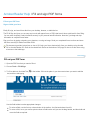
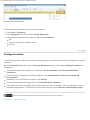
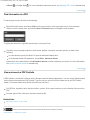
Fill out your PDF form
1. Open the PDF form that you want to fill out.
2. Choose Tools > Fill & Sign.
3. To fill or add text, click Add Text
text, and then start typing.
in the toolbar. Click at the place in your document where you want to add the
Use the field toolbar to make appropriate changes:
To resize a field, use the font up or down button in the toolbar - the first two buttons from left.
To move a field, move your mouse pointer closer to field border until you see the drag handle, and then hold and
move the field as required.
Acrobat Reader Help | Fill and sign PDF forms
To delete a field or typed text, click the trash button.
To convert a normal text field into comb field or vice versa, click the comb button - the second button from right.
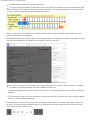
Use Comb fields to fill or add text in continuous boxes in a line/row. The Comb field spreads the user-entered text
evenly across the width of the text field, as shown below below.
While you are typing, if the characters do not fit in each box, adjust the spacing with the grab handle where the
resize here points in the image above.
4. Fill personal data from the right hand panel. In the right hand panel, your personal information is displayed. Some of
the fields are populated for you based on your Adobe ID, which you can edit.
You can fill out the rest of the information in the right hand panel, so it is easier to add to your form. The added
information is saved automatically and made available for future use.
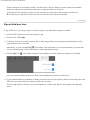
a. Drag and drop labels from the panel onto the form: mouse over the label exposes the drag handle on the left of
the label.
b. Click and hold to drag out the item and drop it over the place onto the form where you want this label to appear.
Resize or move the label as appropriate.
5. Add annotations or symbols: Annotations tools are displayed in the toolbar - Crossmark, Checkmark, Circle, Line,
and Dot. You can use these annotation tools to fill in check boxes and radio buttons, as well as use the Circle to
circle text or the line to strike out text.
Acrobat Reader Help | Fill and sign PDF forms
Click an annotation in the toolbar to select it, and then click on the form where you want to place the annotation.
(Each click will place the selected annotation at the respective location on the form.)
Resize the first annotation you place to fit the check box or radio button in the document, and the next
annotations you add will be of the same size and will fit the rest of the box/circle fields.
To the top
Sign or Initial your form
To sign a PDF form, you can type, draw, or insert an image of your handwritten signature or initials.
1. Open the PDF document or form that you want to sign.
2. Choose Tools > Fill & Sign.
3. To add text, such as your name, company, title, or date, drag and drop your personal saved information from the
right hand pane onto a form field.
in the toolbar. Click at the place in your document where you want to add
Alternatively, you can use Add Text
the text, and start typing. Use the field toolbar to make appropriate changes.
4. Click the Sign icon
in the toolbar, and then choose whether you want to add your signature or just initials.
If you have already added signatures or initials, they are displayed as options to choose from.
5. If you've already added your signature or initials, just select it from the Sign options, and then click at the place in the
PDF where you want to add your signature. Skip to the next step.
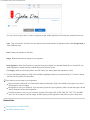
If your are signing for the first time, you see the Signature or Initials panel. Below is an example of the Signature
panel.
Acrobat Reader Help | Fill and sign PDF forms
You can choose to type, draw, or import a signature image. Added signatures and initials are saved for future use.
Type Type your name in the field. You can choose from a small selection of signature styles; click Change Style to
view a different style.
Draw Draw your signature in the field.
Image Browse and select an image of your signature.
Save Signature When this check box is selected, and you're signed in to Acrobat Reader DC or Acrobat DC, the
added signature is saved securely in Adobe Document Cloud for reuse.
Click Apply, and then click at the place in the PDF where you want to place the signature or initial.
6. To move the placed signature or initial, click the field to highlight it and then use the arrow keys. To resize or delete
the field, use the options in field toolbar.
If you want to use an image as your signature:
Sign your name in black ink on a clean, blank sheet of white paper. Sign in the middle of the paper so you don't
photograph or scan the edges.
Photograph or scan your signature. If you are taking a picture of your signature, make sure that the page is lit and
that no shadows fall across the signature.
Transfer the photo or scan to your computer. Acrobat DC accepts JPG, JPEG, PNG, GIF, TIFF, TIF, and BMP
files. You do not need to crop the image. Acrobat imports just the signature if the photo or scan is fairly clean.
Related links
Send and track your signed PDFs
Get PDFs signed by others
Acrobat Reader Help | Fill and sign PDF forms
Twitter™ and Facebook posts are not covered under the terms of Creative Commons.
Legal Notices
| Online Privacy Policy
Acrobat Reader Help / Create PDFs in Acrobat Reader DC
Create PDF
File types you can convert to PDF
Adobe PDF Pack is one service in the Acrobat.com family of online services. Use Adobe PDF Pack to create, export,
sign, and track PDF files. The files you create are automatically stored in your Adobe PDF Pack account.
You can convert documents and images to PDF, but you cannot edit PDF files in Adobe PDF Pack. For information on
editing PDF files, see Acrobat Help.
To the top
Create PDF
If you have a paid subscription of the Adobe PDF Pack service, you can easily create PDFs from various file formats,
including Microsoft Word, Excel, PowerPoint, and images.
File types you can convert to PDF
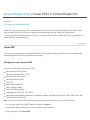
Convert any of the following file types to PDF:
Microsoft Word (DOC, DOCX)
Microsoft PowerPoint (PPT, PPTX)
Microsoft Excel (XLS, XLSX)
Microsoft Publisher (PUB)
Text (TXT)
Adobe PostScript® (PS)
Adobe InDesign (INDD)
Adobe Fill & Sign (FORM)
Image (bitmap, JPEG, GIF, TIFF, PNG)
OpenOffice and StarOffice presentation, spreadsheet, graphic, and document files (ODT, ODP, ODS, ODG, ODF,
SXW, SXI, SXC, SXD, STW).
Note: You cannot combine PDF files that are secure, password protected, 3D, or part of a PDF Portfolio.
1. On the upper-right corner of the Reader DC window, click Sign In.
2. In the Adobe Sign In dialog, sign in using your Adobe ID and password.
3. In the right pane, click Create PDF.
Acrobat Reader Help | Create PDFs in Acrobat Reader DC
Convert files to PDF
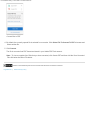
4. By default, the currently opened file is selected for conversion. Click Select File To Convert To PDF to browse and
select another file.
5. Click Convert.
The file is converted into PDF format and stored in your Adobe PDF Pack account.
Note: To view a complete list of files that you have converted, click Create PDF and then click the View Converted
Files link below the Select File button.
Twitter™ and Facebook posts are not covered under the terms of Creative Commons.
Legal Notices
| Online Privacy Policy
Acrobat Reader Help / Export PDF from Acrobat Reader DC
Introduction
Export PDF
To the top
Introduction
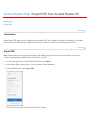
Adobe Export PDF lets you reuse valuable content stored in PDF files. Instead of retyping the information, use Adobe
Export PDF to turn PDF files into editable Word, Excel, PowerPoint, and RTF (rich text format) documents.
To the top
Export PDF
Note: Ensure that you have a paid subscription of the Adobe Export PDF service to convert PDFs to various file
formats, including Microsoft Word, Excel, PowerPoint, and RTF.
1. On the upper-right corner of the Reader DC window, click Sign In.
2. In the Adobe Sign In dialog, sign in using your Adobe ID and password.
3. In the right-hand pane, click Export PDF.
Export PDF to Word, Excel, PowerPoint, and RTF formats
Acrobat Reader Help | Export PDF from Acrobat Reader DC
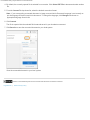
4. By default, the currently opened file is selected for conversion. Click Select PDF File to browse and select another
file.
5. From the Convert To drop-down list, select the desired conversion format.
Note: If you are exporting a scanned document or image, ensure that the Document Language is set correctly as
per the language of the text used in the document. To change the language, click Change and choose an
appropriate language from the list.
6. Click Convert.
The file is exported into the selected file format and saved in your Acrobat.com account.
7. Click Save As to save the converted document to your local system.
Save the converted document to your local system
Twitter™ and Facebook posts are not covered under the terms of Creative Commons.
Legal Notices
| Online Privacy Policy
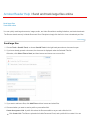
Acrobat Reader Help / Send and track large files online
Send large files
Track files online
You can quickly send large documents, images, audio, and video files without emailing limitations, and track downloads.
The files are stored securely in Adobe Document Cloud. Recipients simply click the link to view or download your files.
To the top
Send large files
1. Choose Tools > Send & Track, or choose Send & Track in the right hand pane when a document is open.
2. If you have already opened a document, the document is displayed under the Selected Files list.
Otherwise, click Select Files to Send, and then browse and choose one or more files.
3. If you want to add more files, click Add Files and then browse and select files.
4. Choose whether you want to send a public or personalized link.
Create Anonymous Link: A public link makes the files accessible to anyone who clicks the link.
Click Create Link. The files are uploaded to Adobe Document Cloud, and a public link is created. You can
Acrobat Reader Help | Send and track large files online
choose to copy the link or directly email the link as appropriate.
Send Personalized Invitations: A personalized link to share the files with specific individuals. The detailed tracking
information is available for files sent to individuals, but not for public links.
a. Enter the email address of whoever you’d like to receive the file. You can also use the Address Book link to
choose email addresses. Each recipient gets a personalized link to the file.
b. The Subject and Message fields are just like the ones you use for sending an email and appear to your
recipients in the same way. Enter desired information and then click Send. Your recipients get an email
notifying them that the file is shared with them.
To the top
Track files online
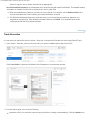
You can track your shared files from the Home > Sent view. It shows all the files that you share using Send & Track.
1. In the Home > Sent view, when you choose a file, you see the available options above the file list.
Click Track Online. A preview with details of the file appears in a new browser window.
2. From the above page, you can do the following:
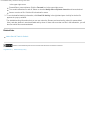
Unshare the file if you would like to prevent anyone else from viewing or downloading it. Click the Unshare icon
Acrobat Reader Help | Send and track large files online
in the upper right corner.
Forward files to new recipients. Click the Forward icon in the upper right corner.
Turn email notifications on and off. Select or clear the Notify when recipients viewed check box as desired.
See an overview of file. Click the file's thumbnail or name.
3. To see the detailed tracking information, click View Full Activity in the right hand pane. Activity for the the file
appears in a pop up window.
The detailed tracking information that you can see: when the file was previewed and by whom (for personalized
links), and also whether it was downloaded and by whom. If there was more than one file in the transaction, you will
also see which files were downloaded.
Related links
Adobe Send & Track for Outlook
Twitter™ and Facebook posts are not covered under the terms of Creative Commons.
Legal Notices
| Online Privacy Policy
Acrobat Reader Help / Send PDF documents for signature
Get PDFs signed by others
Track documents sent for signature
You can get documents signed by others using Send for Signature, an Adobe Document Cloud eSign service. The
service lets recipients quickly sign documents from anywhere using a web browser or mobile device.
The service keeps track of the entire process. It emails your signers that you'd like them to sign a document. Once
signed, both you and your signers receive the signed PDF in email. The signed documents are stored securely in Adobe
Document Cloud.
To the top
Get PDFs signed by others
Complete your edits before you sign. Changes made to the document after it is signed can invalidate the signature.
1. Open the PDF you want to have signed.
2. Click Send for Signature in the right panel or choose Tools > Send for Signature.
3. To add more documents, click Add Files and then browse and select the documents.
4. Click Start. The document is uploaded to Adobe Document Cloud.
5. Type in the email addresses of people you want to sign your document. Add a message if desired.
6. Click Send.
You receive an email from Adobe Document Cloud eSign services that your documents have been sent out for
signature to the first user. The first user also receives an email to sign the document. When the user adds their
signature in the Signature field, and then click the Click to Sign button, the document is sent to the next user for
signature, and so on.
Everyone gets a copy of the signed document, and the file is stored securely in Adobe Document Cloud.
To the top
Track documents sent for signature
You can keep track of which files are out for signature, signed, or waiting for your signature.
In the Home > Sent view, click Manage Documents Sent for Signature. The Adobe Document Cloud eSign
services Manage page is displayed in a new browser window.
Acrobat Reader Help | Send PDF documents for signature
Related links
Sign PDF documents or forms
Twitter™ and Facebook posts are not covered under the terms of Creative Commons.
Legal Notices
| Online Privacy Policy
Acrobat Reader Help / Share, comment, and review
Share documents
Store files on Adobe Document Cloud
Comment on and review PDF files
To the top
Share documents
You can use Acrobat Reader DC to share documents with others. You can share files using Adobe Document Cloud
service or share files by email.
To share your PDF document, do one of the following:
Choose File > Send File > Attach To Email to share the document via email.
Choose File > Send File > Send & Track to upload the document on Adobe Document Cloud. Once uploaded, a
link for the document is created by Adobe Document Cloud service. You can share that link with others to allow
them to access your document. Follow onscreen instructions to share the file with others. For detailed information, see Sharing PDFs in Acrobat Help.
To the top
Store files on Adobe Document Cloud
Adobe Document Cloud service allows you to store and access PDF and other documents from multiple devices. To store files on Adobe Document Cloud:
Choose File > Save or Save As.
In the file Save As dialog box, select Document Cloud.
Specify the filename and click Save to save the file on Adobe Document Cloud.
To the top
Comment on and review PDF files
You can comment on PDF files using the annotations and drawing markup tools. All annotation and drawing markup
tools are available in the secondary toolbar of the Comment feature. When you receive a PDF to review, you can
annotate it by using the commenting and markup tools.
Acrobat Reader Help | Share, comment, and review
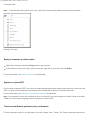
Comment toolbar
Note: To see the labels along with the tool icons, right-click on the secondary toolbar and select Show All Labels.
Drawing Tools menu
Reply to comments, or delete replies
Right-click a comment, and choose Reply from the pop-up menu.
If later decide to remove your reply, open the comment, right-click on your reply, and click Delete.
For more information, see Reply to comments in Acrobat Help.
Approve or reject a PDF
If you’re asked to approve a PDF, you receive an email message that provides step-by-step instructions. At the top of the
PDF, use options in the Stamps tool and the document message bar to approve or reject the document.
For more information, see Participate in an approval workflow in Acrobat Help.
Note: Only Acrobat DC users with multi-byte versions of Acrobat DC can start an approval workflow. However, Acrobat
Reader DC users with any language version can approve or reject a PDF.
Track a review (Reader application
only, not browser)
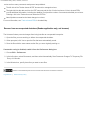
To track a document review or view the status of a review, choose View > Tracker. The Tracker shows who has joined a
Acrobat Reader Help | Share, comment, and review
review and how many comments each person has published.
The left side of the Tracker shows all PDF documents in managed reviews.
The right side lists the date and time the PDF was sent and the list of invited reviewers. Links to shared PDFs
provide additional information, including the deadline (if set) and the number of comments submitted per reviewer.
Deleting a link in the Tracker does not delete the PDF file.
Latest Updates summarize the latest changes to reviews.
For more information, see Track reviewed PDFs in Acrobat Help.
Recover from an unexpected shutdown
(Reader application only, not browser)
The Autosave feature prevents changes from being lost after an unexpected interruption.
1. Open the files you were working on before the unexpected shutdown.
2. When prompted, click Yes to open the files that were automatically saved.
3. Save the files with the same names as the files you were originally working on.
If automatic saving is disabled, enable it from the Preferences dialog box
1. Choose Edit > Preferences.
2. In the left column, select Documents, and then select Automatically Save Document Changes To Temporary File
Every <X> Minutes.
3. In the Minutes box, specify how often you want to save files.
Twitter™ and Facebook posts are not covered under the terms of Creative Commons.
Legal Notices
| Online Privacy Policy
Acrobat Reader Help / Copy content from PDFs
Copy text and images from PDFs
Copy an area of a PDF (Reader DC application only, not browser)
To the top
Copy text and images from PDFs
You can easily copy content in Acrobat Reader DC, unless the PDF author has applied security settings that disallow
copying.
Confirm that content copying is allowed
1. Right-click the document, and choose Document Properties.
2. Click the Security tab, and review the Document Restrictions Summary.
Copy specific content from a PDF
1. Right-click the document, and choose Select Tool from the pop-up menu.
2. Drag to select text, or click to select an image.
3. Right-click the selected item, and choose Copy.
Copy an entire PDF (Windows Reader DC application only, not browser)
Choose Edit > Copy File to Clipboard.
To the top
Copy an area of a PDF (Reader DC application only, not browser)
The Snapshot tool copies an area as an image that you can paste into other applications.
1. Choose Edit > Take A Snapshot.
2. Drag a rectangle around the area you want to copy, and then release the mouse button.
3. Press the Esc key to exit Snapshot mode.
In another application, choose Edit > Paste to paste the copied image.
Acrobat Reader Help | Copy content from PDFs
Twitter™ and Facebook posts are not covered under the terms of Creative Commons.
Legal Notices
| Online Privacy Policy
Acrobat Reader Help / Print PDFs
Print button missing?
Print a PDF
Common printing tasks
Why can’t I print my document?
Simulate overprinting of inks
What should I do if Acrobat Reader DC is asking to save a file when a document is printed?
What should I do to print comments available on the PDF document?
Acrobat Reader DC crashes on printing / Acrobat Reader DC does not Print after clicking Print
button
To the top
Print button missing?
If you can't see the Print and Cancel buttons, your monitor is set to a low screen resolution. Reader wasn't designed for
low-resolution displays (the minimum recommended is 1024 x 768). However, you can work around this limitation. Do
any of the following to print your document:
Press Enter or Return.
If a scroll bar appears on the right of the dialog box, drag the slider down to access the buttons.
(Windows) On some monitors, the Windows taskbar covers the Print button. You can hide the taskbar so it appears
only when you mouse to the bottom of the screen. Right-click the taskbar and choose Properties. In the Properties
dialog box, select Auto-hide the Taskbar, then click OK.
Set the Taskbar properties to hide the taskbar so you can select the Print button
To the top
Print a PDF
1. Choose File > Print or click
icon in the toolbar.
Acrobat Reader Help | Print PDFs
2. Select a Printer and number of Copies to print.
3. (Optional) Click Properties to open the Printer properties. For more information, see your printer documentation.
4. Under Pages to Print, select an option:
All - prints all pages in the PDF.
Current page - prints the current page in the PDF.
Pages - specifies a subset of pages to print. You can enter individual page numbers, a range, or a combination.
For example: 1, 6-18, 33, 98.
More options - specifies additional options such as even or odd pages, and reverse pages.
5. Specify other options as per your requirements:
Page Sizing & Handling
Orientation
Comments & Forms
As you change the settings, the print preview is displayed. Click the arrow buttons at the bottom to preview the
other pages.
6. If necessary, click Page Setup to change the paper size, paper source, or orientation.
7. Click Print.
To the top
Common printing tasks
Print on both sides
You can print double-sided if your printer supports double-sided (duplex printing)
feature.
Note: Double-sided printing is also called duplex, back to back, front and back, or twosided printing.
The printer driver controls the options, not Adobe Acrobat DC or Adobe Reader DC.
Check your printer documentation to see what features your printer supports.
In the Print dialog box, enable Print on both sides of paper, and choose an edge
to flip.
Note: There could be a scenario when a printer actually supports duplex printing and
this option does not appear on Print dialog. In such cases, open the printer properties to
directly access this option from printer preferences.
Acrobat Reader Help | Print PDFs
Print in black and white
You can print a color PDF in shades of gray (also known as grayscale or composite
gray).
In the Print dialog box, enable Print in grayscale.
Print at a different size
You can scale the page to shrink or enlarge pages when you print. You can
automatically scale to fit the paper or manually scale by percentages.
In the Print dialog box, click Size and then specify the scaling options.
Print large-size documents
You can print a large format document, such as a poster or banner, by splitting the page
across multiple sheets of paper (called "tiling"). The Poster option calculates how many
sheets of paper are needed. You can adjust the size of the original to best fit the paper
and specify how much each "tile" overlaps. You can then piece together the tiles.
Acrobat Reader Help | Print PDFs
In the Print dialog box, click Poster and then specify the tiling options.
Print multiple pages on a sheet
You can print more than one page of a PDF onto a single sheet of paper. Printing
multiple pages per sheet is also called n-up printing (such as 2-up or 6-up). You can
specify how the pages are ordered, either horizontally across the page or in vertical
columns.
In the Print dialog box, click Multiple and then specify the pages to print on a single
sheet and other related options.
Print booklets
You can print a multipage document as a booklet. The pages are laid out two per sheet.
When you collate, fold, and staple the double-sided sheets, the result is a single book
with the correct page order.
In the Print dialog box, click Booklet and then specify the booklet options.
Acrobat Reader Help | Print PDFs
For step-by-step instructions, see Print Booklets and PDFs.
Print comments
You can print comments in place (like sticky notes on a page), in a list, or as a summary.
In the Comments and Forms area, do one of the following:
Choose an option from the drop-down list.
Click Summarize Comments.
Print a portion of a page
You can print a portion of a page in a PDF. Use the Snapshot Tool to select just the area
you want to print. The area can be text, graphics, or both. You can print the selected
area full size or resize it to fit the paper.
1. Choose Edit > Take A Snapshot.
2. Draw a rectangle to select a portion of a page.
3. Choose File > Print.
4. In the Print dialog box, click Selected graphic.
Acrobat Reader Help | Print PDFs
To the top
Why can’t I print my document?
Start with these troubleshooting tips
Printing problems can have various causes. To identify the issue, start with this helpful tech note: Troubleshoot PDF
printing | Acrobat, Reader
The PDF is password protected, and printing is not
allowed
If you receive a password-protected PDF, enter
the designated password to print the document. Some protected
documents
have restrictions that prevent you from printing, editing, or copying
content in the document. If a document
has restrictions on printing,
contact the PDF author.
(Windows only) Protected Mode is interfering
The default Protected Mode greatly enhances the security of Acrobat Reader DC. To determine if Protected Mode is
interfering with printing, temporarily disable it. Right-click the document, and choose Document Properties. Click
Advanced to view if protected mode is enabled.
To disable protected mode, choose Edit > Preferences and click Security (Enhanced) on the left. Deselect Enable
Protected Mode At Startup. Close Reader, restart it, and try to print the document again.
Note: To ensure maximum security, when you finish printing, reselect Enable Protected Mode At Startup.
To the top
Simulate overprinting of inks
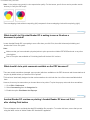
Overprint simulation approximates how blending and overprinting of colored artwork looks when printed on an offset
press. You can simulate the effects of overprinting on a color desktop printer by selecting Simulate Overprinting in the
Advanced Print Setup dialog box. Overprint simulation converts spot colors to process colors for printing. If you intend to
use a file for final output, do not select Simulate Overprinting.
Acrobat Reader Help | Print PDFs
Note: Color printers vary greatly in color reproduction quality. For that reason, proofs from a service provider are the
best way to verify the final output.
Three overlapping circles without overprinting (left) compared
to three overlapping circles with overprinting (right).
To the top
What should I do if Acrobat Reader DC is asking to save a file when a
document is printed?
In case Acrobat Reader DC is prompting to save a file when you click Print, then click Advanced print dialog and
deselect the Print to File option.
Note:
Make sure that you have selected a physical printer to print upon and not Adobe PDFXPS/Send note or any other
virtual printer.
Print to File option was available on Print dialog itself until Acrobat 10.X versions.
To the top
What should I do to print comments available on the PDF document?
There are certain annotations (example: pop-up notes) which are available on the PDF document and the annotations do
not print by default unless you want them to be printed.
This has been intentionally designed so that such annotations do not hinder the view of the content available behind
them.
However, there may be cases when you do want them to be printed. To print the pop-up notes and other annotations:
1. Go to Edit > Preferences.
2. Select Commenting from the Categories list.
3. Enable the option Print Notes And Pop-ups.
To the top
Acrobat Reader DC crashes on printing / Acrobat Reader DC does not Print
after clicking Print button
This could happen due to an Adobe Acrobat DC installation file corruption. To resolve this issue, ensure that you are
using the latest version of Adobe Reader DC/ Acrobat DC application.
Acrobat Reader Help | Print PDFs
If you are seeing this issue with the latest version:
1. Uninstall Acrobat Reader DC using the Acrobat cleaner utility.
2. Reinstall Acrobat Reader DC.
Twitter™ and Facebook posts are not covered under the terms of Creative Commons.
Legal Notices
| Online Privacy Policy
Acrobat Reader Help / Protected View feature for PDFs (Windows)
Protected mode
Protected view
Privileged Locations
For added security, Acrobat Reader DC contains a protected mode and protected view to keep your computer safe. With
Protected Mode enabled, all operations required by Acrobat Reader DC to display the PDF file are run in a restricted
manner inside a confined environment, the “sandbox.” To the top
Protected mode
By default, Adobe Reader DC runs in protected mode to provide an added layer of security. In protected mode, malicious
PDF documents can’t launch arbitrary executable files or write to system directories or the Windows Registry.
To check the status of protected mode, choose File > Properties > Advanced > Protected Mode.
Protected mode is enabled by default. To specify the settings, do the following:
1. Choose Edit > Preferences.
2. In the Categories list on the left, select Security (Enhanced).
3. In the Sandbox Protections section, select or deselect Enable Protected Mode At Startup.
Enable Create Protected Mode Log File to record events. The changes take effect the next time you start the
application.
Click View Log to open the log file.
To the top
Protected view
For additional security and to avoid potential security risks associated with files that may have originated from unsafe
locations, use the Protected View mode. In the Protected View mode, most features are disabled. You can view the
PDF, but not do much else.
In the Protected View, a yellow bar displays on top of the Reader DC window. Click Enable All Features to exit the
Protected View.
Acrobat Reader Help | Protected View feature for PDFs (Windows)
Protected View information bar
To modify when the Protected View is used, do the following:
1. Choose File > Preferences.
2. In the Categories list on the left, select Security (Enhanced).
3. In the Sandbox Protections area, select an option for Protected View:
Off
Files From Potentially Unsafe Locations
All Files
To the top
Privileged Locations
You can add specific files, folders, and hosts to privileged locations to selectively trust PDF files, and bypass the security
restrictions.
Open the Preferences dialog box, select the Security (Enhanced) category, and under the Privileged Locations, do
the following:
To trust all documents with a valid security certificate, select Automatically Trust Documents With Valid
Certification.
To trust any sites you already trust in Internet Explorer, select Automatically Trust Sites From My Win OS
Security Zones.
To add only one or two PDFs from a location, click Add File.
To create a trusted folder for multiple PDFs, click Add Folder Path or Add Host.
To allow data to load from a website, enter the name of the root URL. For example, enter www.adobe.com, but not
www.adobe.com/products. To trust files from secure connections only, select Secure Connections Only (https:).
Twitter™ and Facebook posts are not covered under the terms of Creative Commons.
Legal Notices
| Online Privacy Policy
Acrobat Reader Help / Save, view, and search PDFs
Save PDFs
Why can’t I save a PDF?
View and navigate PDFs
Zoom into a specific area
Find information in a PDF
View and search a PDF Portfolio
To the top
Save PDFs
If the PDF author has enabled local saving, you can save a copy of a PDF or PDF Portfolio.
Reader application or web browser
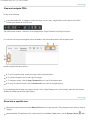
To save a PDF, click the Save File icon
in the Heads Up Display (HUD) toolbar at the bottom of the PDF view.
The HUD toolbar in a web browser
Acrobat Reader DC application only
To create a copy of a PDF, choose File > Save As.
To save the PDF as accessible text, choose File > Save As Other > Text.
To the top
Why can’t I save a PDF?
Because the PDF author has disabled local saving for security, copyright protection, or other reasons.
If you need to save the PDF, contact the author, and ask them to enable local saving. For more information, see Enable
Reader users to save form data in Acrobat Help.
Acrobat Reader Help | Save, view, and search PDFs
To the top
View and navigate PDFs
Do any of the following:
In Acrobat Reader DC, to enlarge or reduce the page, use the zoom, magnification, and fit options in the HUD
toolbar at the bottom of the PDF view.
The HUD toolbar contains - Selection, Zoom, Magnification, Page Thumbnail, and Page Fit options
You can also use the quick navigation options available in the main toolbar and the left navigation pane.
Quickly navigate with these options
a: To go to a specific page, specify the page number and press Enter. b: To quickly navigate to the next and previous page.
c: To navigate visually, click the Page Thumbnails icon in the left navigation pane.
d: To jump to areas of interest, click the Bookmarks icon in the left navigation pane.
To set scrolling and multi-page view options, choose View > Page Display menu. In the browser, right-click the Acrobat
Reader DC toolbar and choose Page Display.
To the top
Zoom into a specific area
Right-click the document and choose Marquee Zoom from the pop-up menu. Then drag across the area you want to
magnify.
(Acrobat Reader DC application only, not browser) From the View > Zoom menu, choose Dynamic Zoom
, Pan
Acrobat Reader Help | Save, view, and search PDFs
& Zoom
, or Loupe Tool
. For more information about each option, see Adjusting PDF views in Acrobat Help.
To the top
Find information in a PDF
To search page content, do either of the following:
Right-click the document, and choose Find from the pop-up menu. In the upper-right corner of the document
window, enter the search term, and click the Next or Previous buttons to navigate to each instance.
To display the search box, right-click the document, and choose Find.
To perform a more complex search for whole words, phrases, comments, and other options, do either of the
following:
In a web browser, press Ctrl+Shift+F to open the advanced Search pane.
In the Acrobat Reader DC application, choose Edit > Advanced Search.
At the bottom of the Search pane, click Show More Options to further customize your search. For more information,
see Advanced Search options in Acrobat Help.
To the top
View and search a PDF Portfolio
A PDF Portfolio is a collection of files in various formats created in different applications. You can use the Reader search
tools to find text throughout the PDF Portfolio. Type the text you want to find in the Search box in the PDF Portfolio
toolbar. The search results show all files where the text was found.
For PDF files, expand the list to see the results in context. Click a search result to go to the location of the text in the
PDF.
For other types of files, click Open, and then search the file.
Related links
View images, objects, or 3D-models
Twitter™ and Facebook posts are not covered under the terms of Creative Commons.
Legal Notices | Online Privacy Policy
Acrobat Reader Help / Accessibility features
Keyboard alternatives to mouse
actions
Use a screen reader or magnifier
Reflow text in a PDF
Additional information
To the top
Keyboard alternatives to mouse
actions
Acrobat Reader DC and Acrobat DC have the same keyboard shortcuts. To view the full list, see Keyboard shortcuts in
Acrobat DC Help.
To the top
Use a screen reader or magnifier
Use the Accessibility Setup Assistant to set up Acrobat Reader DC for either a screen magnifier or a screen reader.
Choose Edit > Accessibility > Setup Assistant, and then select the options you want from each screen of the Setup
Assistant.
Use the Read Out Loud Text-to-Speech tool
Read Out Loud is a Text-to-Speech (TTS) tool that is built in Adobe Reader DC. It reads text contained within a
document window.
To use Read Out Loud, you need Acrobat Reader DC and a Text-to-Speech engine installed on your system. Also the
document must be accessible, otherwise it may not be read at all or it may be read in the wrong order.
To activate Read Out Loud:
1. In the View menu, choose Read Out Loud > Activate Read Out Loud.
2. Again go to View > Read Out Loud and then choose an appropriate option for reading:
To read the current page, choose Read This Page Only.
To read the entire document, choose Read To End of Document.
To the top
Reflow text in a PDF
Acrobat Reader Help | Accessibility features
You can reflow a PDF to temporarily present it as a single column that is the width of the document pane. This reflow
view can make the document easier to read on a mobile device or magnified on a standard monitor, without scrolling
horizontally to read the text.
To reflow text, choose View > Zoom > Reflow.
In most cases, only readable text appears in the reflow view. Text that does not reflow includes forms, comments, digital
signature fields, and page artifacts, such as page numbers, headers, and footers. Pages that contain both readable text
and form or digital signature fields do not reflow. Vertical text reflows horizontally.
Note: You cannot save, edit, or print a document while it is in
Reflow view.
To the top
Additional information
Setting your preferences to enhance onscreen viewing.
Twitter™ and Facebook posts are not covered under the terms of Creative Commons.
Legal Notices
| Online Privacy Policy