1
In this project students will learn how to use the following tools and shop materials to create an
embroidered design on clothing or other textiles: embroidery machine, USB memory stick, embroidery
machine hoops, high-quality embroidery thread, bobbins, embroidery backer, steam iron, Corel Draw
software, embroidery machine design software, and scissors. In addition, students will learn the
importance of shop cleanliness and safety procedures.
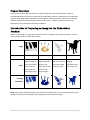
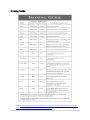
Make sure the design is a single colour and will work for the purpose of cutting out a sticker. Here are
some examples of what will and will not work:
Image
Will It Work? No
Photos result in
groups of stitches
where the image is
Why?
darkest, and no
longer looks like
the original image.
Maybe
Yes
Yes
Colour drawings
might embroider
decently, but
often lack the fine
details of the
original image.
Thin lines work
out well as long as
the overall image
is not too small.
Black and white
drawing
silhouettes work
well at any size.
Resulting
Embroidery
Note: multi-colour embroidery patterns are possible in multiple passes on the embroidery machine, but
the class will only be learning single-colour (single pass) embroidery techniques.
Embroidery Machine Project Instruction Booklet
3|P a ge